首先,AS/bin/*.exe.vmoptions
#
# *DO NOT* modify this file directly. If there is a value that you would like to override,
# please add it to your user specific configuration file.
#
# See http://tools.android.com/tech-docs/configuration
#
-Xms256m
-Xmx2048m
-XX:MaxPermSize=512m
-XX:ReservedCodeCacheSize=240m
-XX:+UseConcMarkSweepGC
-XX:SoftRefLRUPolicyMSPerMB=50
-da
-Djna.nosys=true
-Djna.boot.library.path=
-Djna.debug_load=true
-Djna.debug_load.jna=true
-Dsun.io.useCanonCaches=false
-Djava.net.preferIPv4Stack=true
-XX:+HeapDumpOnOutOfMemoryError
-Didea.paths.selector=AndroidStudio2.1
-Didea.platform.prefix=AndroidStudio
其次,用户/.gradle/gradle.properties(没有的直接自己创建属性文件)
# Project-wide Gradle settings.
# IDE (e.g. Android Studio) users:
# Settings specified in this file will override any Gradle settings
# configured through the IDE.
# For more details on how to configure your build environment visit
# http://www.gradle.org/docs/current/userguide/build_environment.html
# The Gradle daemon aims to improve the startup and execution time of Gradle.
# When set to true the Gradle daemon is to run the build.
# TODO: disable daemon on CI, since builds should be clean and reliable on servers
org.gradle.daemon=true
# Specifies the JVM arguments used for the daemon process.
# The setting is particularly useful for tweaking memory settings.
# Default value: -Xmx10248m -XX:MaxPermSize=256m
org.gradle.jvmargs=-Xmx2048m -XX:MaxPermSize=512m -XX:+HeapDumpOnOutOfMemoryError -Dfile.encoding=UTF-8
# When configured, Gradle will run in incubating parallel mode.
# This option should only be used with decoupled projects. More details, visit
# http://www.gradle.org/docs/current/userguide/multi_project_builds.html#sec:decoupled_projects
org.gradle.parallel=true
# Enables new incubating mode that makes Gradle selective when configuring projects.
# Only relevant projects are configured which results in faster builds for large multi-projects.
# http://www.gradle.org/docs/current/userguide/multi_project_builds.html#sec:configuration_on_demand
org.gradle.configureondemand=true
# Project-wide Gradle settings.
再次,
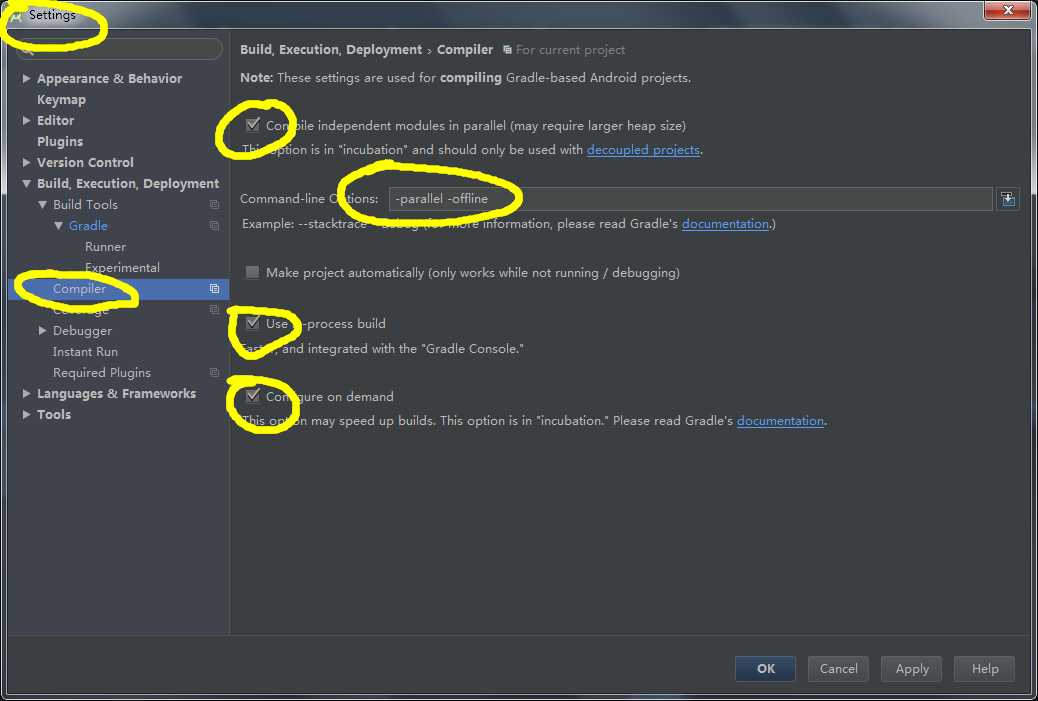
最后,至于很多文章说要打开gradle的离线模式,这里我想根据使用经验说一下,首先做android,你得fq,我并不建议不熟悉gradle的人直接将该模式打开,这是其一,其二使用AS时,一定记得把杀毒软件或者防火墙关闭了,某数字卫士和动物卫士经常导致我编译假死,当时我还来回重装,来回设置。