本文作为vcs学习记录,不定期更新;
Q1:
使用vlogan deepfifo_pkg.sv -ntb_opts uvm
Error-[SV-LCM-PND] Package not defined
test/deepfifo_pkg.sv, 2
deepfifo_pkg, "uvm_pkg::"
  Package scope resolution failed. Token 'uvm_pkg' is not a package.
  Originating module 'deepfifo_pkg'.
  Make sure that uvm_pkg is analyzed before analyzing other files that use
  uvm_pkg.
A1:
vlogan不能同时编译uvm和用户程序,需要预先编译;使用
vlogan -ntb_opts uvm

vlogan deepfifo_pkg.sv -ntb_opts uvm
Q2:
编译程序后,运行simv
Error-[DPI-DIFNF] DPI import function not found
/opt/Synopsys/VCS2014/etc/uvm/base/uvm_resource.svh, 390
  The definition of DPI import function/task 'uvm_glob_to_re' does not exist.
  Please check the stated DPI import function/task is defined, and its
  definition is either passed in a source file at compile-time, or provided in
  a shared library specified using the LRM Annex-J options at run-time.
A2:
A2:
这是vcs编译过程没有夹-ntb_opts uvm,加上即可
Q3:
VCS2016+Verdi2016:
在编译之后使用./simv -verdi或./simv -gui=verdi,打开后Verdi界面一直处于Running状态,SimCMD也无法输入, 如下图

A3:
这是LD_LIBRARY_PATH没有配置的缘故,使用
# 64位Verdi
export LD_LIBRARY_PATH=$Verdi_HOME/share/PLI/VCS/linux64:$LD_LIBRARY_PATH
# 32位Verdi
export LD_LIBRARY_PATH=$Verdi_HOME/share/PLI/VCS/linux:$LD_LIBRARY_PATH
其中Verdi_HOME为Verdi的安装目录,linux64或linux根据实际决定;配置完成后,打开就可以正常工作:

Q4:
VCS2017+Verdi2017
现象为:Failed to invoke simulator;打开File->View Simulation Log,可以看到如下:
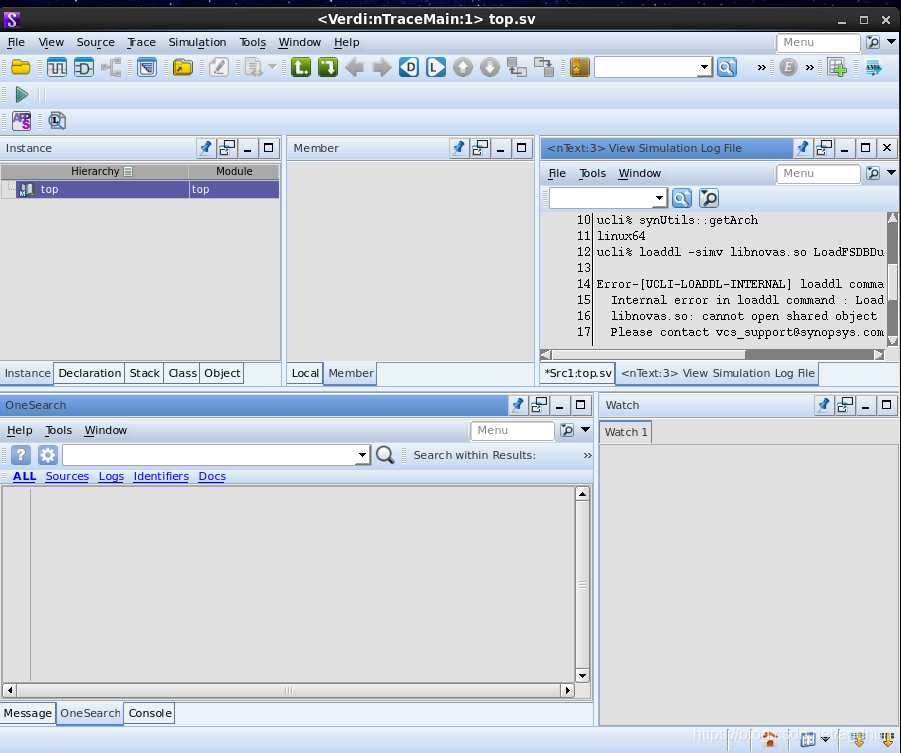
Command: /home/IC/Desktop/p9/simv -ucli +UVM_VERDI_TRACE=UVM_AWARE +fsdb+gate=off +fsdb+delta=2 -ucli2Proc -lca -l /home/IC/Desktop/p9/verdiLog/sim.log
Warning-[LCA_FEATURES_ENABLED] Usage warning
LCA features enabled by '-lca' argument on the command line. For more
information regarding list of LCA features please refer to Chapter "LCA
features" in the VCS/VCS-MX Release Notes
Chronologic VCS simulator copyright 1991-2016
Contains Synopsys proprietary information.
Compiler version L-2016.06_Full64; Runtime version L-2016.06_Full64; May 16 16:49 2020
ucli% synUtils::getArch
linux64
ucli% loaddl -simv libnovas.so LoadFSDBDumpCmd;LoadFSDBDumpCmd
Error-[UCLI-LOADDL-INTERNAL] loaddl command Internal error.
Internal error in loaddl command : Load.
libnovas.so: cannot open shared object file: No such file or directory
Please contact vcs_support@synopsys.com or call 1-800-VERILOG.
ucli% if {[catch {ucliCore::setFocus tool}]} {}
ucli% finish; quit
V C S S i m u l a t i o n R e p o r t
Time: 0 ps
CPU Time: 0.030 seconds; Data structure size: 0.0Mb
Sat May 16 16:49:35 2020
A4:
解决方案见A3.