如果服务器只需要放置一个网站程序,解析网站到服务器的网站,网站程序监听80端口就可以了。如果服务器有很多应用,借助nginx不仅可以实现端口的代理,还可以实现负载均衡。本文将详细介绍前端及nodeJS项目在服务器配置时需要用到的nginx配置。
Nginx 在线配置:https://www.digitalocean.com/community/tools/nginx?global.app.lang=zhCN

安装
卸载nginx
在介绍如何安装nginx之前,先要介绍如何卸载nginx。因为nginx不正确的安装,导致无法正常运行,所以需要卸载nginx。
# 卸载删除除了配置文件以外的所有文件
sudo apt-get remove nginx nginx-common
# 卸载所有东东,包括删除配置文件
sudo apt-get purge nginx nginx-common
# 在上面命令结束后执行,主要是卸载删除Nginx的不再被使用的依赖包
sudo apt-get autoremove
#卸载删除两个主要的包
sudo apt-get remove nginx-full nginx-common
安装nginx
首先,更新包列表
sudo apt-get update然后,一定要在sudo下安装nginx
sudo apt-get install nginx
主机配置
端口配置
listen 127.0.0.1:8000;
listen *:8000;
listen localhost:8000;

# IPV6
listen [::]:8000;

# other params
listen 443 default_serer ssl;
listen 127.0.0.1 default_server accept_filter=dataready backlog=1024
主机名配置
server_name www.xiaohuochai.com xiaohuochai.com
server_name *.xiaohuochai.com
server_name ~^.xiaohuochai.com$
路径配置
Location
nginx使用location指令来实现URI匹配
location = / {
    # 完全匹配  =
    # 大小写敏感 ~
    # 忽略大小写 ~*
}

location ^~ /images/
{
    # 前半部分匹配 ^~
    # 可以使用正则,如:  location ~* .(gif|jpg|png)$ { }
}
location / {
    # 如果以上都未匹配,会进入这里
}
根目录设置
location / {
    root /home/test/;
}
别名设置
location /blog {
    alias /home/www/blog/;
}
location ~ ^/blog/(d+)/([w-]+)$
{
# /blog/20180402/article-name
# -> /blog/20180402-article-name.md
    alias /home/www/blog/$1-$2.md;
}
首页设置
index /html/index.html /php/index.php;重定向页面设置
error_page
404      /404.html;
error_page    502  503  /50x.html;
error_page    404 =200   /1x1.gif;


location /{
    error_page  404@fallback;
}
location @fallback{
    # 将请求反向代理到上游服务器处理
    proxy_pass http://localhost:9000;
}
try_files 设置
try_files $uri $uri.html $uri/index.html @other;

location @other {
    # 尝试寻找匹配 uri 的文件,失败了就会转到上游处理
    proxy_pass  http://localhost:9000;
}
location / {
    # 尝试寻找匹配 uri 的文件,没找到直接返回 502
    try_files $uri $uri.html =502;}
反向代理
代理分为正向和反向代理,正向代理代理的对象是客户端,反向代理代理的对象是服务端。
反向代理(reserve proxy)方式是指用代理服务器来接受 Internet 上的连接请求,然后将请求转发给内部网络中的上游服务器,并将上游服务器上得到的结果返回给 Internet 上请求连接的客户端,此时代理服务器对外的表现就是一个 Web 服务器。
负载均衡设置
upstream,定义一个上游服务器集群
upstream backend
{
    # ip_hash;
    server s1.barretlee.com;
    server s2.barretlee.com;
}
server {
    location / {
        proxy_pass http://backend;
    }
}
反向代理设置
proxy_pass 将请求转发到有处理能力的端上,默认不会转发请求中的 Host 头部
location /blog
{
    prox_pass http://localhost:9000;
    ### 下面都是次要关注项
    proxy_set_header Host $host;
    proxy_method POST;
    # 指定不转发的头部字段
    proxy_hide_header Cache-Control;
    proxy_hide_header Other-Header;
    # 指定转发的头部字段
    proxy_pass_header Server-IP;
    proxy_pass_header Server-Name;
    # 是否转发包体
    proxy_pass_request_body on | off;
    # 是否转发头部
    proxy_pass_request_headers on | off;
    # 显形/隐形 URI,上游发生重定向时,Nginx 是否同步更改 uri
    proxy_redirect on | off;
}
HTTPS配置
server
{
        listen 80;
        server_name api.xiaohuochai.cc;
        return 301 https://api.xiaohuochai.cc$request_uri;
}

server{
        listen 443;
        server_name api.xiaohuochai.cc;
        ssl on;
        ssl_certificate /home/www/blog/crt/api.xiaohuochai.cc.crt;
        ssl_certificate_key /home/www/blog/crt/api.xiaohuochai.cc.key;
        ssl_session_timeout 5m;
        ssl_ciphers ECDHE-RSA-AES128-GCM-SHA256:ECDHE:ECDH:AES:HIGH:!NULL:!aNULL:!MD5:!ADH:!RC4;
        ssl_protocols TLSv1 TLSv1.1 TLSv1.2;
        ssl_prefer_server_ciphers on;

        if ($ssl_protocol = ""){
                rewrite ^(.*)https://$host$1 permanent;
        }

}
HTTP2
开启HTTP2服务非常简单,只需要在端口443后面添加http2即可0。
server{
        listen 443 http2;
...
}
gzip配置
开启网站的 gzip 压缩功能,通常可以高达70%,也就是说,如果网页有30K,压缩之后就变成9K, 对于大部分网站,显然可以明显提高浏览速度。
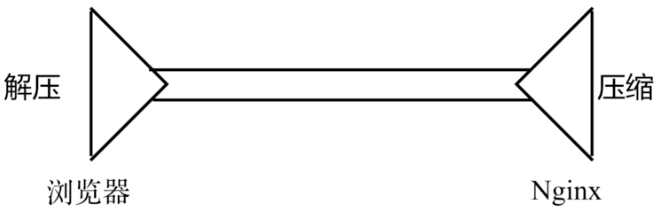
gzip配置在nginx.conf文件中已经存在,只不过默认是注释的状态,只需将注释符号去掉即可
    # Gzip Settings
    gzip on;
    gzip_disable "msie6";
    gzip_vary on;
    gzip_proxied any;
    gzip_comp_level 6;
    gzip_buffers 16 8k;
    gzip_http_version 1.1;
    gzip_types text/plain text/css application/json application/javascript text/xml application/xml application/xml+rss text/javascript;
缓存配置

如果服务器中存在静态资源,可设置本地强缓存。expires 7d表示在本地缓存7天
location / {
    expires 7d;
    ...
}
设置完成后,浏览器会自动添加expires和cache-control字段,而对于协商缓存Etag和Last-Modified,nginx默认开启,无需配置。
CSP配置
跨域脚本攻击 XSS 是最常见、危害最大的网页安全漏洞。为了防止它们,要采取很多编程措施,非常麻烦。很多人提出,能不能根本上解决问题,浏览器自动禁止外部注入恶意脚本?这就是"网页安全政策"(Content Security Policy,缩写 CSP)的来历。
CSP 的实质就是白名单制度,开发者明确告诉客户端,哪些外部资源可以加载和执行,等同于提供白名单。它的实现和执行全部由浏览器完成,开发者只需提供配置
目前,CSP有如下指令
| 指令值 | 指令示例 | 说明 |
|---|---|---|
| default-src | 'self' cnd.a.com | 定义针对所有类型(js、image、css、web font,ajax 请求,iframe,多媒体等)资源的默认加载策略,某类型资源如果没有单独定义策略,就使用默认的。 |
| script-src | 'self' js.a.com | 定义针对 JavaScript 的加载策略。 |
| style-src | 'self' css.a.com | 定义针对样式的加载策略。 |
| img-src | 'self' img.a.com | 定义针对图片的加载策略。 |
| connect-src | 'self' | 针对 Ajax、WebSocket 等请求的加载策略。不允许的情况下,浏览器会模拟一个状态为 400 的响应。 |
| font-src | font.a.com | 针对 WebFont 的加载策略 |
| object-src | self' | 针对 <object>、<embed> 或 <applet> 等标签引入的 flash 等插件的加载策略。 |
| media-src | media.a.com | 针对 <audio> 或 <video> 等标签引入的 HTML 多媒体的加载策略。 |
| frame-src | 'self' | 针对 frame 的加载策略。 |
| sandbox | allow-forms | 对请求的资源启用 sandbox(类似于 iframe 的 sandbox 属性)。 |
| report-uri | /report-uri | 告诉浏览器如果请求的资源不被策略允许时,往哪个地址提交日志信息。 特别的:如果想让浏览器只汇报日志,不阻止任何内容,可以改用 Content-Security-Policy-Report-Only 头 |
admin.xiaohuochai.cc中的CSP配置如下
add_header Content-Security-Policy "default-src 'self'; script-src 'self' 'unsafe-inline' 'unsafe-eval'; img-src 'self' data: https://pic.xiaohuochai.sitehttps://static.xiaohuochai.site; style-src 'self' 'unsafe-inline'; frame-src https://demo.xiaohuochai.site https://xiaohuochai.site;";隐藏信息
在请求响应头中,有这么一行 server: nginx,说明用的是 Nginx 服务器,但并没有具体的版本号。由于某些 Nginx 漏洞只存在于特定的版本,隐藏版本号可以提高安全性。这只需要在配置里加上这个就可以了:
server_tokens off;配置流程
下面在/etc/nginx/conf.d下新建一个配置文件,命名为test-8081.conf,内容如下
注意:一般以域名-端口号来命名配置文件
upstream xiaohuochai {
        server 127.0.0.1:8081;
}
server{
        listen 80;
        server_name 1.2.3.4;
        location / {
                proxy_set_header X-Real-IP $remote_addr;
                proxy_set_header X-Forward-For $proxy_add_x_forwarded_for;
                proxy_set_header Host $http_host;
                proxy_set_header X-Nginx-Proxy true;
                proxy_pass http://test;
                proxy_redirect off;

        }

}
下面使用sudo nginx -t来测试配置文件是否格式正确

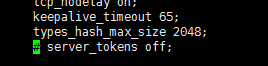
如果不想让报文显示server的详细信息,需要将/etc/nginx/nginx.conf主配置文件中的server_tockens off前面的注释取消即可
接着,重启nginx服务
sudo nginx -s reload
后端项目
下面来部署后端的nodejs项目,在/etc/nginx/conf.d目录下新建文件,该项目占用3000端口,则起名为:api-xiaohuochai-cc-3000
upstream api {
        server 127.0.0.1:3000;
}

server{
    listen 80;
    server_name api.xiaohuochai.cc;
    return 301 https://api.xiaohuochai.cc$request_uri;
}

server{
    listen 443 http2;
    server_name api.xiaohuochai.cc;
    ssl on;
    ssl_certificate /home/www/blog/crt/api.xiaohuochai.cc.crt;
    ssl_certificate_key /home/www/blog/crt/api.xiaohuochai.cc.key;
    ssl_session_timeout 5m;
    ssl_ciphers ECDHE-RSA-AES128-GCM-SHA256:ECDHE:ECDH:AES:HIGH:!NULL:!aNULL:!MD5:!ADH:!RC4;
    ssl_protocols TLSv1 TLSv1.1 TLSv1.2;
    ssl_prefer_server_ciphers on;
    if ($ssl_protocol = "") {
          rewrite ^(.*)https://$host$1 permanent;
    }
    location / {
          proxy_set_header X-Real-IP $remote_addr;
           proxy_set_header X-Forward-For $proxy_add_x_forwarded_for;
           proxy_set_header Host $http_host;
           proxy_set_header X-Nginx-Proxy true;
           proxy_pass http://api;
           proxy_redirect off;
      }
}
后台项目
后台项目起名为admin-xiaohuochai-cc-3001.conf。由于项目采用react构建,与普通的静态网站有些不同
前端路由
由于使用前端路由,项目只有一个根入口。当输入类似/posts的url时,找不到这个页面,这是,nginx会尝试加载index.html,加载index.html之后,react-router就能起作用并匹配我们输入的/posts路由,从而显示正确的posts页面。
try_files $uri $uri/ /index.html = 404;反向代理
由于该项目需要向后端api.xiaohuochai.cc获取数据,但是后台占用的是3000端口,相当于跨域访问,这时就需要进行反向代理。
location /api/ {
     proxy_pass http://api/;
 }
注意:一定要在api后面添加/,否则不生效。
配置缓存及CSP
expires 7d;add_header Content-Security-Policy
 "default-src 'self'; script-src 'self' 'unsafe-inline' 'unsafe-eval'; img-src 'self' data:https://pic.xiaohuochai.site https://static.xiaohuochai.site; style-src 'self''unsafeinline'; frame-src https://demo.xiaohuochai.site https://xiaohuochai.site;";
详细的配置文件
upstream admin
{
   server 127.0.0.1:3001;
}
server{
    listen 80;
    server_name admin.xiaohuochai.cc;
    return 301 https://admin.xiaohuochai.cc$request_uri;
    root /home/www/blog/admin/build;
    index index.html;
}
server{
        listen 443 http2;
        server_name admin.xiaohuochai.cc;
        ssl on;
        ssl_certificate /home/www/blog/crt/admin.xiaohuochai.cc.crt;
        ssl_certificate_key /home/www/blog/crt/admin.xiaohuochai.cc.key;
        ssl_session_timeout 5m;
        ssl_ciphers ECDHE-RSA-AES128-GCM-SHA256:ECDHE:ECDH:AES:HIGH:!NULL:!aNULL:!MD5:!ADH:!RC4;
        ssl_protocols TLSv1 TLSv1.1 TLSv1.2;
        ssl_prefer_server_ciphers on;
        if ($ssl_protocol = "") {
                rewrite ^(.*)https://$host$1 permanent;
        }
    location /api/ {
        proxy_pass http://api/;
    }
    location / {
        index index.html;
        root /home/www/blog/admin/build;
        expires 7d;
        add_header Content-Security-1Policy "default-src 'self'; script-src 'self' 'unsafe-inline' 'unsafe-eval'; img-src 'self' data: https://pic.xiaohuochai.site https://static.xiaohuochai.site; style-src 'self'
'unsafe-inline'; frame-src https://demo.xiaohuochai.site https://xiaohuochai.site;";
        try_files $uri $uri/ /index.html = 404;
    }
}
前台项目
前台项目起名为www-xiaohuochai-cc-3002.conf。项目采用vue构建。该项目与后台项目类似,但稍有些不同。不同之处在于,使用主域名xiaohuochai.cc或二级域名www.xiaohuochai.cc都需要跳转。
{
        listen 443 http2;
        server_name www.xiaohuochai.cc xiaohuochai.cc;
...
详细配置如下
upstream client {
        server 127.0.0.1:3002;
}

server{
    listen 80;
    server_name www.xiaohuochai.cc xiaohuochai.cc;
    return 301 https://www.xiaohuochai.cc$request_uri;
    root /home/www/blog/client/dist;
    index index.html;
}

server{
        listen 443 http2;
        server_name www.xiaohuochai.cc xiaohuochai.cc;
        ssl on;
        ssl_certificate /home/www/blog/client/crt/www.xiaohuochai.cc.crt;
        ssl_certificate_key /home/www/blog/client/crt/www.xiaohuochai.cc.key;
        ssl_session_timeout 5m;
        ssl_ciphers ECDHE-RSA-AES128-GCM-SHA256:ECDHE:ECDH:AES:HIGH:!NULL:!aNULL:!MD5:!ADH:!RC4;
        ssl_protocols TLSv1 TLSv1.1 TLSv1.2;
        ssl_prefer_server_ciphers on;
if ($ssl_protocol = "") {
                rewrite ^(.*)https://$host$1 permanent;
        }
    location /api/ {
        proxy_pass http://api/;
    }
    location / {
        index index.html;
        root /home/www/blog/client/source/dist;
        expires 7d;
        add_header Content-Security-Policy "default-src 'self'; script-src 'self' 'unsafe-inline' 'unsafe-eval' https://static.xiaohuochai.site ; img-src 'self' data: https://pic.xiaohuochai.site https://static.xiaohuochai.site; style-src 'self' 'unsafe-inline' https://static.xiaohuochai.site; frame-src https://demo.xiaohuochai.site https://xiaohuochai.site https://www.xiaohuochai.site;";
        try_files $uri $uri/ /index.html = 404;
    }

}
SSR项目
如果前端项目是服务器端渲染的SSR项目,则与普通的前端项目有很大不同,它不仅需要守护后端程序,还有前端静态资源的处理,如果是首页,还需要处理www
详细配置如下
upstream client {
        server 127.0.0.1:3002;
}
server{
        listen 80;
        server_name www.xiaohuochai.cc xiaohuochai.cc;
        return 301 https://www.xiaohuochai.cc$request_uri;
}
server{
        listen 443 http2;
        server_name www.xiaohuochai.cc xiaohuochai.cc;
        ssl on;
        ssl_certificate /home/blog/client/crt/www.xiaohuochai.cc.crt;
        ssl_certificate_key /home/blog/client/crt/www.xiaohuochai.cc.key;
        ssl_session_timeout 5m;
        ssl_ciphers ECDHE-RSA-AES128-GCM-SHA256:ECDHE:ECDH:AES:HIGH:!NULL:!aNULL:!MD5:!ADH:!RC4;
        ssl_protocols TLSv1 TLSv1.1 TLSv1.2;
        ssl_prefer_server_ciphers on;
    if ($host = 'xiaohuochai.cc'){
        rewrite ^/(.*)$ http://www.xiaohuochai.cc/$1 permanent;
    }
    location / {
        expires 7d;
        add_header Content-Security-Policy "default-src 'self' https://static.xiaohuochai.site; connect-src https://api.xiaohuochai.cc; script-src 'self' 'unsafe-inline' 'unsafe-eval' https://static.xiaohuochai.site ; img-src 'self' data: https://pic.xiaohuochai.site https://static.xiaohuochai.site; style-src 'self' 'unsafe-inline' https://static.xiaohuochai.site; frame-src https://demo.xiaohuochai.site https://xiaohuochai.site https://www.xiaohuochai.site;";
        proxy_set_header X-Real-IP $remote_addr;
                proxy_set_header X-Forward-For $proxy_add_x_forwarded_for;
                proxy_set_header Host $http_host;
                proxy_set_header X-Nginx-Proxy true;
                proxy_pass http://client;
                proxy_redirect off;

    }
}
作者:小火柴的蓝色理想
链接:www.cnblogs.com/xiaohuochai