Mybatis 逆向工程
逆向工程通常包括由数据库的表生成 Java 代码 和 通过 Java 代码生成数据库表。而Mybatis 逆向工程是指由数据库表生成 Java 代码。
Mybaits 需要程序员自己编写 SQL 语句,但是 Mybatis 官方提供逆向工程可以针对单表自动生成 Mybaits 执行所需要的代码,包括 POJO、Mapper.java、Mapper.xml …。
一、通过 Eclipse 插件完成 Mybatis 逆向工程
1. 在线安装 Eclipse 插件
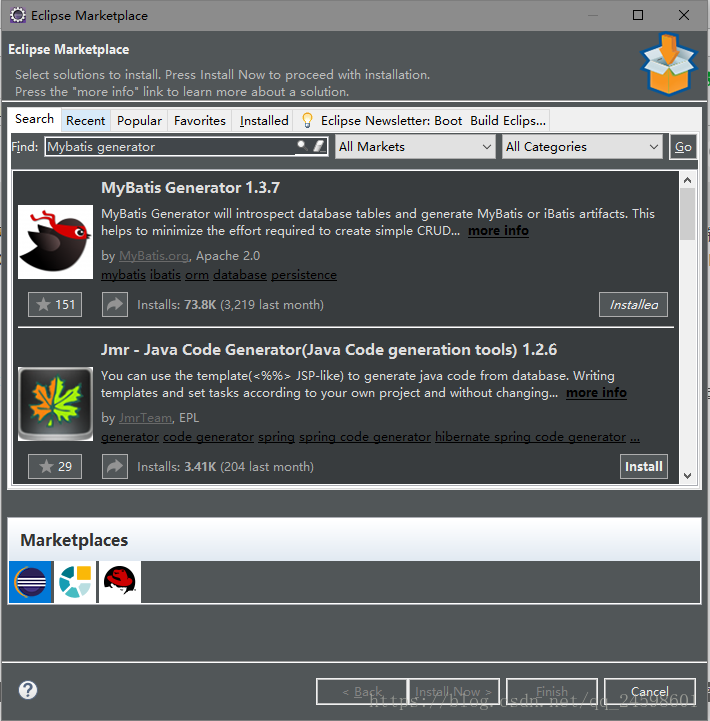
操作步骤:打开Eclipse => Help => Eclipse Marketplace => 搜索 Mybatis Generator => 选择 Mybatis Generator 的版本 => Install => 重启。
2. 新建一个 Java Project 项目
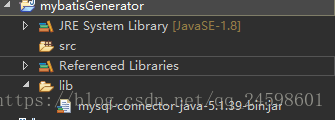
新建一个叫 mybatisGenerator 的 Java 项目,导入 MySQL 的驱动包,如果是 Oracle 数据库就导入 Oracle 的驱动包,我这里是 MySQL 数据库,所以导入的是 MySQL 的。
3. 编写配置文件
逆向工程需要用到 xml 配置文件,编写配置文件(generatorConfig.xml)如下:
/p>
PUBLIC "-//mybatis.org//DTD MyBatis Generator Configuration 1.0//EN"
"http://mybatis.org/dtd/mybatis-generator-config_1_0.dtd">
connectionURL="jdbc:mysql://localhost:3306/mybatis" userId="root"
password="123456">
targetProject="mybatisGenerator">
targetProject="mybatisGenerator">
targetPackage="com.ssm.mapper"
targetProject="mybatisGenerator">
注意:targetProject="mybatisGenerator"
4. 使用插件运行
操作步骤:右击 generatorConfig.xml 文件 => Run as => Run Mybatis Generator => 刷新工程。
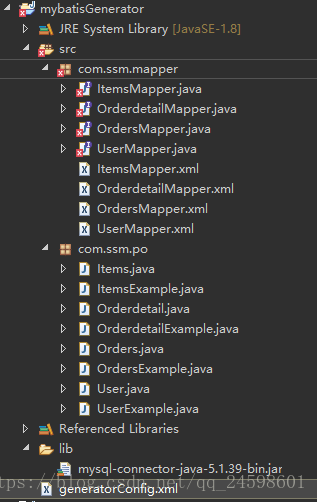
有报错是因为没有导入 Mybatis 相关的包。最后将生成的文件拷入相关的工程当中。
二、通过 Java 代码完成 Mybatis 逆向工程
1. 新建一个 Java Project 项目
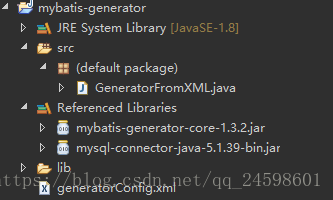
新建一个 Java 项目,导入Mybatis逆向工程包mybatis-generator-core-1.3.2.jar和数据库驱动包mysql-connector-java-5.1.39-bin.jar。
2. 编写配置文件
编写配置文件,和前一种方法的配置文件差不多,区别在于这里的 targetProject 不一样,这种方式的是targetProject="./src",生成的文件也会在这个下面。
/p>
PUBLIC "-//mybatis.org//DTD MyBatis Generator Configuration 1.0//EN"
"http://mybatis.org/dtd/mybatis-generator-config_1_0.dtd">
connectionURL="jdbc:mysql://localhost:3306/mybatis" userId="root"
password="123456">
targetProject="./src">
targetProject="./src">
targetPackage="com.ssm.mapper"
targetProject="./src">
3. 编写生成代码程序
最后编写一个简单的 Java 运行程序,运行后刷新工程就可以了。
/p>
PUBLIC "-//mybatis.org//DTD MyBatis Generator Configuration 1.0//EN"
"http://mybatis.org/dtd/mybatis-generator-config_1_0.dtd">
connectionURL="jdbc:mysql://localhost:3306/mybatis" userId="root"
password="123456">
targetProject="./src">
targetProject="./src">
targetPackage="com.ssm.mapper"
targetProject="./src">
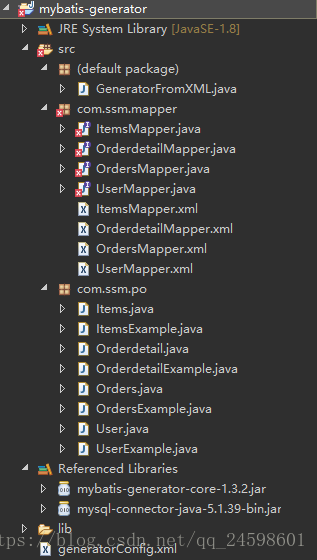
建议在这个项目中加入日志,这样能直观得看出其运行过程。
加入日志配置文件log4j.properties。
# Global logging configuration
log4j.rootLogger=DEBUG, stdout
# MyBatis logging configuration...
log4j.logger.org.mybatis.example.BlogMapper=TRACE
# Console output...
log4j.appender.stdout=org.apache.log4j.ConsoleAppender
log4j.appender.stdout.layout=org.apache.log4j.PatternLayout
log4j.appender.stdout.layout.ConversionPattern=%5p [%t] - %m%n
运行 GeneratorFromXML.java 时产生的日志记录:
DEBUG [main] - Retrieving column information for table "items"
DEBUG [main] - Found column "id", data type 4, in table "mybatis..items"
DEBUG [main] - Found column "name", data type 12, in table "mybatis..items"
DEBUG [main] - Found column "price", data type 7, in table "mybatis..items"
DEBUG [main] - Found column "detail", data type -1, in table "mybatis..items"
DEBUG [main] - Found column "pic", data type 12, in table "mybatis..items"
DEBUG [main] - Found column "createtime", data type 93, in table "mybatis..items"
DEBUG [main] - Retrieving column information for table "orders"
DEBUG [main] - Found column "id", data type 4, in table "mybatis..orders"
DEBUG [main] - Found column "user_id", data type 4, in table "mybatis..orders"
DEBUG [main] - Found column "number", data type 12, in table "mybatis..orders"
DEBUG [main] - Found column "createtime", data type 93, in table "mybatis..orders"
DEBUG [main] - Found column "note", data type 12, in table "mybatis..orders"
DEBUG [main] - Retrieving column information for table "orderdetail"
DEBUG [main] - Found column "id", data type 4, in table "mybatis..orderdetail"
DEBUG [main] - Found column "orders_id", data type 4, in table "mybatis..orderdetail"
DEBUG [main] - Found column "items_id", data type 4, in table "mybatis..orderdetail"
DEBUG [main] - Found column "items_num", data type 4, in table "mybatis..orderdetail"
DEBUG [main] - Retrieving column information for table "user"
DEBUG [main] - Found column "ID", data type 4, in table "mybatis..user"
DEBUG [main] - Found column "USERNAME", data type 12, in table "mybatis..user"
DEBUG [main] - Found column "SEX", data type 12, in table "mybatis..user"
DEBUG [main] - Found column "birthday", data type 91, in table "mybatis..user"
DEBUG [main] - Found column "address", data type 12, in table "mybatis..user"
三、通过 Maven 完成 Mybatis 逆向工程
1. 新建一个 Maven Project 项目
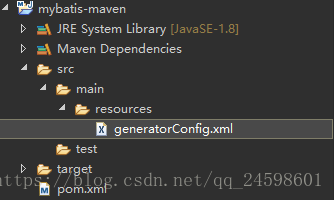
新建一个 Maven 项目,然后新建文件夹 /mybatis-maven/src/main/resources,在文件夹下新建文件 generatorConfig.xml。
2. 配置 pom.xml 文件
配置 pom.xml 文件,在 pom.xml 文件的 project 标签里加入代码:
org.mybatis.generator
mybatis-generator-maven-plugin
1.3.2
mysql
mysql-connector-java
5.1.38
true
配置插件 generator 版本是 1.3.2 并配置 Mysql 驱动是 5.1.38。
3. 配置文件 generatorConfig.xml
generatorConfig.xml 是在目录 src 下的 main 下的 resources 下。注意这里的targetProject="./src" 生成的文件也会在这个下面。
/p>
PUBLIC "-//mybatis.org//DTD MyBatis Generator Configuration 1.0//EN"
"http://mybatis.org/dtd/mybatis-generator-config_1_0.dtd">
connectionURL="jdbc:mysql://localhost:3306/mybatis" userId="root"
password="123456">
targetProject="./src">
targetProject="./src">
targetPackage="com.ssm.mapper"
targetProject="./src">
4. 运行 Maven
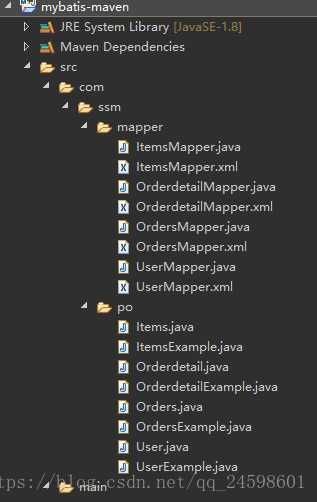
运行命令mybatis-generator:generate。
操作步骤:选中项目右击 => Run As => Maven build… =>在 Goals 中输入mybatis-generator:generate => Run =>刷新工程。
到此这篇关于Mybatis 逆向工程的三种方法详解的文章就介绍到这了,更多相关Mybatis 逆向工程内容请搜索脚本之家以前的文章或继续浏览下面的相关文章希望大家以后多多支持脚本之家!