布局如下:
<com.google.android.material.textfield.TextInputLayout
        android:id="@+id/name"
        android:layout_width="match_parent"
        android:layout_height="wrap_content"
        android:hint="用户名"
        android:layout_marginTop="50dp"
        app:layout_constraintLeft_toLeftOf="parent"
        app:layout_constraintRight_toRightOf="parent"
        app:layout_constraintTop_toTopOf="parent"
        app:endIconMode="clear_text"
        style="@style/Widget.MaterialComponents.TextInputLayout.OutlinedBox">

        <com.google.android.material.textfield.TextInputEditText
            android:layout_width="match_parent"
            android:layout_height="wrap_content"
            />
    </com.google.android.material.textfield.TextInputLayout>

    <com.google.android.material.textfield.TextInputLayout
        android:id="@+id/password"
        android:layout_width="match_parent"
        android:layout_height="wrap_content"
        android:hint="密码"
        android:layout_marginTop="20dp"
        app:layout_constraintLeft_toLeftOf="parent"
        app:layout_constraintRight_toRightOf="parent"
        app:layout_constraintTop_toBottomOf="@id/name"
        app:endIconMode="password_toggle"
        style="@style/Widget.MaterialComponents.TextInputLayout.OutlinedBox">

        <com.google.android.material.textfield.TextInputEditText
            android:layout_width="match_parent"
            android:layout_height="wrap_content"
            android:inputType="textPassword"
            />
    </com.google.android.material.textfield.TextInputLayout>
直接给binding.name.text="name"赋值会报错
可以用binding.name.editText!!.setText("name")代替
例如:
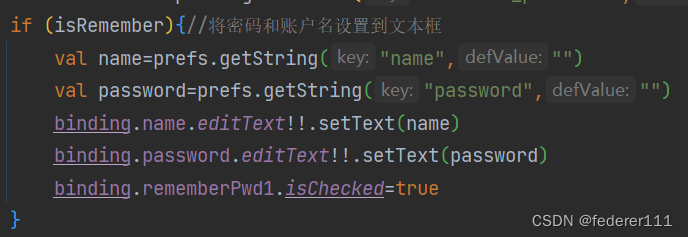
程序可以正常运行
版权声明:本文为qq_52833728原创文章,遵循CC 4.0 BY-SA版权协议,转载请附上原文出处链接和本声明。