之前把 element-ui的 table结合 pagination简单封装成了一个组件,经过一段时间的使用,为了更好地适配自己的项目,断断续续做了一些调整,稍微饱满了一点点,更好用了一点点。
(ps:这是适配的 vue2.0,如果使用 vue3.0,对 slot部分需要做一下调整)
!!!修补一个bug:最后一页删掉所有数据后,分页器 current自动更新为前一页,但无法触发 current-change事件,以至于分页器显示在前一页,但是 table中无数据。
——试来试去也没有定位到问题所在,就想了个比较被动的办法,在监听到 data为空且 current不为1时,再请求一次数据,不过这个请求需要在 current被自动更新之后,所以需要用到 $nextTick。具体见下图: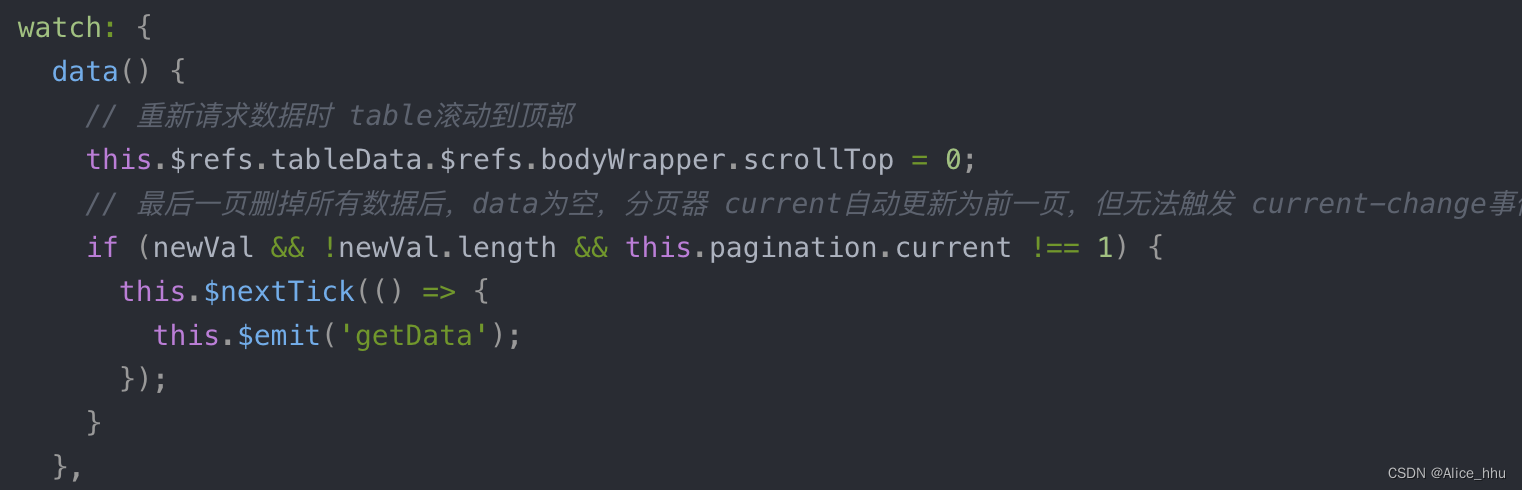
1.【Table】组件
<template>
  <div
    :style="{ 'height': wrapperHeight }"
    v-loading="loading">
    <el-table
      ref="tableData"
      :stripe="stripe"
      :height="height"
      :max-height="maxHeight"
      header-row-class-name="table-list-header"
      row-class-name="table-list-row"
      :size="tableSize"
      :data="data"
      @selection-change="handleSelectionChange"
      @current-change="handleTableCurrentChange"
      @row-click="handleTableRowClick"
      v-bind="otherConfig">
      <template v-for="(item, index) in columns">
        <!-- 选择框 -->
        <el-table-column
          v-if="item.selection"
          type="selection"
          width="50"
          :fixed="item.fixed"
          align="center"
          header-align="center"
          :key="`selection_${index}`"
        ></el-table-column>
        <!-- 序号 -->
        <el-table-column
          v-else-if="item.index"
          type="index"
          width="80"
          :fixed="item.fixed"
          label="序号"
          :index="item.indexMethod"
          :key="`index_${index}`"
        ></el-table-column>
        <!-- 多级表头 -->
        <el-table-column
          v-else-if="item.multi"
          align="center"
          :label="item.label"
          :key="`multi_${index}`"
        >
          <el-table-column
            v-for="(child, childIndex) in item.children"
            :key="`child_${index}_${childIndex}`"
            v-bind="child"
          >
          </el-table-column>
        </el-table-column>
        <!-- 自定义内容 -->
        <slot
          v-else-if="item.slot"
          :name="item.slot"></slot>
        <!-- 常规字段 -->
        <el-table-column
          v-else
          show-overflow-tooltip
          v-bind="item"
          :fixed="item.fixed"
          :min-width="item.minWidth"
          :key="`normal_${index}`"
        ></el-table-column>
      </template>
    </el-table>
    <!-- eslint-disable -->
    <el-pagination
      v-if="isPaginationShow && pagination.total"
      class="opagination mt12"
      background
      layout="sizes, prev, pager, next"
      :page-sizes="[10, 20, 50, 100]"
      :current-page.sync="pagination.current"
      :page-size="pagination.size"
      :total="pagination.total"
      @size-change="handleSizeChange"
      @current-change="handleCurrentChange"
    >
    </el-pagination>
    <!-- eslint-enable -->
    <!-- 自定义内容 -->
    <slot name="custom-content"></slot>
  </div>
</template>
<script>
export default {
  name: 'Table',
  props: {
    columns: {
      type: Array,
      default: () => [],
    },
    data: {
      type: Array,
      default: () => [],
    },
    pagination: {
      type: Object,
      default: () => ({
        current: 1,
        size: 10,
        total: 0,
      }),
    },
    isPaginationShow: {
      type: Boolean,
      default: true,
    },
    wrapperHeight: {
      type: [Number, String],
      default: '100%', // 一般情况下,更多地是配置父元素的高度,table的高度根据父元素高度计算
    },
    height: {
      type: [Number, String],
      default: 'calc(100% - 48px)', // table的默认高度是 父元素高度 减去 pagination高度,一般情况下,这个默认配置就够用了,有特殊场景可以另配置
    },
    maxHeight: {
      type: [Number, String],
      default: 'auto',
    },
    tableSize: {
      type: String,
      default: 'small',
    },
    stripe: {
      type: Boolean,
      default: true,
    },
    otherConfig: {
      type: Object,
      default: () => {},
    },
    loading: {
      type: Boolean,
      default: false,
    },
  },
  data() {
    return {};
  },
  methods: {
    // 切换页码
    handleCurrentChange() {
      this.$emit('getData');
    },
    // 切换每页条数
    handleSizeChange(value) {
      // current-page和 page-size都支持 .sync修饰符,用了.sync修饰符,就不需要手动给 this.pagination赋值了
      this.pagination.size = value;
      this.$emit('getData');
    },
    // 切换选择
    handleSelectionChange(val) {
      this.$emit('changeSelection', val);
    },
    // 单选
    handleTableCurrentChange(currentRow) {
      this.$emit('changeCurrent', currentRow);
    },
    // 点击行
    handleTableRowClick(currentRow) {
      this.$emit('rowClick', currentRow);
    },
  },
  watch: {
    data() {
      // 重新请求数据时 table滚动到顶部
      this.$refs.tableData.$refs.bodyWrapper.scrollTop = 0;
      // 最后一页删掉所有数据后,data为空,分页器 current自动更新为前一页,但无法触发 current-change事件,此处手动判断重新请求数据
      if (newVal && !newVal.length && this.pagination.current !== 1) {
        this.$nextTick(() => {
          this.$emit('getData');
        });
      }
    },
  },
};
</script>
2.父组件调用
<template>
  <div>
  	<!-- 查询条件 -->
  	<el-form
      ref="searchForm"
      :model="searchForm"
      label-width="80px">
      <el-form-item label="名称" prop="name">
        <el-input v-model="searchForm.name" placeholder="请输入"></el-input>
      </el-form-item>
      <el-form-item>
        <el-button
          type="primary"
          @click="onSearch"
          :disabled="loading">查询</el-button>
        <el-button @click="onReset" :disabled="loading">重置</el-button>
      </el-form-item>
    </el-form>

    <!-- Table组件 -->
    <Table
      :columns="columns"
      :data="tableList"
      :pagination="pagination"
      @getData="fetchTableList"
      :loading="loading"
      wrapperHeight="calc(100% - 45px)">
      <!-- wrapperHeight:父元素高度根据实际布局情况配置,大多情况可能是 外层祖父元素高度 减去 其他兄弟元素的高度,如果外层祖父元素高度或者兄弟元素的高度不固定,可能需要借助 js来计算 -->
      <el-table-column slot="action" fixed="right" label="操作" width="100">
        <template
          slot-scope="scope">
          <el-button
            type="text"
            @click="showDetail(scope.row)">查看详情</el-button>
        </template>
      </el-table-column>
    </Table>
  </div>
</template>
<script>
export default {
  data() {
    return {
      // 查询条件
      searchForm: {
        name: '',
      },
      // 每次请求缓存的查询参数
      searchCache: {},
      columns: [
        { selection: true, },
        {
          index: true,
          indexMethod(index) {
            return index + 1;
          },
        },
        { prop: 'name', label: '名称', width: 160},
        ...
        { slot: 'action', },
      ],
      tableList: [],
      pagination: {
        current: 1,
        size: 20,
        total: 0,
      },
      loading: false,
    };
  },
  methods: {
  	// 获取数据
  	fetchTableList() {
  	  this.loading = true;
  	  const params = {};
  	  fetchApi(params).then((res) => {
        if (res.code === 200) {
          const { list = [], totalRecord = 0 } = res.data;
          this.tableList = list || [];
          this.pagination.total = totalRecord;
        }
      }).finally(() => {
        this.loading = false;
      });
  	},
    // 点击”查询“按钮 => 此时缓存查询参数
    onSearch() {
      this.searchCache = { ...this.searchForm };
      this.pagination = {
        current: 1,
        size: 20,
        total: 0,
      };
      this.fetchTableList();
    },
    // 重置
    onReset() {
      this.$refs.searchForm.resetFields();
    },
    // 操作
    showDetail(row) {
      console.log(row);
      // ...
    },
  },
};
</script>
版权声明:本文为weixin_40615155原创文章,遵循CC 4.0 BY-SA版权协议,转载请附上原文出处链接和本声明。