第一节:PreparedStatement接口引入
PreparedStatement 是 Statement 的子接口,属于预处理操作,与直接使用 Statement 不同的是,PreparedStatement
在操作时,是先在数据表中准备好了一条 SQL 语句,但是此 SQL 语句的具体内容暂时不设置,而是之后再进行设置。
(以后开发一般用 PreparedStatement,不用 Statement)
第二节:使用PreparedStatement接口实现添加数据操作
实例1:
1、学生模型类
public class Student {
	private int id;
	private String stuName;
	private String stuSex;
	private int stuAge;


	public Student() {
		super();
		// TODO Auto-generated constructor stub
	}

	public Student(String stuName, String stuSex, int stuAge) {
		super();
		this.stuName = stuName;
		this.stuSex = stuSex;
		this.stuAge = stuAge;
	}

	public Student(int id, String stuName, String stuSex, int stuAge) {
		super();
		this.id = id;
		this.stuName = stuName;
		this.stuSex = stuSex;
		this.stuAge = stuAge;
	}


	public String getStuName() {
		return stuName;
	}
	public void setStuName(String stuName) {
		this.stuName = stuName;
	}
	public String getStuSex() {
		return stuSex;
	}
	public void setStuSex(String stuSex) {
		this.stuSex = stuSex;
	}
	public int getStuAge() {
		return stuAge;
	}
	public void setStuAge(int stuAge) {
		this.stuAge = stuAge;
	}
	public int getId() {
		return id;
	}
	public void setId(int id) {
		this.id = id;
	}


}
2、工具类
public class DbUtil {

	private static String dbUrl="jdbc:mysql://localhost:3306/book?useUnicode=true&characterEncoding=UTF-8";
	private static String dbUserName="root";
	private static String dbPassword="root";
	private static String jdbcName="com.mysql.jdbc.Driver";

	/**
	 * 获取数据库连接
	 * @return
	 * @throws Exception
	 */
	public Connection getCon() throws Exception{
		Class.forName(jdbcName);
		Connection con=DriverManager.getConnection(dbUrl,dbUserName,dbPassword);
		return con;
	}

	/**
	 * 关闭连接
	 * @param con
	 * @throws Exception
	 */
	public void close(Statement stmt,Connection con)throws Exception{
		if(stmt!=null){
			stmt.close();
			if(con!=null){
				con.close();
			}
		}

	}
}
3、测试类
public class jdbcTest {

	private static DbUtil dbUtil=new DbUtil();
	private static Student student=new Student();
	/**
	 * 添加数据
	 * @param stuName
	 * @param stuSex
	 * @param stuAge
	 * @return
	 */
	public static int addStudent(Student student)throws Exception{
		Connection con=dbUtil.getCon();//获取连接
		String sql="insert into student values(null,?,?,?)";
		PreparedStatement pstmt=con.prepareStatement(sql);
		pstmt.setString(1, student.getStuName());//给第一个?设置值
		pstmt.setString(2, student.getStuSex());//给第二个?设置值
		pstmt.setInt(3, student.getStuAge());给第三个?设置值
		int result=pstmt.executeUpdate();
		dbUtil.close(pstmt, con);//pstmt是子类,可以关闭
		return result;
	}
	public static void main(String[] args) throws Exception {
		Student student=new Student("大黄蜂","女",8979);
		addStudent(student);
	}
}
第三节:使用PreparedStatement接口实现更新数据操作
实例:
3、测试类
public class jdbcTest {

	private static DbUtil dbUtil=new DbUtil();
	private static Student student=new Student();
	/**
	 * 更新数据
	 * @param stuName
	 * @param stuSex
	 * @param stuAge
	 * @return
	 */
	public static int updateStudent(Student student)throws Exception{
		Connection con=dbUtil.getCon();//获取连接
		String sql="update student set stuName=?,stuSex=?,stuAge=? where stuId=?";
		PreparedStatement pstmt=con.prepareStatement(sql);
		pstmt.setString(1, student.getStuName());//给第一个?设置值
		pstmt.setString(2, student.getStuSex());//给第二个?设置值
		pstmt.setInt(3, student.getStuAge());给第三个?设置值
		pstmt.setInt(4, student.getId());
		int result=pstmt.executeUpdate();
		dbUtil.close(pstmt, con);//pstmt是子类,可以关闭
		return result;
	}
	public static void main(String[] args) throws Exception {
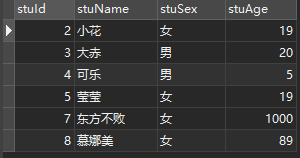
		Student student=new Student(8,"慕娜美","女",89);
		updateStudent(student);
	}
}
第四节:使用PreparedStatement接口实现删除数据操作
实例:
3、测试类
public class jdbcTest {

	private static DbUtil dbUtil=new DbUtil();
	private static Student student=new Student();
	/**
	 * 删除数据
	 * @param stuName
	 * @param stuSex
	 * @param stuAge
	 * @return
	 */
	public static int deleteStudent(int id)throws Exception{
		Connection con=dbUtil.getCon ();//获取连接
		String sql="delete from student where stuId=?";
		PreparedStatement pstmt=con.prepareStatement(sql);
		pstmt.setInt(1, id);
		int result=pstmt.executeUpdate();
		dbUtil.close(pstmt, con);//pstmt是子类,可以关闭
		return result;
	}
	public static void main(String[] args) throws Exception {
		deleteStudent(8);
	}
}
运行结果: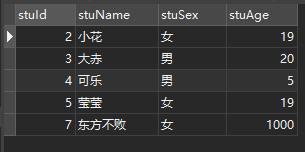
版权声明:本文为weixin_44234912原创文章,遵循CC 4.0 BY-SA版权协议,转载请附上原文出处链接和本声明。