前言
前面一篇文章,我们讲解了如何创建Windows服务,并说明了如何使用installutil.exe来实现服务的安装和卸载。
今天这篇文章,我们讲解一下如何通过C#来安装、卸载、启动、停止Windows服务。
界面设计
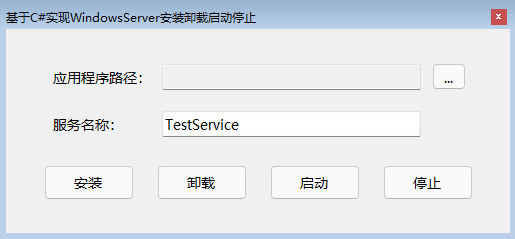
首先创建一个Windows窗体应用,界面设计如下图所示:
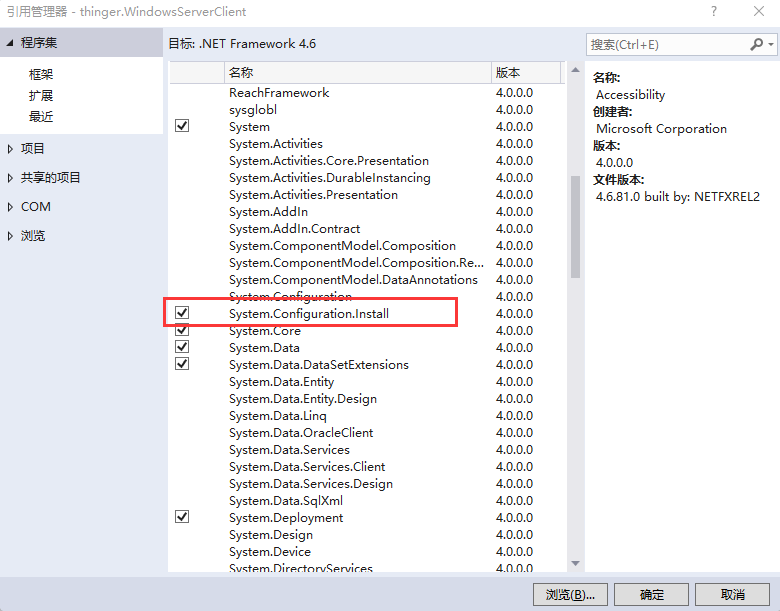
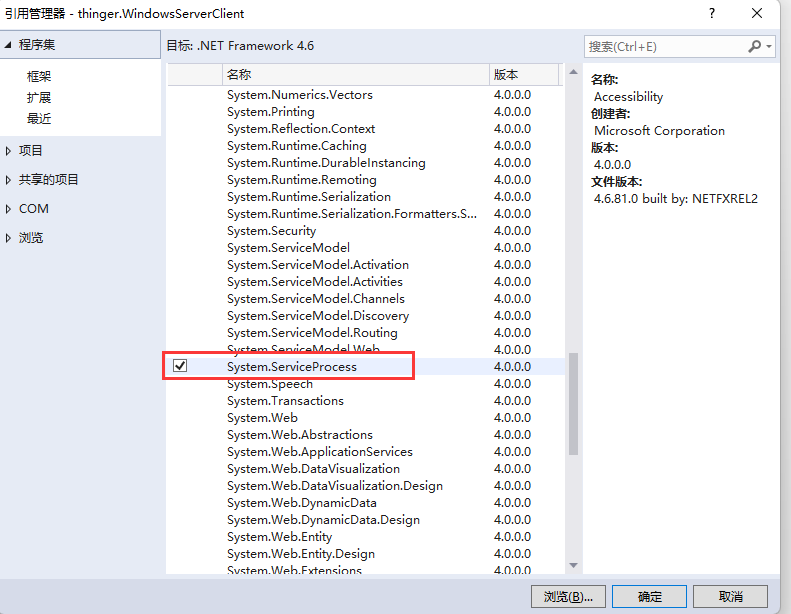
操作服务会使用到两个dll,这两个dll属于系统dll,但是默认是没有添加到引用里的,通过添加引用,从程序集中将这两个引用勾选上,如下图所示:
代码实现
1、检查服务名称是否存在:
        //判断服务是否存在
        private bool IsServiceExisted(string serviceName)
        {
            ServiceController[] services = ServiceController.GetServices();
            foreach (ServiceController sc in services)
            {
                if (sc.ServiceName.ToLower() == serviceName.ToLower())
                {
                    return true;
                }
            }
            return false;
        }
2、安装服务
        //安装服务
        private bool InstallService(string serviceFilePath)
        {
            try
            {
                using (AssemblyInstaller installer = new AssemblyInstaller())
                {
                    installer.UseNewContext = true;
                    installer.Path = serviceFilePath;
                    IDictionary savedState = new Hashtable();
                    installer.Install(savedState);
                    installer.Commit(savedState);
                }
            }
            catch (Exception)
            {
                return false;
            }
            return true;
        }
3、卸载服务
        //卸载服务
        private bool UnInstallService(string serviceFilePath)
        {
            try
            {
                using (AssemblyInstaller installer = new AssemblyInstaller())
                {
                    installer.UseNewContext = true;
                    installer.Path = serviceFilePath;
                    installer.Uninstall(null);
                }
            }
            catch (Exception)
            {
                return false;
            }
            return true;
        }
4、启动服务
        //启动服务
        private bool StartService(string serviceName)
        {
            try
            {
                using (ServiceController control = new ServiceController(serviceName))
                {
                    if (control.Status == ServiceControllerStatus.Stopped)
                    {
                        control.Start();
                    }
                }
            }
            catch (Exception)
            {
                return false;
            }
            return true;
        }
5、停止服务
        //停止服务
        private bool StopService(string serviceName)
        {
            try
            {
                using (ServiceController control = new ServiceController(serviceName))
                {
                    if (control.Status == ServiceControllerStatus.Running)
                    {
                        control.Stop();
                    }
                }
            }
            catch (Exception)
            {
                return false;
            }
            return true;

        }
6、在对应按钮的事件中,调用对应方法即可。
        private string ServiceName
        {
            get { return this.txt_ServiceName.Text.Trim(); }
        }

        private string ServicePath
        {
            get { return this.txt_Path.Text.Trim(); }
        }


        private void btn_Install_Click(object sender, EventArgs e)
        {
            if (this.IsServiceExisted(ServiceName))
            {
                this.UnInstallService(ServicePath);
            }
            if (this.InstallService(ServicePath))
            {
                MessageBox.Show("服务安装成功", "服务安装");
            }
            else
            {
                MessageBox.Show("服务安装失败", "服务安装");
            }

        }
        private void btn_UnInstall_Click(object sender, EventArgs e)
        {
            if (this.IsServiceExisted(ServiceName))
            {
                if (this.StopService(ServiceName) && this.UnInstallService(ServicePath))
                {
                    MessageBox.Show("服务卸载成功", "服务卸载");
                }
                else
                {
                    MessageBox.Show("服务卸载失败", "服务卸载");
                }
            }
            else
            {
                MessageBox.Show("服务卸载失败:服务不存在", "服务卸载");
            }
        }

        private void btn_Start_Click(object sender, EventArgs e)
        {
            if (this.IsServiceExisted(ServiceName))
            {
                if (this.StartService(ServiceName))
                {
                    MessageBox.Show("服务开启成功", "服务开启");
                }
                else
                {
                    MessageBox.Show("服务开启失败", "服务开启");
                }
            }
            else
            {
                MessageBox.Show("服务开启失败:服务不存在", "服务开启");
            }
        }

        private void btn_Stop_Click(object sender, EventArgs e)
        {
            if (this.IsServiceExisted(ServiceName))
            {
                if (this.StopService(ServiceName))
                {
                    MessageBox.Show("服务停止成功", "服务停止");
                }
                else
                {
                    MessageBox.Show("服务停止失败", "服务停止");
                }
            }
            else
            {
                MessageBox.Show("服务停止失败:服务不存在", "服务停止");
            }
        }
功能测试
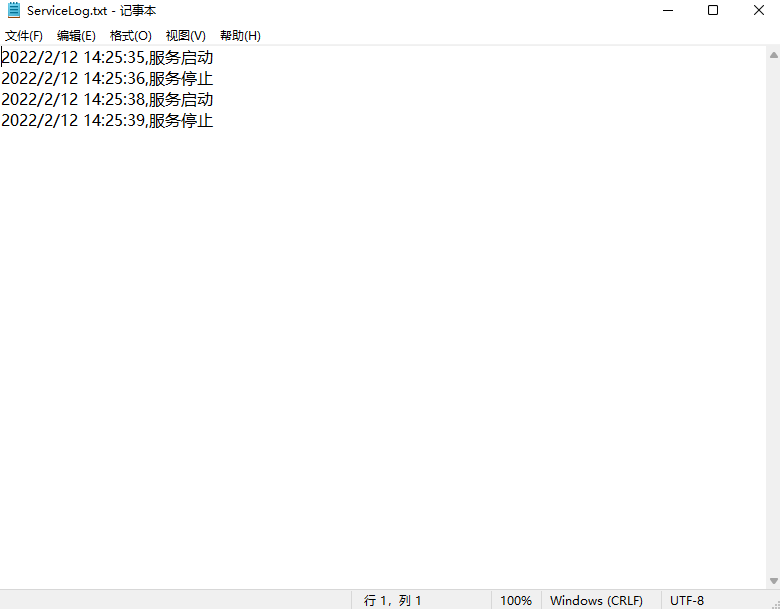
经过测试,确定可以实现服务的安装卸载及开启停止功能。
版权声明:本文为xiketangAndy原创文章,遵循CC 4.0 BY-SA版权协议,转载请附上原文出处链接和本声明。