一、模块简介
Melexis MLX90393是一个三轴霍尔传感器,可以检测各个方向的磁场强度,MCU通过I2C或SPI读取X/Y/Z三轴磁场分量。
MLX90393的数据手册已上传:https://download.csdn.net/download/zhyulo/11125410
MLX90393的SPI与I2C通讯方式电路结构不一样,详细内容在数据手册24页。推荐使用I2C方式,以下程序均为I2C下代码。
MLX90393的Arduino驱动程序在网上有现成库函数:https://github.com/tedyapo/arduino-MLX90393,感谢Theodore Yapo大神的分享。如果不方便从github上下载,也可以使用我下好的程序:https://download.csdn.net/download/zhyulo/11156218
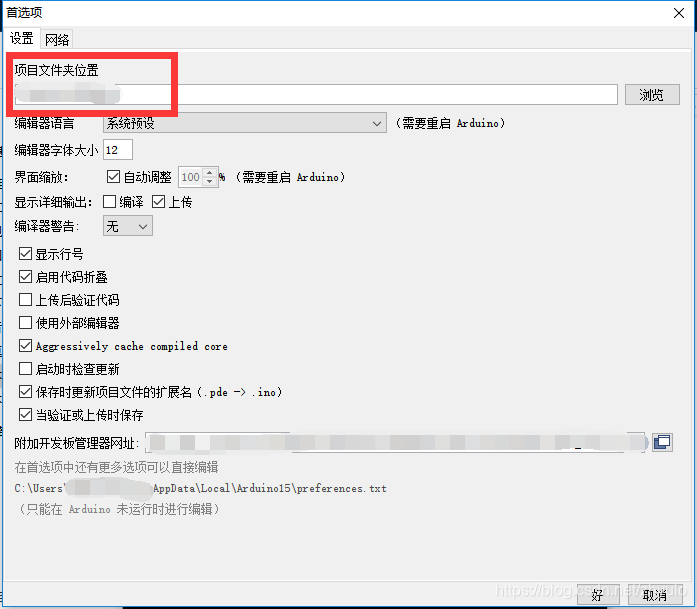
把文件解压到项目文件夹下的libraries文件夹下,项目文件夹的查看及更改方式在:arduino IDE->文件->首选项->设置->项目文件夹位置。
二、arduino代码
注意,有的arduino板子,I2C需要配置引脚、或者时钟频率,请在setup()函数里的Wire.begin();语句里加上参数Wire.begin(...);
#include <Wire.h>
#include <MLX90393.h> //From https://github.com/tedyapo/arduino-MLX90393 by Theodore Yapo

MLX90393 mlx;
MLX90393::txyz data; //Create a structure, called data, of four floats (t, x, y, and z)

void setup()
{
  Serial.begin(9600);
  Serial.println("MLX90393 Read Example");

  Wire.begin();
  //Assumes I2C jumpers are GND. No DRDY pin used.
  while(mlx.begin() != MLX90393::STATUS_OK) {
  	Serial.print('.');
        delay(500);
  	mlx.begin();
  }
}

void loop()
{
  mlx.readData(data); //Read the values from the sensor

  Serial.print("magX[");
  Serial.print(data.x);
  Serial.print("] magY[");
  Serial.print(data.y);
  Serial.print("] magZ[");
  Serial.print(data.z);
  Serial.print("] temperature(C)[");
  Serial.print(data.t);
  Serial.print("]");
  Serial.println();

  delay(1000);
}
版权声明:本文为zhyulo原创文章,遵循CC 4.0 BY-SA版权协议,转载请附上原文出处链接和本声明。