Spring-Mvc 快速入门步骤
是本人笔记啦!
本篇文章仅供参考,大家一起进步!
目录大纲
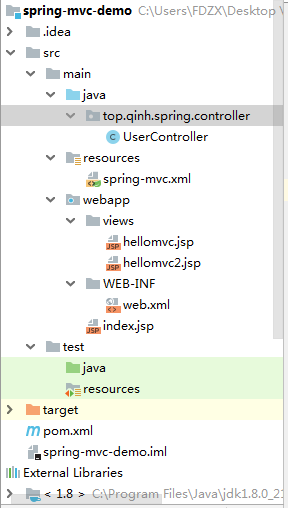
引入依赖
jar包下载地址
选择自己适用的版本
Maven引入依赖
<!-- https://mvnrepository.com/artifact/org.springframework/spring-webmvc -->
    <dependency>
      <groupId>org.springframework</groupId>
      <artifactId>spring-webmvc</artifactId>
      <version>5.1.13.RELEASE</version>
    </dependency>
spring-mvc.xml
<?xml version="1.0" encoding="UTF-8"?>
<beans xmlns="http://www.springframework.org/schema/beans"
       xmlns:xsi="http://www.w3.org/2001/XMLSchema-instance"
       xmlns:mvc="http://www.springframework.org/schema/mvc"
       xmlns:context="http://www.springframework.org/schema/context"
       xsi:schemaLocation="http://www.springframework.org/schema/beans
            http://www.springframework.org/schema/beans/spring-beans-3.0.xsd
            http://www.springframework.org/schema/context
            http://www.springframework.org/schema/context/spring-context-3.0.xsd
            http://www.springframework.org/schema/mvc
            http://www.springframework.org/schema/mvc/spring-mvc-3.0.xsd">

    <!-- 开启注解 -->
    <mvc:annotation-driven />

    <!-- 让扫描spring扫描这个包下所有的类,让标注spring注解的类生效 -->
    <context:component-scan base-package="top.qinh.spring.controller"></context:component-scan>

    <!-- 视图解析器 -->
    <bean class="org.springframework.web.servlet.view.InternalResourceViewResolver">
        <property name="prefix" value="/views/"></property>
        <property name="suffix" value=".jsp"></property>
    </bean>

  <!--  <bean class="org.springframework.web.servlet.mvc.method.annotation.RequestMappingHandlerAdapter">
        <property name="messageConverters">
            <list >
                <ref bean="mappingJacksonHttpMessageConverter" />
            </list>
        </property>
    </bean>
    <bean id="mappingJacksonHttpMessageConverter"
          class="org.springframework.http.converter.json.MappingJackson2HttpMessageConverter">
        <property name="supportedMediaTypes">
            <list>
                <value>text/html;charset=UTF-8</value>
            </list>
        </property>
    </bean>-->


</beans>
配置web.xml
 <servlet>
    <servlet-name>spring-mvc</servlet-name>
    <servlet-class>org.springframework.web.servlet.DispatcherServlet</servlet-class>
    <!-- 指定路径 -->
    <init-param>
      <param-name>contextConfigLocation</param-name>
      <param-value>classpath:spring-mvc.xml</param-value>
    </init-param>
  </servlet>

  <servlet-mapping>
    <servlet-name>spring-mvc</servlet-name>
    <url-pattern>/</url-pattern>  //拦截所有请求
  </servlet-mapping>
写contorller(控制)层
package top.qinh.spring.controller;

import org.springframework.stereotype.Controller;
import org.springframework.web.bind.annotation.RequestMapping;
import org.springframework.web.bind.annotation.RequestMethod;

import java.lang.annotation.Annotation;

@Controller
@RequestMapping("user")
public class UserController{
    @RequestMapping(value="index",method = RequestMethod.GET)
    public String index(){
        return"hellomvc";
    }
    @RequestMapping(value="index1",method = RequestMethod.GET)
    public String index1(){
        return"hellomvc2";
    }
}
写VIEWS(视图)
在webapp下 创建一个views 文件,在控制器创建方法返回jps文件名
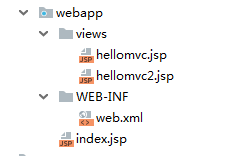
hellomvc.jsp
<%--
  Created by IntelliJ IDEA.
  User: FDZX
  Date: 2020/6/10
  Time: 15:34
  To change this template use File | Settings | File Templates.
--%>
<%@ page contentType="text/html;charset=UTF-8" language="java" %>
<html>
<head>
    <title>Title</title>
</head>
<body>
    Hello Spring Mvc!
</body>
</html>
hellomvc2.jsp
<%--
  Created by IntelliJ IDEA.
  User: FDZX
  Date: 2020/6/10
  Time: 15:34
  To change this template use File | Settings | File Templates.
--%>
<%@ page contentType="text/html;charset=UTF-8" language="java" %>
<html>
<head>
    <title>Title</title>
</head>
<body>
    Hello Spring Mvc222!
</body>
</html>
配置Tomcat Server

将项目添加到Tomcat Server

启动Tomcat


本片文章仅供参考,记录了黄国才老师课上讲的springmvc快速入门步骤。看得懂的扣1,看不懂的扣眼珠子
版权声明:本文为weixin_46492079原创文章,遵循CC 4.0 BY-SA版权协议,转载请附上原文出处链接和本声明。