参考资料:MATLAB图像处理理论、算法、实例分析

1. GUI是什么
GUI(Graphical User Interfaces)即图形用户界面,采用图形方式显示的计算机操作用户界面,由窗口、菜单、对话框、按钮等各种图形对象组成。可以只管地输出、展示数据和图像。
2. 设计环境
1)打开GUI布局编辑器
- 在命令行窗口输入,会弹出如下GUI设计启动界面。
>>> guide

勾选复选框,为图窗选择存储路径和名字
有四种GUI设计模板:
- 空白模板


带控件的模板
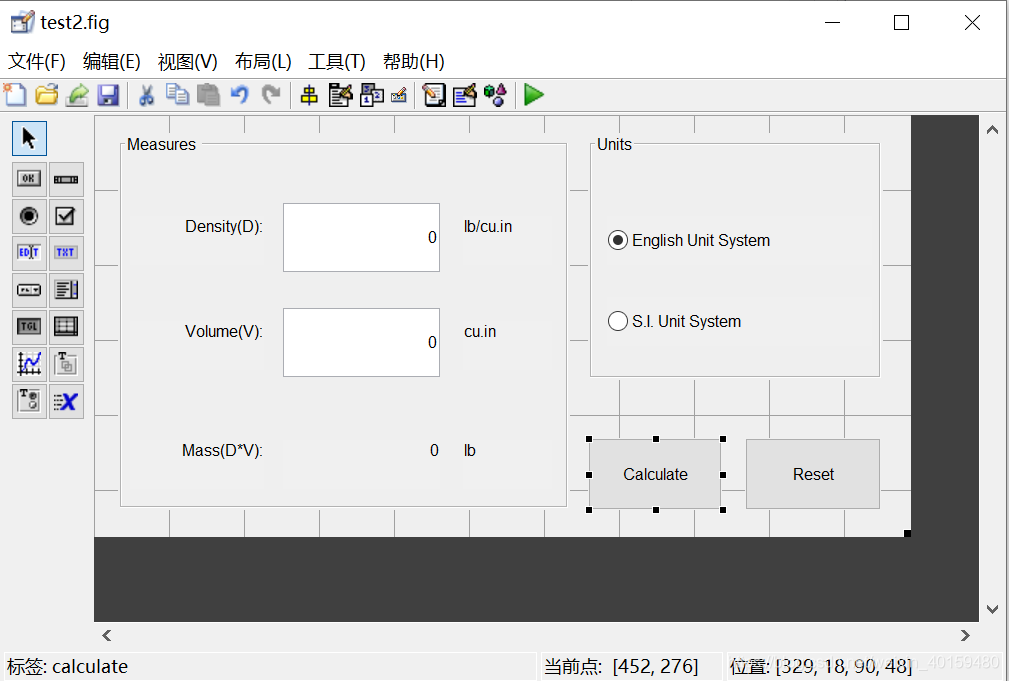
带坐标和菜单的模板

带模式问题对话的模板

2) 打开图窗
%创建一个图窗,原点坐标在(200,200)处,长400宽200像素,图窗名为demo02,图窗序标不显示
hf = figure('Position',[200,200,400,200],'Name','demo02','NumberTitle','off');

3)认识GUI布局编辑器

- 对齐对象:对控件进行布局
- 菜单编辑器:创建、设置、修改下拉菜单和上下文
- Tab键顺序编辑器:调整对象的先后顺序
- 工具栏编辑器
- 编辑器
- 属性编辑器:查看、修改、设置对象的属性值
- 对象浏览器:查看当前设计阶段各个图像
- 运行窗口
- 控件工具栏 — 最左边
3. 控件
使用
方一:将控件工具栏的控件拖拽至设计界面
方二:h = uicontrol(…)
1)坐标轴axes(函数) — 用于显示图像或图形
h = axes(…),返回坐标轴句柄
- 指定第一个
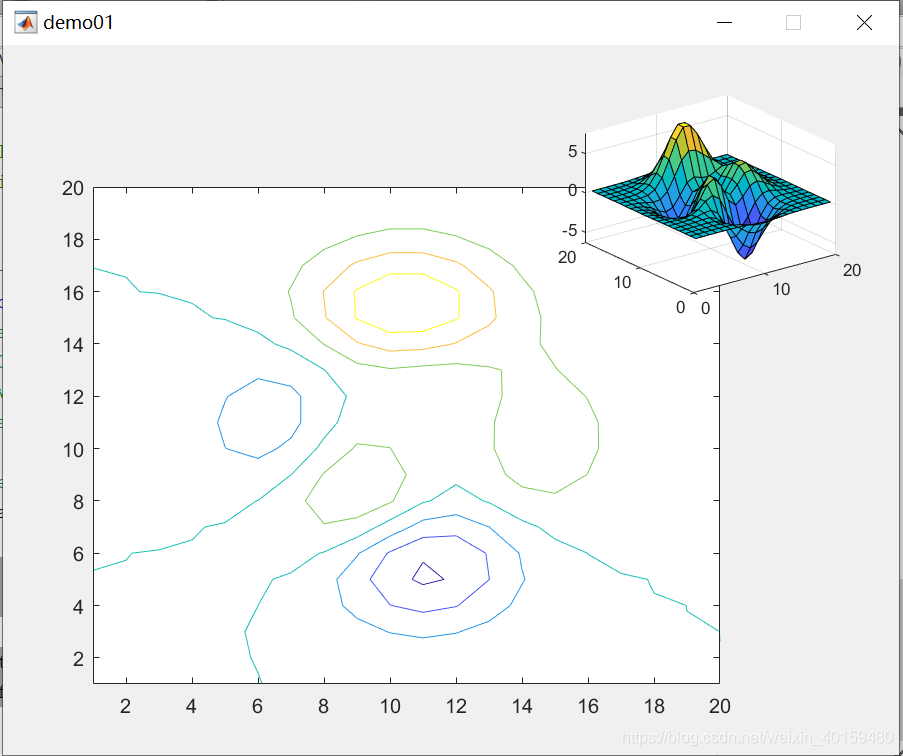
Axes对象的位置,使其左下角位于点 (0.1 0.1) 处,宽度和高度均为 0.7。指定第二个Axes对象的位置,使其左下角位于点 (0.65 0.65) 处,宽度和高度均为 0.28。默认情况下,所有值为基于图窗的归一化值。将这两个Axes对象返回为ax1和ax2。
- 指定第一个
	ax1 = axes('Position',[0.1,0.1,0.7,0.7]);
    ax2 = axes('Position',[0.65,0.65,0.28,0.28]);

    contour(ax1,peaks(20));
    surf(ax2,peaks(20));
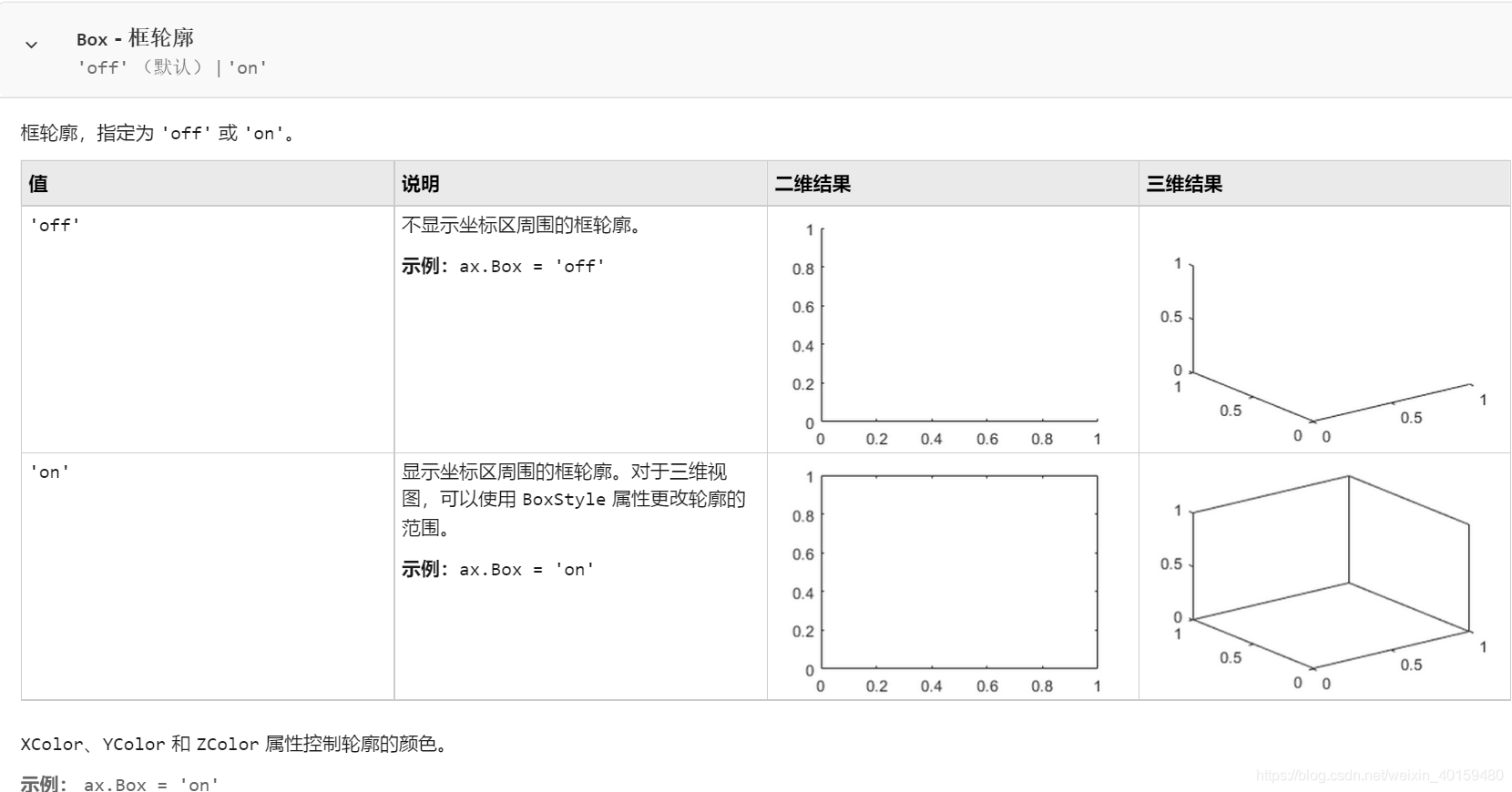
- axes中的属性Box
2)按钮pushbutton — 用于执行某种预定功能或操作
在uicontrol中的**
style属性值设为“pushbutton”**%创建图窗 hf = figure('Position',[200,400,200,200],'Name','demo02','NumberTitle','off'); %读取一张图片 picture = imread('matlabCode\images\3.jpg') %创建一个左下角位于(0.4,0.2),长0.5,宽0.7的坐标系,并显示外边框 ax = axes('Position',[0.4,0.2,0.5,0.7],'Box','on'); %创建按钮控件 hbi = uicontrol(hf,'style','pushbutton','Position',[200,200,80,40],'String',... '显示图像','FontSize',10,'CallBack','imshow(picture);'); hbq = uicontrol(hf,'style','pushbutton','Position',[200,100,80,40],'String',... '退出','FontSize',10,'CallBack','close(hf)');

3)静态文本 — text
- 将uicontrol中的**
style属性设为“text”**
4)可编辑文本 — edit
将uicontrol中的**
style属性设为“edit”**例子:灰度图像二值化并显示
  %创建图窗
  hf = figure('Position',[200,200,400,400],'Name','demo03','NumberTitle','off');

  %创建两个坐标系用于显示原图和二值化图
  ax1 = axes('Position',[0.1,0.4,0.4,0.5],'Box','on');
  ax2 = axes('Position',[0.5,0.4,0.4,0.5],'Box','on');

  %设置坐标系ax1功能 --- 显示原图
  axes(ax1);
  Image = imread('matlabCode/images/pic_gray.png');
  imshow(Image);
  axis off;

  %设置坐标系ax2功能 --- 显示二值化图
  thresholding = ['strT = get(he,"string");' 'thresh = str2num(strT);'...
      'thresh = thresh/255;' 'BW = imbinarize(Image, thresh);'...
      'axes(ax2);' 'imshow(BW);' 'axis off'];

  % %创建静态文本 --- 显示阈值
   ht = uicontrol(hf,'style','text','Position',[30,0,100,40],...
   'String','输入阈值:','Fontsize',12);

  %创建可编辑文本 --- 输入阈值
   he = uicontrol(hf,'style','edit','Position',[170,10,100,40],'String','128');

  %创建按钮1 --- 按下按钮执行二值化操作
  b1 = uicontrol(hf,'style','pushbutton','Position',[260,10,100,40],...
      'String','二值化图像','CallBack',thresholding);

  %创建按钮2 --- 按下按钮退出图窗
  b2 = uicontrol(hf,'style','pushbutton','Position',[350,10,100,40],...
      'String','退出','CallBack','close(hf)');


5)滑动条 — slider
在uicontrol中的**
style属性值设为“slider”**滑动条组成
- 滑动槽(有效对象值范围)
- 指示器(华表当前值)
- 槽两端的箭头
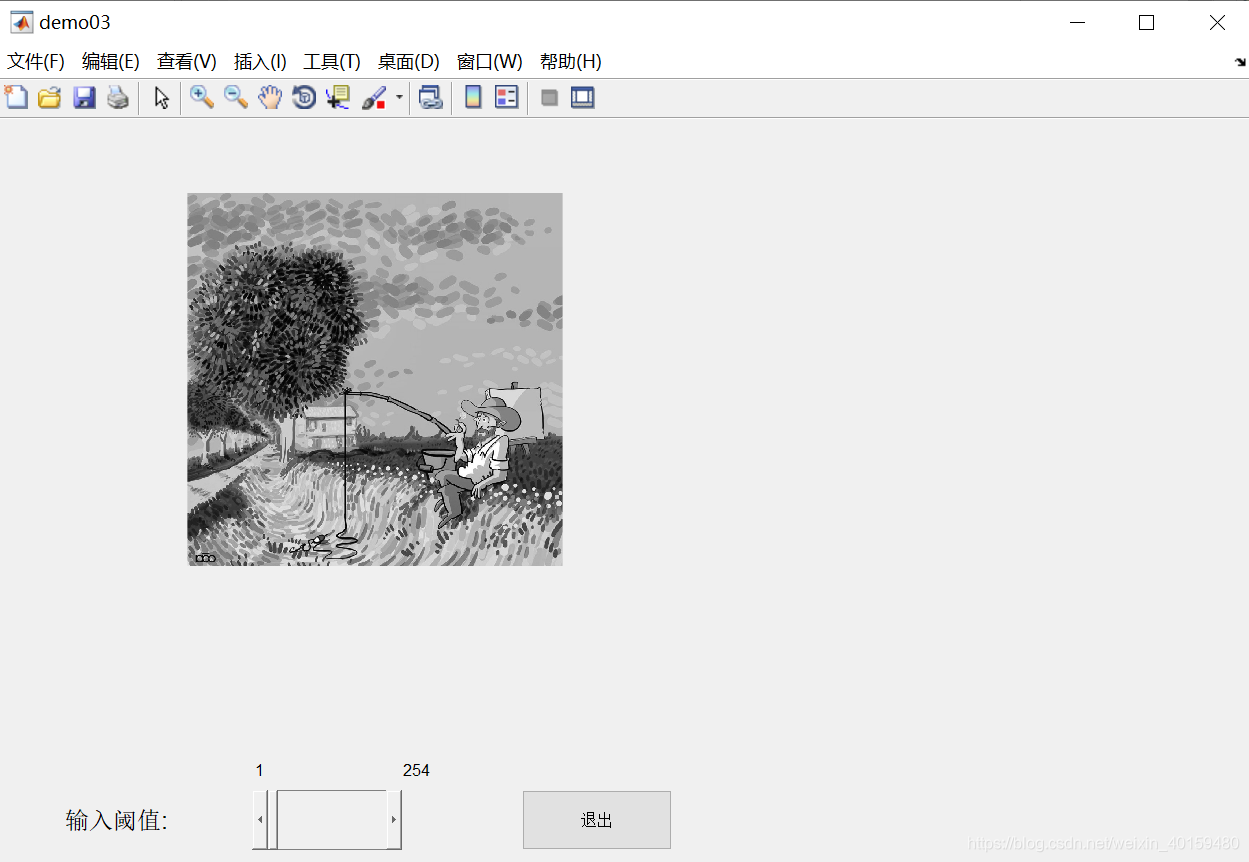
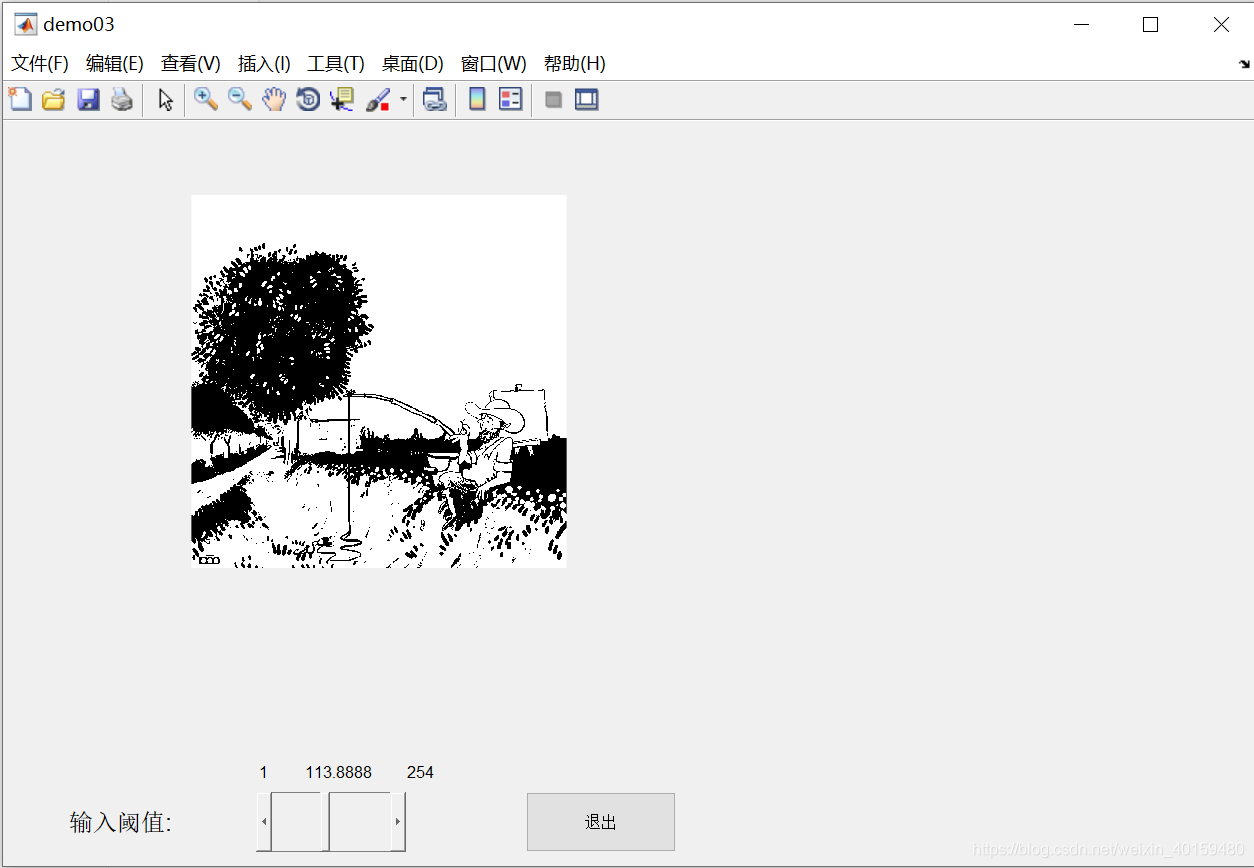
例子:创建滑动条控件,滑动获取阈值
方一:将动态文本去掉,换成滑块
%创建图窗
hf = figure('Position',[200,200,400,400],'Name','demo03','NumberTitle','off');

%创建两个坐标系用于显示原图和二值化图
ax1 = axes('Position',[0.1,0.4,0.4,0.5],'Box','on');
ax2 = axes('Position',[0.5,0.4,0.4,0.5],'Box','on');

%设置坐标系ax1功能 --- 显示原图
axes(ax1);
Image = imread('matlabCode/images/pic_gray.png');
imshow(Image);
axis off;

%设置坐标系ax2功能 --- 显示二值化图
thresholding = ['thresh = get(hs, ''value'');' 'strT = num2str(thresh);'...
    'hsCur.String = strT;' 'thresh = thresh/255;'...
    'BW = imbinarize(Image,thresh);'...
    'axes(ax2);' 'imshow(BW);' 'axis off'];

%创建静态文本 --- 显示阈值
 ht = uicontrol(hf,'style','text','Position',[30,0,100,40],...
 'String','输入阈值:','Fontsize',12);

%创建滑动条 --- 输入阈值
 hs = uicontrol(hf,'style','slider','Position',[170,10,100,40],...
 'Min',1, 'Max',255,'value',1);

%创建三个静态文本,显示滑动条最小值、最大值、当前值
hsMin = uicontrol(hf,'style','text','Position',[170,50,10,20],'String','1');
hsMax = uicontrol(hf,'style','text','Position',[270,50,20,20],'String','254');
hsCur = uicontrol(hf,'style','text','Position',[200,50,40,20]);

%创建按钮1 --- 按下按钮执行二值化操作
b1 = uicontrol(hf,'style','pushbutton','Position',[260,10,100,40],...
    'String','二值化图像','CallBack',thresholding);

%创建按钮2 --- 按下按钮退出图窗
b2 = uicontrol(hf,'style','pushbutton','Position',[350,10,100,40],...
    'String','退出','CallBack','close(hf)');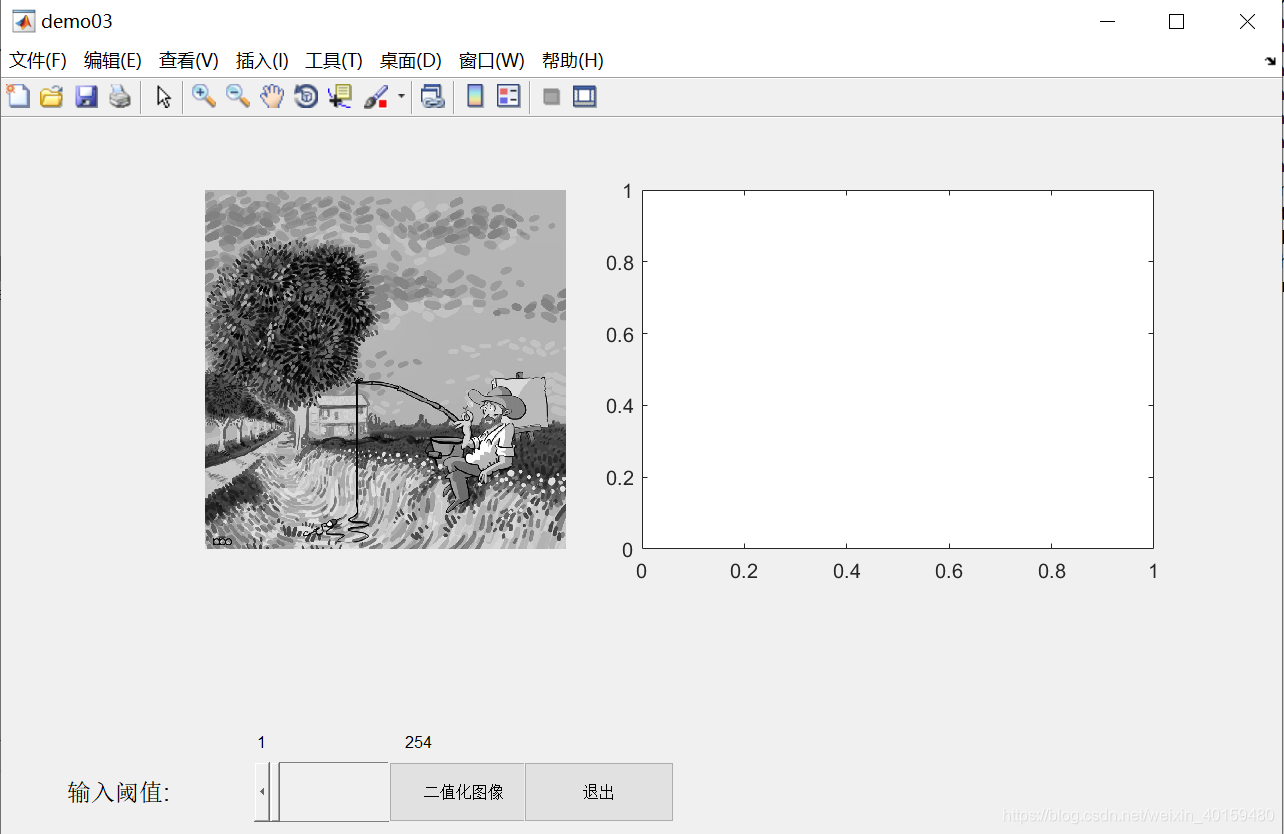

方二:将thresholding函数作为滑动条的CallBack函数体
clear,clc,close all;
%创建图窗
hf = figure('Position',[200,200,400,400],'Name','demo03','NumberTitle','off');

%创建一个坐标系用于显示原图和二值化图
ax1 = axes('Position',[0.1,0.4,0.4,0.5],'Box','on');

%设置坐标系ax1功能 --- 显示原图
axes(ax1);
Image = imread('matlabCode/images/pic_gray.png');
imshow(Image);
axis off;

%定义滑动条的CallBack函数体thresholding --- 显示二值化图
thresholding = ['thresh = get(hs, ''value'');' 'strT = num2str(thresh);'...
    'hsCur.String = strT;' 'thresh = thresh/255;'...
    'BW = imbinarize(Image,thresh);' 'imshow(BW)'];

%创建滑动条 --- 输入阈值
 hs = uicontrol(hf,'style','slider','Position',[170,10,100,40],...
 'Min',1, 'Max',255,'value',1,'CallBack',thresholding);

%创建静态文本 --- 显示阈值
 ht = uicontrol(hf,'style','text','Position',[30,0,100,40],...
 'String','输入阈值:','Fontsize',12);

%创建三个静态文本,显示滑动条最小值、最大值、当前值
hsMin = uicontrol(hf,'style','text','Position',[170,50,10,20],'String','1');
hsMax = uicontrol(hf,'style','text','Position',[270,50,20,20],'String','254');
hsCur = uicontrol(hf,'style','text','Position',[200,50,50,20]);

%创建按钮2 --- 按下按钮退出图窗
b2 = uicontrol(hf,'style','pushbutton','Position',[350,10,100,40],...
    'String','退出','CallBack','close(hf)');
6)单选按钮 — radiobutton
在uicontrol中的**
style属性值设为“radiobutton”**,一般用于在一组互斥选项中选择一项。为了确保互斥性,各单选按钮的回调函数需要将其他各项的Value值设为0例子:创建单选按钮,选择显示灰度图像或彩色图像
clc,clear,close all;

hf = figure('Position',[200,200,600,400],'Name','demo06','NumberTitle','off');
ax = axes(hf,'Position',[0.4,0.2,0.5,0.7],'Box','on');
Image = imread('matlabCode/images/3.jpg');

hr1 = uicontrol(hf,'style','radiobutton','Position',[30,100,80,40],...
    'String','彩色图像','Value',0,'CallBack',...
    ['axes(ax);','imshow(Image);','axis off;','hr1.Value = 1;','hr2.Value = 0;']);
hr2 = uicontrol(hf,'style','radiobutton','Position',[30,140,80,40],...
    'String','灰度图像','Value',0,'CallBack',...
    ['axes(ax);','gray = rgb2gray(Image);','imshow(gray);','axis off;',...
    'hr1.Value = 0;','hr2.Value = 1;']);

hq = uicontrol(hf,'style','pushbutton','Position',[20,180,80,40],...
    'String','退出','CallBack','close(hf)');


7)复选框 — checkbox
在uicontrol中的**
style属性值设为“checkbox”**例子:创建复选框,选择色彩通道显示彩色图像
clc,clear,close all;

hf = figure('Position',[200,200,600,400],'Name','demo06','NumberTitle','off');
ax = axes(hf,'Position',[0.4,0.2,0.5,0.7],'Box','on');

Image = imread('matlabCode/images/3.jpg');
result = Image;
[x,y,z] = size(Image);
result(:,:,1) = zeros(x,y);
result(:,:,2) = zeros(x,y);
result(:,:,3) = zeros(x,y);

%r通道
hcr = uicontrol(hf,'style','checkbox','Position',[30,100,80,40],...
    'String','红色通道','Value',0,'CallBack',...
    ['if hcr.Value == 1;','result(:,:,1) = Image(:,:,1);',...
    'else;','result(:,:,1) = 0;',...
    'end;','axes(ax);','imshow(result);','axis off;']);

%g通道
hcg = uicontrol(hf,'style','checkbox','Position',[30,140,80,40],...
    'String','绿色通道','Value',0,'CallBack',...
    ['if hcg.Value == 1;','result(:,:,2) = Image(:,:,2);',...
    'else;','result(:,:,2) = 0;',...
    'end;','axes(ax);','imshow(result);','axis off;']);

%b通道
hcb = uicontrol(hf,'style','checkbox','Position',[30,180,80,40],...
    'String','蓝色通道','Value',0,'CallBack',...
     ['if hcb.Value == 1;','result(:,:,3) = Image(:,:,3);',...
     'else;','result(:,:,3) = 0;',...
     'end;','axes(ax);','imshow(result);','axis off;']);

hq = uicontrol(hf,'style','pushbutton','Position',[20,220,80,40],...
    'String','退出','CallBack','close(hf)');


8)弹出式菜单 — popupmenu
在uicontrol中的**
style属性值设为“popupmenu”**例子:创建弹出式菜单,选择色彩通道显示彩色的图像
clc,clear,close all;

hf = figure('Position',[200,200,600,400],'Name','demo06','NumberTitle','off');
ax = axes(hf,'Position',[0.4,0.2,0.5,0.7],'Box','on');
Image = imread('matlabCode/images/3.jpg');

%不同选项显示不同色彩通道
hp = uicontrol(hf,'style','popupmenu','Position',[30,100,80,40],...
    'String','ALL|Red|Green|Blue|Yellow|Cyan|Magenta|None','Value',1,'CallBack',...
    ['switch hp.Value;',...
    'case 1;','result = Image;',...
    'case 2;','result = 0*Image;','result(:,:,1) = Image(:,:,1);',...
    'case 3;','result = 0*Image;','result(:,:,2) = Image(:,:,2);',...
    'case 4;','result = 0*Image;','result(:,:,3) = Image(:,:,3);',...
    'case 5;','result = Image;','result(:,:,3) = 0;',...
    'case 6;','result = Image;','result(:,:,1) = 0;',...
    'case 7;','result = Image;','result(:,:,2) = 0;',...
    'case 8;','result = 0 * Image;',...
    'end;',...
    'axes(ax);','imshow(result);','axis off;']);

hq = uicontrol(hf,'style','pushbutton','Position',[20,180,80,40],...
    'String','退出','CallBack','close(hf)');


9)列表框 — listbox
在uicontrol中的**
style属性值设为“listbox”**。用户可以选择其中一个或多个选项,用Min和Max控制;Value属性值为被选中选项的序号,同时也指示了选中选项的个数。例子:创建列表框,选择色彩通道显示彩色图像
clc,clear,close all;

hf = figure('Position',[200,200,600,400],'Name','demo08','NumberTitle','off');
ax = axes(hf,'Position',[0.4,0.2,0.5,0.7],'Box','on');
Image = imread('matlabCode/images/3.jpg');

%选中哪个选项就保留哪个色彩通道的数据,可一选或多选,最多选3项
hl = uicontrol(hf,'style','listbox','Position',[30,100,80,40],...
    'String','Red|Green|Blue','Max',3,'CallBack',...
    ['channel = get(hl,''value'');',...
    'result = 0 * Image;',...
    'for i = 1:length(channel);',...
    'result(:,:,channel(i)) = Image(:,:,channel(i));',...
    'end;',...
    'axes(ax);','imshow(result);','axis off;']);

hq = uicontrol(hf,'style','pushbutton','Position',[20,180,80,40],...
    'String','退出','CallBack','close(hf)');

10)切换按钮 — togglebutton
在uicontrol中的**
style属性值设为“togglebutton”**。选中时Value值为1,清除时Value值为0例子:创建切换按钮,显示是否显示彩色图像
clc,clear,close all;

hf = figure('Position',[200,200,600,400],'Name','demo08','NumberTitle','off');
ax = axes(hf,'Position',[0.4,0.2,0.5,0.7],'Box','on');
Image = imread('matlabCode/images/3.jpg');
result = Image;
imshow(Image);

%选中哪个选项就保留哪个色彩通道的数据,可一选或多选,最多选3项
ht = uicontrol(hf,'style','togglebutton','Position',[30,100,80,40],...
    'String','彩色图像','Value',1,'CallBack',...
    ['switch ht.Value;','case 0;',...
    'result=rgb2gray(Image);','set(ht,''String'',''灰度图像'');',...
    'case 1;','result=Image;','set(ht,''String'',''彩色图像'');',...
    'end;',...
    'axes(ax);','imshow(result);','axis off;']);

hq = uicontrol(hf,'style','pushbutton','Position',[20,180,80,40],...
    'String','退出','CallBack','close(hf)');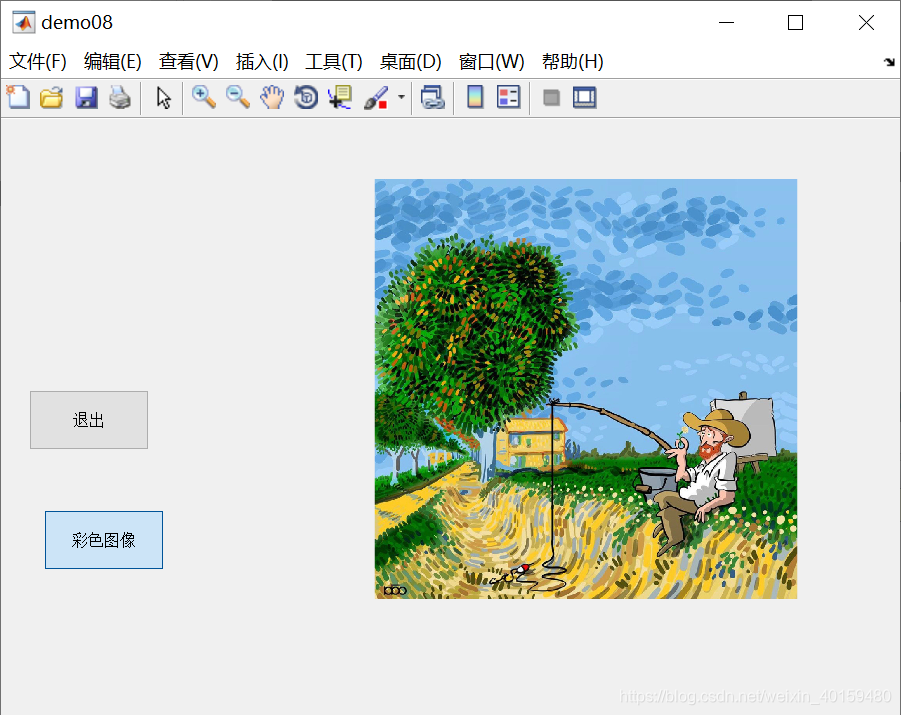
11)面板 — uipanel(函数)
- 面板的创建用uipanel函数**,无CallBack函数体**。用于将其他控件放入其中组成一组
12)按钮组 — uibuttongroup(函数)
按钮组的创建用uibuttongroup函数。用于管理单选按钮和切换按钮
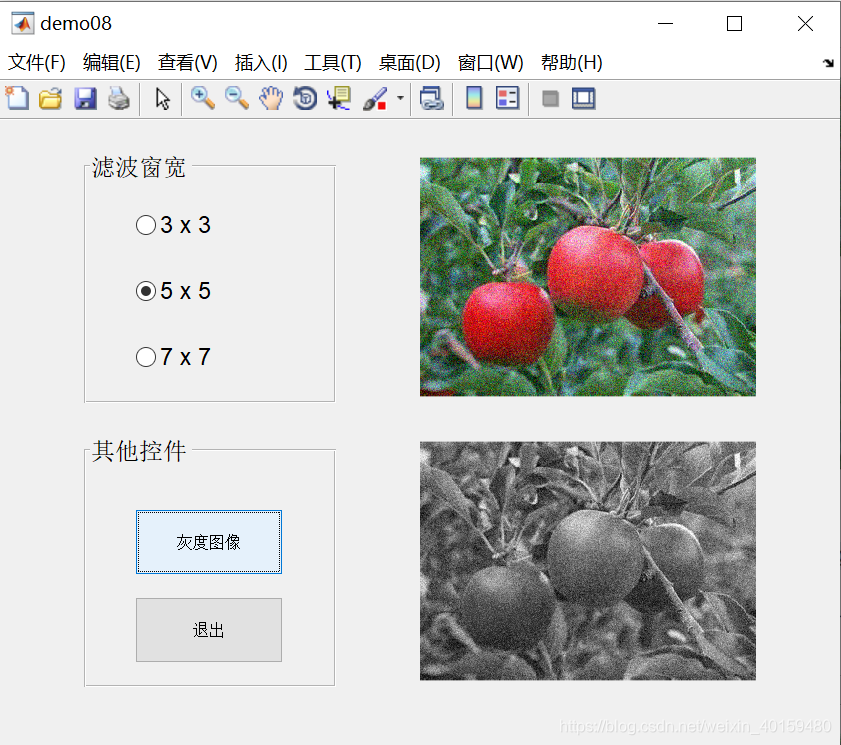
例子:创建按钮组和面板,选择图像均值滤波窗口大小和切换彩色、灰度图像
clc,clear,close all;

hf = figure('Name','demo08','NumberTitle','off');
ax1 = axes(hf,'Position',[0.5,0.1,0.4,0.4],'Box','on');
ax2 = axes(hf,'Position',[0.5,0.55,0.4,0.4],'Box','on');

%ax2显示噪声图片
axes(ax2);
%给图片加噪声
Image = imnoise(imread('matlabCode/images/fruit.jpg'),'gaussian');
imshow(Image);
axis off;

%ax1显示去噪图片
axes(ax1);
filtering = imfilter(Image,fspecial('average',3));
imshow(filtering);

%创建按钮组,装单选按钮---滤波窗宽
hbg = uibuttongroup(hf,'Position',[0.1,0.55,0.3,0.4],'Title','滤波窗宽','FontSize',12);

hr1 = uicontrol(hbg,'style','radiobutton','Units','normalized','FontSize',12,...
'Position',[0.2,0.7,0.7,0.2],'String','3 x 3','Value',1,...
 'CallBack',['filtering = imfilter(Image,fspecial(''average'',3));','imshow(filtering);']);

hr2 = uicontrol(hbg,'style','radiobutton','Units','normalized','FontSize',12,...
    'Position',[0.2,0.4,0.7,0.2],'String','5 x 5','Value',0,...
    'CallBack',['filtering = imfilter(Image,fspecial(''average'',5));','imshow(filtering);']);

hr3 = uicontrol(hbg,'style','radiobutton','Units','normalized','FontSize',12,...
    'Position',[0.2,0.1,0.7,0.2],'String','7 x 7','Value',0,...
    'CallBack',['filtering = imfilter(Image,fspecial(''average'',7));','imshow(filtering);']);

%创建面板,装其他控件
hp = uipanel(hf,'Position',[0.1,0.1,0.3,0.4],'Title','其他控件','FontSize',12);

%其他控件:选中哪个选项就保留哪个色彩通道的数据,可一选或多选,最多选3项
ht = uicontrol(hp,'style','togglebutton','Units','normalized','Position',[0.2,0.5,0.6,0.3],...
    'String','彩色图像','Value',1,'CallBack',...
    ['switch ht.Value;','case 0;',...
    'result=rgb2gray(Image);','set(ht,''String'',''灰度图像'');',...
    'case 1;','result=Image;','set(ht,''String'',''彩色图像'');',...
    'end;',...
    'axes(ax1);','imshow(result);','axis off;']);

hq = uicontrol(hp,'style','pushbutton','Units','normalized','Position',[0.2,0.1,0.6,0.3],...
    'String','退出','CallBack','close(hf)');


4. 菜单 — uimenu(函数)
例子:创建自定义菜单,实现打开原图和三通道图像,并由退出功能
clear,clc,close all;
hf = figure('Name','demo12','NumberTitle','off','MenuBar','none');
Image = imread('matlabCode/images/3.jpg');

%创建菜单栏上的标签
hm1 = uimenu(hf,'Label','文件');
%用于显示图像
ax = axes('Position',[0.2,0.2,0.6,0.6],'Box','on');
%创建hm1标签的下拉标签
hm11 = uimenu(hm1,'Label','打开图像','CallBack',...
    ['imshow(Image);','title(''原始图像'');']);
hm12 = uimenu(hm1,'Label','红色通道','CallBack',...
    ['result = 0 * Image;','result(:,:,1) = Image(:,:,1);','imshow(result);','title(''红色通道'');']);
hm13 = uimenu(hm1,'Label','绿色通道','CallBack',...
    ['result = 0 * Image;','result(:,:,2) = Image(:,:,2);','imshow(result);','title(''绿色通道'');']);
hm14 = uimenu(hm1,'Label','蓝色通道','CallBack',...
    ['result = 0 * Image;','result(:,:,3) = Image(:,:,3);','imshow(result);','title(''蓝色通道'');']);

hm2 = uimenu(hf,'Label','退出','CallBack','close(hf)');

