语法要求:
测试脚本名以test_开头(或以_test结尾也可以)
测试脚本中若是执行函数,以test_开头
测试脚本中若是执行一个类中的函数,测试类以Test开头,并且不能带有init方法
断言使用assert
执行文件下所有的测试脚本,命令为pytest【cd到对应文件下执行】 或者 pytest 文件名/
执行文件下指定的测试脚本,命令为pytest -q 指定测试脚本名称【cd到对应文件下执行】 或者 pytest 文件名/脚本名
安装requests库
# --default-timeout=200设置超时时间
pip --default-timeout=200 install requests
# 设置阿里代理
pip config set global.index-url https://mirrors.aliyun.com/pypi/simple/

pytest 命令行执行
-x选项
Pytest会运行每一个搜索到的测试用例,如果某个测试函数被断言失败,或者触发了外部异常,则该测试用例的运行就会停止,pytest将其标记为失败后继续运行一下测试用例,然而在debug的时候,我们往往希望遇到失败时立刻停止整个会话
测试报告
pip install pytest-html
pytest ./ --html=…/report/first.html
操作数据库
https://www.cnblogs.com/it-tsz/p/10205940.html
pip --default-timeout=200 install pymysql
代码提交githab
https://www.cnblogs.com/yuanchaoyong/p/9976895.html
FAQ:
问题1:
pycharm please specify a different SDK name
解决方法:
在setting里面的解释器选择里面,打开show all,删除其他多余的环境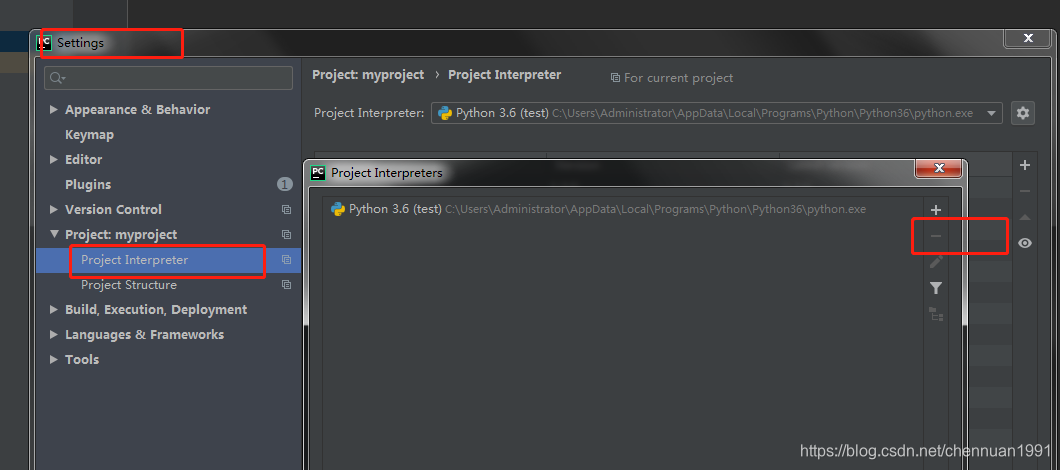
问题2:
pip安装完requests包后pycharm中仍然不能import requests库
https://blog.csdn.net/kouyi5627/article/details/80531442
问题3:
No schema supplied. Perhaps you meant
解决:
访问域名时,要写http://域名
参考文章:
https://blog.csdn.net/weixin_34067980/article/details/94348138