springboot-集成swagger
本文所贴代码,实现了springboot集成swagger的常用配置和功能,可直接复制粘贴使用。
环境: springboot 2.1.4.RELEASE
java 1.8
swagger常用注解:
@Api:放在controller类上;
@ApiOperation:放在controller类的方法上;
@ApiParam:单个参数描述
@ApiModel:用对象来接收参数
@ApiProperty:用对象接收参数时,描述对象的一个字段
@ApiResponse:HTTP响应其中1个描述
@ApiResponses:HTTP响应整体描述
@ApiIgnore:使用该注解忽略这个API
@ApiError :发生错误返回的信息
@ApiParamImplicitL:一个请求参数
@ApiParamsImplicit 多个请求参数
1.依赖swagger
        <dependency>
            <groupId>io.springfox</groupId>
            <artifactId>springfox-swagger2</artifactId>
            <version>2.5.0</version>
        </dependency>
        <!-- swagger-ui -->
        <dependency>
            <groupId>io.springfox</groupId>
            <artifactId>springfox-swagger-ui</artifactId>
            <version>2.5.0</version>
        </dependency>
2.配置SwaggerConfig
application.properties中加入下面配置开启swagger
swagger.enable=true
配置swagger
import org.springframework.boot.autoconfigure.condition.ConditionalOnProperty;
import org.springframework.context.annotation.Bean;
import springfox.documentation.service.Contact;
import org.springframework.context.annotation.Configuration;
import springfox.documentation.builders.ApiInfoBuilder;
import springfox.documentation.builders.ParameterBuilder;
import springfox.documentation.builders.PathSelectors;
import springfox.documentation.builders.RequestHandlerSelectors;
import springfox.documentation.schema.ModelRef;
import springfox.documentation.service.ApiInfo;
import springfox.documentation.service.Parameter;
import springfox.documentation.spi.DocumentationType;
import springfox.documentation.spring.web.plugins.Docket;
import springfox.documentation.swagger2.annotations.EnableSwagger2;

import java.util.ArrayList;
import java.util.List;

@Configuration
@EnableSwagger2
/**
 * 从配置文件中的值判断是否开启swagger
 */
@ConditionalOnProperty(prefix = "swagger",value = {"enable"},havingValue = "true")
public class SwaggerConfig {
    /**
     * swagger2的配置文件,这里可以配置swagger2的一些基本的内容,比如扫描的包等等
     * @return
     */
    @Bean
    public Docket createRestfulApi(){
        return new Docket(DocumentationType.SWAGGER_2)
                .apiInfo(apiInfo())
                .pathMapping("/")
                .select()
                //暴露接口地址的包路径
                .apis(RequestHandlerSelectors.basePackage("com.example.springbootswagger"))
                .paths(PathSelectors.any())
                .build()
                //自定义全局入参,通用参数如token
                .globalOperationParameters(globalOperation());
    }

    /**
     * 自定义全局入参
     */
    private List<Parameter> globalOperation(){
        //添加head参数配置start
        ParameterBuilder tokenPar = new ParameterBuilder();
        List<Parameter> pars = new ArrayList<>();
        //第一个token为传参的key,第二个token为swagger页面显示的值
        tokenPar.name("X-Authorization").description("X-Authorization").defaultValue("Bearer ").modelRef(new ModelRef("string")).parameterType("header").required(false).build();
        pars.add(tokenPar.build());

        return pars;
    }

    /**
     * 构建 api文档的详细信息函数,注意这里的注解引用的是哪个
     * @return
     */

    private ApiInfo apiInfo(){
        return new ApiInfoBuilder()
                //页面标题
                .title("我的测试swagger")
                //创建人
               // .contact(new Contact("阿拉","", "阿拉@qq.com"))
                //版本号
                .version("1.0")
                //描述
                .description("API 描述")
                .build();
    }
}
3.Controller上配置swagger
import com.example.springbootswagger.bean.Book;
import io.swagger.annotations.Api;
import io.swagger.annotations.ApiImplicitParam;
import io.swagger.annotations.ApiImplicitParams;
import io.swagger.annotations.ApiOperation;
import org.springframework.web.bind.annotation.*;
import springfox.documentation.annotations.ApiIgnore;

import java.util.*;

@RestController
@RequestMapping(value = "/bookcurd")
@Api(value = "图书",tags={"图书接口"})
public class BookController {
    /*
        @Api:修饰整个类,描述Controller的作用
        @ApiOperation:描述一个类的一个方法,或者说一个接口
        @ApiParam:单个参数描述
        @ApiModel:用对象来接收参数
        @ApiProperty:用对象接收参数时,描述对象的一个字段
        @ApiResponse:HTTP响应其中1个描述
        @ApiResponses:HTTP响应整体描述
        @ApiIgnore:使用该注解忽略这个API
        @ApiError :发生错误返回的信息
        @ApiParamImplicitL:一个请求参数
        @ApiParamsImplicit 多个请求参数
     */
    /**
     *
     */
    Map<Long, Book> books = Collections.synchronizedMap(new HashMap<Long, Book>());

    @ApiOperation(value = "获取图书列表", notes = "获取图书列表")
    @GetMapping
    public List<Book> getBook() {
        List<Book> book = new ArrayList<>(books.values());
        return book;
    }

    @ApiOperation(value = "创建图书", notes = "创建图书")
    //@ApiImplicitParam(name = "book", value = "图书详细实体", required = true, dataType = "Book")
    @PostMapping
    public String postBook(@RequestBody Book book) {
        books.put(book.getId(), book);
        return "success";
    }

    @ApiOperation(value = "获图书细信息", notes = "根据url的id来获取详细信息")
    @ApiImplicitParam(name = "id", value = "ID", required = true, dataType = "Long", paramType = "path")
    @RequestMapping(value = "/{id}", method = RequestMethod.GET)
    public Book getBook(@PathVariable Long id) {
        return books.get(id);
    }

    @ApiOperation(value = "更新信息", notes = "根据url的id来指定更新图书信息")
    @ApiImplicitParams({
            @ApiImplicitParam(name = "id", value = "图书ID", required = true, dataType = "Long", paramType = "path"),
    })
    @RequestMapping(value = "/{id}", method = RequestMethod.PUT)
    public String putUser(@PathVariable Long id, @RequestBody Book book) {
        Book book1 = books.get(id);
        book1.setName(book.getName());
        book1.setPrice(book.getPrice());
        books.put(id, book1);
        return "success";
    }

    @ApiOperation(value = "删除图书", notes = "根据url的id来指定删除图书")
    @ApiImplicitParam(name = "id", value = "图书ID", required = true, dataType = "Long", paramType = "path")
    @RequestMapping(value = "/{id}", method = RequestMethod.DELETE)
    public String deleteUser(@PathVariable Long id) {
        books.remove(id);
        return "success";
    }

    @ApiIgnore//使用该注解忽略这个API
    @RequestMapping(value = "/hi", method = RequestMethod.GET)
    public String jsonTest() {
        return " hi you!";
    }
}
notes中换行用<br/>
参数配置用@ApiImplicitParams+@ApiImplicitParam
paramType = “form”,入参为表单提交;
paramType = “query”,入参拼接在地址上;
paramType = “path”,入参在路径上;
post表单提交配置:
    @ApiOperation(value = "全量获取",notes = "1.xxx;<br/>" +
            "2.xxx。<br/>" +
            "3.xxx;<br/>" +
            "注意:xxxxx")

    @PostMapping("/getAll")
    @ApiImplicitParams({
            @ApiImplicitParam(value = "接口ID", name = "serviceId", defaultValue = "1327072876729511936", required = true, dataType = "string", paramType = "form"),
            @ApiImplicitParam(value = "开始日期(如:2021-01-01)", name = "beginDate", dataType = "string", paramType = "form"),
            @ApiImplicitParam(value = "续传", name = "goon", defaultValue = "false", required = true, dataType = "string", paramType = "form"),
    })
    public String getAll(String serviceId,
                        String beginDate,
                        boolean goon) {
   }
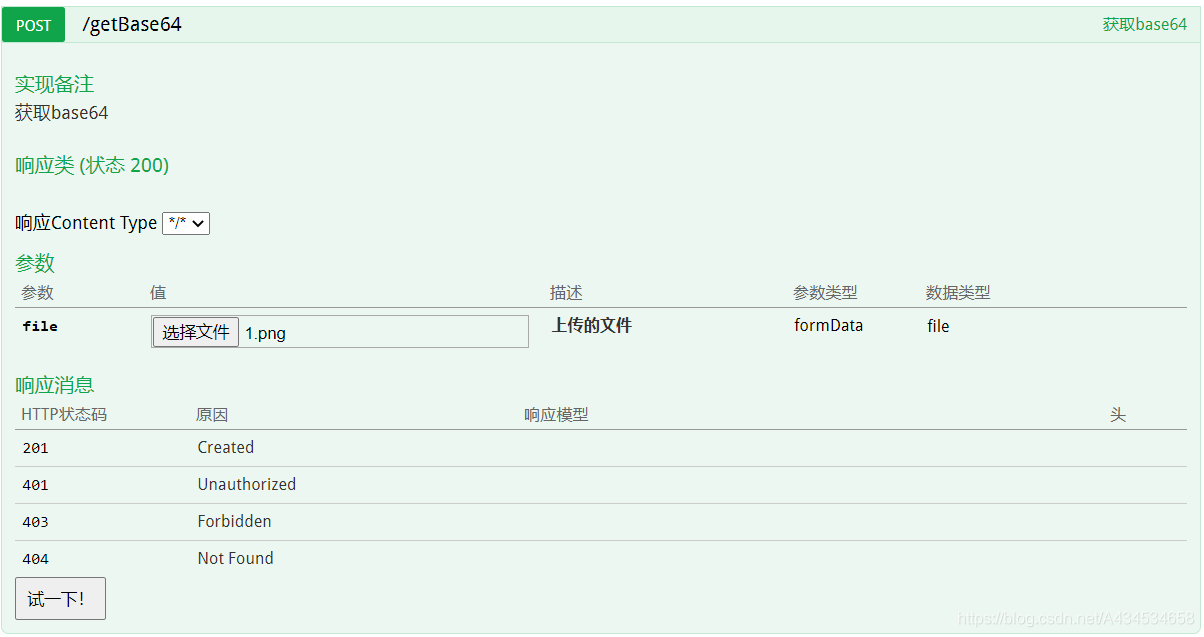
swagger上传文件或图片
@Api(value = "工具类", tags = {"工具类"})
@RestController
@RequestMapping("/tool")
public class ToolController {

    @PostMapping(value = "/getBase64",consumes = "multipart/*",headers = "content-type=multipart/form-data")
    @ApiOperation(value="获取base64", notes="获取base64,响应体里面鼠标左键连点三次全选")
    public String getBase64(@ApiParam(value = "上传的文件" ,required = true) MultipartFile file, HttpServletRequest request) throws IOException {
        return  Base64.encodeBase64String(file.getBytes()).replaceAll(" ", "+").replaceAll("\r|\n", "");
    }
}
4.Model模型类上配置swagger
使用@ApiModel配置的类型,可以直接接收入参,不用把一个个入参配置到控制器的方法
import io.swagger.annotations.ApiModel;
import io.swagger.annotations.ApiModelProperty;
import lombok.Data;

import java.io.Serializable;

@Data
@ApiModel("书籍")
public class Book implements Serializable {
   @ApiModelProperty(name = "id",value = "主键",dataType = "Long",required = false)
   private Long id;
   @ApiModelProperty(name = "name",value = "名字",dataType = "String",required = true)
   private String name;
   @ApiModelProperty(name = "price",value = "价格",dataType = "Double",required = true)
   private double price;
}
5.swagger页面中文配置
将下面html放到这个路径中
src\main\resources\META-INF\resources\swagger-ui.html
<!DOCTYPE html>
<html>
<head>
<meta charset="UTF-8">
<title>Swagger UI</title>
<link rel="icon" type="image/png" href="webjars/springfox-swagger-ui/images/favicon-32x32.png" sizes="32x32"/>
<link rel="icon" type="image/png" href="webjars/springfox-swagger-ui/images/favicon-16x16.png" sizes="16x16"/>
<link href='webjars/springfox-swagger-ui/css/typography.css' media='screen' rel='stylesheet' type='text/css'/>
<link href='webjars/springfox-swagger-ui/css/reset.css' media='screen' rel='stylesheet' type='text/css'/>
<link href='webjars/springfox-swagger-ui/css/screen.css' media='screen' rel='stylesheet' type='text/css'/>
<link href='webjars/springfox-swagger-ui/css/reset.css' media='print' rel='stylesheet' type='text/css'/>
<link href='webjars/springfox-swagger-ui/css/print.css' media='print' rel='stylesheet' type='text/css'/>
<script src='webjars/springfox-swagger-ui/lib/jquery-1.8.0.min.js' type='text/javascript'></script>
<script src='webjars/springfox-swagger-ui/lib/jquery.slideto.min.js' type='text/javascript'></script>
<script src='webjars/springfox-swagger-ui/lib/jquery.wiggle.min.js' type='text/javascript'></script>
<script src='webjars/springfox-swagger-ui/lib/jquery.ba-bbq.min.js' type='text/javascript'></script>
<script src='webjars/springfox-swagger-ui/lib/handlebars-2.0.0.js' type='text/javascript'></script>
<script src='webjars/springfox-swagger-ui/lib/underscore-min.js' type='text/javascript'></script>
<script src='webjars/springfox-swagger-ui/lib/backbone-min.js' type='text/javascript'></script>
<script src='webjars/springfox-swagger-ui/swagger-ui.min.js' type='text/javascript'></script>
<script src='webjars/springfox-swagger-ui/lib/highlight.7.3.pack.js' type='text/javascript'></script>
<script src='webjars/springfox-swagger-ui/lib/jsoneditor.min.js' type='text/javascript'></script>
<script src='webjars/springfox-swagger-ui/lib/marked.js' type='text/javascript'></script>
<script src='webjars/springfox-swagger-ui/lib/swagger-oauth.js' type='text/javascript'></script>
<script src='webjars/springfox-swagger-ui/springfox.js' type='text/javascript'></script>
<!-- 加入国际化的js -->
<script src="webjars/springfox-swagger-ui/lang/translator.js" type="text/javascript"></script>
<script src="webjars/springfox-swagger-ui/lang/zh-cn.js" type="text/javascript"></script>
</head>
<body class="swagger-section">
<div id='header'>
<div class="swagger-ui-wrap">
<a id="logo" href="http://swagger.io">swagger</a>
<form id='api_selector'>
<div class='input'>
<select id="select_baseUrl" name="select_baseUrl"/>
</div>
<div class='input'><input placeholder="http://example.com/api" id="input_baseUrl" name="baseUrl" type="text"/>
</div>
<div class='input'><input placeholder="api_key" id="input_apiKey" name="apiKey" type="text"/></div>
<div class='input'><a id="explore" href="#" data-sw-translate>Explore</a></div>
</form>
</div>
</div>
<div id="message-bar" class="swagger-ui-wrap" data-sw-translate> </div>
<div id="swagger-ui-container" class="swagger-ui-wrap"></div>
</body>
</html>
6.效果
http://localhost:8001/api/swagger-ui.html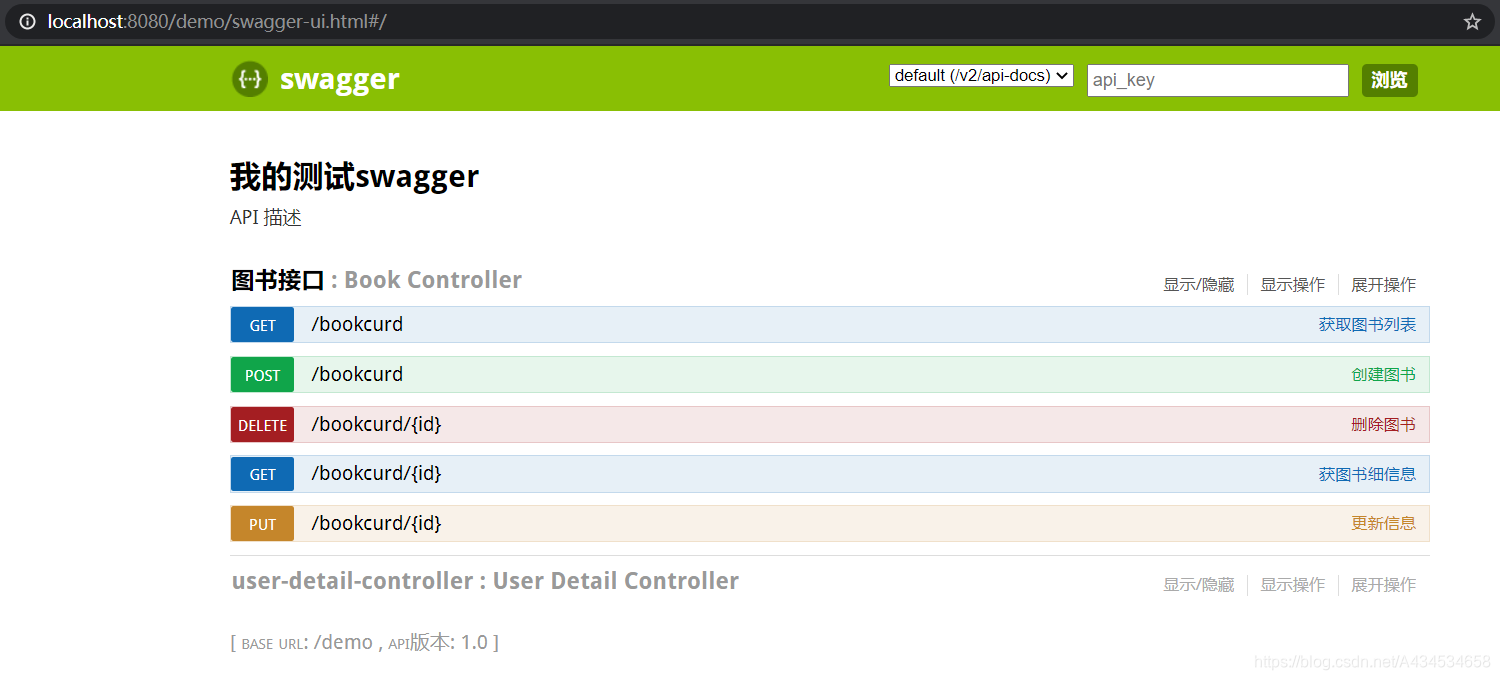
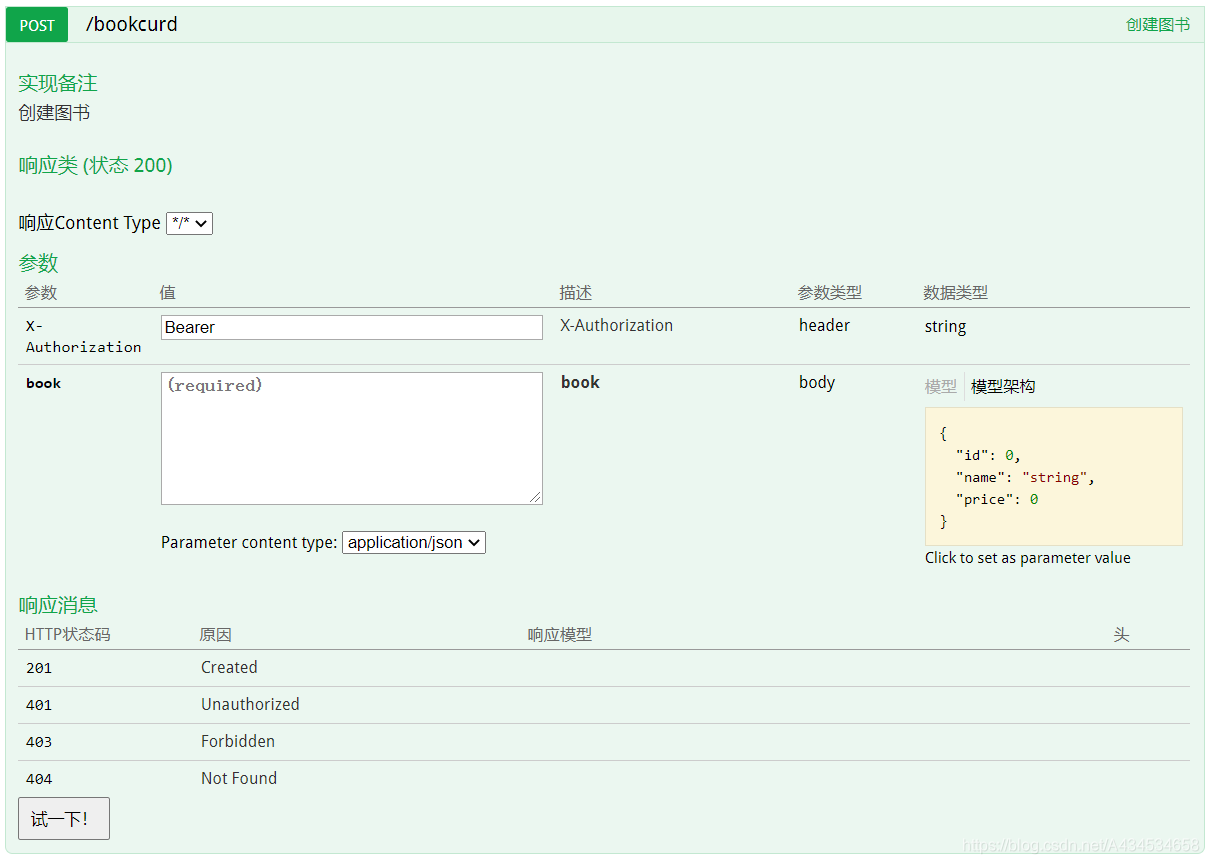
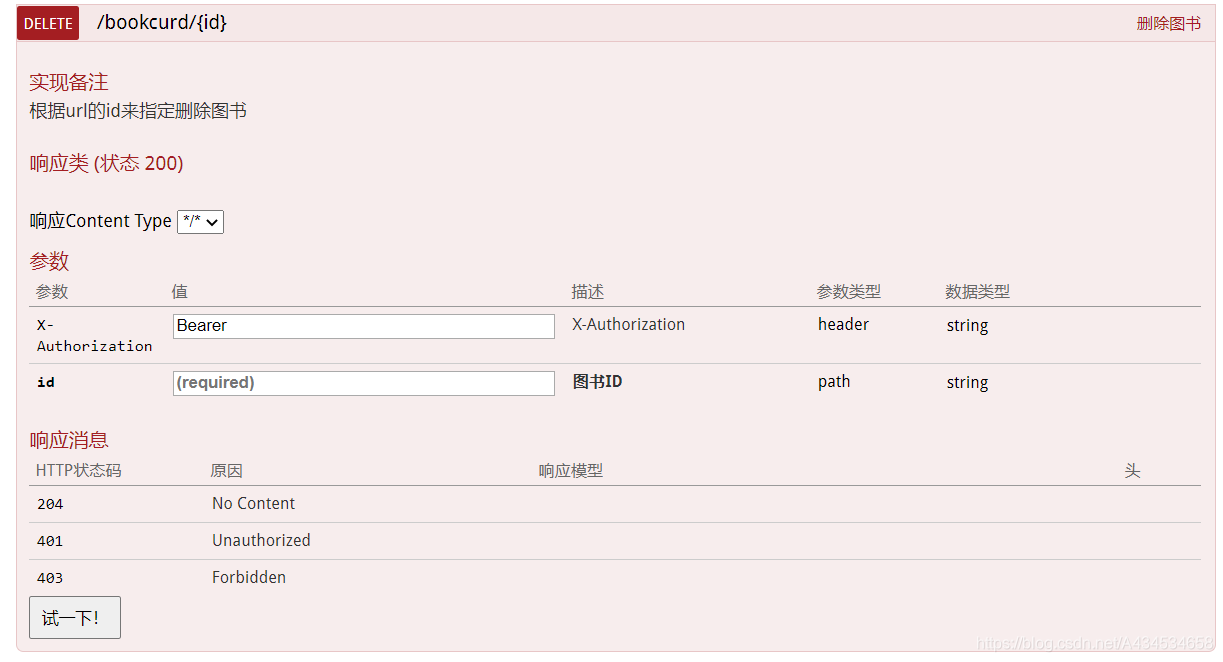
如果觉得本文对您有帮助,请点赞支持,非常感谢;
7.接口分组
有时候需要将接口分组,比如需要token的一组,不需要token的一组;
在SwaggerConfig.java中配置如下:
    @Bean(value = "defaultApi")
    public Docket createRestfulApi(){
        return new Docket(DocumentationType.SWAGGER_2)
                .apiInfo(apiInfo())
                .pathMapping("/")
                .select()
                //暴露接口地址的包路径
                .apis(RequestHandlerSelectors.basePackage("cn.demo.controller"))
                .paths(PathSelectors.any())
                .build().groupName("需要token")
                //自定义全局入参,通用参数如token
                .globalOperationParameters(globalOperation());
    }
    @Bean(value = "publicApi")
    public Docket publicApi() {
        return new Docket(DocumentationType.SWAGGER_2)
                .pathMapping("/")
                .apiInfo(apiInfo())
                .select()
                .apis(RequestHandlerSelectors.basePackage("cn.demo.noauth"))
                .paths(PathSelectors.any())
                .build().groupName("无需token");
    }
页面中可选择分组进行查看
报错1:No mapping for GET /swagger-ui.html
访问swagger页面是报上面错误,其他啥都没有。可能是配置问题。
如果配置了WebMvcConfigurer ,则在其中添加下面代码,进行配置,即可
@Configuration
public class MvcConfigurer implements WebMvcConfigurer {
    @Override
    public void addResourceHandlers(ResourceHandlerRegistry registry) {
        registry.addResourceHandler("/**").addResourceLocations(
                "classpath:/static/");
        registry.addResourceHandler("swagger-ui.html").addResourceLocations(
                "classpath:/META-INF/resources/");
        registry.addResourceHandler("/webjars/springfox-swagger-ui/**").addResourceLocations(
                "classpath:/META-INF/resources/webjars/springfox-swagger-ui/");
    }
}
或
    @Override
    public void addResourceHandlers(ResourceHandlerRegistry registry) {
        registry.addResourceHandler("swagger-ui.html")
                .addResourceLocations("classpath:/META-INF/resources/");
        registry.addResourceHandler("/webjars/**")
                .addResourceLocations("classpath:/META-INF/resources/webjars/");
    }
报错2:webjars下面的东西都报404
权限限制,若是jwt权限限制,则在程序配置文件中配置无登录访问即可:
# 白名单
cw.security.jwt.anonUrls=/swagger-ui.html,/webjars/**,/swagger-resources/**,/v2/**