1、目录结构
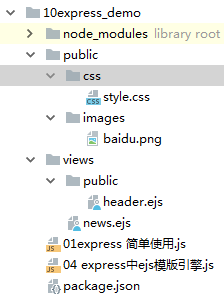
2、news.ejs
<!DOCTYPE HTML PUBLIC "-//W3C//DTD HTML 4.01 Transitional//EN"
        "http://www.w3.org/TR/html4/loose.dtd">
<html>
<head>
    <title></title>
    <link rel="stylesheet" href="css/style.css">
</head>
<body>
<h1 class="header">this is news</h1><br>
<div><img src="images/baidu.png" alt="百度"/></div>
<%=list%><br>
<%- include public/header.ejs%>
</body>
</html>
3、01express 简单使用.js
var express = require('express')
var app = new express()

app.get('/',function(req,res){
    res.send('你好express')
})

app.get('/news',function(req,res){
    res.send('news模块')
})

//动态路由  http://localhost:3000/newscontent/213
app.get('/newscontent/:aid',function(req,res){
    console.log(req.params);
    var aid = req.params.aid;
    res.send('newscontent模块' + aid)
})


//获取get传值   http://localhost:3000/product?aid=123
app.get('/product',function(req,res){
    console.log(req.query);
    res.send('product')
})

app.listen(3000,'127.0.0.1')
4、04express中ejs模版
/*
*   如果使用express框架,那么安装完ejs之后不需要通过
*   var ejs = require('ejs')的方式引入,
*   但是把模版引擎设置为ejs
*
* */

var express = require('express')

var app = express()

//配置ejs模版引擎
app.set('view engine','ejs')

/*
*   中间件app.use
*   express.static('public') 给public目录下面的文件提供静态web服务
*   http://localhost:3001/images/baidu.png
 * */
app.use(express.static('public'))

app.get('/news',function(req,res){
    var arr = ['1111','2222','3333'];
    //res.send('news')
    res.render('news',{//将数据渲染到news.ejs模版中
        list:arr
    })
    //默认在views文件夹下面找模版。

})
/*
*   即可以在public目录下查找文件,又可以在views目录下查找文件
* */
app.listen(3000)