1、IDEA中添加参数
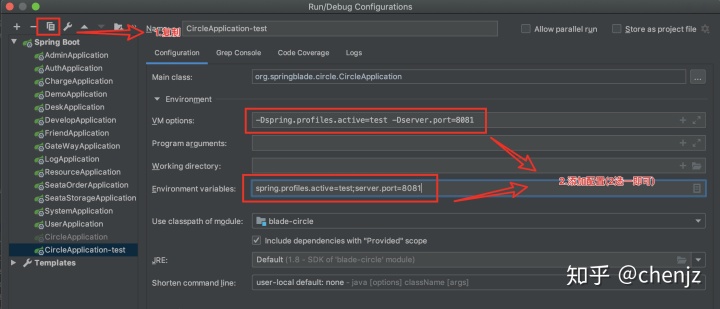
添加以下参数(二选一即可)
-Dspring.profiles.active=test -Dserver.port=8081
# 或
spring.profiles.active=test;server.port=8081
2、启动时添加参数
对应上面的参数在启动jar包是添加参数
- 第一种
java -jar -Dspring.profiles.active=test -Dserver.port=8081 app.jar- 第二种
java -jar app.jar --spring.profiles.active=test --server.port=8081 - 第三种,混合使用
java -jar -Dspring.profiles.active=test app.jar --server.port=8081 3、服务器
编写shell脚本
APP_NAME=app.jar
#使用说明,用来提示输入参数
usage() {
    echo "Usage: sh 执行脚本.sh [start|stop|restart|status]"
    exit 1
}

#检查程序是否在运行
is_exist() {
    pid=$(ps -ef | grep $APP_NAME | grep -v grep | awk '{print $2}')
    #如果不存在返回1,存在返回0
    if [ -z "${pid}" ]; then
        return 1
    else
        return 0
    fi
}

#启动方法
start() {
    is_exist
    if [ $? -eq "0" ]; then
        echo "${APP_NAME} is already running. pid=${pid} ."
    else
        nohup java -jar $APP_NAME >/dev/null 2>&1 &
    fi
}

#停止方法
stop() {
    is_exist
    if [ $? -eq "0" ]; then
        kill -9 $pid
    else
        echo "${APP_NAME} is not running"
    fi
}

#输出运行状态
status() {
    is_exist
    if [ $? -eq "0" ]; then
        echo "${APP_NAME} is running. Pid is ${pid}"
    else
        echo "${APP_NAME} is NOT running."
    fi
}

#重启
restart() {
    stop
    start
}

#根据输入参数,选择执行对应方法,不输入则执行使用说明
case "$1" in
"start")
    start
    ;;
"stop")
    stop

    ;;
"status")
    status
    ;;
"restart")
    restart
    ;;
*)
    usage
    ;;
esac
将app.jar 和 app.sh脚本上传同一级目录中

启动脚本
# sh app.sh [start|stop|restart|status] 对用启动、停止、重启、查看状态
sh app.sh start版权声明:本文为weixin_39838362原创文章,遵循CC 4.0 BY-SA版权协议,转载请附上原文出处链接和本声明。