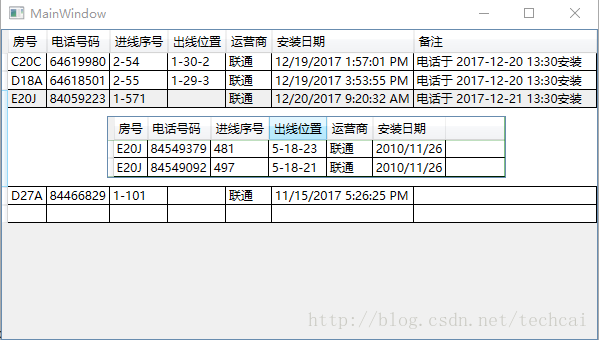
wpf DataGrid主从表,DataGrid嵌套DataGrid主从结构rowdetailtemplate实现,绑定DataTable数据源,使用Visual Studio 2017 .
子表绑定DataTable数据源.这样的好处是从数据库查询完成不用转换就可以绑定数据,非常方便.
DetailsDataGrid.ItemsSource = DS.Tables[“DetailsDataTable”].DefaultView;
这条语句绑定了字表的数据源.
虽然实现了功能,但还有错误,实现显示收缩子表时有闪烁,这与dataset数据库查询慢有关,选择行的单元格时常不能编辑,这和子表的显示折叠不知如何控制有关,希望抛砖引玉,与大家共同进步.
效果图如下:
xml代码:
<Window x:Class="YZTelApp.MainWindow"
        xmlns="http://schemas.microsoft.com/winfx/2006/xaml/presentation"
        xmlns:x="http://schemas.microsoft.com/winfx/2006/xaml"
        xmlns:d="http://schemas.microsoft.com/expression/blend/2008"
        xmlns:mc="http://schemas.openxmlformats.org/markup-compatibility/2006"
        xmlns:local="clr-namespace:YZTelApp"
        mc:Ignorable="d"
        Title="MainWindow" Height="350" Width="525">
    <Grid>
      <!--主从表-->
        <DataGrid Name="YuYueDataGrid" ItemsSource="{Binding}" AutoGenerateColumns="False" ColumnWidth="*">
            <DataGrid.Columns>
                <DataGridTextColumn Header="房号" Binding="{Binding 房号}" CanUserResize="False" Width="Auto"/>
                <DataGridTextColumn Header="电话号码" Binding="{Binding 电话号码}" CanUserResize="False" Width="Auto"/>
                <DataGridTextColumn Header="进线序号" Binding="{Binding 进线序号}" CanUserResize="False" Width="Auto"/>
                <DataGridTextColumn Header="出线位置" Binding="{Binding 出线位置}" CanUserResize="False" Width="Auto"/>
                <DataGridTextColumn Header="运营商" Binding="{Binding 运营商}" CanUserResize="False" Width="Auto"/>
                <DataGridTextColumn Header="安装日期" Binding="{Binding 安装日期}" CanUserResize="False" Width="Auto"/>
                <DataGridTextColumn Header="备注" Binding="{Binding 备注}"  />
            </DataGrid.Columns>
            <DataGrid.RowDetailsTemplate>
              <DataTemplate>
                    <!--从表-->
                <DataGrid Name="DetailsDataGrid" IsReadOnly="True" AutoGenerateColumns="False" Margin="15,8,8,8"  Background="Green" Width="399">
                  <DataGrid.Columns>
                      <DataGridTextColumn Header="房号" Binding="{Binding 房号}" Width="Auto"/>
                      <DataGridTextColumn Header="电话号码" Binding="{Binding 电话号码}" Width="Auto"/>
                      <DataGridTextColumn Header="进线序号" Binding="{Binding 进线序号}" Width="Auto"/>
                      <DataGridTextColumn Header="出线位置" Binding="{Binding 出线位置}" Width="Auto"/>
                      <DataGridTextColumn Header="运营商" Binding="{Binding 运营商}" Width="Auto"/>
                            <DataGridTextColumn Header="安装日期" Binding="{Binding 安装日期}" Width="Auto"/>
                  </DataGrid.Columns>
                </DataGrid>
              </DataTemplate>
            </DataGrid.RowDetailsTemplate>
        </DataGrid>
    </Grid>
</Window>
c#d代码:
using System;
using System.Data;
using System.Data.OleDb;
using System.Windows;
using System.Windows.Controls;

namespace YZTelApp
{
    /// <summary>
    /// MainWindow.xaml 的交互逻辑
    /// </summary>
    public partial class MainWindow : Window
    {
        public MainWindow()
        {
            InitializeComponent();
            YuYueDataGrid.DataContext = GetDataSet("select * from 预约电话", "YuYueDataTable").Tables["YuYueDataTable"];
            YuYueDataGrid.RowDetailsVisibilityChanged += new EventHandler<DataGridRowDetailsEventArgs>(YuYueDataGrid_RowDetailsVisibilityChanged);

        }
        private string conStr = Properties.Settings.Default.YZTelDBConnectionString;

        public DataSet GetDataSet(string SqlStr,string TblName)
        {
            OleDbConnection OleCon = new OleDbConnection(conStr);
            DataSet DS;
            DS = new DataSet();
            OleDbCommand cmd = new OleDbCommand(SqlStr, OleCon);//预约电话表
            try
            {
                OleCon.Open();
                OleDbDataAdapter adapter = new OleDbDataAdapter(cmd);
                adapter.Fill(DS, TblName);
            }
            catch (Exception e)
            {
                MessageBox.Show(e.Message);
            }
            finally
            {
                OleCon.Close();
            }
            return DS;
        }
        //string CellValue;
        void YuYueDataGrid_RowDetailsVisibilityChanged(object sender, DataGridRowDetailsEventArgs e)
        {
            DataGrid MainDataGrid = sender as DataGrid;
            var cell = MainDataGrid.CurrentCell;
            int HeaderIndex = cell.Column.DisplayIndex;//获取单元格表头索引
            if(HeaderIndex>3)//3列以后不进行详细查询
            {
                MainDataGrid.SelectedIndex = 1;
                return;
            }
            DataRowView item = cell.Item as DataRowView;
            string CellValue="";
            if (item == null)
            {
              return;
            } else
            {
              CellValue = item[cell.Column.DisplayIndex].ToString();//获取选中的当前单元格的值
                if (string.IsNullOrEmpty(CellValue))
                {
                    MainDataGrid.SelectedIndex = -1;
                    return;
                }
            }
            string HeaderName = MainDataGrid.CurrentColumn.Header.ToString();//获取单元格表头名字(列名)
            string SqlStr = String.Format("SELECT * FROM(SELECT * FROM 联通进线 WHERE {0}='{1}' " +
                "UNION SELECT * FROM 电信进线 WHERE {2}='{3}' " +
                "UNION SELECT * FROM 铁通进线 WHERE {4}='{5}')", HeaderName, CellValue, HeaderName, CellValue, HeaderName, CellValue);
            //MessageBox.Show(HeaderIndex+" "+ HeaderName + " "+ CellValue);
            DataGrid DetailsDataGrid = e.DetailsElement as DataGrid;
            DataSet DS = GetDataSet(SqlStr, "DetailsDataTable");
            if (!IfExitData(DS,0))
            {
                MainDataGrid.SelectedIndex = -1;
                return;
            }
            DetailsDataGrid.ItemsSource = DS.Tables["DetailsDataTable"].DefaultView;
        }
        /// <summary>
        /// 检查一个DataSet 里面是否含有数据
        /// </summary>
        /// <param name="ds">要检测的DataSet</param>
        /// <param name="tableIndex">DataSet里Table的索引</param>
        /// <returns>True: 里面有数据。 False:里面没有数据</returns>
        public static bool IfExitData(DataSet ds, int tableIndex)
        {
            if (ds != null && ds.Tables[tableIndex].Rows.Count > 0)
            {
                return true;
            }
            else
            {
                return false;
            }
        }
    }
}版权声明:本文为techcai原创文章,遵循CC 4.0 BY-SA版权协议,转载请附上原文出处链接和本声明。