在PHP and MySQL Web Development这本书中49页,在写入文件的时候用到了函数fwrite()
$outputstring = $date."\t".$tireqty." tires \t".$oilqty." oil\t"
.$sparkqty." spark plugs\t\$".$totalamount
."\t". $address."\n";//注意这里的\n 根本没起作用
fwrite($fp, $outputstring, strlen($outputstring));
无论是这个函数还是,其参数 $outputstring,均无法满足使得文件追加内容得到换行。
如果纯粹如上面这种格式写入processorder_2.php文件,结果如下:

因此并没有换行,那么我的解决办法如下:
首先百度了经验,地址:http://www.shuchengxian.com/article/575.html
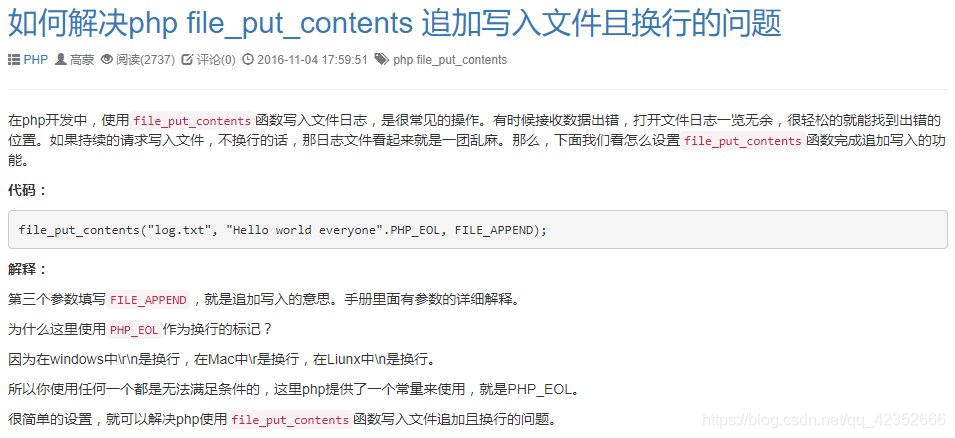
那么我的解决办法是在关闭文件函数的前面或者后面加一个函数:
flock($fp, LOCK_UN);
fwrite($fp, $outputstring, strlen($outputstring));
flock($fp, LOCK_UN);//LOCK_UN
fclose($fp);
file_put_contents("$document_root/../orders/orders.txt", PHP_EOL, FILE_APPEND);//关闭后
或者:
flock($fp, LOCK_UN);
fwrite($fp, $outputstring, strlen($outputstring));
flock($fp, LOCK_UN);//LOCK_UN
file_put_contents("$document_root/../orders/orders.txt", PHP_EOL, FILE_APPEND);//关闭前
fclose($fp);
或者:
flock($fp, LOCK_UN);
fwrite($fp, $outputstring, strlen($outputstring));
file_put_contents("$document_root/../orders/orders.txt", PHP_EOL, FILE_APPEND);
flock($fp, LOCK_UN);//LOCK_UN
fclose($fp);
以上答案均正确!对于这个函数的插入位置,只要是这个整体之间都行。并且最后文件内容添加格式都如下图所示。
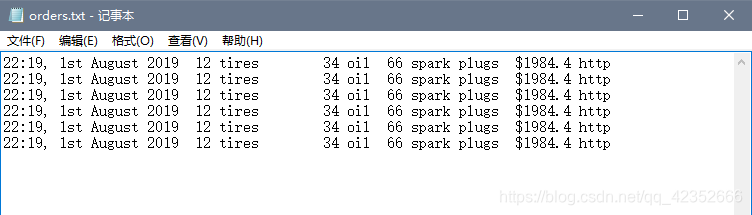
同时,目前我仅仅所知可以加一个 file_put_contents函数,并且其参数之一PHP_EOL是一个换行标记。
源码如下:
orderform.html文件:
<!DOCTYPE html>
<html>
  <head>
   <title>Bob's Auto Parts - Order Form</title>
  </head>
  <body>
    <form action="processorder_2.php" method="post">
    <table style="border: 0px;">
    <tr style="background: #cccccc;">
      <td style="width: 150px; text-align: center;">Item</td>
      <td style="width: 15px; text-align: center;">Quantity</td>
    </tr>
    <tr>
      <td>Tires</td>
      <td><input type="text" name="tireqty" size="3" maxlength="3" /></td>
    </tr>
    <tr>
     <td>Oil</td>
     <td><input type="text" name="oilqty" size="3" maxlength="3" /></td>
    </tr>
    <tr>
     <td>Spark Plugs</td>
     <td><input type="text" name="sparkqty" size="3" maxlength="3" /></td>
    </tr>
    <tr>
      <td>Shipping Address</td>
      <td><input type="text" name="address" size="50" maxlength="100"</td>
    </tr>
    <tr>
     <td colspan="2" style="text-align: center;"><input type="submit" value="Submit Order" /></td>
    </tr>
    </table>
    </form>
  </body>
</html>
processorder_2.php文件:
<?php
  // create short variable names
  $tireqty = (int) $_POST['tireqty'];
  $oilqty = (int) $_POST['oilqty'];
  $sparkqty = (int) $_POST['sparkqty'];
  $address = preg_replace('/\t|\R/',' ',$_POST['address']);
  $document_root = $_SERVER['DOCUMENT_ROOT'];
  $date = date('H:i, jS F Y');
?>
<!DOCTYPE html>
<html>
  <head>
    <title>Bob's Auto Parts - Order Results</title>
  </head>
  <body>
    <h1>Bob's Auto Parts</h1>
    <h2>Order Results</h2>
    <?php
      echo "<p>Order processed at ".date('H:i, jS F Y')."</p>";
      echo "<p>Your order is as follows: </p>";

      $totalqty = 0;
      $totalamount = 0.00;

      define('TIREPRICE', 100);
      define('OILPRICE', 10);
      define('SPARKPRICE', 4);

      $totalqty = $tireqty + $oilqty + $sparkqty;
      echo "<p>Items ordered: ".$totalqty."<br />";

      if ($totalqty == 0) {
        echo "You did not order anything on the previous page!<br />";
      } else {
        if ($tireqty > 0) {
          echo htmlspecialchars($tireqty).' tires<br />';
        }
        if ($oilqty > 0) {
          echo htmlspecialchars($oilqty).' bottles of oil<br />';
        }
        if ($sparkqty > 0) {
          echo htmlspecialchars($sparkqty).' spark plugs<br />';
        }
      }


      $totalamount = $tireqty * TIREPRICE
                   + $oilqty * OILPRICE
                   + $sparkqty * SPARKPRICE;

      echo "Subtotal: $".number_format($totalamount,2)."<br />";

      $taxrate = 0.10;  // local sales tax is 10%
      $totalamount = $totalamount * (1 + $taxrate);
      echo "Total including tax: $".number_format($totalamount,2)."</p>";

      echo "<p>Address to ship to is ".htmlspecialchars($address)."</p>";

      $outputstring = $date."\t".$tireqty." tires \t".$oilqty." oil\t"
                      .$sparkqty." spark plugs\t\$".$totalamount
                      ."\t". $address."\n";

       // open file for appending
       $fp = fopen("$document_root/../orders/orders.txt", 'ab');

       if (!$fp) {
         echo "<p><strong> Your order could not be processed at this time.
               Please try again later.</strong></p>";
         exit;
       }

       flock($fp, LOCK_UN);
       fwrite($fp, $outputstring, strlen($outputstring));
       file_put_contents("$document_root/../orders/orders.txt", PHP_EOL, FILE_APPEND);
       flock($fp, LOCK_UN);//LOCK_UN
       fclose($fp);

       echo "<p>Order written.</p>";
    ?>
  </body>
</html>
vieworders.php文件
<?php
  // create short variable name
  $document_root = $_SERVER['DOCUMENT_ROOT'];
?>
<!DOCTYPE html>
<html>
  <head>
    <title>Bob's Auto Parts - Customer Orders</title>
  </head>
  <body>
    <h1>Bob's Auto Parts</h1>
    <h2>Customer Orders</h2>
    <?php
      @$fp = fopen("$document_root/../orders/orders.txt", 'rb');
      flock($fp, LOCK_SH); // lock file for reading

      if (!$fp) {
        echo "<p><strong>No orders pending.<br />
              Please try again later.</strong></p>";
        exit;
      }

      while (!feof($fp)) {
         $order= fgets($fp);
         echo htmlspecialchars($order)."<br />";
      }

      flock($fp, LOCK_UN); // release read lock
      fclose($fp);
    ?>
  </body>
</html>
尽管如上是一种方法但是最为正确的方法如下:
其实本书在写变量$outputstring的时候,其内容有所欠缺:
$outputstring = $date."\t".$tireqty." tires \t".$oilqty." oil\t"
                      .$sparkqty." spark plugs\t\$".$totalamount
                      ."\t". $address."\r\n";
和之前不一样,这次在\n的前面加了一个\r,也就是在换行的时候一般\r和\n一块儿用,所以本书在写此代码时有所欠缺。
会导致无法换行总结如下:
1:\r\n要一块用
2:"\r\n"要放在双引号里面,不能放在单引号里面,谨记!
3:即使你可能忘了\r\n要一块儿用,而是单独用了\n没有用\r,这个时候只需要在其中加一个函数
file_put_contents("$document_root/../orders/orders.txt", PHP_EOL, FILE_APPEND);
这个函数的PHP_EOL参数就是一个换行标记。
题外话语:file_put_contents("$document_root/../orders/orders.txt", PHP_EOL, FILE_APPEND);这个函数里面的第一个参数的两个点".."是转至上一级目录的意思,所以是和根目录WWW是同一级目录,而不是WWW内。(如下)
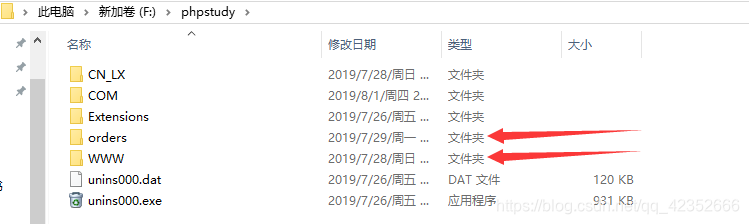
双引号是对内容有所检查,而单引号只做替换,所以如果用'\r\n' 则显示'\r\n' ,相反,如果用"\r\n'"就会解析里面是什么命令啥的。
尽管上面总结的如此的好,但是,我们并没有搞清楚为什么会发生这样的情况,这样的情况会出现什么。
那我们就继续解决。
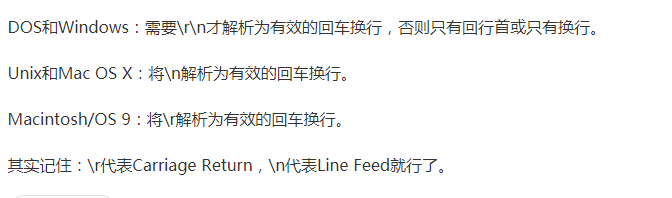
Windows下的换行定义为\r\n,Linux、Unix系统下的换行定义为\n,所以在Windows下的串口助手要显示换行,需在字符串后加\r\n,Linux下则只要\n就能换行。
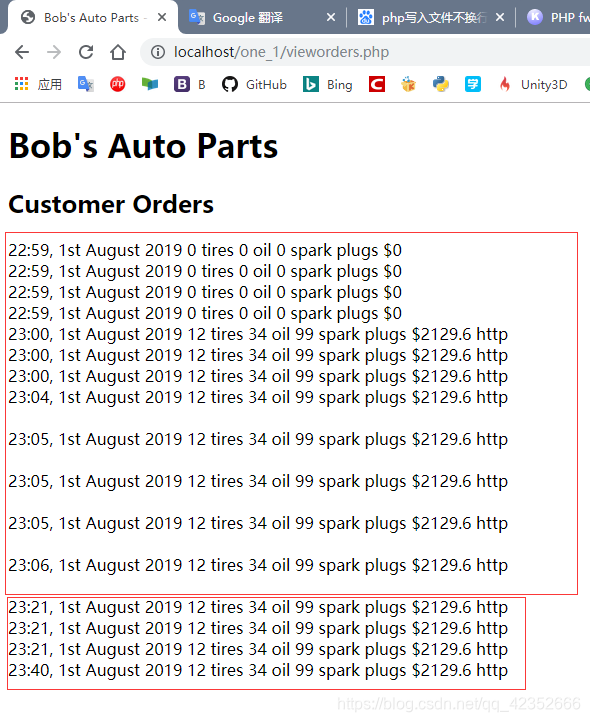
我们知道在之前用\n没有用\r\n,也就是他俩儿没有一块儿用,这样的话,如果在文件里面显示并不会被解析,而如果在浏览器里面显示就会显示,为什么?因为浏览器自带解析器,而文件不自带。的所以在单独用\n以及没有加file_put_contents函数之前:

那么至于在浏览器的显示格式一些细小的区别就留给大家己去琢磨了。