This post was initially shared on my blog. Read the post testing in spring boot with JUnit for beginners
未经测试就运送我们的产品就像在不打开引擎的情况下出售汽车。 在产品开发过程中,我们必须一次又一次地运行一些测试,如果这些测试不是自动化的,我们将很难测试我们的应用程序。
I have written a post on the importance of writing tests against your codebase.

This post is in continuation of the last post we shared related to Spring boot in which we shared on how to write Rest APIs in Spring Boot.. Please go through that post if you want to learn on how to create rest APIs using Spring Boot.
在本文中,我们将讨论如何在没有任何模拟的情况下从头到尾测试我们的spring boot应用程序。
首先,我们必须添加测试图书馆pom.xml,以便maven可以为我们安装它们。
这是将测试库添加到的代码pom.xml
        ...
        </dependency>
        <dependency>
            <groupId>org.springframework.boot</groupId>
            <artifactId>spring-boot-starter-test</artifactId>
        </dependency>
        <dependency>
        ...
Using separate config for testing purposes
我们不想将数据添加到与生产数据库相同的数据库中。 因此,我们将从创建用于处理测试用例的单独配置开始。 同样,始终具有单独的配置始终是一个好习惯。
创建一个新的资源文件,src / main / resources / application-test.properties并添加以下数据。
注意:我们将不得不在本地系统中创建数据库以使其正常运行。
现在我们有了一个单独的配置文件,我们必须将其导出为App配置,以便可以在测试本身中使用它。
将以下代码添加到文件中,src / main / java / io / singh1114 / springboottut / AppConfigurationTest.java
Writing Controller test for Spring Boot API.
现在,既然我们要端到端地测试应用程序,那么让我们创建一个控制器测试。
将以下代码添加到src / test / java / io / singh1114 / springboottut / SchoolControllerTest.java
让我们浏览文件并了解这一点。
@ActiveProfiles用于使框架知道我们将使用给定的配置文件。 正如我们已经声明的测试中的个人资料组态文件,我们可以在这里直接使用它。
@RunWith和@SpringBootTest用于启动一个简单的服务器,以使用SpringBoot框架。
Running on a random port
用SpringBootTest.WebEnvironment.RANDOM_PORT我们告诉框架在随机PORT上启动应用程序。
Removing any change made to the database after test completion.
@交易测试完成后,将帮助我们清除数据库。 我们不想继续向数据库中添加内容,并希望在每次测试运行后都将其清除。
Creating the API endpoint
    @LocalServerPort
    private int port;

    private String createURLWithPort(String uri) {
        return "http://localhost:" + port + uri;
    }
这些用于创建要命中的给定端点的URL。
Creating the School Object
    @Autowired
    private SchoolRepository repository;
    ...
        School testSchool = new School(1, "First Location", "Mr. Ranvir", "California");
        repository.save(testSchool);
    ...
此代码用于在数据库中创建对象。
Sending the request and getting the response
    TestRestTemplate restTemplate = new TestRestTemplate();

    HttpHeaders headers = new HttpHeaders();
    ...
        HttpEntity<String> entity = new HttpEntity<String>(null, headers);

        ResponseEntity<String> response = restTemplate.exchange(
                createURLWithPort("/schools"),
                HttpMethod.GET, entity, String.class);
    ...
Checking if the response is equal to the object created
JSONAssert.assertEquals(expected, response.getBody(), false);
在这里,我们正在检查响应的主体是否等于预期的响应。
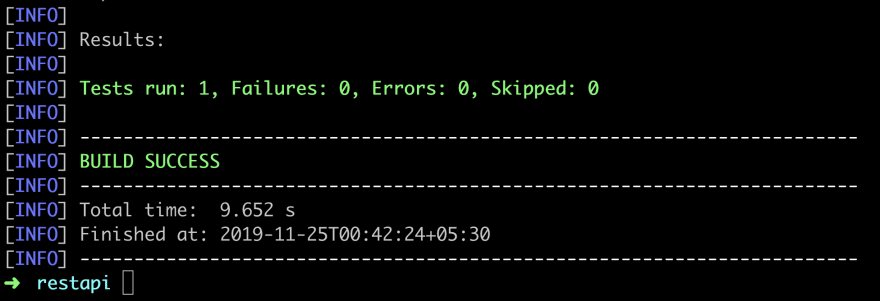
Run the tests
使用可以使用以下命令来运行测试。
mvn test
我希望你喜欢这个帖子。 请在下面的评论部分中分享您的观点。
from: https://dev.to//singh1114/integrity-testing-of-apis-in-spring-boot-java-with-junit-2mck