远程管理防火墙
实验拓扑图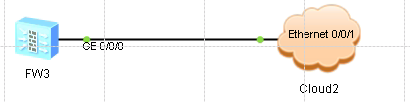
推介实验步骤
◆配置web远程管理防火墙
◆配置ssh远程管理
实验步骤
1、配置web远程管理防火墙
1)配置IP地址将接口加入到trust区域并允许http,https协议远程管理
[FW1]firewall zone trust
[FW1-zone-trust]add interface GigabitEthernet 0/0/0
[FW1]interface GigabitEthernet 0/0/0
[FW1-GigabitEthernet0/0/0]ip address 192.168.1.1 24
[FW1-GigabitEthernet0/0/0]service-manage http permit
[FW1-GigabitEthernet0/0/0]service-manage https permit
[FW1-GigabitEthernet0/0/0]quit
2)配置安全策略
[FW1]security-policy
[FW1-policy-security]rule name allow_web
[FW1-policy-security-rule-allow_web]source-zone trust
[FW1-policy-security-rule-allow_web]destination-zone local
[FW1-policy-security-rule-allow_web]action permit
[FW1-policy-security-rule-allow_web]quit
3)配置身份验证
[FW1]web-manager security enable
[FW1]aaa
[FW1-aaa]manager-user web
[FW1-aaa-manager-user-web]password
[FW1-aaa-manager-user-web]service-type web
[FW1-aaa-manager-user-web]level 15
[FW1-aaa-manager-user-web]quit
4)客户端配置IP地址并远程访问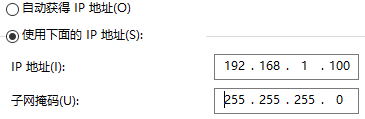


2、配置ssh远程管理
1)允许ssh配置安全策略及ssh密钥对
[FW1]interface GigabitEthernet  0/0/0
[FW1-GigabitEthernet0/0/0]service-manage enable
[FW1-GigabitEthernet0/0/0]service-manage ssh permit
[FW1-GigabitEthernet0/0/0]quit
[FW1]security-policy
[FW1]security-policy
[FW1-policy-security]rule name allow_ssh
[FW1-policy-security-rule-allow_ssh]source-zone trust
[FW1-policy-security-rule-allow_ssh]destination-zone local
[FW1-policy-security-rule-allow_ssh]action permit
[FW1]rsa local-key-pair create
2)配置ssh身份验证
[FW1]user-interface vty 0 4
[FW1-ui-vty0-4]authentication-mode aaa
[FW1-ui-vty0-4]protocol inbound ssh
[FW1-ui-vty0-4]quit
[FW1]ssh user test
[FW1]ssh user test authentication-type password
[FW1]ssh user test service-type stelnet
[FW1]aaa
[FW1-aaa-manager-user-test]password cipher pwd@1234
[FW1-aaa-manager-user-test]service-type ssh
[FW1-aaa-manager-user-test]level 15
[FW1-aaa-manager-user-test]quit
[FW1]stelnet server enable
3)通过CRT连接防火墙

版权声明:本文为weixin_45447911原创文章,遵循CC 4.0 BY-SA版权协议,转载请附上原文出处链接和本声明。