目录
0、写在前面
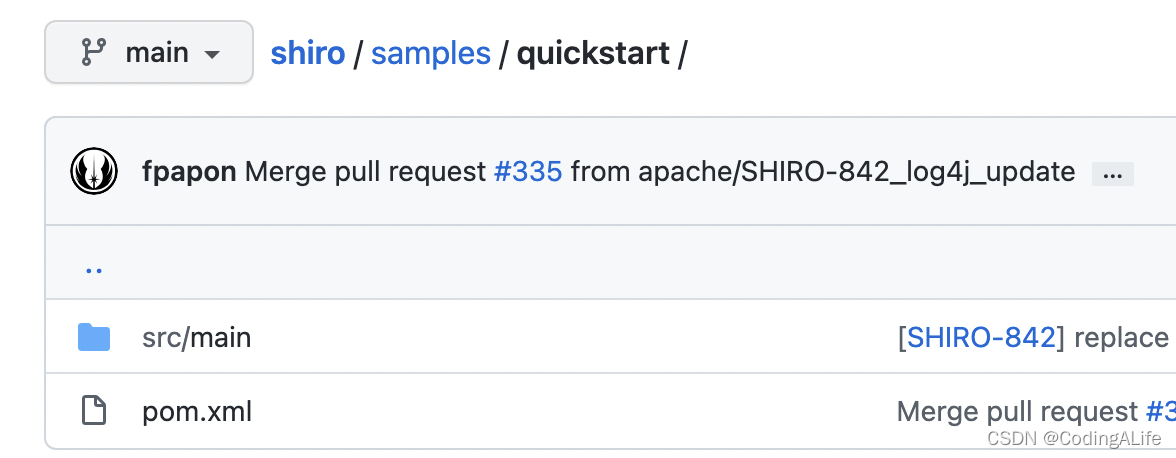
github地址: https://github.com/apache/shiro
参考:quickstart中的pom文件
1、导入依赖
  <dependencies>
        <dependency>
            <groupId>org.apache.shiro</groupId>
            <artifactId>shiro-core</artifactId>
        </dependency>

        <!-- configure logging -->
        <dependency>
            <groupId>org.slf4j</groupId>
            <artifactId>jcl-over-slf4j</artifactId>
            <scope>runtime</scope>
        </dependency>
        <dependency>
            <groupId>org.apache.logging.log4j</groupId>
            <artifactId>log4j-slf4j-impl</artifactId>
            <scope>runtime</scope>
        </dependency>
        <dependency>
            <groupId>org.apache.logging.log4j</groupId>
            <artifactId>log4j-core</artifactId>
            <scope>runtime</scope>
        </dependency>
    </dependencies>
2、配置文件
log4j.xml
<Configuration name="ConfigTest" status="ERROR" monitorInterval="5">
    <Appenders>
        <Console name="Console" target="SYSTEM_OUT">
            <PatternLayout pattern="%d{HH:mm:ss.SSS} [%t] %-5level %logger{36} - %msg%n"/>
        </Console>
    </Appenders>
    <Loggers>
        <Logger name="org.springframework" level="warn" additivity="false">
            <AppenderRef ref="Console"/>
        </Logger>
        <Logger name="org.apache" level="warn" additivity="false">
            <AppenderRef ref="Console"/>
        </Logger>
        <Logger name="net.sf.ehcache" level="warn" additivity="false">
            <AppenderRef ref="Console"/>
        </Logger>
        <Logger name="org.apache.shiro.util.ThreadContext" level="warn" additivity="false">
            <AppenderRef ref="Console"/>
        </Logger>
        <Root level="info">
            <AppenderRef ref="Console"/>
        </Root>
    </Loggers>
</Configuration>
shiro.ini
[users]
# user 'root' with password 'secret' and the 'admin' role
root = secret, admin
# user 'guest' with the password 'guest' and the 'guest' role
guest = guest, guest
# user 'presidentskroob' with password '12345' ("That's the same combination on
# my luggage!!!" ;)), and role 'president'
presidentskroob = 12345, president
# user 'darkhelmet' with password 'ludicrousspeed' and roles 'darklord' and 'schwartz'
darkhelmet = ludicrousspeed, darklord, schwartz
# user 'lonestarr' with password 'vespa' and roles 'goodguy' and 'schwartz'
lonestarr = vespa, goodguy, schwartz

# -----------------------------------------------------------------------------
# Roles with assigned permissions
#
# Each line conforms to the format defined in the
# org.apache.shiro.realm.text.TextConfigurationRealm#setRoleDefinitions JavaDoc
# -----------------------------------------------------------------------------
[roles]
# 'admin' role has all permissions, indicated by the wildcard '*'
admin = *
# The 'schwartz' role can do anything (*) with any lightsaber:
schwartz = lightsaber:*
# The 'goodguy' role is allowed to 'drive' (action) the winnebago (type) with
# license plate 'eagle5' (instance specific id)
goodguy = winnebago:drive:eagle5
3、快速开始
public class Quickstart {

    private static final transient Logger log = LoggerFactory.getLogger(Quickstart.class);


    public static void main(String[] args) {

        // The easiest way to create a Shiro SecurityManager with configured
        // realms, users, roles and permissions is to use the simple INI config.
        // We'll do that by using a factory that can ingest a .ini file and
        // return a SecurityManager instance:

        // Use the shiro.ini file at the root of the classpath
        // (file: and url: prefixes load from files and urls respectively):
        Factory<SecurityManager> factory = new IniSecurityManagerFactory("classpath:shiro.ini");
        SecurityManager securityManager = factory.getInstance();

        // for this simple example quickstart, make the SecurityManager
        // accessible as a JVM singleton.  Most applications wouldn't do this
        // and instead rely on their container configuration or web.xml for
        // webapps.  That is outside the scope of this simple quickstart, so
        // we'll just do the bare minimum so you can continue to get a feel
        // for things.
        SecurityUtils.setSecurityManager(securityManager);

        // Now that a simple Shiro environment is set up, let's see what you can do:

        // get the currently executing user:
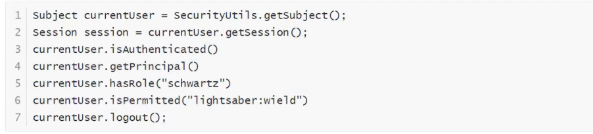
        Subject currentUser = SecurityUtils.getSubject();

        // Do some stuff with a Session (no need for a web or EJB container!!!)
        Session session = currentUser.getSession();
        session.setAttribute("someKey", "aValue");
        String value = (String) session.getAttribute("someKey");
        if (value.equals("aValue")) {
            log.info("Retrieved the correct value! [" + value + "]");
        }

        // let's login the current user so we can check against roles and permissions:
        if (!currentUser.isAuthenticated()) {
            UsernamePasswordToken token = new UsernamePasswordToken("lonestarr", "vespa");
            token.setRememberMe(true);
            try {
                currentUser.login(token);
            } catch (UnknownAccountException uae) {
                log.info("There is no user with username of " + token.getPrincipal());
            } catch (IncorrectCredentialsException ice) {
                log.info("Password for account " + token.getPrincipal() + " was incorrect!");
            } catch (LockedAccountException lae) {
                log.info("The account for username " + token.getPrincipal() + " is locked.  " +
                        "Please contact your administrator to unlock it.");
            }
            // ... catch more exceptions here (maybe custom ones specific to your application?
            catch (AuthenticationException ae) {
                //unexpected condition?  error?
            }
        }

        //say who they are:
        //print their identifying principal (in this case, a username):
        log.info("User [" + currentUser.getPrincipal() + "] logged in successfully.");

        //test a role:
        if (currentUser.hasRole("schwartz")) {
            log.info("May the Schwartz be with you!");
        } else {
            log.info("Hello, mere mortal.");
        }

        //test a typed permission (not instance-level)
        if (currentUser.isPermitted("lightsaber:wield")) {
            log.info("You may use a lightsaber ring.  Use it wisely.");
        } else {
            log.info("Sorry, lightsaber rings are for schwartz masters only.");
        }

        //a (very powerful) Instance Level permission:
        if (currentUser.isPermitted("winnebago:drive:eagle5")) {
            log.info("You are permitted to 'drive' the winnebago with license plate (id) 'eagle5'.  " +
                    "Here are the keys - have fun!");
        } else {
            log.info("Sorry, you aren't allowed to drive the 'eagle5' winnebago!");
        }

        //all done - log out!
        currentUser.logout();

        System.exit(0);
    }
}
注意:
下面的日志slf4j都使用了test范围,只有门面没有具体实现,会报错
        <dependency>
            <groupId>org.apache.shiro</groupId>
            <artifactId>shiro-core</artifactId>
            <version>1.4.1</version>
        </dependency>
        <dependency>
            <groupId>org.slf4j</groupId>
            <artifactId>slf4j-simple</artifactId>
            <version>1.7.21</version>
            <scope>test</scope>
        </dependency>
        <dependency>
            <groupId>org.slf4j</groupId>
            <artifactId>jcl-over-slf4j</artifactId>
            <version>1.7.21</version>
            <scope>test</scope>
        </dependency>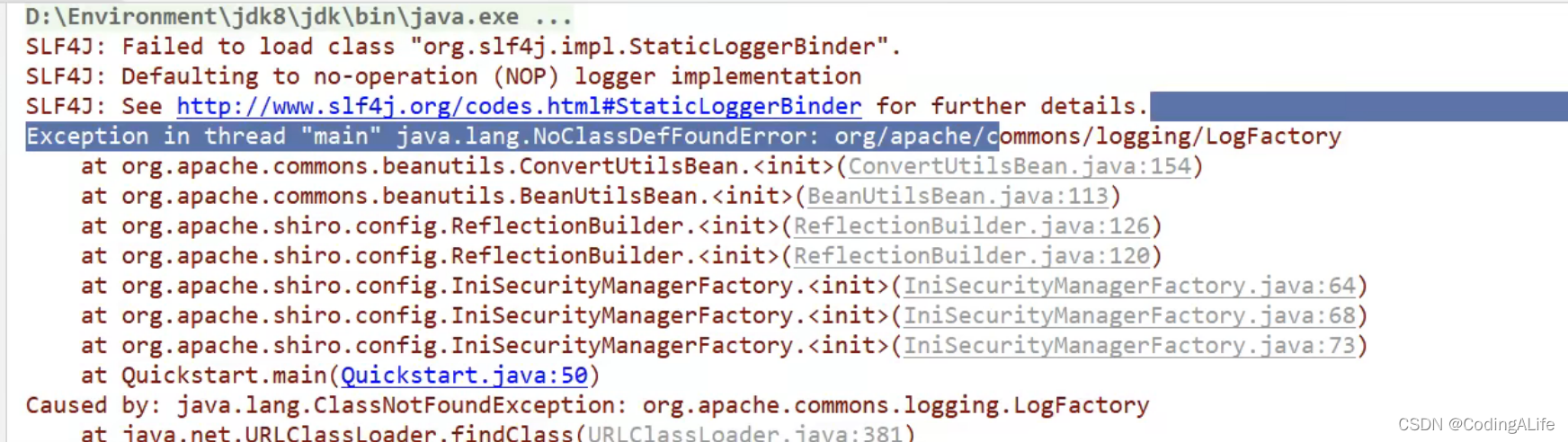
解决:添加log实现
<dependency>
    <groupId>commons-logging</groupId>
    <artifactId>commons-logging</artifactId>
    <version>1.2</version>
</dependency>
1、Shiro简介

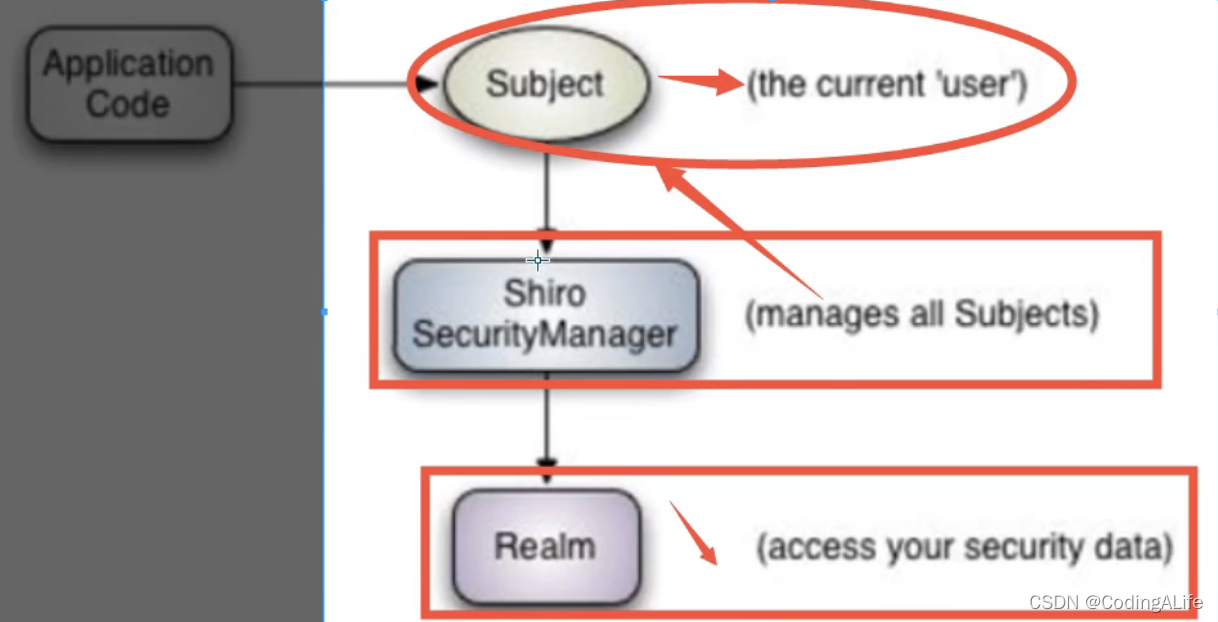
- Subject 用户
- SecurityManager 管理用户
- Realm 连接数据
2、简单实验
1、导入依赖
<dependency>
    <groupId>org.apache.shiro</groupId>
    <artifactId>shiro-spring</artifactId>
    <version>1.5.3</version>
</dependency>
2、编写Shiro配置类
注意:
- 自定类被spring托管:使用@Bean+返回该bean的方法
- bean注入到其他bean中:在方法参数使用@Qualifier即可
@Configuration
public class ShrioConfig {
    //ShiroFilterFactoryBean : Step3
    @Bean
    public ShiroFilterFactoryBean getShrioFilterFactoryBean(@Qualifier("securityManager") DefaultWebSecurityManager defaultWebSecurityManager){
        ShiroFilterFactoryBean bean = new ShiroFilterFactoryBean();
        //设置安全管理器
        bean.setSecurityManager(defaultWebSecurityManager);
        return bean;
    }

    //DefaultWebSecurityManager : Step2
    @Bean("securityManager")
    public DefaultWebSecurityManager getDefaultWebSecurityManager(@Qualifier("userRealm") UserRealm userRealm){
        DefaultWebSecurityManager securityManager = new DefaultWebSecurityManager();
        //关联userRealm
        securityManager.setRealm(userRealm);
        return securityManager;
    }

    //创建 realm 对象, 需要自定义类:Step1
    @Bean
    public UserRealm userRealm(){
        return new UserRealm();
    }
}
3、自定义UserRealm
//自定义的 UserRealm
public class extends AuthorizingRealm {

    //授权
    @Override
    protected AuthorizationInfo doGetAuthorizationInfo(PrincipalCollection principalCollection) {
        return null;
    }

    //认证
    @Override
    protected AuthenticationInfo doGetAuthenticationInfo(AuthenticationToken authenticationToken) throws AuthenticationException {
        return null;
    }
}
3、一个小Demo:
3.1、登陆拦截
3.2、用户认证
访问: http://localhost:8080/index
@Controller
public class RouteController {

    @RequestMapping({"/index"})
    public String toIndex(Model model){
        model.addAttribute("msg", "hello shiro");
        return "index";
    }
}
index.html
<!DOCTYPE html>
<html lang="en" xmlns:th="http://www.thymeleaf.org">
<head>
	<meta charset="utf-8">
</head>

<body>
<h1>首页</h1>
<p th:text="${msg}"></p>
<a th:href="@{/user/add}">add</a>
<a th:href="@{/user/update}">update</a>
</body>

</html>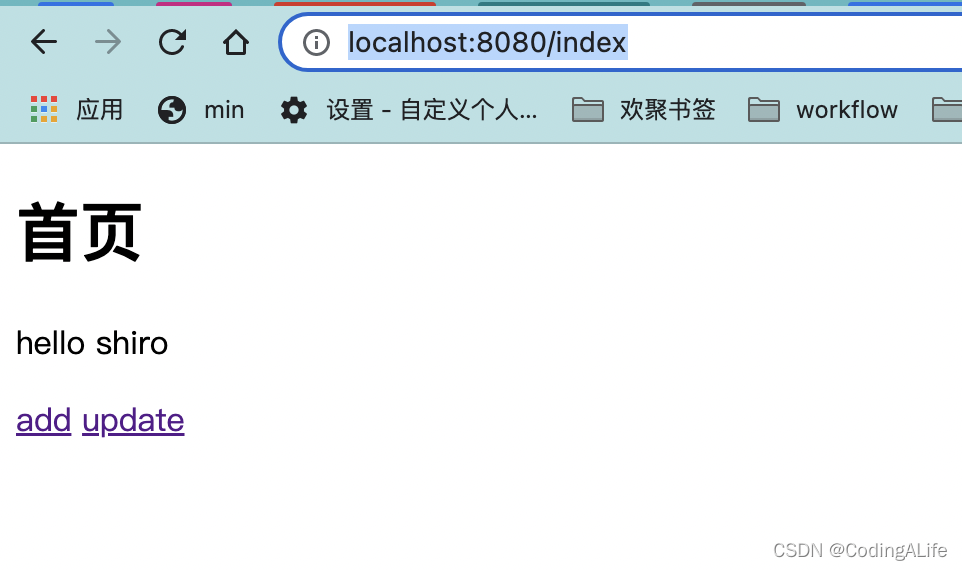
add/update
@Controller
public class RouteController {

    @RequestMapping({"/user/add"})
    public String add(){
        return "user/add";
    }

    @RequestMapping({"/user/update"})
    public String update(){
        return "user/update";
    }
}
add.html
<!DOCTYPE html>
<html lang="en" xmlns:th="http://www.thymeleaf.org">
<head>
	<meta charset="utf-8">
</head>

<body>
<h1>首页</h1>
<p th:text="${msg}"></p>
</body>

</html>
update.html
<!DOCTYPE html>
<html lang="en" xmlns:th="http://www.thymeleaf.org">
<head>
	<meta charset="utf-8">
</head>

<body>
<h1>首页</h1>
<p th:text="${msg}"></p>
</body>

</html>
通过shiro设置,访问add/update.html时需要认证,即需要登陆用户名和密码
拦截:
@Configuration
public class ShiroConfig {

    //创建 realm 对象, 需要自定义类:Step1
    @Bean("userRealm")
    public UserRealm userRealm() {
        return new UserRealm();
    }

    //DefaultWebSecurityManager : Step2
    @Bean("securityManager")
    public DefaultWebSecurityManager getDefaultWebSecurityManager(@Qualifier("userRealm") UserRealm userRealm) {
        DefaultWebSecurityManager securityManager = new DefaultWebSecurityManager();
        //关联userRealm
        securityManager.setRealm(userRealm);
        return securityManager;
    }
    //ShiroFilterFactoryBean : Step3
    @Bean
    public ShiroFilterFactoryBean getShiroFilterFactoryBean(@Qualifier("securityManager") DefaultWebSecurityManager defaultWebSecurityManager) {
        ShiroFilterFactoryBean bean = new ShiroFilterFactoryBean();
        //设置安全管理器
        bean.setSecurityManager(defaultWebSecurityManager);
        //添加shiro的内置过滤器
        /**
         * anon:无需认证就可以访问
         * authc:必须认证才可以访问
         * user: 必须拥有记住我功能才能访问
         * perms:拥有对某个字段的权限才能访问
         * role: 拥有某个角色权限才能访问
         */
//拦截
        Map<String, String> filterMap = new LinkedHashMap<>();
        filterMap.put("/user/add", "authc");
        filterMap.put("/user/update", "authc");
        bean.setFilterChainDefinitionMap(filterMap);
        //设置登录的请求
        bean.setLoginUrl("/toLogin");
        return bean;
    }

}
public class UserRealm extends AuthorizingRealm{

    @Override
    protected AuthorizationInfo doGetAuthorizationInfo(PrincipalCollection principalCollection) {
        System.out.println("授权");
        return null;
    }

    @Override
    protected AuthenticationInfo doGetAuthenticationInfo(AuthenticationToken token) throws AuthenticationException {
        System.out.println("用户身份认证...doGetAuthenticationInfo");
        String name = "root";
        String password = "123456";
        UsernamePasswordToken userToken = (UsernamePasswordToken) token;
        if(!userToken.getUsername().equals(name)){
            return null;
        }
        //密码认证,shiro做
        return new SimpleAuthenticationInfo("", password, "");
    }
}
login.html
<!DOCTYPE html>
<html lang="en" xmlns:th="http://www.thymeleaf.org">
<head>
	<meta charset="utf-8">
</head>

<body>
<h1>登陆</h1>

<hr>
<p th:text="${msg}" style="color: red;"></p>
<form th:action="@{/login}">
	<p>用户名:<input type="text" name="username"></p>
	<p>密码: <input type="text" name="password"></p>
	<P><input type="submit"></P>
</form>
</body>

</html>
3.3、授权
导入依赖
- springboot-mybatis整合
<?xml version="1.0" encoding="UTF-8"?>
<project xmlns="http://maven.apache.org/POM/4.0.0" xmlns:xsi="http://www.w3.org/2001/XMLSchema-instance"
         xsi:schemaLocation="http://maven.apache.org/POM/4.0.0 https://maven.apache.org/xsd/maven-4.0.0.xsd">
    <modelVersion>4.0.0</modelVersion>
    <parent>
        <groupId>org.springframework.boot</groupId>
        <artifactId>spring-boot-starter-parent</artifactId>
        <version>2.3.1.RELEASE</version>
        <relativePath/> <!-- lookup parent from repository -->
    </parent>
    <groupId>com.kuang</groupId>
    <artifactId>shiro-springboot</artifactId>
    <version>0.0.1-SNAPSHOT</version>
    <name>shiro-springboot</name>
    <description>Demo project for Spring Boot</description>

    <properties>
        <java.version>1.8</java.version>
    </properties>

    <dependencies>
        <!--shiro-thymeleaf整合-->
        <dependency>
            <groupId>com.github.theborakompanioni</groupId>
            <artifactId>thymeleaf-extras-shiro</artifactId>
            <version>2.0.0</version>
        </dependency>

        <dependency>
            <groupId>mysql</groupId>
            <artifactId>mysql-connector-java</artifactId>
            <version>8.0.20</version>
        </dependency>
        <!-- https://mvnrepository.com/artifact/log4j/log4j -->
        <dependency>
            <groupId>log4j</groupId>
            <artifactId>log4j</artifactId>
            <version>1.2.17</version>
        </dependency>
        <dependency>
            <groupId>com.alibaba</groupId>
            <artifactId>druid</artifactId>
            <version>1.1.22</version>
        </dependency>
        <!--引入mybatis,这是Mybatis官方提供的适配SpringBoot的,而不是SpringBoot自己的-->
        <dependency>
            <groupId>org.mybatis.spring.boot</groupId>
            <artifactId>mybatis-spring-boot-starter</artifactId>
            <version>2.1.1</version>
        </dependency>
        <dependency>
            <groupId>org.projectlombok</groupId>
            <artifactId>lombok</artifactId>
            <version>1.18.12</version>
        </dependency>
        <dependency>
            <groupId>org.apache.shiro</groupId>
            <artifactId>shiro-spring</artifactId>
            <version>1.5.3</version>
        </dependency>
        <dependency>
            <groupId>org.springframework.boot</groupId>
            <artifactId>spring-boot-starter-thymeleaf</artifactId>
        </dependency>
        <dependency>
            <groupId>org.springframework.boot</groupId>
            <artifactId>spring-boot-starter-web</artifactId>
        </dependency>

        <dependency>
            <groupId>org.springframework.boot</groupId>
            <artifactId>spring-boot-starter-test</artifactId>
            <scope>test</scope>
            <exclusions>
                <exclusion>
                    <groupId>org.junit.vintage</groupId>
                    <artifactId>junit-vintage-engine</artifactId>
                </exclusion>
            </exclusions>
        </dependency>
    </dependencies>

    <build>
        <plugins>
            <plugin>
                <groupId>org.springframework.boot</groupId>
                <artifactId>spring-boot-maven-plugin</artifactId>
            </plugin>
        </plugins>
    </build>

</project>
2、整合MyBatis
- 编写实体类
- 编写mapper接口、mapper.xml、application.properties配置mybatis(别名,mapper.xml文件位置)
- 编写service接口,serviceImpl类
@Data
@AllArgsConstructor
@NoArgsConstructor
@ApiModel("用户实体")
public class User {

    @ApiModelProperty("id")
    private String id;

    @NotBlank(message = "密码不能为空")
    @ApiModelProperty("用户密码")
    private String pwd;

    private String  name;

    //权限
    private String perms;
}
mybatis配置文件:mybatis.properties
mybatis.type-aliases-package=com.crane.domain
mybatis.mapper-locations=classpath:mapper/*.xml
public interface UserService {
User queryUserByName(String name);
}
@Service
public class UserServiceImpl implements UserService {
@Autowired
UserMapper userMapper;
@Override
public User queryUserByName(String name) {
return userMapper.queryUserByName(name);
}
}@Mapper
@Repository
public interface UserMapper {
User queryUserByName(String name);
}
<?xml version="1.0" encoding="UTF-8" ?>
<!DOCTYPE mapper
PUBLIC "-//mybatis.org//DTD Mapper 3.0//EN"
"http://mybatis.org/dtd/mybatis-3-mapper.dtd">
<mapper namespace="com.crane.mapper.UserMapper">
<select id="queryUserByName" parameterType="String" resultType="User">
select * from mybatis.user where name = #{name};
</select>
</mapper>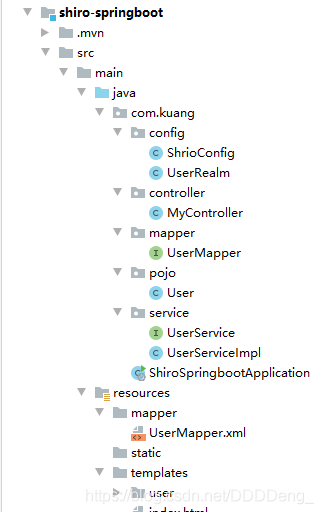
3、 编写Shiro配置类
@Configuration
public class ShrioConfig {

    //ShiroFilterFactoryBean : Step3
    @Bean
    public ShiroFilterFactoryBean getShrioFilterFactoryBean(@Qualifier("securityManager") DefaultWebSecurityManager defaultWebSecurityManager){
        ShiroFilterFactoryBean bean = new ShiroFilterFactoryBean();
        //设置安全管理器
        bean.setSecurityManager(defaultWebSecurityManager);

        //添加shiro的内置过滤器
        /*
            anno: 无需认证就可以访问
            authc: 必须认证了才可以访问
            user: 必须拥有 记住我 功能才能用
            perms: 拥有对某个资源的权限才能访问
            role: 拥有某个角色权限才能访问
        */

        Map<String, String> filterMap = new LinkedHashMap<>();

        //用户授权,正常情况下没有授权会跳转到授权页面
//user用户有add权限
        filterMap.put("/user/add","perms[user:add]");
        filterMap.put("/user/update","perms[user:update]");

        //拦截
        //filterMap.put("/user/add","authc");
        //filterMap.put("/user/update","authc");
        filterMap.put("/user/*","authc");

        //设置登录请求
        bean.setLoginUrl("/toLogin");
        //设置未授权页面
        bean.setUnauthorizedUrl("/noauth");
        bean.setFilterChainDefinitionMap(filterMap);
        return bean;
    }

    //DefaultWebSecurityManager : Step2
    @Bean("securityManager")
    public DefaultWebSecurityManager getDefaultWebSecurityManager(@Qualifier("userRealm") UserRealm userRealm){
        DefaultWebSecurityManager securityManager = new DefaultWebSecurityManager();
        //关联userRealm
        securityManager.setRealm(userRealm);
        return securityManager;
    }

    //创建 realm 对象, 需要自定义类:Step1
    @Bean
    public UserRealm userRealm(){
        return new UserRealm();
    }

    //整合 ShiroDialect:用来整合shiro thymeleaf
    @Bean
    public ShiroDialect getShiroDialect(){
        return new ShiroDialect();
    }
}
4、自定义UserRealm
//自定义的 UserRealm
public class UserRealm extends AuthorizingRealm {

    @Autowired
    UserServiceImpl userService;

    //授权
    @Override
    protected AuthorizationInfo doGetAuthorizationInfo(PrincipalCollection principalCollection) {
        System.out.println("执行了 => doGetAuthorizationInfo");

        SimpleAuthorizationInfo info = new SimpleAuthorizationInfo();
        // 拿到当前登录的这个对象
        Subject subject = SecurityUtils.getSubject();
        // 拿到User对象
        User currentUser = (User) subject.getPrincipal();
        // 设置当前用户的权限
        System.out.println(currentUser.getName() + "的权限为 " + currentUser.getPerms());
        info.addStringPermission(currentUser.getPerms());

        return info;
    }

    //认证
    @Override
    protected AuthenticationInfo doGetAuthenticationInfo(AuthenticationToken authenticationToken) throws AuthenticationException {
        System.out.println("执行了 => 认证AuthenticationToken");

        UsernamePasswordToken userToken = (UsernamePasswordToken) authenticationToken;
        //连接真实的数据库
        User user = userService.queryUserByName(userToken.getUsername());
        if(user == null){
            //没有这个人
            return null; //抛出异常 UnknownAccountException
        }

        // 登录成功 将用户信息存入session
        Subject currentSubject = SecurityUtils.getSubject();
        Session session = currentSubject.getSession();
        session.setAttribute("loginUser",user.getName());

        // 密码认证,shiro做
        return new SimpleAuthenticationInfo(user,user.getPassword(),"");
    }
}
@Controller
public class RouteController {
   @RequestMapping({"/noauth"})
    @ResponseBody
    public String unauthorized(){
        return "未经过授权无法访问";
    }

}
4、Shiro-thymeleaf整合
 <!-- shiro-thymeleaf 整合-->
        <dependency>
            <groupId>com.github.theborakompanioni</groupId>
            <artifactId>thymeleaf-extras-shiro</artifactId>
            <version>2.0.0</version>
        </dependency>
<!DOCTYPE html>
<html lang="en" xmlns:th="http://www.thymeleaf.org"
xmlns:shiro="http://www.thymeleaf.org/thymeleaf-extras-shiro">
<head>
<meta charset="utf-8">
</head>
<body>
<h1>首页</h1>
<div th:if="${session.loginUser==null}">
<a th:href="@{/toLogin}">登陆</a>
</div>
<p th:text="${msg}"></p>
<hr>
<div shiro:hasPermission="user:add">
<a th:href="@{/user/add}">add</a>
</div>
<div shiro:hasPermission="user:add">
<a th:href="@{/user/update}">update</a>
</div>
</body>
</html>@Configuration
public class ShiroConfig {
//创建 realm 对象, 需要自定义类:Step1
@Bean("userRealm")
public UserRealm userRealm() {
return new UserRealm();
}
//DefaultWebSecurityManager : Step2
@Bean("securityManager")
public DefaultWebSecurityManager getDefaultWebSecurityManager(@Qualifier("userRealm") UserRealm userRealm) {
DefaultWebSecurityManager securityManager = new DefaultWebSecurityManager();
//关联userRealm
securityManager.setRealm(userRealm);
return securityManager;
}
//ShiroFilterFactoryBean : Step3
@Bean
public ShiroFilterFactoryBean getShiroFilterFactoryBean(@Qualifier("securityManager") DefaultWebSecurityManager defaultWebSecurityManager) {
ShiroFilterFactoryBean bean = new ShiroFilterFactoryBean();
//设置安全管理器
bean.setSecurityManager(defaultWebSecurityManager);
//添加shiro的内置过滤器
/**
* anon:无需认证就可以访问
* authc:必须认证才可以访问
* user: 必须拥有记住我功能才能访问
* perms:拥有对某个字段的权限才能访问
* role: 拥有某个角色权限才能访问
*/
Map<String, String> filterMap = new LinkedHashMap<>();
//用户授权
//用户授权,正常情况下没有授权会跳转到授权页面
filterMap.put("/user/add","perms[user:add]");
filterMap.put("/user/update","perms[user:update]");
//认证
// filterMap.put("/user/add", "authc");
// filterMap.put("/user/update", "authc");
filterMap.put("/user/*", "authc");
bean.setFilterChainDefinitionMap(filterMap);
//设置登录的请求
bean.setLoginUrl("/toLogin");
//未授权页面
bean.setUnauthorizedUrl("/noauth");
return bean;
}
//整合ShiroDialect:用于整合shiro thymeleaf
@Bean
public ShiroDialect getShiroDialect(){
return new ShiroDialect();
}
}
5、SpringBoot的Controller页面跳转
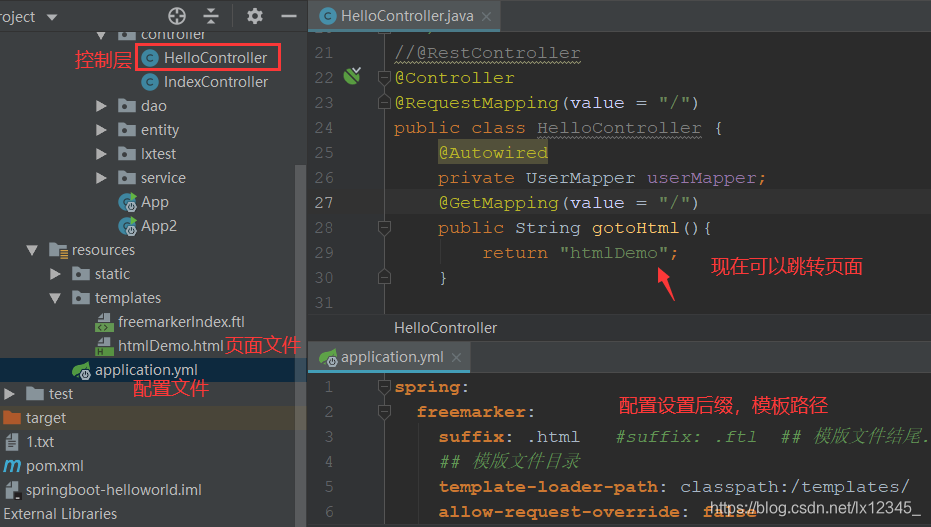
SpringBoot的Maven项目中,控制层加的是@RestController,页面没有跳转。改成@Controller后,就可以正常跳转了。原来@RestController注解,相当于@Controller+@ResponseBody两个注解的结合,但使用@RestController这个注解,就不能返回jsp,html页面,视图解析器无法解析jsp,html页面。@ResponseBody 表示该方法的返回结果直接写入 HTTP response body 中,一般在异步获取数据时使用【也就是AJAX】,在使用 @RequestMapping后,返回值通常解析为跳转路径,但是加上 @ResponseBody 后返回结果不会被解析为跳转路径,而是直接写入 HTTP response body 中。 比如异步获取 json 数据,加上 @ResponseBody 后,会直接返回 json 数据。附截图,以资记忆。
原文链接:https://blog.csdn.net/lx12345_/article/details/105181664
6、MD5加密
MD5加密:202CB962AC59075B964B07152D234B70
MD5盐值加密:202CB962AC59075B964B07152D234B70username
盐值加密目的:正常MD5加密不可逆,但是唯一的,可能会被破解,盐值加密的话会在原始的加密基础上再加一些内容