Latex入门教程(二)组织一篇文章
前言
这是一篇基本指令的介绍及使用方法。作者也是刚入门,和大家分享这篇学习笔记。有不对的地方,欢迎大家指正。
正文
\instruction[options]{}几乎是所有指令的格式。即指令+选择的属性+对应操作。
文件的序言
序言是指在正文之前的所有内容,也就是在写\begin{document}之前的所有内容。 在序言中,可以定义要编写的文档类型,要编写的语言,要使用的包以及其他几个元素。一般的序言如下所示:
\documentclass[12pt, letterpaper]{article}
\usepackage[utf8]{inputenc}
参数说明
在示例第一句中,额外参数设置字体大小(12pt)和纸张大小(letterpaper)。 当然可以使用其他字体大小(9pt,11pt,12pt),但如果没有指定,则默认大小为10pt。 至于纸张尺寸,其他可能的值是a4paper和legalpaper。
示例第二句是文档的编码。 它可以省略或更改为其他编码,但一般使用utf-8。
除此之外,还会加上标题、作者、日期
添加标题,作者和日期
语法如下所示。日期可以用注释部分表示,能自动识别当前日期。
\title{My first try}
\author{Jing Peng}
%\date{\today}
\date{April,2019}
同时,如果想致谢某个机构,可以在作者里面加入语句\thanks{}:
\author{patrici \thanks{funded by TeX Live}}
现在已经为文档提供了标题,作者和日期,可以在文章正文里使用\ maketitle命令在文档上打印此信息:
\begin{document}

\maketitle

This is my article!

\end{document}
如下图所示: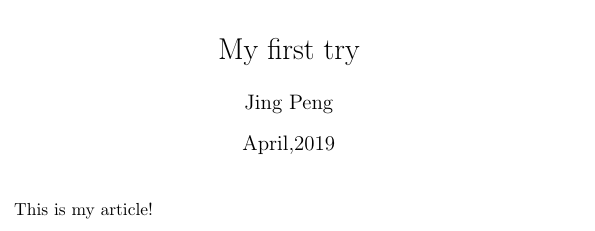
添加注释
我们可以在语句前后添加注释,和matlab一样,我们只要在“%”之后开始注释内容就可以了。
\begin{document}

\maketitle

This is my article!
% This is a comment

\end{document}
加粗,斜体和加下划线
示例如下:
You can make directions as follows to get a \textbf{bold}
or \underline{underling}
or \textit{italics}
effect.

强调文字
如果你想在文章里强调某个词,可以用\emph{}语句。其效果是:如果文字都是斜体,则强调部分变为正体;反之则为斜体。如下例所示:
Sometimes you can use a direction like \emph{to emphasize} something.

\textit{Sometimes you can use a direction like \emph{to emphasize} something.}

添加图
如果想在文章中添加图,则首先需要把图上传至texworks的工作路径。然后在语句中调用graphicx包。
\usepackage{graphicx}  % This is the package for figure-showing
\section{Figures}
\begin{figure}[h]
	\centering
	\includegraphics[width = .2\textwidth]{pic.jpg}
% pic is the name for your picture. If you create a list of figures this caption will be used there. You can place it above or below the figure.
	\caption{BIT logo}
% The label will number the image, and combined with the next command will allow you to reference it.
	\label{fig:pic}

\end{figure}

引用图
如果在文章中要对这张图进行解释说明需要引用它,可以用\ref{}语句:
As you can see in the figure \ref{fig:pic}.Images can be captioned, labelled and referenced by means of the figure environment

添加条目
当文章有分不同点论述时,可以添加条目。分为有序和无序,有序是以阿拉伯数字进行编号;无序则是用·进行索引。
有序条目
\textbf{Ordered lists}
\begin{enumerate}
  \item Each entry must be preceded by the control sequence \textbf{item} as shown, which will automatically generate the number labelling the item.
  \item The enumerate labels consists of sequential numbers starting at one.
\end{enumerate}

无序条目
\textbf{Unordered lists}
\begin{itemize}
  \item Unordered lists are produced by the itemize environment.
  \item Each entry must be preceded by the control sequence \textbf{item} as shown .
\end{itemize}

添加数学公式
文字内嵌入数学公式
In physics, the mass-energy equivalence is stated by the equation $E=mc^2$, discovered in 1905 by Albert Einstein.

文字外插入数学公式
可以在文字下方我加入数学公式,同时可以对公式进行编号,只需要用到下面的语句:
In physics, the mass-energy equivalence is stated
by the equation
\begin{equation}
E=mc^2
\end{equation}
which discovered in 1905 by Albert Einstein.

说明
对于数学公式表达式,给大家推荐一个latex在线数学公式编辑器,我们只要选择相应公式就可以生成一些数学表达式(从而偷懒不用写这方面的语句),有些语法会和TeX稍许不同,但是还是能编译出来,用法如下:
We can use online math editer to get the expression below, what we should do after that is to add \$\$ both in front of the expression and at the end of it.
$$\int_{0}^{1}\frac{1}{e^{x}}dx = \frac{e-1}{e}$$

参考资料
https://www.overleaf.com/learn/latex/Learn_LaTeX_in_30_minutes#The_preamble_of_a_document