何为心跳
顾名思义, 所谓 心跳, 即在 TCP 长连接中, 客户端和服务器之间定期发送的一种特殊的数据包, 通知对方自己还在线, 以确保 TCP 连接的有效性.
为什么需要心跳
因为网络的不可靠性, 有可能在 TCP 保持长连接的过程中, 由于某些突发情况, 例如网线被拔出, 突然掉电等, 会造成服务器和客户端的连接中断. 在这些突发情况下, 如果恰好服务器和客户端之间没有交互的话, 那么它们是不能在短时间内发现对方已经掉线的. 为了解决这个问题, 我们就需要引入 心跳 机制.
心跳的使用场景
长连接的应用场景非常的广泛,比如监控系统,IM系统,即时报价系统,推送服务等等。像这些场景都是比较注重实时性,如果每次发送数据都要进行一次DNS解析,建立连接的过程肯定是极其影响体验。
而长连接的维护必然需要一套机制来控制。比如 HTTP/1.0 通过在 header 头中添加 Connection:Keep-Alive参数,如果当前请求需要保活则添加该参数作为标识,否则服务端就不会保持该连接的状态,发送完数据之后就关闭连接。HTTP/1.1以后 Keep-Alive 是默认打开的。
Netty 是 基于 TCP 协议开发的,在四层协议 TCP 协议的实现中也提供了 keepalive 报文用来探测对端是否可用。TCP 层将在定时时间到后发送相应的 KeepAlive 探针以确定连接可用性。
tcp-keepalive,操作系统内核支持,但是不默认开启,应用需要自行开启,开启之后有三个参数会生效,来决定一个 keepalive 的行为。
net.ipv4.tcp_keepalive_time = 7200
net.ipv4.tcp_keepalive_probes = 9
net.ipv4.tcp_keepalive_intvl = 75
tcp_keepalive_time: 在 TCP 保活打开的情况下,最后一次数据交换到 TCP 发送第一个保活探测包的间隔,即允许的持续空闲时长,或者说每次正常发送心跳的周期,默认值为7200s(2h);
tcp_keepalive_probes: 在 tcp_keepalive_time 之后,没有接收到对方确认,继续发送保活探测包次数,默认值为9(次);
tcp_keepalive_intvl:在 tcp_keepalive_time 之后,没有接收到对方确认,继续发送保活探测包的发送频率,默认值为75s。
TCP KeepAlive 是用于检测连接的死活,而心跳机制则附带一个额外的功能:检测通讯双方的存活状态。两者听起来似乎是一个意思,但实际上却大相径庭。
考虑一种情况,某台服务器因为某些原因导致负载超高,CPU 100%,无法响应任何业务请求,但是使用 TCP 探针则仍旧能够确定连接状态,这就是典型的连接活着但业务提供方已死的状态,对客户端而言,这时的最好选择就是断线后重新连接其他服务器,而不是一直认为当前服务器是可用状态一直向当前服务器发送些必然会失败的请求。
可以通过如下命令查看系统tcp-keepalive参数配置:
sysctl -a | grep keepalive

cat /proc/sys/net/ipv4/tcp_keepalive_time

sysctl net.ipv4.tcp_keepalive_time
Netty 中也提供了设置 tcp-keepalive 的设置:
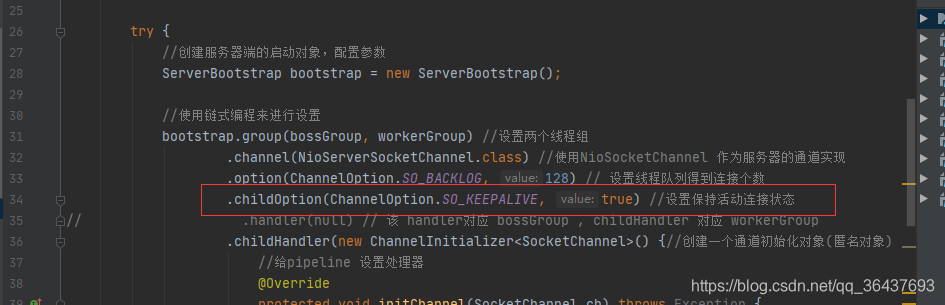
设置childOption(ChannelOption.SO_KEEPALIVE, true) 表示打开 TCP 的 keepAlive 设置。
所以基础协议对应用来说不是那么尽善尽美,一个 Netty 服务端可能会面临上万个连接,如何去维护这些连接是应用应该去处理的事情。在 Netty 中提供了 IdleStateHandler 类专门用于处理心跳。
心跳机制的工作原理
在服务器和客户端之间一定时间内没有数据交互时, 即处于 idle 状态时, 客户端或服务器会发送一个特殊的数据包给对方, 当接收方收到这个数据报文后, 也立即发送一个特殊的数据报文, 回应发送方, 此即一个 PING-PONG 交互. 自然地, 当某一端收到心跳消息后, 就知道了对方仍然在线, 这就确保 TCP 连接的有效性.
如何实现心跳
我们可以通过两种方式实现心跳机制:
使用 TCP 协议层面的 keepalive 机制.
在应用层上实现自定义的心跳机制.
虽然在 TCP 协议层面上, 提供了 keepalive 保活机制, 但是使用它有几个缺点:
它不是 TCP 的标准协议, 并且是默认关闭的.
TCP keepalive 机制依赖于操作系统的实现, 默认的 keepalive 心跳时间是 两个小时, 并且对 keepalive 的修改需要系统调用(或者修改系统配置), 灵活性不够.
TCP keepalive 与 TCP 协议绑定, 因此如果需要更换为 UDP 协议时, keepalive 机制就失效了.
虽然使用 TCP 层面的 keepalive 机制比自定义的应用层心跳机制节省流量, 但是基于上面的几点缺点, 一般的实践中, 人们大多数都是选择在应用层上实现自定义的心跳.
既然如此, 那么我们就来大致看看在在 Netty 中是怎么实现心跳的吧. 在 Netty 中, 实现心跳机制的关键是 IdleStateHandler, 它可以对一个 Channel 的 读/写设置定时器, 当 Channel 在一定事件间隔内没有数据交互时(即处于 idle 状态), 就会触发指定的事件.
使用 Netty 实现心跳
上面我们提到了, 在 Netty 中, 实现心跳机制的关键是 IdleStateHandler, 那么这个 Handler 如何使用呢? 我们来看看它的构造器:
public IdleStateHandler(int readerIdleTimeSeconds, int writerIdleTimeSeconds, int allIdleTimeSeconds) {
    this((long)readerIdleTimeSeconds, (long)writerIdleTimeSeconds, (long)allIdleTimeSeconds, TimeUnit.SECONDS);
}
实例化一个 IdleStateHandler 需要提供三个参数:
readerIdleTimeSeconds, 读超时. 即当在指定的时间间隔内没有从 Channel 读取到数据时, 会触发一个 READER_IDLE 的 IdleStateEvent 事件.
writerIdleTimeSeconds, 写超时. 即当在指定的时间间隔内没有数据写入到 Channel 时, 会触发一个 WRITER_IDLE 的 IdleStateEvent 事件.
allIdleTimeSeconds, 读/写超时. 即当在指定的时间间隔内没有读或写操作时, 会触发一个 ALL_IDLE 的 IdleStateEvent 事件.
除此之外,unit决定是时间的类型,可以设置秒,分钟等
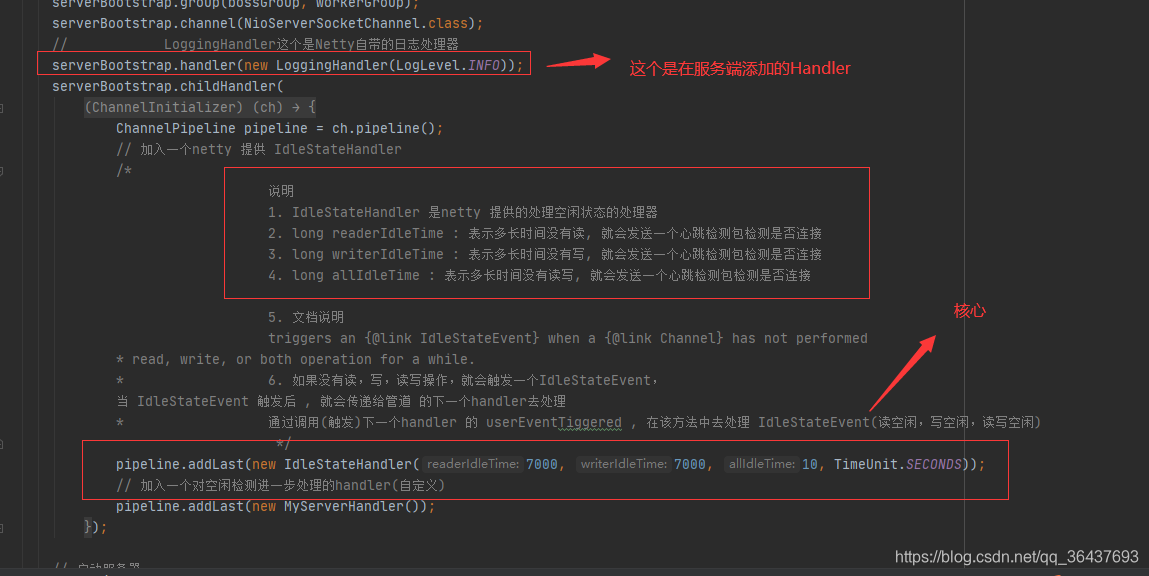
IdleStateHandler处理流程:如果没有读,写,读写操作,就会触发一个IdleStateEvent, 当 IdleStateEvent 触发后 , 就会传递给管道 的下一个handler去处理 ,通过调用(触发)下一个handler 的 userEventTiggered , 在该方法中去处理 IdleStateEvent(读空闲,写空闲,读写空闲)
服务端代码:
package com.atguigu.netty.heartbeat;

import io.netty.bootstrap.ServerBootstrap;
import io.netty.channel.ChannelFuture;
import io.netty.channel.ChannelInitializer;
import io.netty.channel.ChannelPipeline;
import io.netty.channel.EventLoopGroup;
import io.netty.channel.nio.NioEventLoopGroup;
import io.netty.channel.socket.SocketChannel;
import io.netty.channel.socket.nio.NioServerSocketChannel;
import io.netty.handler.logging.LogLevel;
import io.netty.handler.logging.LoggingHandler;
import io.netty.handler.timeout.IdleStateHandler;

import java.util.concurrent.TimeUnit;

public class MyServer {
  public static void main(String[] args) throws Exception {

    // 创建两个线程组
    EventLoopGroup bossGroup = new NioEventLoopGroup(1);
    EventLoopGroup workerGroup = new NioEventLoopGroup(); // 8个NioEventLoop
    try {

      ServerBootstrap serverBootstrap = new ServerBootstrap();

      serverBootstrap.group(bossGroup, workerGroup);
      serverBootstrap.channel(NioServerSocketChannel.class);
      //            LoggingHandler这个是Netty自带的日志处理器
      serverBootstrap.handler(new LoggingHandler(LogLevel.INFO));
      serverBootstrap.childHandler(
          new ChannelInitializer<SocketChannel>() {

            @Override
            protected void initChannel(SocketChannel ch) throws Exception {
              ChannelPipeline pipeline = ch.pipeline();
              // 加入一个netty 提供 IdleStateHandler
              /*
                                 说明
                                 1. IdleStateHandler 是netty 提供的处理空闲状态的处理器
                                 2. long readerIdleTime : 表示多长时间没有读, 就会发送一个心跳检测包检测是否连接
                                 3. long writerIdleTime : 表示多长时间没有写, 就会发送一个心跳检测包检测是否连接
                                 4. long allIdleTime : 表示多长时间没有读写, 就会发送一个心跳检测包检测是否连接

                                 5. 文档说明
                                 triggers an {@link IdleStateEvent} when a {@link Channel} has not performed
              * read, write, or both operation for a while.
              *                  6. 如果没有读,写,读写操作,就会触发一个IdleStateEvent,
              当 IdleStateEvent 触发后 , 就会传递给管道 的下一个handler去处理
              *                  通过调用(触发)下一个handler 的 userEventTiggered , 在该方法中去处理 IdleStateEvent(读空闲,写空闲,读写空闲)
                                  */
              pipeline.addLast(new IdleStateHandler(7000, 7000, 10, TimeUnit.SECONDS));
              // 加入一个对空闲检测进一步处理的handler(自定义)
              pipeline.addLast(new MyServerHandler());
            }
          });

      // 启动服务器
      ChannelFuture channelFuture = serverBootstrap.bind(7000).sync();
      channelFuture.channel().closeFuture().sync();

    } finally {
      bossGroup.shutdownGracefully();
      workerGroup.shutdownGracefully();
    }
  }
}
服务端Handler
package com.atguigu.netty.heartbeat;

import io.netty.channel.ChannelHandlerContext;
import io.netty.channel.ChannelInboundHandlerAdapter;
import io.netty.handler.timeout.IdleStateEvent;

public class MyServerHandler extends ChannelInboundHandlerAdapter {

    /**
     *
     * @param ctx 上下文
     * @param evt 事件
     * @throws Exception
     */
//    这里处理心跳监测事件
    @Override
    public void userEventTriggered(ChannelHandlerContext ctx, Object evt) throws Exception {

        if(evt instanceof IdleStateEvent) {

            //将  evt 向下转型 IdleStateEvent
            IdleStateEvent event = (IdleStateEvent) evt;
            String eventType = null;
            switch (event.state()) {
                case READER_IDLE:
                  eventType = "读空闲";
                  break;
                case WRITER_IDLE:
                    eventType = "写空闲";
                    break;
                case ALL_IDLE:
                    eventType = "读写空闲";
                    break;
            }
            System.out.println(ctx.channel().remoteAddress() + "--超时时间--" + eventType);
            System.out.println("服务器做相应处理..");

            //如果发生空闲,我们关闭通道,只能触发一个,后面的就都不执行了
           // ctx.channel().close();
        }
    }
}
客户端
package com.atguigu.netty.heartbeat;

import com.atguigu.netty.groupchat.GroupChatClientHandler;
import io.netty.bootstrap.Bootstrap;
import io.netty.channel.*;
import io.netty.channel.nio.NioEventLoopGroup;
import io.netty.channel.socket.SocketChannel;
import io.netty.channel.socket.nio.NioSocketChannel;
import io.netty.handler.codec.string.StringDecoder;
import io.netty.handler.codec.string.StringEncoder;

import java.util.Scanner;


public class GroupChatClient {

    //属性
    private final String host;
    private final int port;

    public GroupChatClient(String host, int port) {
        this.host = host;
        this.port = port;
    }

    public void run() throws Exception{
        EventLoopGroup group = new NioEventLoopGroup();

        try {


        Bootstrap bootstrap = new Bootstrap()
                .group(group)
                .channel(NioSocketChannel.class)
                .handler(new ChannelInitializer<SocketChannel>() {

                    @Override
                    protected void initChannel(SocketChannel ch) throws Exception {

                        //得到pipeline
                        ChannelPipeline pipeline = ch.pipeline();
                        //加入相关handler
                        pipeline.addLast("decoder", new StringDecoder());
                        pipeline.addLast("encoder", new StringEncoder());
                        //加入自定义的handler
                        pipeline.addLast(new GroupChatClientHandler());
                    }
                });

        ChannelFuture channelFuture = bootstrap.connect(host, port).sync();
        //得到channel
            Channel channel = channelFuture.channel();
            System.out.println("-------" + channel.localAddress()+ "--------");
            //客户端需要输入信息,创建一个扫描器
            Scanner scanner = new Scanner(System.in);
            while (scanner.hasNextLine()) {
                String msg = scanner.nextLine();
                //通过channel 发送到服务器端
                channel.writeAndFlush(msg + "\r\n");
            }
        }finally {
            group.shutdownGracefully();
        }
    }

    public static void main(String[] args) throws Exception {
        new GroupChatClient("127.0.0.1", 7000).run();
    }
}
客户端Handler
package com.atguigu.netty.heartbeat;

import io.netty.channel.ChannelHandlerContext;
import io.netty.channel.SimpleChannelInboundHandler;

public class GroupChatClientHandler extends SimpleChannelInboundHandler<String> {
    @Override
    protected void channelRead0(ChannelHandlerContext ctx, String msg) throws Exception {
        System.out.println(msg.trim());
    }
}
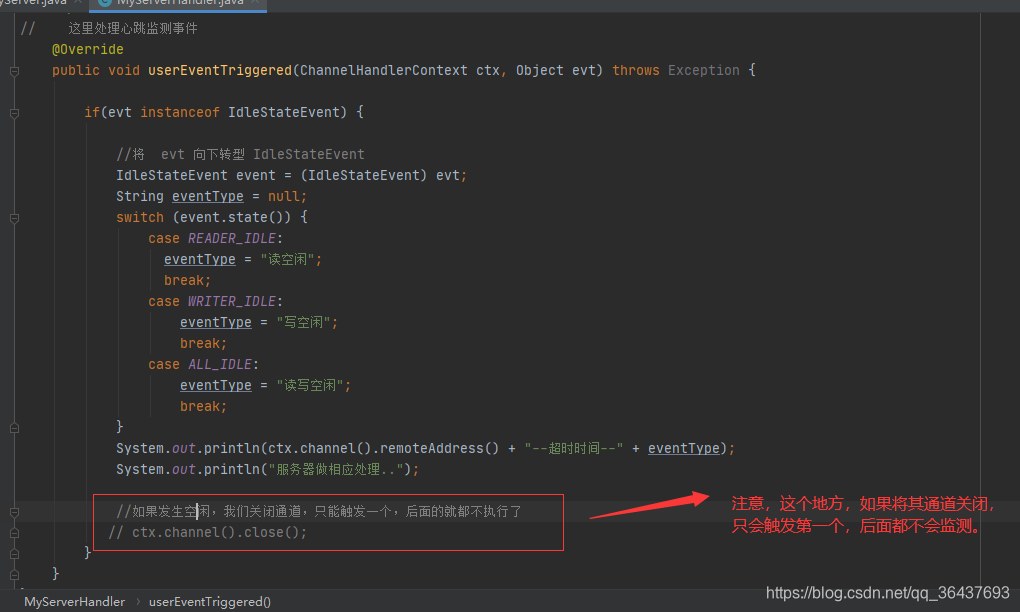
代码关键点:
总结
使用 Netty 实现心跳机制的关键就是利用 IdleStateHandler 来产生对应的 IdleStateEvent 事件.
一般是客户端负责发送心跳的 PING 消息, 因此客户端注意关注 ALL_IDLE 事件, 在这个事件触发后, 客户端需要向服务器发送 PING 消息, 告诉服务器"我还存活着".
服务器是接收客户端的 PING 消息的, 因此服务器关注的是 READER_IDLE 事件, 并且服务器的 READER_IDLE 间隔需要比客户端的 ALL_IDLE 事件间隔大(例如客户端ALL_IDLE 是5s 没有读写时触发, 因此服务器的 READER_IDLE 可以设置为10s)
当服务器收到客户端的 PING 消息时, 会发送一个 PONG 消息作为回复. 一个 PING-PONG 消息对就是一个心跳交互.
参考文档:https://blog.csdn.net/a953713428/article/details/106317445