1. Mapper接口的传参
在mapper文件中,每个sql语句的id都是唯一的,所以在mapper接口中定义重载方法没有意义。
1.1 接口方法传一个基本类型的参数
当接口方法有一个基本类型参数时,mapper文件中的sql语句中可以使用 #{任意名称} 引用这个参数;
List<StudentInfo> list1(Integer stuId); <select id="list1" resultType="StudentInfo">
select * from studentInfo
where studentId = #{xxx}
</select>1.2 接口方法传多个基本类型参数
当接口方法中有多个参数时, mapper不能直接使用参数名引用参数,可以使用 #{arg0},
#{arg1}这种特定的参数名来依次传参,或者用 #{param1},#{param2};
List<StudentInfo> list2(Integer stuId,String name); <select id="list2" resultType="StudentInfo">
select * from studentInfo
where studentId = #{arg0} and name = #{arg1}
</select>1.3 为方法参数设置别名
对于多个参数使用上中方式不够直观,可以通过 @Param注解 为接口方法的参数设置别名,mybatis会自动将多个参数数据封装到Map对象中;
List<StudentInfo> studentList1(@Param("studentId") Integer studentId,
                                   @Param("classId") Integer classId);
<select id="studentList1" resultMap="studentMap">
select studentId,name,sex,birthday,province,s.classId,
c.classId,c.className
from studentInfo s join classInfo c
on s.classId = c.classId
<where>
<if test="studentId!=null and studentId!=''">
and studentId > #{studentId}
</if>
<if test="classId!=null and classId!= ''">
and s.classId = #{classId}
</if>
</where>
</select>1.4 传入对象类型的参数
方法参数用对象封装,在mapper文件中可以直接引用对象属性;
List<StudentInfo> listByStu(StudentInfo studentInfo);
    <select id="listByStudent" resultType="StudentMap" parameterType="StudentInfo">
        select * from studentInfo
        where sex = #{sex} and name like concat("%",#{name},"%")
    </select>
1.5 #{} 和 ${} 区别
#{ }:是一个参数占位符,mybatis默认使用PreparedStatement 来执行sql语句,#{} 等价于 占位符 ?;
${ }:用字符串拼接的方式,拼接sql语句,当方法参数只有一个值的时候,同时没有设置 @Param 注解时可以使用 ${value} 来引用参数,同时不安全,sql注入。
2. resultType和resultMap的使用
对于查询而言,除了使用resultType指定返回记录类型,也可以使用resultMap进行查询结果的映射。
resultType:查询结果是单表数据(单一实体),或者插叙的列名和实体属性能一一对应,一般 用于简单结果集的映射配置;
resultMap:查询是多表数据(有多个实体),或者查询的列名和实体属性不能对应,一般用于 复杂结果集的映射配置。
2.1 一对一查询的配置
一个学生对应一个班级;
@Data
public class StudentInfo {
    private Integer studentId;
    private String name;
    private String sex;
    private Date birthday;
    private String province;
    private Integer classId;

    private ClassInfo classInfo;
}
sql:
    <resultMap id="studentMap" type="StudentInfo" autoMapping="true">
        <association property="classInfo" javaType="ClassInfo" autoMapping="true"/>
    </resultMap>
    <select id="studentList" resultMap="studentMap">
        select studentId,name,sex,birthday,province,s.classId,
               c.classId,c.className
        from studentInfo s join classInfo c
        on s.classId = c.classId
</select>| 属性名称 | 作用 |
| property | 对象属性名称 |
| javaType | 对象属性的类型 |
| column | 所对应的外键字段名称 |
| select | 使用另一个查询封装结果 |
2.2 一对多的配置
一个班级对应多个学生;
@Data
public class ClassInfo {
    private Integer classId;
    private String className;

    private List<StudentInfo> studentList;
}
sql:
    <resultMap id="classMap" type="classInfo" autoMapping="true">
        <!--必须配置主键列-->
        <id property="classId" column="classId"/>
        <collection property="studentList" ofType="studentInfo" autoMapping="true">

        </collection>
    </resultMap>
    <select id="classList" resultMap="classMap">
        select studentId,name,sex,birthday,province,s.classId,
               c.classId,c.className
        from studentInfo s join classInfo c
        on s.classId = c.classId
</select>| 属性名称 | 作用 |
| property | 对象属性名称 |
| ofType | 对象属性类型 |
| column | 所对应的外键字段名称 |
| select | 使用另一个查询封装结果 |
3. MyBatis 的动态SQL
使用动态sql标签
3.1 if
条件判断,动态拼接sql;
一般用于非空验证,不满足条件,if标签里面的代码就不会执行。
3.2 where
一般和if结合使用,根据参数动态拼接sql,特点:
①当需要拼接条件时,根据参数值动态拼接sql;
②自动去除第一个条件前面的and关键字。
<select id="studentList1" resultMap="studentMap">
select studentId,name,sex,birthday,province,s.classId,
c.classId,c.className
from studentInfo s join classInfo c
on s.classId = c.classId
<where>
<if test="studentId!=null and studentId!=''">
and studentId > #{studentId}
</if>
<if test="classId!=null and classId!= ''">
and s.classId = #{classId}
</if>
</where>
</select>此外,在xml文件中尽量避免直接写 >,<,& 等;
| 特殊符号 | 转义序列 |
| < | < |
| <= | <= |
| > | > |
| >= | >= |
| & | & |
| ' | ' |
| " | " |
备用方式:
<
可以使用延迟加载技术解决这个问题;
延迟加载,就是再进行关联查询的时候,按照设置的延迟规则推迟对关联对象的查询;延迟加载可以有效的减少数据库的压力,延迟加载只是对有延迟设置的关联对象的推迟查询,对于主查询是直接执行sql。
MyBatis关联查询加载时机:
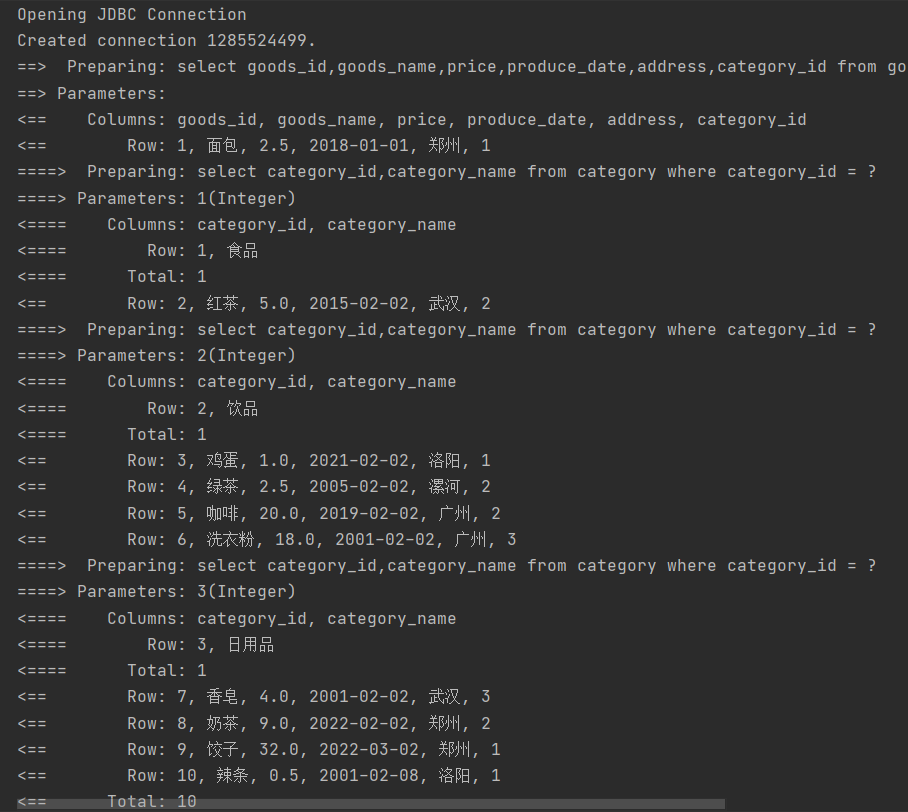
①直接加载:执行完主对象的查询后,马上执行对关联对象的查询语句;
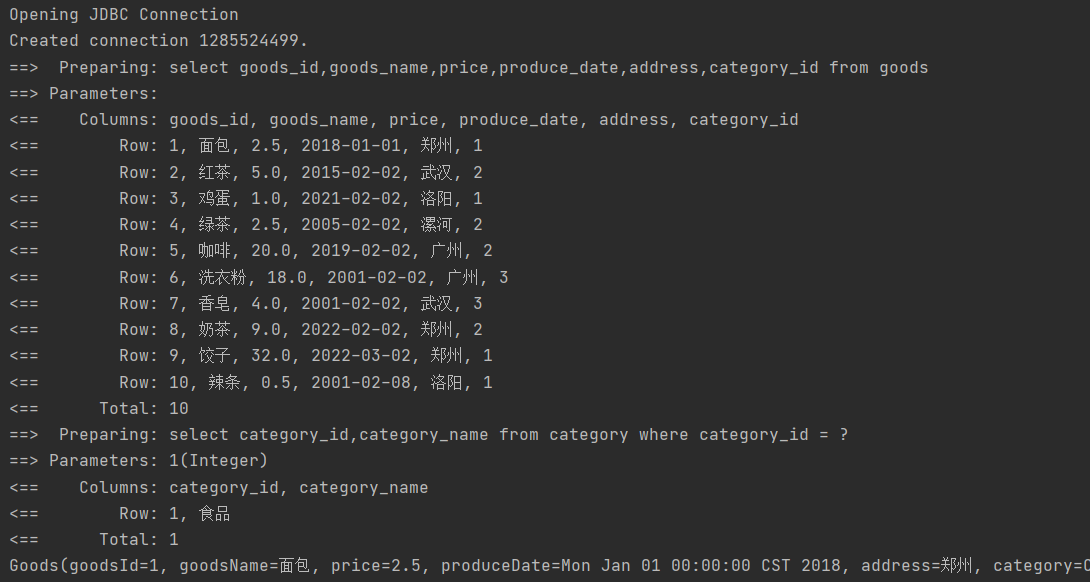
②侵入式延迟:执行完对主对象的查询后,不会执行对关联对象的查询,但当访问主对象的属性时,就会执行关联对象的查询;
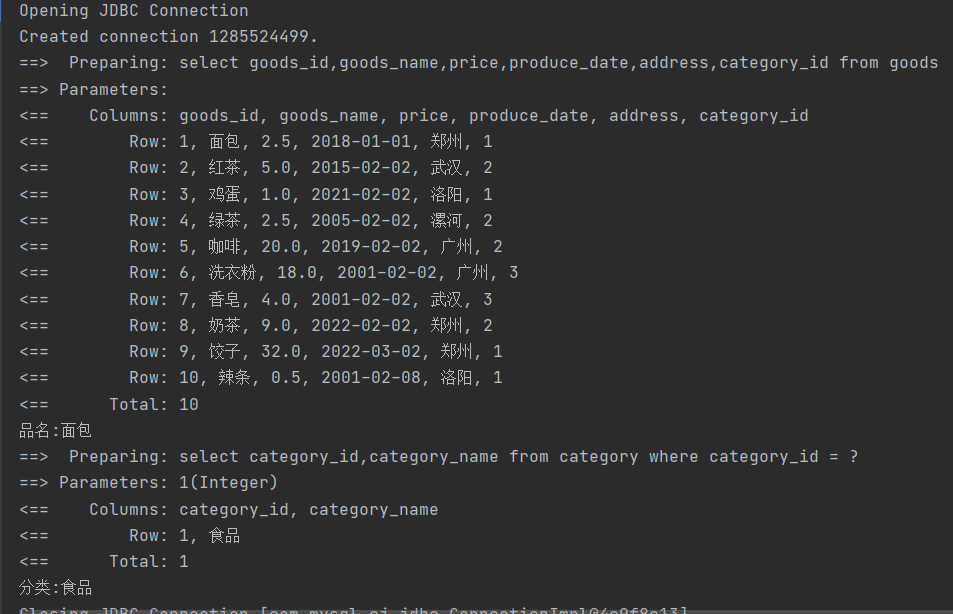
③深度延迟:只有当真正访问关联对象的详情时,才会执行查询语句。
4.1 MyBatis延迟加载实现方式
4.1.1 全局延迟
①直接加载(默认)
        <setting name="lazyLoadingEnabled" value="false"/>
        <setting name="aggressiveLazyLoading" value="false"/>
②侵入式延迟:
        <setting name="lazyLoadingEnabled" value="true"/>
        <setting name="aggressiveLazyLoading" value="true"/>
效果:
(访问对象属性时执行关联对象查询)
③深度延迟:
(访问关联对象时执行关联查询)
4.1.2 部分延迟
在关联查询collection,association标签上添加fetchType属性;
lazy:(深度)延迟加载
eager:立即加载
指定属性后,在映射配置中的全局配置 lazyLoadingEnabled会被忽略。
    <resultMap id="goodsMap2" type="Goods" autoMapping="true">
        <id property="goodsId" column="goods_id"/>
        <association property="category"
                     javaType="Category"
                     column="category_id"
                     select="com.mapper.CategoryMapper.category"
                     fetchType="eager">
        </association>
    </resultMap>