#include "stdafx.h"
#include <Windows.h>
#include <iostream>
#include <string>
using namespace std;

#include <osgViewer/Viewer>
#include <osg/Node>
#include <osg/Geode>
#include <osg/Geometry>
#include <osg/Group>
#include <osg/Switch>
#include <osg/Billboard>
#include <osg/Texture2D>
#include <osg/Image>
#include <osg/Vec3>
#include <osg/Vec2>
#include <osg/PositionAttitudeTransform>
#include <osg/MatrixTransform>
#include <osgDB/ReadFile>
#include <osgDB/WriteFile>
#include <osgUtil/Optimizer>
#include <osg/PagedLOD>
#include <osgSim/Impostor>
#include <osgViewer/ViewerEventHandlers> //事件监听
#include <osgGA/StateSetManipulator> //事件响应类,对渲染状态进行控制
#include <osgUtil/Simplifier> //简化几何体
#include <osg/ClipPlane>
#include <osg/StateAttribute>

#include <osgEarth/MapNode>
#include <osgEarth/ImageLayer>
#include <osgEarth/GLUtils>

#include <osgEarthDrivers/gdal/GDALOptions>
#include <osgEarthDrivers/cache_filesystem/FileSystemCache>
#include <osgEarthDrivers/feature_ogr/OGRFeatureOptions>

#include <osgEarthFeatures/FeatureSourceLayer>
#include <osgEarthFeatures/FeatureModelLayer>
#include <osgEarthUtil/EarthManipulator>

#pragma comment(lib, "OpenThreadsd.lib")
#pragma comment(lib, "osgd.lib")
#pragma comment(lib, "osgDBd.lib")
#pragma comment(lib, "osgUtild.lib")
#pragma comment(lib, "osgGAd.lib")
#pragma comment(lib, "osgViewerd.lib")
#pragma comment(lib, "osgTextd.lib")
#pragma comment(lib, "osgSimd.lib")

#pragma comment(lib, "osgEarthd.lib")
#pragma comment(lib, "osgEarthFeaturesd.lib")
#pragma comment(lib, "osgEarthUtild.lib")
#pragma comment(lib, "osgEarthSymbologyd.lib")

int main()
{
	osg::ref_ptr<osgViewer::Viewer> viewer = new osgViewer::Viewer();

	osg::ref_ptr<osg::Group> root = new osg::Group();

	osg::ref_ptr<osg::Node> node = osgDB::readNodeFile("arcgisonline.earth");

	root->addChild(node.get());

	//优化场景数据
	osgUtil::Optimizer optimzier;
	optimzier.optimize(root.get());
	viewer->addEventHandler(new osgGA::StateSetManipulator(viewer->getCamera()->getOrCreateStateSet()));
	viewer->addEventHandler(new osgViewer::StatsHandler());//实现状态信息统计
	viewer->addEventHandler(new osgViewer::WindowSizeHandler());

	viewer->setSceneData(root.get());

	viewer->realize();

	viewer->run();

	return 0;

}
arcgisonline.earth文件如下:
<map name="ArcGIS Online" type="geocentric" version="2">
    <image name="arcgis-world-imagery" driver="arcgis">
        <url>http://services.arcgisonline.com/ArcGIS/rest/services/World_Imagery/MapServer</url>
<nodata_image>http://services.arcgisonline.com/ArcGIS/rest/services/World_Imagery/MapServer/tile/0/0/0.jpeg</nodata_image>
    </image>
    <image name="arcgis-transportation" driver="arcgis">
         <url>http://services.arcgisonline.com/ArcGIS/rest/services/Reference/World_Transportation/MapServer</url>
  </image>
    <image name="arcgis-reference-overlay" driver="arcgis">
        <url>http://services.arcgisonline.com/ArcGIS/rest/services/Reference/World_Boundaries_and_Places_Alternate/MapServer</url>
    </image>
    <options>
        <lighting>false</lighting>
          <terrain>
            <min_tile_range_factor>9</min_tile_range_factor>
        </terrain>
     </options>
</map>
显示效果如下: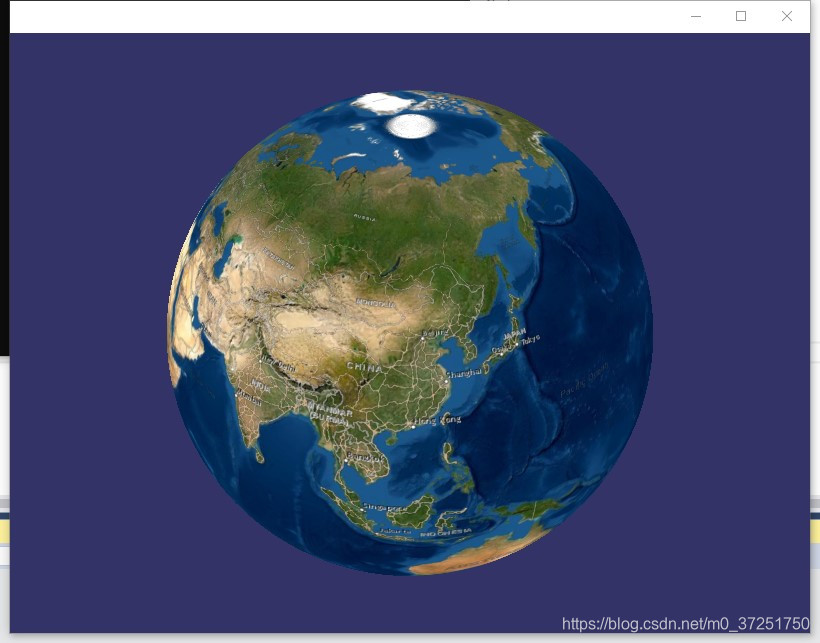
版权声明:本文为m0_37251750原创文章,遵循CC 4.0 BY-SA版权协议,转载请附上原文出处链接和本声明。