安装texLive
双击install-tl-windows.exe下载。
出现以下问题:
...
Installing [4258/4258, time/total: 02:01:24/02:03:24]: zztex [147k]
Retrying to install: easybook [624k]
TeXLive::TLUtils::check_file_and_remove: checksums differ for C:\Users\lenovo\AppData\Local\Temp\yYrbLSK6Rh\0uMWBkzgqt/easybook.tar.xz:
TeXLive::TLUtils::check_file_and_remove:   tlchecksum=bea1e82bd1bd01fd873cd123614d71ed1958867b79d3efa21447a735ccfa611ceeb146e4790cb1bfeae67a3cf21577a41de5db072a10ac24b936fbf9013d2ea9, arg=92dc5eef6f1ad281dd382e2fc1cbba46e72c4f4114ea1e0b23f1a7956c6d993540f53f594362433f9384b26c9c0a147531d620a4e63c3c680a746569eaa78213
TeXLive::TLUtils::check_file_and_remove: backtrace:
 -> C:/Users/lenovo/AppData/Local/Temp/nsb7AFF.tmp/install-tl-20211112/tlpkg/TeXLive/TLUtils.pm:2399: TeXLive::TLUtils::check_file_and_remove
 -> C:/Users/lenovo/AppData/Local/Temp/nsb7AFF.tmp/install-tl-20211112/tlpkg/TeXLive/TLPDB.pm:1978: TeXLive::TLUtils::unpack
 -> C:/Users/lenovo/AppData/Local/Temp/nsb7AFF.tmp/install-tl-20211112/tlpkg/TeXLive/TLPDB.pm:1813: TeXLive::TLPDB::_install_data
 -> C:/Users/lenovo/AppData/Local/Temp/nsb7AFF.tmp/install-tl-20211112/tlpkg/TeXLive/TLPDB.pm:1729: TeXLive::TLPDB::not_virtual_install_package
 -> C:/Users/lenovo/AppData/Local/Temp/nsb7AFF.tmp/install-tl-20211112/tlpkg/TeXLive/TLUtils.pm:1633: TeXLive::TLPDB::install_package
 -> C:/Users/lenovo/AppData/Local/Temp/nsb7AFF.tmp/install-tl-20211112/install-tl:2135: TeXLive::TLUtils::install_packages
 -> C:/Users/lenovo/AppData/Local/Temp/nsb7AFF.tmp/install-tl-20211112/install-tl:946: main::do_install_packages
 -> C:/Users/lenovo/AppData/Local/Temp/nsb7AFF.tmp/install-tl-20211112/install-tl:700: main::do_installation
TeXLive::TLUtils::check_file_and_remove:   removing C:\Users\lenovo\AppData\Local\Temp\yYrbLSK6Rh\0uMWBkzgqt/easybook.tar.xz, but saving copy in C:\Users\lenovo\AppData\Local\Temp\P1hqORviSl
TLPDB::_install_data: downloading did not succeed (check_file_and_remove failed) for https://mirrors.sjtug.sjtu.edu.cn/ctan/systems/texlive/tlnet/archive/easybook.tar.xz
Installation failed.
Rerunning the installer will try to restart the installation.
Or you can restart by running the installer with:
  install-tl-windows.bat --profile installation.profile [YOUR-EXTRA-ARGS]
or
  install-tl-advanced.bat --profile installation.profile [YOUR-EXTRA-ARGS]
C:/Users/lenovo/AppData/Local/Temp/nsb7AFF.tmp/install-tl-20211112/install-tl: Writing log in current directory: C:/Users/lenovo/AppData/Local/Temp/nsb7AFF.tmp/install-tl.log
测试是否安装成功:
> xelatex -v
> latex -v
> tex -v
如果没有自动配置路径,请将D:\ProgramFiles\texlive\2021\bin\win32加入到环境变量的path中。
用命令行编译tex文件:
# 如果是纯英文
pdflatex main
# 如果是中文
xelatex main
编译出现的bug:
C:\Users\lenovo\Desktop\vscode>latex demo.tex
This is pdfTeX, Version 3.141592653-2.6-1.40.23 (TeX Live 2021/W32TeX) (preloaded format=latex)
 restricted \write18 enabled.

kpathsea: Running mktexfmt latex.fmt

The command name is D:\ProgramFiles\texlive\2021\bin\win32\mktexfmt
Running the command D:\ProgramFiles\texlive\2021\bin\win32\fmtutil-user.exe
D:\ProgramFiles\texlive\2021\bin\win32\runscript.tlu:935: D:\ProgramFiles\texlive\2021\bin\win32\runscript.tlu:858:
no appropriate script or program found: fmtutil
I can't find the format file `latex.fmt'!
网上的解决方式:
> fmtutil-sys --all
# runscript.tlu:858: no appropriate script or program found: fmtutil
以上未解决我的问题。
fmtutil文档
该问题仍没有解决!
后来我发现,我安装乱了,D盘下安装的缺少一些文件,想卸载,在D:\ProgramFiles\texlive\2021\tlpkg\installer目录下都没有uninst.bat,我想一定还缺少别的东西。而且我还发现,曾经下载了多次,C盘也有一个完整版本,索性把C盘下载的卸载掉;D盘下载的没法卸载,就把文件夹都删掉(texlive应该不会修改电脑内部的注册表等,因此直接文件夹可以删除干净,不过最好还是用uninst.bat卸载)
重新下载使用texlive2021.iso镜像,解压之后运行install-tl-windows.bat,除了修改安装路径以外,其余都不需要动。
下载vscode,在扩展中安装latex workshop插件;安装好之后,在vscode中配置setting(在 VSCode 界面下按下 F1,然后键入“setjson”,点击“首选项: 打开设置(JSON)”):
{
    // LaTeX
    "latex-workshop.latex.autoBuild.run": "never",
    "latex-workshop.message.error.show": false,
    "latex-workshop.message.warning.show": false,
    "latex-workshop.latex.tools": [
        {
            "name": "xelatex",
            "command": "xelatex",
            "args": [
                "-synctex=1",
                "-interaction=nonstopmode",
                "-file-line-error",
                "-pdf",
                "%DOCFILE%"
            ]
        },
        {
            "name": "pdflatex",
            "command": "pdflatex",
            "args": [
                "-synctex=1",
                "-interaction=nonstopmode",
                "-file-line-error",
                "%DOCFILE%"
            ]
        },
        {
            "name": "bibtex",
            "command": "bibtex",
            "args": [
                "%DOCFILE%"
            ]
        }
    ],
    "latex-workshop.latex.recipes": [
        {
            "name": "xelatex",
            "tools": [
                "xelatex"
            ],
        },
        {
            "name": "pdflatex",
            "tools": [
                "pdflatex"
            ]
        },
        {
            "name": "xe->bib->xe->xe",
            "tools": [
                "xelatex",
                "bibtex",
                "xelatex",
                "xelatex"
            ]
        },
        {
            "name": "pdf->bib->pdf->pdf",
            "tools": [
                "pdflatex",
                "bibtex",
                "pdflatex",
                "pdflatex"
            ]
        }
    ],
    "latex-workshop.view.pdf.viewer": "external",
    "latex-workshop.view.pdf.external.viewer.command": "D:/ProgramFiles/SumatraPDF-3.2-64/SumatraPDF-3.3.3-32.exe",
    "latex-workshop.view.pdf.external.viewer.args": [
        "-forward-search",
        "%TEX%",
        "%LINE%",
        "-reuse-instance",
        "-inverse-search",
        "\"D:/ProgramFiles/Microsoft VS Code/Code.exe\" \"D:/ProgramFiles/Microsoft VS Code/resources/app/out/cli.js\" -gr \"%f\":\"%l\"",
        "%PDF%"
    ],
    "latex-workshop.view.pdf.external.synctex.command": "D:/ProgramFiles/SumatraPDF-3.2-64/SumatraPDF-3.3.3-32.exe",
    "latex-workshop.view.pdf.external.synctex.args": [
        "-forward-search",
        "%TEX%",
        "%LINE%",
        "-reuse-instance",
        "-inverse-search",
        "\"D:/ProgramFiles/Microsoft VS Code/Code.exe\" \"D:/ProgramFiles/Microsoft VS Code/resources/app/out/cli.js\" -gr \"%f\":\"%l\"",
        "%PDF%",
    ],
    "workbench.colorTheme": "Eva Dark", // 代码风格
}
然后,环境变量也不需要配置texlive的路径,就可以用。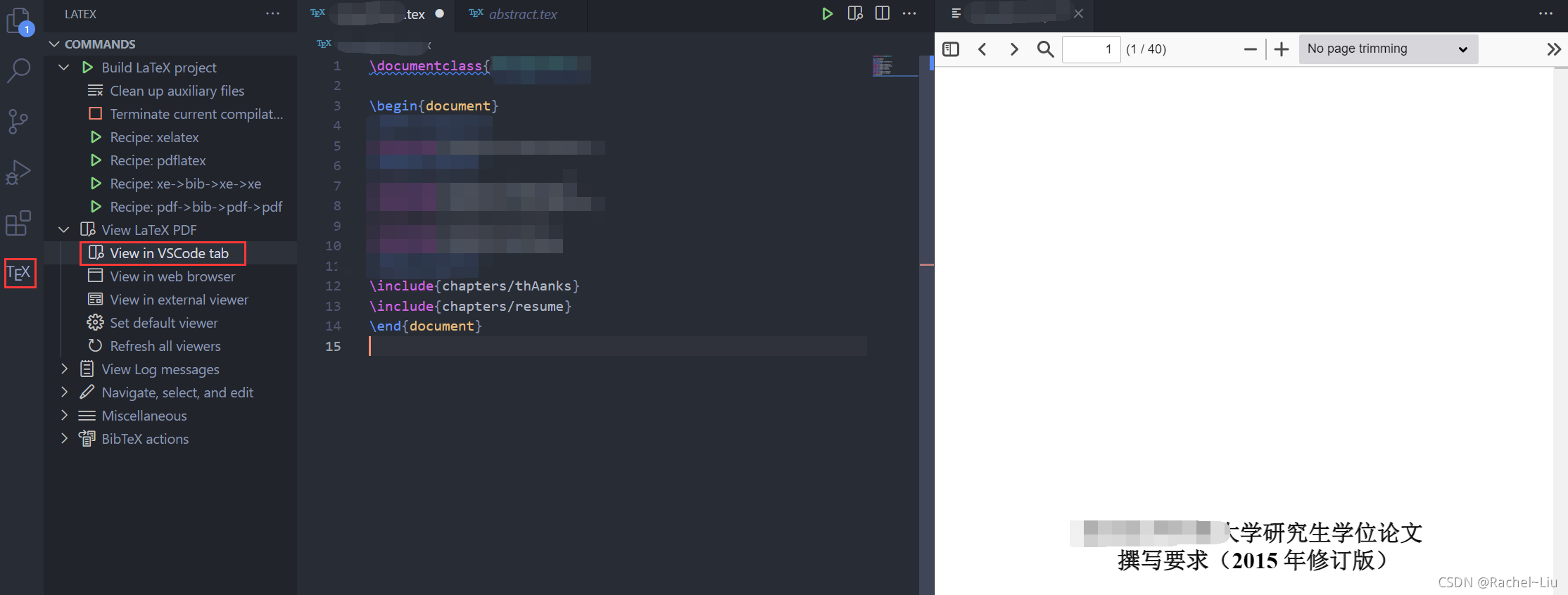
版权声明:本文为qq_33866063原创文章,遵循CC 4.0 BY-SA版权协议,转载请附上原文出处链接和本声明。