allure用例描述参数汇总:
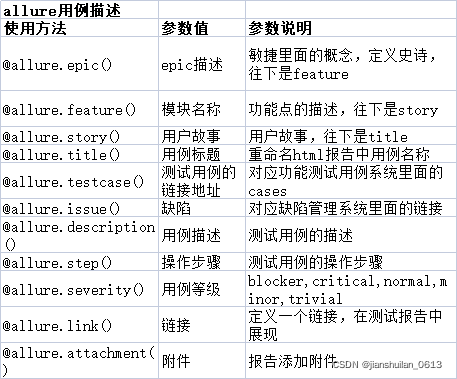
epic、feature、story、title之间是层级关系的:epic > feature(模块功能点描述) > story(用户场景或故事) > title(测试用例标题)。
下面展示feature、story和title的使用栗子:
"""
allure中对应上元素的一些常见参数:以下概念从大至小
    (1)feature:模块名称
    (2)story:用例故事或场景
    (3)title:对应用例的标题
"""
import os
import allure
import pytest

@allure.feature('模块一:正整数的打印')
class Testallure1:

    @allure.story("打印奇数数字")
    @allure.title("打印奇数 1")
    def test_1(self):
        # 测试用例内部的注释会作为该测试用例的描述展示在报告中
        """test_1是第一个测试用例"""
        print('这是test_1')

    @allure.story("打印偶数数字")
    @allure.title("打印偶数 2")
    def test_2(self):
        # 测试用例内部的注释会作为该测试用例的描述展示在报告中
        """test_2是第二个测试用例"""
        print('这是test_2')


@allure.feature("模块二:打印汉语字母")
class Testallure2:
    @allure.story("打印声母")
    @allure.title("打印声母 b")
    def test_3(self):
        # 测试用例内部的注释会作为该测试用例的描述展示在报告中
        """test_3是第三个测试用例:打印声母 b"""
        print('这是test_3:打印声母 b')

    @allure.story("打印韵母")
    @allure.title("打印单韵母 a")
    def test_4(self):
        # 测试用例内部的注释会作为该测试用例的描述展示在报告中
        """test_4是第四个测试用例:打印韵母 a"""
        print('这是test_4:打印韵母 a')

    @allure.story("打印韵母")
    @allure.title("打印双韵母 ao")
    def test_5(self):
        # 测试用例内部的注释会作为该测试用例的描述展示在报告中
        """test_5是第五个测试用例:打印韵母 ao"""
        print('这是test_5:打印韵母 ao')


if __name__ == '__main__':
    # 全部用例都执行
    # pytest.main(['test_allure_fe_st_ti.py', '--alluredir', './result2', '--clean-alluredir'])
    # 根据标签执行指定用例story=“打印韵母”
    pytest.main(['test_allure_fe_st_ti.py', '--alluredir', './result2', '--allure-stories', '打印韵母', '--clean-alluredir'])
    os.system('allure serve result2')
全部用例都执行

根据标签执行指定用例story=“打印韵母”
版权声明:本文为jianshuilan_0613原创文章,遵循CC 4.0 BY-SA版权协议,转载请附上原文出处链接和本声明。