直接参考官网教程即可:
http://www.ceres-solver.org/installation.html#linux
https://blog.csdn.net/SoftwarerRJY/article/details/113354759
安装ceres
1. 安装依赖
# CMake
sudo apt-get install cmake
# google-glog + gflags
sudo apt-get install libgoogle-glog-dev libgflags-dev
# BLAS & LAPACK
sudo apt-get install libatlas-base-dev
# Eigen3
sudo apt-get install libeigen3-dev
# SuiteSparse and CXSparse (optional)
sudo apt-get install libsuitesparse-dev
2. 安装ceres
首先下载git clone https://ceres-solver.googlesource.com/ceres-solver
tar zxf ceres-solver-2.0.0.tar.gz
mkdir ceres-bin
cd ceres-bin
cmake ../ceres-solver-2.0.0
make -j3
make test
# Optionally install Ceres, it can also be exported using CMake which
# allows Ceres to be used without requiring installation, see the documentation
# for the EXPORT_BUILD_DIR option for more information.
make install
3.测试
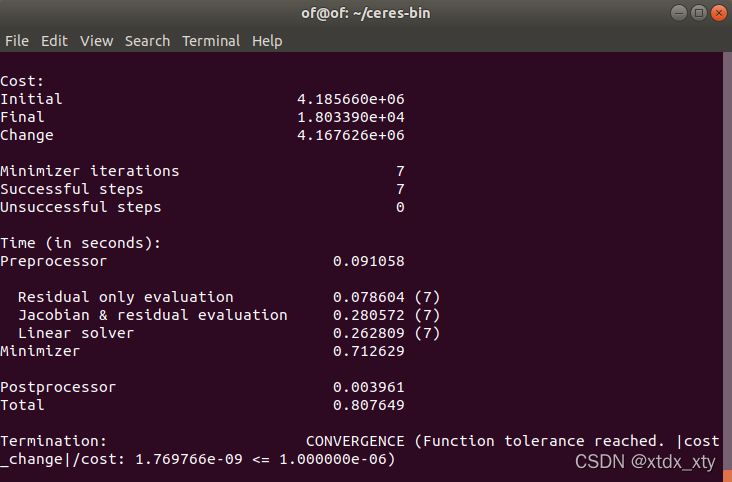
bin/simple_bundle_adjuster ../ceres-solver-2.0.0/data/problem-16-22106-pre.txt
安装g2o
1.安装依赖项
git clone https://github.com/RainerKuemmerle/g2o.git
sudo apt-get install libeigen3-dev
sudo apt-get install libsuitesparse-dev
sudo apt-get install qtdeclarative5-dev
sudo apt-get install qt5-qmake
sudo apt-get install libqglviewer-dev
2.编译与安装g2o
cd g2o
mkdir build
cd build
sudo ldconfig
cmake ..
make
sudo make install
版权声明:本文为xtdx_xty原创文章,遵循CC 4.0 BY-SA版权协议,转载请附上原文出处链接和本声明。