项目部署到 k8s 中
通过deployment-go-hello2.yml创建副本为3的Deployment,更新策略默认使用滚动更新
apiVersion: apps/v1
kind: Deployment
metadata:
  name: go-hello
spec:
  replicas: 3
  selector:
    matchLabels:
      app: go
  template:
    metadata:
      labels:
        app: go
    spec:
      containers:
      - name: hello
        image: go-helloworld:0.0.4
        ports:
        - containerPort: 8009   #让集群知道pod开放的端口
[root@k8s docker-go]# kubectl apply -f deployment-go-hello2.yml
deployment.apps/go-hello created
[root@k8s docker-go]# kubectl get deployment -o wide
NAME       READY   UP-TO-DATE   AVAILABLE   AGE   CONTAINERS   IMAGES                SELECTOR
go-hello   3/3     3            3           6s    hello        go-helloworld:0.0.4   app=go
通过 service 把服务暴露出来,可以从外部直接访问
通过Service 中的LoadBalancer将pod端口映射到物理机
kind: Service
apiVersion: v1
metadata:
  name: service-hello
spec:
  type: LoadBalancer
  ports:
    - port: 8008  # 设置 Service 暴露的端口
      protocol: TCP
      targetPort: 8009  # 设置 Pod 的端口
      nodePort: 30081  # 设置 NodePort 的端口
  selector:
      app: go
[root@k8s docker-go]# kubectl create -f rc1server.yml
service/service-hello created
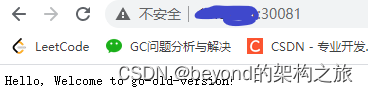
实践 k8s 的伸缩功能,实践 k8s 的滚动更新功能
滚动升级:kubectl set image deployment/go-hello hello=go-helloworld:0.0.7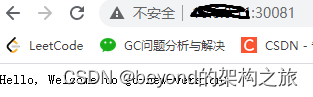
扩充副本数:
[root@k8s docker-go]# kubectl edit deployment go-hello
deployment.extensions/go-hello edited
[root@k8s docker-go]# kubectl get deployment -o wide
NAME       READY   UP-TO-DATE   AVAILABLE   AGE     CONTAINERS   IMAGES                SELECTOR
go-hello   5/5     5            5           4m49s   hello        go-helloworld:0.0.7   app=go
版权声明:本文为qq_41969358原创文章,遵循CC 4.0 BY-SA版权协议,转载请附上原文出处链接和本声明。