备份完还原就比较简单了;
第一步 dir管理端执行还原任务从数据库获取需要还原的hyperv虚拟机和host名;
不做过多说明;
第二步 fd端通过hyperv虚拟机名和host名 还原虚拟机
还原主要通过一个New-VM命令,fd通过调用system(“restore.exe”)来执行还原;
restore.exe源码如下:
using System;
using System.Collections.Generic;
using System.Management.Automation;
using System.Management.Automation.Runspaces;
using System.IO;
using System.Text;
using System.Management;
using System.Text.RegularExpressions;

namespace restore
{

   public class Program
   {
      private static string script = File.ReadAllText(@"C:\hyperv.ps1");
      public static string ReadLineAddress()
      {
         String textFileName = @"C:\name.conf";
         TextReader tr = new StreamReader(textFileName);
         StringBuilder strtmp = new StringBuilder();
         string findstr = "";
         int i = 0;
         while (tr.Peek() > 0)
         {
            i++;
            findstr = tr.ReadLine();
            if(findstr.Contains("#"))
            {
               continue;
            }
            if (string.IsNullOrEmpty(findstr))
            {
               continue;
            }else{
               strtmp.Append(findstr);
               strtmp.Append("+");
            }
         }
         tr.Close();
         return strtmp.ToString();
      }

      private static string  getmemory(string vmname, string hostname)
      {
         string ret="";
         using (Runspace runspace = RunspaceFactory.CreateRunspace())
         {
            runspace.Open();
            PowerShell ps = PowerShell.Create();
            ps.Runspace = runspace;
            ps.AddScript(script);
            ps.Invoke();
            ps.AddCommand("getmemory").AddParameters(
               new Dictionary<string, string>(){
                  {"vname", vmname},
                  {"hostname",hostname}
               }
            );

            foreach (PSObject result in ps.Invoke())
            {
               Console.WriteLine(result);
               ret = result.ToString();
            }
         }
         return ret;
      }

      private static string getcpunum(string vmname,string hostname)
      {
         string ret = "";
         using (Runspace runspace = RunspaceFactory.CreateRunspace())
         {
            runspace.Open();
            PowerShell ps = PowerShell.Create();
            ps.Runspace = runspace;
            ps.AddScript(script);
            ps.Invoke();
            ps.AddCommand("getcpunum").AddParameters(
               new Dictionary<string, string>(){
                  {"vname", vmname},
                  {"hostname",hostname}
               }
            );

            foreach (PSObject result in ps.Invoke())
            {
               Console.WriteLine(result);
               ret = result.ToString();
            }
         }
         return ret;
      }

      private static string getnet(string vmname , string hostname)
      {
         string ret = "";
         using (Runspace runspace = RunspaceFactory.CreateRunspace())
         {
            runspace.Open();
            PowerShell ps = PowerShell.Create();
            ps.Runspace = runspace;
            ps.AddScript(script);
            ps.Invoke();
            ps.AddCommand("getnet").AddParameters(
               new Dictionary<string, string>(){
                  {"vname", vmname},
                  {"hostname", hostname}
               }
            );

            foreach (PSObject result in ps.Invoke())
            {
               Console.WriteLine(result);
               ret = result.ToString();
            }
         }
         return ret;
      }

      private static string getpath(string vmname, string hostname)
      {
         string ret = "";
         using (Runspace runspace = RunspaceFactory.CreateRunspace())
         {
            runspace.Open();
            PowerShell ps = PowerShell.Create();
            ps.Runspace = runspace;
            ps.AddScript(script);
            ps.Invoke();
            ps.AddCommand("getpath").AddParameters(
               new Dictionary<string, string>(){
                  {"vname", vmname},
                  {"hostname", hostname}
               }
            );

            foreach (PSObject result in ps.Invoke())
            {
               Console.WriteLine(result);
               ret = result.ToString();
            }
         }
         return ret;
      }

      private static string getVMtype(string vmname, string hostname)
      {
         string ret = "";
         using (Runspace runspace = RunspaceFactory.CreateRunspace())
         {
            runspace.Open();
            PowerShell ps = PowerShell.Create();
            ps.Runspace = runspace;
            ps.AddScript(script);
            ps.Invoke();
            ps.AddCommand("getvmtype").AddParameters(
               new Dictionary<string, string>(){
                  {"vname", vmname},
                  {"hostname", hostname}
               }
            );

            foreach (PSObject result in ps.Invoke())
            {
               Console.WriteLine(result);
               ret = result.ToString();
            }
         }
         return ret;
      }

      private static string getvhdsize(string vmname, string hostname)
      {
         string ret = "";
         using (Runspace runspace = RunspaceFactory.CreateRunspace())
         {
            runspace.Open();
            PowerShell ps = PowerShell.Create();
            ps.Runspace = runspace;
            ps.AddScript(script);
            ps.Invoke();
            ps.AddCommand("getvhdsize").AddParameters(
               new Dictionary<string, string>(){
                  {"vname", vmname},
                  {"hostname", hostname}
               }
            );

            foreach (PSObject result in ps.Invoke())
            {
               Console.WriteLine(result);
               ret = result.ToString();
            }
         }
         return ret;
      }

      private static string setcpunum(string vmname, string hostname, string cpunum)
      {
         string ret = "";
         using (Runspace runspace = RunspaceFactory.CreateRunspace())
         {
            runspace.Open();
            PowerShell ps = PowerShell.Create();
            ps.Runspace = runspace;
            ps.AddScript(script);
            ps.Invoke();
            ps.AddCommand("setcpunum").AddParameters(
               new Dictionary<string, string>(){
                  {"vname", vmname},
                  {"hostname", hostname},
                  {"cpunum", cpunum}
               }
            );

            foreach (PSObject result in ps.Invoke())
            {
               Console.WriteLine(result);
               ret = result.ToString();
            }
         }
         return ret;
      }

      private static string creatvm(string vmname, string vmtype,string hostname, string memory, string cpunum, string net, string path )
      {
         string ret = "";
         using (Runspace runspace = RunspaceFactory.CreateRunspace())
         {
            runspace.Open();
            PowerShell ps = PowerShell.Create();
            ps.Runspace = runspace;
            ps.AddScript(script);
            ps.Invoke();
            ps.AddCommand("createvm").AddParameters(
               new Dictionary<string, string>(){
                  {"vname", vmname},
                  {"vmtype",vmtype},
                  {"hostname",hostname},
                  {"memory", memory},
                  {"cpunum", cpunum},
                  {"net", net},
                  {"path", path}
                  //{"vhdsize",vhdsize}
               }
            );

            foreach (PSObject result in ps.Invoke())
            {
               Console.WriteLine(result);
               ret = result.ToString();
            }
         }
         return ret;
      }

      private static string creatvmtwo(string vmname, string vmtype, string hostname, string memory, string cpunum, string path)
      {
         string ret = "";
         using (Runspace runspace = RunspaceFactory.CreateRunspace())
         {
            runspace.Open();
            PowerShell ps = PowerShell.Create();
            ps.Runspace = runspace;
            ps.AddScript(script);
            ps.Invoke();
            ps.AddCommand("createvmtwo").AddParameters(
               new Dictionary<string, string>(){
                  {"vname", vmname},
                  {"vmtype",vmtype},
                  {"hostname",hostname},
                  {"memory", memory},
                  {"cpunum", cpunum},
                  {"path", path}
                  //{"vhdsize",vhdsize}
               }
            );

            foreach (PSObject result in ps.Invoke())
            {
               Console.WriteLine(result);
               ret = result.ToString();
            }
         }
         return ret;
      }

      private static void Cleanname(string cleanname)
      {
         using (Runspace runspace = RunspaceFactory.CreateRunspace())
         {
            runspace.Open();
            PowerShell ps = PowerShell.Create();
            ps.Runspace = runspace;
            ps.AddScript(script);
            ps.Invoke();
            ps.AddCommand("cleanname").AddParameters(
               new Dictionary<string, string>(){
                  {"cleanname", cleanname}
               }
            );

            foreach (PSObject result in ps.Invoke())
            {
               Console.WriteLine(result);
            }
         }
      }

      public static int Main()
      {
         //restore vmname
         string name = ReadLineAddress();
         string[] temp = name.Split('+');
         string hostname = temp[1];
         string vname = temp[0];
         if (String.IsNullOrEmpty(hostname) || String.IsNullOrEmpty(vname))
         {
            Console.WriteLine("虚拟机名或Host为空\n");
            return 0;
         }
         string key = "C:";
         string newkey = @"C:\test\C";
         string memory =getmemory(vname,hostname);
         string cpunum =getcpunum(vname,hostname);
         string vhdpath=getpath(vname,hostname);
         //Console.WriteLine("1 chu");
        // Console.WriteLine( vhdpath);
         vhdpath.Replace(key,newkey);
         //Console.WriteLine("2 chu");
        // Console.WriteLine(vhdpath);
         StringBuilder sb = new StringBuilder(vhdpath);
         sb.Replace("C:", @"C:\test\C");
         Console.WriteLine("2 chu");
          Console.WriteLine(sb);
          vhdpath = sb.ToString();
         string vmtype = getVMtype(vname,hostname);
         string netcf = getnet(vname,hostname);
         string cleannanme = "cleanname";
         // string vhdsize = getvhdsize(name, hostname); 暂时不需要

         //必须参数为,虚拟机代数,vhd模板path,内存 创建后不能更改,其他参数都可以手动更改
         //getnet 获取网络连接,为空则默认选host第一个网络连接
         if (netcf.Equals("null"))
         {
            Console.WriteLine("if null\n");
            Console.WriteLine(vname);
            Console.WriteLine(vmtype);
            Console.WriteLine(hostname);
            Console.WriteLine(memory);
            Console.WriteLine(cpunum);
            Console.WriteLine(vhdpath);
            creatvmtwo(vname, vmtype, hostname, memory, cpunum, vhdpath);
         }else{
            creatvm(vname, vmtype, hostname, memory, cpunum, netcf, vhdpath);
         }
         Cleanname(cleannanme);
         return 0;
      }
   }
}
代码比较简单 其中用到(二)中hyper-v.ps1脚本,其中恢复时需要hyperv虚拟机名和host名 默认在name.conf中 这个文件时fd端生成的, 具体就是读到dir、传来的hyperv名称和host名写入name.conf 文件,还原完后会自动清空;
还原时 先将vhd还原的C:/test/原路径;相当于再路径追加了一级/test/防止覆盖原有路径的vhdx导致原虚拟机启动失败,最新修改的。
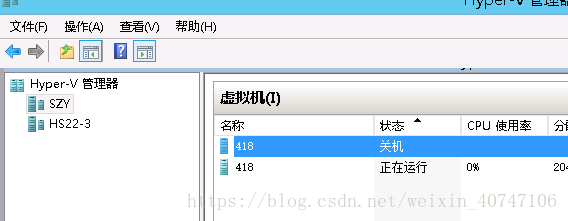
还原完后的效果
后续待优化的内容:
1 获取所有hyperv虚拟机信息,目前只在少数hyperv虚拟机情况下,hyper-v.conf文件会比较小,如果虚拟机数目很大,则dir端获取显示所有虚拟机时,会有比较大的延迟,参考文章,可以存成csv格式文件,用c或c++l解析这个比较快;
2 获取信息只存了hyperv虚拟机名称,和host,而且是在其他表中追加的参数,后期可以考虑单独建表,专门存hyperv虚拟机信息,cpu个数,代数,内存,vhd路径等其他信息,这样还原的时候就不需要再get一遍;
github 账号https://github.com/HHHSong 后续代码会传到github上。
以上内容均属原创,转载请注明出处。
版权声明:本文为weixin_40747106原创文章,遵循CC 4.0 BY-SA版权协议,转载请附上原文出处链接和本声明。