一、服务端
服务端截图
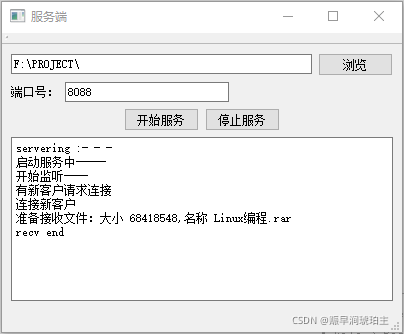
服务端实现
重要成员
1.通过TcpFileRecve类封装服务端和客户端建立通信的套接字
QTcpSocket* m_pClients建立连接的客户端套接字
QFile m_StroeFile用于接受客户端发来的文件
2.通过MyTcpServer类封装整个服务端
QTcpServer* m_pTcpServer该成员用于监听以及建立与客户端的连接
TcpFileRecve* m_ptcpfilerecve该成员用于通讯
3.用于两端的结构体,封装传输文件的信息包括名称,大小
struct TFileInfo
{
char fileName[256];
qint64 fileSize;
};
流程
1.通过QTcpServer* m_pTcpServer开始监听,当有新的客户段请求连接时,发送newConnection()信号。
2.收到新的连接请求时开辟一个QTcpSocket* m_pClients,开始准备接收文件。
3.等待客户发送文件信息struct TFileInfo。
4.客户发送第一段信息struct TFileInfo,此时QTcpSocket* m_pClients会产生一个readyRead()信号。这是准备好文件QFile m_StroeFile用于存储。
5通过判断已接收的文件大小是否等于struct TFileInfo的size来结束文件的接收。
6.结束通信,释放相关资源。
界面布局
void MainWindow::InitWindow()
{
    //成员初始化
    m_pMyTcpServer=new MyTcpServer();

    //界面初始化
    m_pLineEdit_Browse=new QLineEdit("F:\\PROJECT\\");
    m_pPushButton_Browse=new QPushButton("浏览");
    QLabel* PortLable=new QLabel("端口号:");
    m_pLineEdit_Port=new QLineEdit("4321");
    m_pPushButton_StartServer=new QPushButton("开始服务");
    m_pPushButton_StopServer=new QPushButton("停止服务");
    m_pPlainEdit_Show=new QPlainTextEdit();

    //设置属性
    m_pPlainEdit_Show->setReadOnly(true);

    //添加布局
    QHBoxLayout* HLayout0=new QHBoxLayout();
    HLayout0->addWidget(m_pLineEdit_Browse);
    HLayout0->addWidget(m_pPushButton_Browse);

    QHBoxLayout* HLayout1=new QHBoxLayout();
    HLayout1->addWidget(PortLable);
    HLayout1->addWidget(m_pLineEdit_Port);
    HLayout1->addStretch();

    QHBoxLayout* HLayout2=new QHBoxLayout();
    HLayout2->addStretch();
    HLayout2->addWidget(m_pPushButton_StartServer);
    HLayout2->addWidget(m_pPushButton_StopServer);
    HLayout2->addStretch();

    QGridLayout* GridLayout=new QGridLayout();
    GridLayout->addLayout(HLayout0,0,0,1,1);
    GridLayout->addLayout(HLayout1,1,0,1,1);
    GridLayout->addLayout(HLayout2,2,0,1,1);
    GridLayout->addWidget(m_pPlainEdit_Show,4,0,1,1);

    this->centralWidget()->setLayout(GridLayout);
    this->setWindowTitle("服务端");

    //连接信号与槽
    connect(m_pPushButton_StartServer,SIGNAL(clicked(bool)),this,SLOT(slots_Btn_StartServer()));
    connect(m_pPushButton_StopServer,SIGNAL(clicked(bool)),this,SLOT(slots_Btn_StopServer()));
    connect(m_pPushButton_Browse,SIGNAL(clicked(bool)),this,SLOT(slots_Btn_BrowseFolder()));
    connect(m_pMyTcpServer,SIGNAL(signal_RevEnd()),this,SLOT(slots_MyTcp_RevEnd()));
}
关键函数
槽函数用于文件的接收
void TcpFileRecve::slots_ClientSock_ReadyRead()
{
    if(m_pClients->bytesAvailable()==sizeof(TFileInfo)&&!m_isBeginTransFile)
    {
        m_isBeginTransFile=true;
        TFileInfo tInfo;
        m_pClients->read((char*)&tInfo,sizeof(TFileInfo));
        m_pStrLog->append(QString("准备接收文件:大小 %1,名称 %2\n").arg(tInfo.fileSize).arg(tInfo.fileName));

        m_nFileTotalSize=tInfo.fileSize;

        //准备存储数据的文件
        m_StroeFile.setFileName(m_pSavePath+tInfo.fileName);
        m_StroeFile.open(QFile::WriteOnly);
    }
    else//开始接受存储数据
    {
        //如果已接收的数据小于文件总大小
        if(m_nRecvedFileSize<m_nFileTotalSize)
        {
            //将接收的数据写入文件
            QByteArray block = m_pClients->readAll();
            m_StroeFile.write(block);

            //计算已接收的文件大小
            m_nRecvedFileSize+=block.size();
            qDebug()<<"计算已接收的文件大小:"<<m_nRecvedFileSize;
        }
    }

    if (m_nRecvedFileSize >= m_nFileTotalSize)   //文件已经接收完毕
    {
       m_StroeFile.close();
       m_isBeginTransFile = false;
       m_nRecvedFileSize = 0;
       m_nFileTotalSize = 0;

       m_pStrLog->append("recv end\n");

       emit signal_RecveEnd();
    }
}
二、客户端
客户端截图
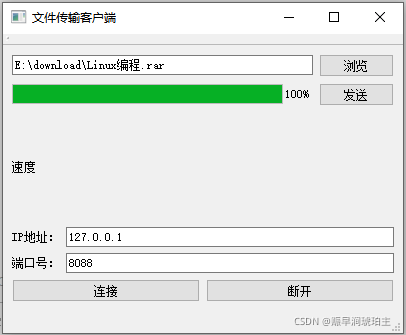
客户端实现
重要成员
1.通过TransmissionFile类封装用于和服务端通讯的套接字QTcpSocket* m_pTcpSocket,以及用于文件传输的QFile m_TransFile
2.用于两端的结构体,封装传输文件的信息包括名称,大小
struct TFileInfo
{
char fileName[256];
qint64 fileSize;
};
流程
1.通过connectToHost()函数连接服务器。
2.准备好要发送的文件到QFile m_TransFile。
3.将要发送的文件信息通过struct TFileInfo发送到服务端,一遍服务端做好接受的准备。
4.发送struct TFileInfo信息到服务端后,产生bytesWritten(qint64)的信号
5.槽函数slots_Socket_BytesWritten(qint64 bytes)用于开始读取文件并发送到服务端。
6.结束通信,释放相关资源。
界面布局
void MainWindow::Init()
{
    //初始化界面
    m_pLineEdit_Browse=new QLineEdit();
    m_pBtn_Browse=new QPushButton("浏览");

    m_pProBar_Send=new QProgressBar();
    m_pProBar_Send->setValue(0);
    m_pBtn_Send=new QPushButton("发送");

    QLabel* pLableSpeed=new QLabel("速度");
    m_pLable_Speed=new QLabel();

    QLabel* pLableIpAddress=new QLabel("IP地址:");
    m_pLineEdit_IpAddress=new QLineEdit("127.0.0.1");
    QLabel* pLablePort=new QLabel("端口号:");
    m_pLineEdit_Port=new QLineEdit("4321");

    m_pBtn_Connect=new QPushButton("连接");
    m_pBtn_DisConnect=new QPushButton("断开");

    //添加布局
    QGridLayout* pQGridLayout=new QGridLayout();

    QHBoxLayout* pQHBoxLayout1=new QHBoxLayout();
    pQHBoxLayout1->addWidget(m_pLineEdit_Browse);
    pQHBoxLayout1->addWidget(m_pBtn_Browse);

    QHBoxLayout* pQHBoxLayout2=new QHBoxLayout();
    pQHBoxLayout2->addWidget(m_pProBar_Send);
    pQHBoxLayout2->addWidget(m_pBtn_Send);

    QHBoxLayout* pQHBoxLayout3=new QHBoxLayout();
    pQHBoxLayout3->addWidget(pLableSpeed);
    pQHBoxLayout3->addWidget(m_pLable_Speed);

    QHBoxLayout* pQHBoxLayout4=new QHBoxLayout();
    pQHBoxLayout4->addWidget(pLableIpAddress);
    pQHBoxLayout4->addWidget(m_pLineEdit_IpAddress);

    QHBoxLayout* pQHBoxLayout5=new QHBoxLayout();
    pQHBoxLayout5->addWidget(pLablePort);
    pQHBoxLayout5->addWidget(m_pLineEdit_Port);

    QHBoxLayout* pQHBoxLayout6=new QHBoxLayout();
    pQHBoxLayout6->addWidget(m_pBtn_Connect);
    pQHBoxLayout6->addWidget(m_pBtn_DisConnect);

    pQGridLayout->addLayout(pQHBoxLayout1,0,0);
    pQGridLayout->addLayout(pQHBoxLayout2,1,0);
    pQGridLayout->addLayout(pQHBoxLayout3,2,0);
    pQGridLayout->addLayout(pQHBoxLayout4,3,0);
    pQGridLayout->addLayout(pQHBoxLayout5,4,0);
    pQGridLayout->addLayout(pQHBoxLayout6,5,0);

    this->centralWidget()->setLayout(pQGridLayout);
    this->setWindowTitle("文件传输客户端");

    //初始化成员
    m_pLineEdit_Browse->setText(tr("E:\\download\\Linux编程.rar"));

    //connect
    connect(m_pBtn_Browse,SIGNAL(clicked(bool)),this,SLOT(slots_Btn_Browse()));
    connect(m_pBtn_Send,SIGNAL(clicked(bool)),this,SLOT(slots_Btn_Send()));
    connect(m_pBtn_Connect,SIGNAL(clicked(bool)),this,SLOT(slots_Btn_Connect()));
    connect(m_pBtn_DisConnect,SIGNAL(clicked(bool)),this,SLOT(slots_Btn_DisConnect()));
    connect(m_pTransFile,SIGNAL(signal_Socket_SendedByte(qint64)),this,SLOT(slots_TFile_SendedByte(qint64)));
}
关键函数
void TransmissionFile::slots_Socket_BytesWritten(qint64 bytes)
{
    char sendBuffer[m_nSendPerSize]={0};//每次可以发送的最大数据
    int readLenth=0;//每次读取的数据量


    //打开并开始发送文件
    if(bytes==sizeof(T_File::TFileInfo) && m_isBeginTransFile==false)
    {
        m_isBeginTransFile=true;

        m_TransFile.setFileName(m_sTransFileName);
        m_TransFile.open(QFile::ReadOnly);      //打开文件开始传输

        readLenth=m_TransFile.read(sendBuffer,m_nSendPerSize);
        m_nSendedFileSize += m_pTcpSocket->write(sendBuffer,readLenth);

    }
    else
    {
        if(!m_TransFile.atEnd())
        {
            readLenth=m_TransFile.read(sendBuffer,m_nSendPerSize);
            m_nSendedFileSize += m_pTcpSocket->write(sendBuffer,readLenth);
        }
        else//读到了文件结尾
        {
            m_isBeginTransFile=false;
            m_TransFile.close();            //传输完成后关闭文件
        }
    }

    //发送信号:已经发送了多少字节
    emit signal_Socket_SendedByte(m_nSendedFileSize);
}
三、QT实现TCP文件传输相关源码
链接:-_-源码已上传
提取码:8f70
上述全部内容均为原创,欢迎大家吐槽,一起学习@_@。