v-autosuggest
A simple modular Vuejs component that autosuggest input from a dyanamic or static data querying.
Table of contents
Installation
npm install --save v-autosuggest
Usage
import VAutoSuggest from 'v-autosuggest'
Vue.component('v-autosuggest', VAutosuggest )
In your template you can use this syntax:
v-model="searchData"
:getItemFromAjax="ajaxCall"
:suggValue="'name'"
:suggStatusComp="statusComponent"
:suggItemComp="suggItemComponent"
:items="staticSuggArray"
:maxSuggestion="maxSugg"
:inputClass="'form-control'"
/>
Properties
Property Name
type
Required
Default Value
Description
getItemFromAjax
Function
false
null
contains function that queries and returns the data ( if property "items" is present, this property function will not be fired )
suggValue
String
false
"value" or "item.value" for nested value
the property name that is the main thing that is being queried
suggStatusComp
Object (vue component)
false
base status component
Vue component that show the status of the querying
suggItemComp
Object (vue component)
false
base item component
Vue component that show the suggestion items
items
Array
false
null
Contains a static array of items that is gonna be queried (if this property is present, the getItemFromAjax function will not be fired)
maxSuggestion
Number
false
5
Max number of suggestion item is being shown on screen
inputClass
String
false
v-autocomplete-input
Defines the class for the input tag which you can override with your own class like bootstrap's form-control
Example
There's 2 ways of inserting the data for v-autosuggest
Basic Usage
Through online querying (ie: ajax, firebase , etc...)
Static JSON file or equivalent
Basic usage with Online querying (not limited to ajax)
import axios from 'axios'
import VAutosuggest from 'v-autosuggest'
export default {
name: 'app',
components: {
VAutosuggest
},
data () {
return {
searchData: ''
}
},
methods: {
ajaxCall: async function (query) {
const response = await axios.get(`https://swapi.co/api/people/?search=${query}`)
return response.data.results.reduce((Accumulative, current) => {
Accumulative.push({value: current.name, description: 'Height: '+ current.height + 'cm'})
return Accumulative
})
}
}
}
Important Note:
ajaxCall: Return either a promise or await the function and return the value
I use reduce in the ajaxCall to only get the the name and height of each of the data, but for the height i put description, this is because the default suggestion component shows description in the description property.
Basic usage with static data (eg: JSON file, array, xml)
import axios from 'axios'
import VAutosuggest from 'v-autosuggest'
export default {
name: 'app',
components: {
VAutosuggest
},
data () {
return {
searchData: '',
arrayData: [{name:'Ben', description:'180cm'},{name:'Jon', description:'179cm'},{name:'Smith', description:'190cm'}]
}
}
}
Advanced Usage
You are able to change the component for the status and suggestion to suit your own website.
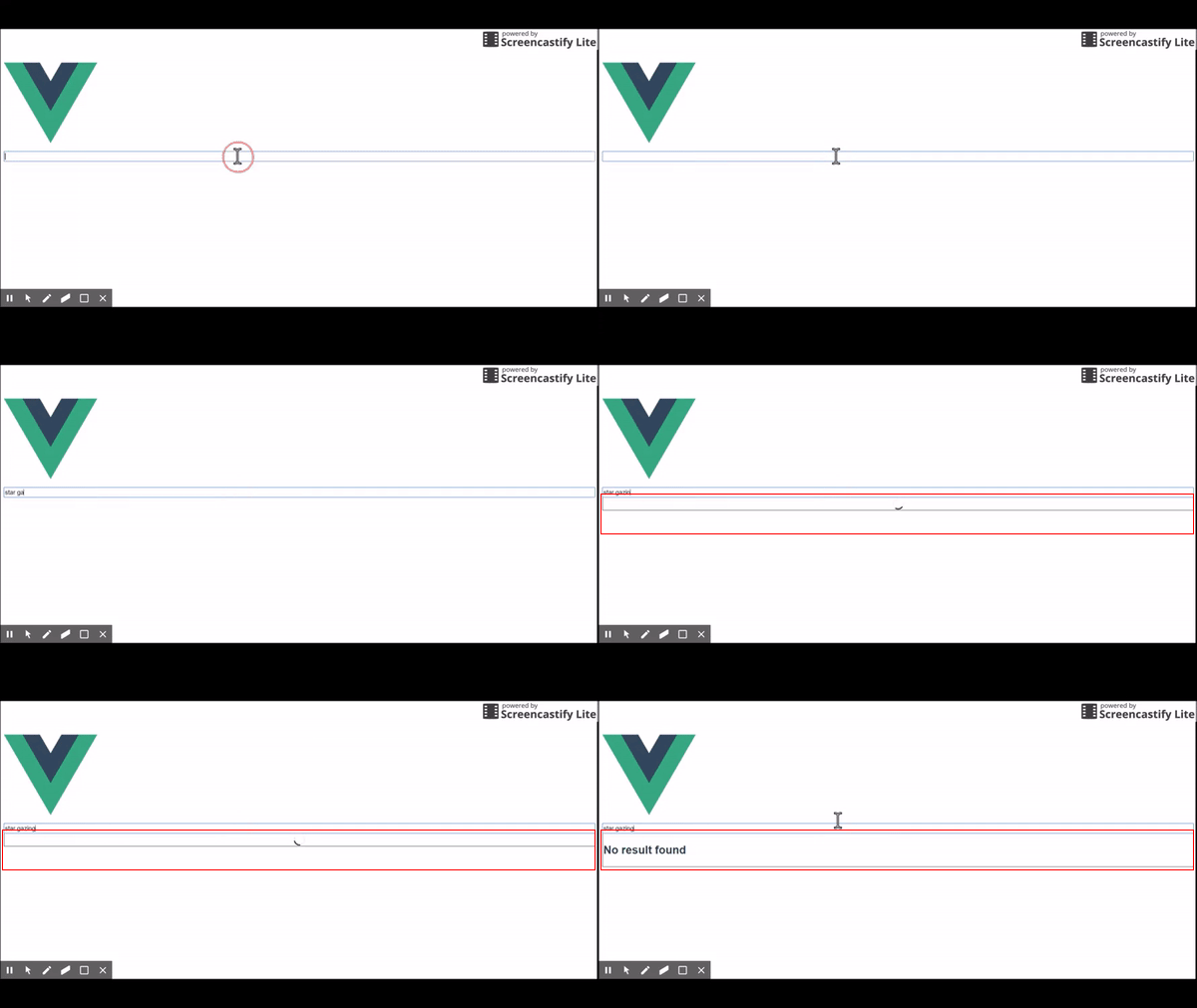
This is the status component
These are the suggestion items component
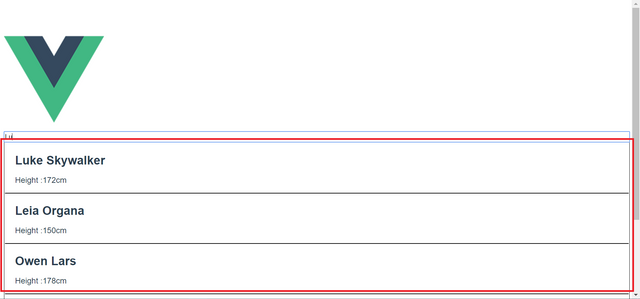
You will be able to change the status and suggestion item component by passing your own into the suggStatusComp and suggItemComp respectively.
But there are some caveats.
Suggestion Status Component
When trying to make this component, be sure to include this prop and data
...props: {
suggestionStatusEnum: {
required: true,
type: Number,
default: 0
}
},
data () {
return {
suggestionStatus: {
nuetralStatus: 0,
noDataFound: 1,
loading: 2,
closeStatus: 3
}
}
}...
As you can see the suggestionStatus act as a enum to check the current status of the suggestion querying
Property Name
Description
suggestionStatusEnum
represents the current status of the suggestion querying
valueProp
Represents the key value data that you are trying to find/suggest
Status enum table
Status Name
Status Number
Status Description
nuetralStatus
0
Shown as a neutral stands as no suggestion is being shown but will still be able to shown as empty li tag to the user
noDataFound
1
This is to show an error message to the user that data can be found on their query
loading
2
Shows a loading spinner to tell user it is querying the data
closeStatus
3
Hides the li tag completely even if query finds the data
Example Suggestion Item component
No result found
.loader {
border: 2px solid #f3f3f3;
border-radius: 100%;
border-top: 2px solid black;
width: 20px;
height: 20px;
-webkit-animation: spin 0.5s linear infinite;
animation: spin 0.5s linear infinite;
margin: 0 auto;
}
/* Safari */
@-webkit-keyframes spin {
0% { -webkit-transform: rotate(0deg); }
100% { -webkit-transform: rotate(360deg); }
}
@keyframes spin {
0% { transform: rotate(0deg); }
100% { transform: rotate(360deg); }
}
export default {
name: 'suggestionStatus',
props: {
suggestionStatusEnum: {
required: true,
type: Number,
default: 0
}
},
data () {
return {
suggestionStatus: {
nuetralStatus: 0,
noDataFound: 1,
loading: 2,
closeStatus: 3
}
}
}
}
Suggestion Status Component
When trying to make this component, be sure to include these 2 props
...props: {
item: {
type: Object,
required: true
},
valueProp:{
type: String,
required: false,
default: 'value',
}
}...
property Name
Description
item
Object that represents a suggestion item
valueProp
Represents the key value data that you are trying to find/suggest
Example Suggestion Item component
export default {
name: 'suggItemComponent',
props: {
item: {
type: Object,
required: true
},
valueProp:{
type: String,
required: false,
default: 'value',
}
}
}
License