来源于动力节点spring,复习使用
文章目录
spring概述
spring是什么?
Spring 是于 2003 年兴起的一个轻量级的 Java 开发框架,它是为了解决企业应用开发 的复杂性而创建的。Spring 的核心是控制反转(IoC)和面向切面编程(AOP)。Spring 是可 以在 Java SE/EE 中使用的轻量级开源框架
Spring 的主要作用就是为代码“解耦”,降低代码间的耦合度。就是让对象和对象(模 块和模块)之间关系不是使用代码关联,而是通过配置来说明。即在 Spring 中说明对象(模 块)的关系。
Spring 根据代码的功能特点,使用 Ioc 降低业务对象之间耦合度。IoC使得主业务在相互 调用过程中,不用再自己维护关系了,即不用再自己创建要使用的对象了。而是由 Spring 容器统一管理,自动“注入”,注入即赋值。 而 AOP 使得系统级服务得到了最大复用,且 不用再由程序员手工将系统级服务“混杂”到主业务逻辑中了,而是由 Spring 容器统一完成 “织入”。
官网:https://spring.io/
spring优点
Spring 是一个框架,是一个半成品的软件。有 20 个模块组成。它是一个容器管理对象, 容器是装东西的,Spring 容器不装文本,数字。装的是对象。Spring 是存储对象的容器。
轻量
Spring 框架使用的 jar 都比较小,一般在 1M 以下或者几百 kb。Spring 核心功能的所需的jar 总共在 3M 左右。 Spring 框架运行占用的资源少,运行效率高。不依赖其他 jar
针对接口编程,解耦合
Spring 提供了 Ioc 控制反转,由容器管理对象,对象的依赖关系。原来在程序代码中的对象创建方式,现在由容器完成。对象之间的依赖解耦合。
AOP编程的支持
通过 Spring 提供的 AOP 功能,方便进行面向切面的编程,许多不容易用传统 OOP 实现 的功能可以通过 AOP 轻松应付 。
在 Spring 中,开发人员可以从繁杂的事务管理代码中解脱出来,通过声明式方式灵活地 进行事务的管理,提高开发效率和质量。
方便集成各种优秀框架
Spring 不排斥各种优秀的开源框架,相反 Spring可以降低各种框架的使用难度,Spring 提 供了对各种优秀框架(如 Struts,Hibernate、MyBatis)等的直接支持。简化框架的使用。 Spring 像插线板一样,其他框架是插头,可以容易的组合到一起。需要使用哪个框架,就把这个插头放 入插线板。不需要可以轻易的移除。
Spring 体系结构

Spring 由 20 多个模块组成,它们可以分为数据访问/集成(Data Access/Integration)、Web、 面向切面编程(AOP, Aspects)、提供 JVM的代理(Instrumentation)、消息发送(Messaging)、 核心容 器(Core Container)和测试(Test)
IoC 控制反转
简介
spring的第一个核心功能 ioc。
依赖:classA 类中含有 classB 的实例,在 classA 中调用 classB 的方法完成功能,即 classA 对 classB 有依赖。
IoC (Inversion of Control) : 控制反转, 是一个理论,概念,思想。
描述:把对象的创建,赋值,管理工作都交给代码之外的容器实现, 也就是对象的创建是有其它外部资源完成。
控制: 创建对象,对象的属性赋值,对象之间的关系管理。
反转: 把原来的开发人员管理,创建对象的权限转移给代码之外的容器实现。 由容器代替开发人员管理对象。创建对象,给属性赋值。
正转:由开发人员在代码中,使用new 构造方法创建对象, 开发人员主动管理对象。
为什么要使用 ioc : 目的就是减少对代码的改动, 也能实现不同的功能。 实现解耦合。
java中创建对象有哪些方式:
- 构造方法 , new Student()
- 反射
- 序列化
- 克隆
- ioc :容器创建对象
- 动态代理
ioc的体现:
servlet 1: 创建类继承HttpServelt
2: 在web.xml 注册servlet , 使用<servlet-name> myservlet </servlet-name>
<servelt-class>com.bjpwernode.controller.MyServlet1</servlet-class>
- 没有创建 Servlet对象, 没有 MyServlet myservlet = new MyServlet()
- Servlet 是Tomcat服务器创建的。 Tomcat也称为容器。Tomcat作为容器:里面存放的有Servlet对象, Listener , Filter对象
IoC的技术实现:
Spring 框架使用依赖注入(DI)实现 IoC。
DI(Dependency Injection) :依赖注入, 只需要在程序中提供要使用的对象名称就可以, 至于对象如何在容器中创建,赋值,查找都由容器内部实现。
spring是使用的di实现了ioc的功能, spring底层创建对象,使用的是反射机制。
spring是一个容器,管理对象,给属性赋值, 底层是反射创建对象。
spring-conetxt 和 spring-webmvc是spring中的两个模块:
spring-context:是ioc功能的,创建对象的。
spring-webmvc做web开发使用的, 是servlet的升级。
spring-webmvc中也会用到spring-context中创建对象的功能的。
spring第一个程序
和之前mybais一样,先创建一个空的工程,在新建maven模块,选择骨架quickstart就可以,删除pom文件中的生命周期插件,将jdk版本设置为1.8。生成站点的东西也可以删除。
pom.xml
<?xml version="1.0" encoding="UTF-8"?>

<project xmlns="http://maven.apache.org/POM/4.0.0" xmlns:xsi="http://www.w3.org/2001/XMLSchema-instance"
  xsi:schemaLocation="http://maven.apache.org/POM/4.0.0 http://maven.apache.org/xsd/maven-4.0.0.xsd">
  <modelVersion>4.0.0</modelVersion>

  <groupId>ysk</groupId>
  <artifactId>01-spring-hello</artifactId>
  <version>1.0-SNAPSHOT</version>

  <properties>
    <project.build.sourceEncoding>UTF-8</project.build.sourceEncoding>
    <maven.compiler.source>1.8</maven.compiler.source>
    <maven.compiler.target>1.8</maven.compiler.target>
  </properties>

  <dependencies>
    <dependency>
      <groupId>junit</groupId>
      <artifactId>junit</artifactId>
      <version>4.11</version>
      <scope>test</scope>
    </dependency>

    <dependency>
      <groupId>org.springframework</groupId>
      <artifactId>spring-context</artifactId>
      <version>5.2.5.RELEASE</version>
    </dependency>
  </dependencies>

  <build>

  </build>
</project>
定义接口:
public interface SomeService {
    void doSome();
}
接口实现类:
public class SomeServiceImpl implements SomeService {
    @Override
    public void doSome() {
        System.out.println("doSome执行");
    }
}
创建spring配置文件:

创建后会有这个报错:
idea application context not configured for this file
建议名称为:applicationContext.xml:
<?xml version="1.0" encoding="UTF-8"?>
<beans xmlns="http://www.springframework.org/schema/beans"
       xmlns:xsi="http://www.w3.org/2001/XMLSchema-instance"
       xsi:schemaLocation="http://www.springframework.org/schema/beans http://www.springframework.org/schema/beans/spring-beans.xsd">
	<!--告诉spring创建对象
        声明bean , 就是告诉spring要创建某个类的对象
        id:对象的自定义名称,唯一值。 spring通过这个名称找到对象
        class:类的全限定名称(不能是接口,因为spring是反射机制创建对象,必须使用类)

        spring就完成 SomeService someService = new SomeServiceImpl();
        spring是把创建好的对象放入到map中, spring框架有一个map存放对象的。
           springMap.put(id的值, 对象);
           例如 springMap.put("someService", new SomeServiceImpl());

        一个bean标签声明一个对象。
    -->
    <bean id="someService" class="ysk.service.impl.SomeServiceImpl"/>

</beans>
<bean/>:用于定义一个实例对象。一个实例对应一个 bean 元素。
id:该属性是 Bean 实例的唯一标识,程序通过 id 属性访问 Bean,Bean 与 Bean 间的依 赖关系也是通过 id 属性关联的。
class:指定该 Bean 所属的类,注意这里只能是类,不能是接口。
测试:
@Test
public void test01(){
    String config = "applicationContext.xml";
    ApplicationContext ac = new ClassPathXmlApplicationContext(config);
    //3.从spring容器中获取对象 使用id
    SomeServiceImpl实现了SomeService接口,强转成SomeService
    SomeService service = (SomeService) ac.getBean("someService");
    //4.执行对象的业务方法
    service.doSome();
}
使用 spring 创建非自定义类对象
<bean id="mydate" class="java.util.Date"/>
测试:
Date date = (Date) ac.getBean("mydate");
//4.执行对象的业务方法
System.out.println(date);
容器接口和实现类
ApplicationContext接口(容器)
ApplicationContext 用于加载 Spring 的配置文件,在程序中充当“容器”的角色。其实现 类有两个:
ctrl加鼠标左键进入ApplicationContext.class ctrl+h 查看层级关系:

ApplicationContext 容器中对象的装配时机
spring创建对象调用的是无参构造方法!
ApplicationContext 容器,会在容器对象初始化时,将其中的所有对象一次性全部装配好。 以 后代码中若要使用到这些对象,只需从内存中直接获取即可。执行效率较高。但占用内存。
意思就是说执行ApplicationContext ac = new ClassPathXmlApplicationContext(config);这段代码时,就已经创建了对象

基于 XML 的 DI
bean 实例在调用无参构造器创建对象后,就要对 bean 对象的属性进行初始化。初始化是由容器自动完成的,称为注入。
di:依赖注入,表示创建对象,给属性赋值。
di的实现有两种:
1.在spring的配置文件中, 使用标签和属性完成,叫做基于XML的di实现
2.使用spring中的注解,完成属性赋值, 叫做基于注解的id实现
di的语法分类:
set注入(设置注入): spring调用类的set方法,在set方法可以实现属性的赋值。
80左右都是使用的set注入构造注入,spring调用类的有参数构造方法,创建对象。在构造方法中完成赋值。
set注入(掌握)
首先,在代码的目录中,直接复制01的代码,改名,pom文件中修改名称。创建ba01
目录结构:
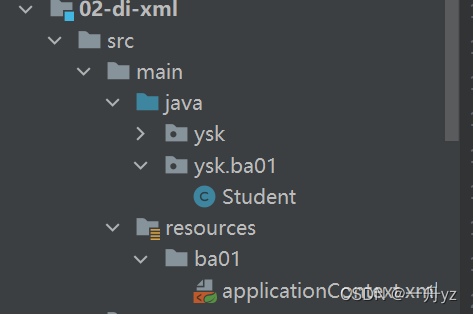
注意,此时String config = “applicationContext.xml”; 要修改为:**ba01/**applicationContext.xml,否则会报错!
因为它是存在于target目录下classes目录中的ba01下。
简单类型:
实体类:
public class Student {

    private String name;
    private Integer age;
    //get set
}
applicationContext.xml:
<bean id="student" class="ysk.ba01.Student">
    <!--声明student对象
        注入:就是赋值的意思
        简单类型: spring中规定java的基本数据类型和String都是简单类型。
        di:给属性赋值
        1. set注入(设值注入) :spring调用类的set方法, 你可以在set方法中完成属性赋值
         1)简单类型的set注入
            <bean id="xx" class="yyy">
               <property name="属性名字" value="此属性的值"/>
               一个property只能给一个属性赋值
               <property....>
            </bean>
    -->
    <property name="name" value="zhangsan"/>
    <property name="age" value="22"/>
</bean>
spring它只是执行了set方法,至于set方法中写的是什么,赋值或不赋值开发人员决定,例如 this.name = name.toUpperCase();
注意:它只关注的是set方法,加上语句:<property name = "email" value="123@qq.com"/> ,在实体类中加入email的set方法,实体类中没有email属性,但是email的set方法依旧可以执行!
测试:
String config = "ba01/applicationContext.xml";
ApplicationContext ac = new ClassPathXmlApplicationContext(config);
Student student = (Student) ac.getBean("student");
System.out.println(student);
这样也可以:
<bean id="mydate" class="java.util.Date">
    <property name="time" value="8921215132"/> <!-- setTime-->
</bean>
记住:只认set方法!
引用类型
在ba01中创建School类:
public class School {

    private String name;
    private String address;
    //get set
}
Student类中加入School属性:
private String name;
private Integer age;
private School school;
//get set
applicationContext.xml:
注意用的ref!
<bean id="student" class="ysk.ba01.Student">
    <property name="name" value="zhangsan"/>
    <property name="age" value="22"/>
    <property name="school" ref="school"/>
</bean>

<bean id="school" class="ysk.ba01.School">
    <property name="name" value="清华"/>
    <property name="address" value="北京"/>
</bean>
构造注入(理解)
构造注入是指,在构造调用者实例的同时,完成被调用者的实例化。即使用构造器设置依赖关系。
private String name;
private Integer age;
private School school;

public Student(String myName, Integer myAge, School mySchool) {
    System.out.println("student的有参构造~");
    this.name = myName;
    this.age = myAge;
    this.school = mySchool;
}
applicatioContext.xml
<bean id="student" class="ysk.ba02.Student">
    <constructor-arg name="myName" value="ysk"/>
    <constructor-arg name="myAge" value="22"/>
    <constructor-arg name="mySchool" ref="school"/>
</bean>

<!--    这样也可以-->
<bean id="student2" class="ysk.ba02.Student">
    <constructor-arg index="0" value="ysk"/>
    <constructor-arg index="1" value="10"/>
    <constructor-arg index="2" ref="school"/>
</bean>

<bean id="school" class="ysk.ba02.School">
    <property name="name" value="清华"/>
    <property name="address" value="北京"/>
</bean>
使用构造注入创建一个系统类 File 对象:
<bean id="myFile" class="java.io.File">
    <constructor-arg name="parent" value="E:\idea\ideaProject2022\spring\01-spring-hello"/>
    <constructor-arg name="child" value="readme.txt"/>
</bean>
File file = (File) ac.getBean("myFile");
System.out.println(file.getName());
引用类型属性自动注入
对于引用类型属性的注入,也可不在配置文件中显示的注入。可以通过为标签 设置 autowire 属性值,为引用类型属性进行隐式自动注入(默认是不自动注入引用类型属 性)。根据自动注入判断标准的不同,可以分为两种:
byName:根据名称自动注入
byType: 根据类型自动注入
byName方式自动注入
当配置文件中被调用者 bean 的 id 值与代码中调用者 bean 类的属性名相同时,可使用 byName 方式,让容器自动将被调用者 bean 注入给调用者 bean。容器是通过调用者的 bean 类的属性名与配置文件的被调用者 bean 的 id 进行比较而实现自动注入的。
 <!--引用类型的自动注入: spring框架根据某些规则可以给引用类型赋值。·不用你在给引用类型赋值了
       使用的规则常用的是byName, byType.
       1.byName(按名称注入) : java类中引用类型的属性名和spring容器中(配置文件)<bean>的id名称一样,
                              且数据类型是一致的,这样的容器中的bean,spring能够赋值给引用类型。
         语法:
         <bean id="xx" class="yyy" autowire="byName">
            简单类型属性赋值
         </bean>
           -->
<bean id="student" class="ysk.ba03.Student" autowire="byName">
    <property name="name" value="zhangsan"/>
    <property name="age" value="22"/>
</bean>

名称是school
<bean id="school" class="ysk.ba03.School">
    <property name="name" value="清华"/>
    <property name="address" value="北京"/>
</bean>
private String name; private Integer age; private School school;测试:
public class Test03 {
    @Test
    public void test01() {
        String config = "ba03/applicationContext.xml";
        ApplicationContext ac = new ClassPathXmlApplicationContext(config);
        Student student = (Student) ac.getBean("student");
        System.out.println(student);
    }
}
byType方式自动注入
byType(按类型注入) : java类中引用类型的数据类型和spring容器中(配置文件)的class属性
是同源关系的,这样的bean能够赋值给引用类型
同源就是一类的意思:- java类中引用类型的数据类型和bean的class的值是一样的。
- java类中引用类型的数据类型和bean的class的值父子类关系的。
- java类中引用类型的数据类型和bean的class的值接口和实现类关系的
<bean id="student" class="ysk.ba04.Student" autowire="byType">
    <property name="name" value="zhangsan"/>
    <property name="age" value="22"/>
</bean>
<!--    第一种-->
<bean id="school" class="ysk.ba04.School">
    <property name="name" value="清华"/>
    <property name="address" value="北京"/>
</bean>
子类可以当作父类使用
第二种:
package ysk.ba04;
//子类
public class PrimarySchool extends School{
}
<bean id="student" class="ysk.ba04.Student" autowire="byType">
    <property name="name" value="zhangsan"/>
    <property name="age" value="22"/>
</bean>
<!--    第二种-->
<bean id="primarySchool" class="ysk.ba04.PrimarySchool">
    <property name="name" value="地大"/>
    <property name="address" value="武汉"/>
</bean>
为应用指定多个 Spring 配置文件
在实际应用里,随着应用规模的增加,系统中 Bean 数量也大量增加,导致配置文件变 得非常庞大、臃肿。为了避免这种情况的产生,提高配置文件的可读性与可维护性,可以将 Spring 配置文件分解成多个配置文件。 包含关系的配置文件: 多个配置文件中有一个总文件,总配置文件将各其它子文件通过<import/>引入。在 Java 代码中只需要使用总配置文件对容器进行初始化即可。
spring-school.xml
<!--School模块所有bean的声明, School模块的配置文件-->
    <!--声明School对象-->
    <bean id="school" class="ysk.ba05.School">
        <property name="name" value="航空大学"/>
        <property name="address" value="北京的海淀区" />
    </bean>
spring-student.xml
<!--
     student模块所有bean的声明
   -->
<!--byType-->
<bean id="student" class="ysk.ba05.Student"  autowire="byType">
    <property name="name" value="张飒" />
    <property name="age" value="30" />
    <!--引用类型-->
    <!--<property name="school" ref="mySchool" />-->
</bean>
total.xml
<import resource="classpath:ba05/spring-school.xml"/>
<import resource="classpath:ba05/spring-student.xml"/>
上述三个xml文件一定要位于同一个包下面!
测试文件:
String config = "ba05/total.xml";
ApplicationContext ac = new ClassPathXmlApplicationContext(config);
Student student = (Student) ac.getBean("student");
System.out.println(student);
也可使用通配符*。但,此时要求父配置文件名不能满足*所能匹配的格式,否则将出现循环递归包含。就本例而言,父配置文件不能匹配 spring-*.xml 的格式,即不能起名为 spring-total.xml。
<import resource="classpath:ba05/spring-*.xml"/>
基于注解的 DI
通过注解完成java对象创建,属性赋值。
使用注解的步骤:
- 加入maven的依赖 spring-context ,在你加入spring-context的同时, 间接加入spring-aop的依赖。使用注解必须使用spring-aop依赖
- 在类中加入spring的注解(多个不同功能的注解)
- 在spring的配置文件中,加入一个组件扫描器的标签,说明注解在你的项目中的位置
学习的注解:
1.@Component
2.@Respotory
3.@Service
4.@Controller
5.@Value
6.@Autowired
7.@Resource
applicationContext.xml:
<?xml version="1.0" encoding="UTF-8"?>
<beans xmlns="http://www.springframework.org/schema/beans"
       xmlns:xsi="http://www.w3.org/2001/XMLSchema-instance"
       xmlns:context="http://www.springframework.org/schema/context"
       xsi:schemaLocation="http://www.springframework.org/schema/beans http://www.springframework.org/schema/beans/spring-beans.xsd http://www.springframework.org/schema/context https://www.springframework.org/schema/context/spring-context.xsd">
    <!--声明组件扫描器(component-scan),组件就是java对象
       base-package:指定注解在你的项目中的包名。
       component-scan工作方式: spring会扫描遍历base-package指定的包,
          把包中和子包中的所有类,找到类中的注解,按照注解的功能创建对象,或给属性赋值。

      加入了component-scan标签,配置文件的变化:
       1.加入一个新的约束文件spring-context.xsd
       2.给这个新的约束文件起个命名空间的名称
   -->
    <context:component-scan base-package="ysk.ba01"/>
</beans>
实体类:
import org.springframework.stereotype.Component;

@Component(value = "student")
public class Student {
    private String name;
    private Integer age;
    //get set
测试:
String config = "ba01/applicationContext.xml";
ApplicationContext ac = new ClassPathXmlApplicationContext(config);
Student student = (Student) ac.getBean("student");
System.out.println(student);
指定包的多种方式
<!--指定多个包的三种方式-->
<!--第一种方式:使用多次组件扫描器,指定不同的包-->
<context:component-scan base-package="com.bjpowernode.ba01"/>
<context:component-scan base-package="com.bjpowernode.ba02"/>

<!--第二种方式:使用分隔符(;或,)分隔多个包名-->
<context:component-scan base-package="com.bjpowernode.ba01;com.bjpowernode.ba02" />

<!--第三种方式:指定父包-->
<context:component-scan base-package="com.bjpowernode" />
简单类型属性注入@Value(掌握)
需要在属性上使用注解@Value,该注解的 value 属性用于指定要注入的值。 使用该注解完成属性注入时,类中无需 setter(内部机制是使用反射,不需要set方法)。当然,若属性有 setter,则也可将其加 到 setter 上。
@Component(value = "student")
public class Student {

    @Value("张三")
    private String name;
    @Value("12")
    private Integer age;
byType 自动注入@Autowired(掌握),引用类型
需要在引用属性上使用注解@Autowired,该注解默认使用按类型自动装配 Bean 的方式。使用该注解完成属性注入时,类中无需 setter。当然,若属性有 setter,则也可将其加 到 setter 上
school.java
@Component("school")
public class School {
    @Value("武大")
    private String name;
    @Value("武汉")
    private String address;
student.java
@Component(value = "student")
public class Student {

    @Value("张三")
    private String name;
    @Value("12")
    private Integer age;

    @Autowired
    private School school;
byName 自动注入@Autowired 与@Qualifier(掌握)
需要在引用属性上联合使用注解@Autowired 与@Qualifier。@Qualifier 的 value 属性用 于指定要匹配的 Bean 的 id 值。类中无需 set 方法,也可加到 set 方法上。
School.java:
@Component("mySchool")
public class School {
    @Value("武大")
    private String name;
    @Value("武汉")
    private String address;
Student.java:
@Component(value = "student")
public class Student {

    @Value("张三")
    private String name;
    @Value("12")
    private Integer age;

    //byName 方式注入, 下面这两个没有先后顺序
    @Autowired
    @Qualifier("mySchool")
@Autowired 还有一个属性 required,默认值为true,表示当匹配失败后,会终止程序运行。若将其值设置为 false,则若匹配失败,程序正常执行,将被忽略,未匹配的属性值为 null。建议用 true
//byName 方式注入, 下面这两个没有先后顺序
    @Autowired(required = true)
    @Qualifier("mySchool")
    private School school;
JDK 注解@Resource 自动注入(掌握)
Spring提供了对 jdk中@Resource注解的支持。@Resource注解既可以按名称匹配Bean, 也可以按类型匹配 Bean。默认是按名称注入。使用该注解,要求 JDK 必须是 6 及以上版本。 @Resource 可在属性上,也可在 set 方法上。
byType注入引用类型属性
@Resource 注解若不带任何参数,采用默认按名称的方式注入,按名称注入 bean失败, 则会按照类型进行 Bean 的匹配注入
@Component("myschool") public class School { @Value("武大") private String name; @Value("武汉") private String address;@Component(value = "student") public class Student { @Value("张三") private String name; @Value("12") private Integer age; @Resource private School school;byName注入引用类型属性
@Resource 注解指定其 name 属性,则 name 的值即为按照名称进行匹配的 Bean 的 id。
@Component("myschool") public class School { @Value("华科") private String name; @Value("武汉") private String address;@Component(value = "student") public class Student { @Value("张三") private String name; @Value("12") private Integer age; @Resource(name = "myschool") private School school;
@Resource和@Autowired的区别?
@Resource是jdk提供的注解,它默认使用byName进行装配,byName无法装配则使用byType;
@Autowired是spring提供的注解,@Autowired默认使用byType进行装配,byType无法装配则使用byName,如果接口有多个实现类,需要配合@Qualifier注解使用。
注解与 XML 的对比
注解优点是:
- 方便
- 直观
- 高效(代码少,没有配置文件的书写那么复杂)。 其弊端也显而易见:以硬编码的 方式写入到 Java 代码中,修改是需要重新编译代码的
XML 方式优点是:
- 配置和代码是分离的
- 在 xml 中做修改,无需编译代码,只需重启服务器即可将新的配置加载。 xml 的缺点是:编写麻烦,效率低,大型项目过于复杂
AOP 面向切面编程
不使用 AOP 的开发方式(理解)
先定义好接口与一个实现类,该实现类中除了要实现接口中的方法外,还要再写两个非 业务方法。非业务方法也称为交叉业务逻辑:
doTransaction():用于事务处理 ;doLog():用于日志处理 然后,再使接口方法调用它们。接口方法也称为主业务逻辑。
接口:
public interface SomeService {
    void doSome();
    void doOther();
}
工具类:
public class ServiceTools {

    public static void doLog(){

        System.out.println("非业务方法,方法的执行时间:"+ new Date());
    }

    public static void doTrans(){
        //方法的最后,提交事务
        System.out.println("非业务方法,方法执行完毕后,提交事务");
    }
}
实现类:
public class SomeServiceImpl implements SomeService {
    @Override
    public void doSome() {
        ServiceTools.doLog();
        System.out.println("执行业务方法doSome");
        ServiceTools.doTrans();
    }

    @Override
    public void doOther() {
        ServiceTools.doLog();
        System.out.println("执行业务方法doOther");
        ServiceTools.doTrans();
    }
}
交叉业务与主业务深度耦合在一起。当交叉业务逻辑 较多时,在主业务代码中会出现大量的交叉业务逻辑代码调用语句,大大影响了主业务逻辑 的可读性,降低了代码的可维护性,同时也增加了开发难度。
所以,可以采用动态代理方式。在不修改主业务逻辑的前提下,扩展和增强其功能。
@Override
public Object invoke(Object proxy, Method method, Object[] args) throws Throwable {
    //通过代理对象执行方法时,会调用执行这个invoke()
    System.out.println("执行MyInvocationHandler中的invoke()");
    System.out.println("method名称:"+method.getName());
    String methodName = method.getName();
    Object res = null;

    if("doSome".equals(methodName)){ //JoinPoint  Pointcut
        ServiceTools.doLog(); //在目标方法之前,输出时间
        //执行目标类的方法,通过Method类实现
        res  = method.invoke(target,args); //SomeServiceImpl.doSome()
        ServiceTools.doTrans(); //在目标方法执行之后,提交事务
    } else {
        res  = method.invoke(target,args); //SomeServiceImpl.doOther()
    }

    //目标方法的执行结果
    return res;
}
public class MyApp {
    public static void main(String[] args) {
        //调用doSome, doOther
//        SomeService service = new SomeServiceImpl();
//        service.doSome();
//        System.out.println("============================================");
//        service.doOther();

        //使用jdk的Proxy创建代理对象
        //创建目标对象
        SomeService target = new SomeServiceImpl();

        //创建InvocationHandler对象
        InvocationHandler handler = new MyInvocationHandler(target);

        //使用Proxy创建代理
        SomeService proxy = (SomeService) Proxy.newProxyInstance(
                target.getClass().getClassLoader(),
                target.getClass().getInterfaces(),handler);
        //com.sun.proxy.$Proxy0
        System.out.println("proxy======"+proxy.getClass().getName());
        //通过代理执行方法,会调用handler中的invoke()
        proxy.doSome();
        System.out.println("==================================================");
        proxy.doOther();
    }
}
AOP
动态代理的作用
- 在目标类源代码不改变的情况下,增加功能。
- 减少代码的重复
- 专注业务逻辑代码
- 解耦合,让你的业务功能和日志,事务非业务功能分离。
动态代理的作用:能创建对象,在原有代码不变的情况下给程序增加功能。
aop简介
AOP(Aspect Orient Programming),面向切面编程。面向切面编程是从动态角度考虑程 序运行过程。 AOP 底层,就是采用动态代理模式实现的。采用了两种代理:JDK 的动态代理,与 CGLIB 的动态代理。(动态代理规范化)
AOP 为 Aspect Oriented Programming 的缩写,意为:面向切面编程,可通过运行期动态代理实现程序功能的统一维护的一种技术。AOP 是 Spring 框架中的一个重要内容。利用 AOP 可以对业务逻辑的各个部分进行隔离,从而使得业务逻辑各部分之间的耦合度降低,提高程 序的可重用性,同时提高了开发的效率。
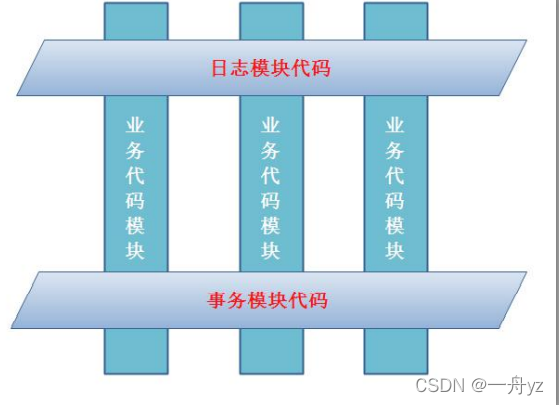
面向切面编程,就是将交叉业务逻辑封装成切面,利用 AOP 容器的功能将切面织入到 主业务逻辑中。所谓交叉业务逻辑是指,通用的、与主业务逻辑无关的代码,如安全检查、 事务、日志、缓存等。
怎么理解面向切面编程 ?
1)需要在分析项目功能时,找出切面。
2)合理的安排切面的执行时间(在目标方法前, 还是目标方法后)
3)合理的安全切面执行的位置,在哪个类,哪个方法增加增强功能
若不使用 AOP,则会出现代码纠缠,即交叉业务逻辑与主业务逻辑混合在一起。这样, 会使主业务逻辑变的混杂不清。
例如,转账,在真正转账业务逻辑前后,需要权限控制、日志记录、加载事务、结束事 务等交叉业务逻辑,而这些业务逻辑与主业务逻辑间并无直接关系。但,它们的代码量所占 比重能达到总代码量的一半甚至还多。它们的存在,不仅产生了大量的“冗余”代码,还大 大干扰了主业务逻辑—转账。
面向切面编程对有什么好处?
1.减少重复;
2.专注业务; 注意:面向切面编程只是面向对象编程的一种补 充。
使用 AOP 减少重复代码,专注业务实
AOP 编程术语(掌握)
AOP(Aspect Orient Programming)面向切面编程
- Aspect:切面,表示增强的功能, 就是一堆代码,完成某个一个功能。非业务功能,
常见的切面功能有日志, 事务, 统计信息, 参数检查, 权限验证。 - JoinPoint:连接点 ,连接业务方法和切面的位置。 就某类中的业务方法
- Pointcut : 切入点 ,指多个连接点方法的集合。多个方法
- 目标对象: 给哪个类的方法增加功能, 这个类就是目标对象
- Advice:通知,通知表示切面功能执行的时间。
一个切面有三个关键的要素:
- 切面的功能代码,切面干什么
- 切面的执行位置,使用Pointcut表示切面执行的位置
- 切面的执行时间,使用Advice表示时间,在目标方法之前,还是目标方法之后。
aop的实现
aop是一个规范,是动态的一个规范化,一个标准
aop的技术实现框架:
spring:spring在内部实现了aop规范,能做aop的工作。spring主要在事务处理时使用aop。
项目开发中很少使用spring的aop实现。 因为spring的aop比较笨重。aspectJ: 一个开源的专门做aop的框架。spring框架中集成了aspectj框架,通过spring就能使用aspectj的功能。
aspectJ框架实现aop有两种方式:
- 使用xml的配置文件 : 配置全局事务
- 使用注解,我们在项目中要做aop功能,一般都使用注解, aspectj有5个注解。
AspectJ 的通知类型(理解)
AspectJ 中常用的通知有五种类型: (1)前置通知 (2)后置通知 (3)环绕通知 (4)异常通知 (5)最终通知
AspectJ 的切入点表达式(掌握)
AspectJ 定义了专门的表达式用于指定切入点。表达式的原型是:
// ?表示可选的部分
execution(modifiers-pattern? ret-type-pattern
declaring-type-pattern?name-pattern(param-pattern)
throws-pattern?)
modifiers-pattern] 访问权限类型
ret-type-pattern 返回值类型
declaring-type-pattern 包名类名
name-pattern(param-pattern) 方法名(参数类型和参数个数)
throws-pattern 抛出异常类型
以上表达式共 4 个部分。 execution(访问权限方法返回值 方法声明(参数)异常类型)
红色字体必须要有!
切入点表达式要匹配的对象就是目标方法的方法名。所以,execution 表达式中明显就 是方法的签名。注意,表达式中黑色文字表示可省略部分,各部分间用空格分开。在其中可以使用以下符号:
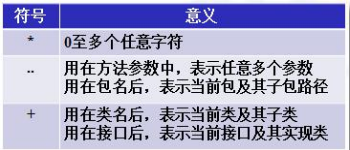
举例:
execution(public * *(..))
指定切入点为:任意公共方法。
execution(* set*(..)) 指定切入点为:任何一个以“set”开
始的方法。execution(* com.xyz.service.*.*(..))
指定切入点为:定义在 service 包里的任意类的任意方法。
execution(* com.xyz.service..*.*(..))
指定切入点为:定义在 service 包或者子包里的任意类的任意方法。“..”出现在类名中时,后
面必须跟“*”,表示包、子包下的所有类。
execution(* *..service.*.*(..))
指定所有包下的 serivce 子包下所有类(接口)中所有方法为切入点
使用aspectj实现aop
基本步骤:
- 新建maven项目
- 加入依赖,spring依赖,aspectj依赖,junit单元测试
- .创建目标类:接口和他的实现类。要做的是给类中的方法增加功能
- 创建切面类:普通类
1)在类的上面加入 @Aspect
2)在类中定义方法, 方法就是切面要执行的功能代码
在方法的上面加入aspectj中的通知注解,例如@Before
有需要指定切入点表达式execution() - 创建spring的配置文件:声明对象,把对象交给容器统一管理
声明对象你可以使用注解或者xml配置文件<bean>
1)声明目标对象
2)声明切面类对象
3)声明aspectj框架中的自动代理生成器标签。
自动代理生成器:用来完成代理对象的自动创建功能的。 - 创建测试类,从spring容器中获取目标对象(实际就是代理对象)。
通过代理执行方法,实现aop的功能增强。
pom.xml:
<?xml version="1.0" encoding="UTF-8"?>

<project xmlns="http://maven.apache.org/POM/4.0.0" xmlns:xsi="http://www.w3.org/2001/XMLSchema-instance"
  xsi:schemaLocation="http://maven.apache.org/POM/4.0.0 http://maven.apache.org/xsd/maven-4.0.0.xsd">
  <modelVersion>4.0.0</modelVersion>

  <groupId>ysk</groupId>
  <artifactId>06-aop-aspectj</artifactId>
  <version>1.0-SNAPSHOT</version>


  <properties>
    <project.build.sourceEncoding>UTF-8</project.build.sourceEncoding>
    <maven.compiler.source>1.8</maven.compiler.source>
    <maven.compiler.target>1.8</maven.compiler.target>
  </properties>

  <dependencies>
    <dependency>
      <groupId>junit</groupId>
      <artifactId>junit</artifactId>
      <version>4.11</version>
      <scope>test</scope>
    </dependency>


  <dependency>
    <groupId>org.springframework</groupId>
    <artifactId>spring-context</artifactId>
    <version>5.2.5.RELEASE</version>
  </dependency>

  <dependency>
    <groupId>org.springframework</groupId>
    <artifactId>spring-aspects</artifactId>
    <version>5.2.5.RELEASE</version>
  </dependency>

  </dependencies>
  <build>

  </build>
</project>
接口以及实现类
public interface SomeService {
    void doSome(String name,Integer age);
}
public class SomeServiceImpl implements SomeService { @Override public void doSome(String name, Integer age) { System.out.println("doSome执行!"); } }定义切面类
package ysk.ba01;

import org.aspectj.lang.annotation.Aspect;
import org.aspectj.lang.annotation.Before;

import java.util.Date;

/**
 *  @Aspect : 是aspectj框架中的注解。
 *     作用:表示当前类是切面类。
 *     切面类:是用来给业务方法增加功能的类,在这个类中有切面的功能代码
 *     位置:在类定义的上面
 */
@Aspect
public class MyAspect {

    /**
     * @Before: 前置通知注解
     *   属性:value ,是切入点表达式,表示切面的功能执行的位置。
     *   位置:在方法的上面
     * 特点:
     *  1.在目标方法之前先执行的
     *  2.不会改变目标方法的执行结果
     *  3.不会影响目标方法的执行。
     */
    //注:这是完整的写法,有些可以省略
    @Before(value = "execution(public void ysk.ba01.SomeServiceImpl.doSome(String,Integer))")
    public void myBefore(){
        System.out.println("前置通知, 切面功能:在目标方法之前输出执行时间:"+ new Date());
    }
     /*@Before(value = "execution(* do*(..))")
    public void myBefore2(){
        //就是你切面要执行的功能代码
        System.out.println("4=====前置通知, 切面功能:在目标方法之前输出执行时间:"+ new Date());
    }*/
}
声明目标对象切面类对象
<!--    声明目标类对象-->
    <bean id="someService" class="ysk.ba01.SomeServiceImpl"/>

<!--    声明切面类对象-->
    <bean id="myAspect" class="ysk.ba01.MyAspect"/>
注册 AspectJ 的自动代理
在定义好切面 Aspect 后,需要通知 Spring 容器,让容器生成“目标类+ 切面”的代理 对象。这个代理是由容器自动生成的。只需要在 Spring 配置文件中注册一个基于 aspectj 的自动代理生成器,其就会自动扫描到@Aspect 注解,并按通知类型与切入点,将其织入,并 生成代理。
自动代理生成器:使用 aspectj 框架内部的功能,创建目标对象的代理对象。创建代理对象是在内存中实现的, 修改目标对象的内存中的结构。 创建为代理对象 所以目标对象就是被修改后的代理对象
<!--    声明自动代理生成器,创建代理-->
    <aop:aspectj-autoproxy/>
测试:
@Test
public void test(){
    String config= "applicationContext.xml";
    ApplicationContext ac= new ClassPathXmlApplicationContext(config);
    SomeService service = (SomeService) ac.getBean("someService");
    service.doSome("张三",12);
}
@Before 前置通知-方法有 JoinPoint 参数
在目标方法执行之前执行。被注解为前置通知的方法,可以包含一个 JoinPoint 类型参 数。该类型的对象本身就是切入点表达式。通过该参数,可获取切入点表达式、方法签名、 目 标对象等。
不光前置通知的方法,可以包含一个 JoinPoint 类型参数,所有的通知方法均可包含该 参数。
@Before(value = "execution(* do*(..))")
public void myBefore3(JoinPoint jp){
    //获取方法的完整定义
    System.out.println("方法的签名(定义)="+jp.getSignature());
    System.out.println("方法的名称="+jp.getSignature().getName());
    //获取方法的实参
    Object args [] = jp.getArgs();
    for (Object arg:args){
        System.out.println("参数="+arg);
    }
    //就是你切面要执行的功能代码
    System.out.println("2=====前置通知, 切面功能:在目标方法之前输出执行时间:"+ new Date());
}
[掌握]@AfterReturning 后置通知-注解有 returning 属性
在目标方法执行之后执行。由于是目标方法之后执行,所以可以获取到目标方法的返回值。该注解的 returning 属性就是用于指定接收方法返回值的变量名的。所以,被注解为后 置通知的方法,除了可以包含 JoinPoint 参数外,还可以包含用于接收返回值的变量。该变 量最好为 Object 类型,因为目标方法的返回值可能是任何类型。
接口:
String doOther(String name,Integer age);
实现类:
@Override
public String doOther(String name, Integer age) {
    System.out.println("doOther执行");
    return "ysk";
}
/**
     * @AfterReturning:后置通知
     *    属性:1.value 切入点表达式
     *         2.returning 自定义的变量,表示目标方法的返回值的。
     *          自定义变量名必须和通知方法的形参名一样。
     *    位置:在方法定义的上面
     * 特点:
     *  1。在目标方法之后执行的。
     *  2. 能够获取到目标方法的返回值,可以根据这个返回值做不同的处理功能
     *      Object res = doOther();
     *  3. 可以修改这个返回值
     *
     *  后置通知的执行
     *    Object res = doOther();
     *    参数传递: 传值, 传引用
     *    myAfterReturning(res);
     *    System.out.println("res="+res)
     *
     */
@AfterReturning(value = "execution(* *..ServiceImpl.doOther(..))",returning = "res")
public void myAfterReturning(Object res){
    //修改目标方法的返回值, 看一下是否会影响 最后的方法调用结果
    if( res != null){
        System.out.println("后置执行");
        res = "Hello Aspectj";
    }

}
[掌握]@Around 环绕通知-增强方法有ProceedingJoinPoint 参数
在目标方法执行之前之后执行。被注解为环绕增强的方法要有返回值,Object 类型。并 且方法可以包含一个 ProceedingJoinPoint 类型的参数。接口 ProceedingJoinPoint 其有一个 proceed()方法,用于执行目标方法。若目标方法有返回值,则该方法的返回值就是目标方法 的返回值。最后,环绕增强方法将其返回值返回。该增强方法实际是拦截了目标方法的执行。 接口增加方法:
接口:
String doFirst(String name,Integer age);
实现类:
@Override
public String doFirst(String name, Integer age) {
    System.out.println("doFirst执行");
    return "doFirst";
}
定义切面:
/**
     * @Around: 环绕通知
     *    属性:value 切入点表达式
     *    位置:在方法的定义什么
     * 特点:
     *   1.它是功能最强的通知
     *   2.在目标方法的前和后都能增强功能。
     *   3.控制目标方法是否被调用执行
     *   4.修改原来的目标方法的执行结果。 影响最后的调用结果
     *
     *  环绕通知,等同于jdk动态代理的,InvocationHandler接口
     *
     *  参数:  ProceedingJoinPoint 就等同于 Method
     *         作用:执行目标方法的
     *  返回值: 就是目标方法的执行结果,可以被修改。
     *
     *  环绕通知: 经常做事务, 在目标方法之前开启事务,执行目标方法, 在目标方法之后提交事务
     */

    @Around(value = "execution(* *..ServiceImpl.doOther(..))")
    public Object myAround(ProceedingJoinPoint pjp)  throws Throwable{
        String name = "";
        //获取第一个参数值
        Object args [] = pjp.getArgs();
        if( args!= null && args.length > 1){
            Object arg=  args[0];
            name =(String)arg;
        }

        //实现环绕通知
        Object result = null;
        System.out.println("环绕通知:在目标方法之前,输出时间:"+ new Date());
        //1.目标方法调用
        if( "zhangsan".equals(name)){
            //符合条件,调用目标方法
            result = pjp.proceed(); //method.invoke(); Object result = doFirst();

        }

        System.out.println("环绕通知:在目标方法之后,提交事务");
        //2.在目标方法的前或者后加入功能

        //修改目标方法的执行结果, 影响方法最后的调用结果
        if( result != null){
            result = "Hello AspectJ AOP";
        }

        //返回目标方法的执行结果
        return result;
    }
测试:
String config = "applicationContext.xml";
ApplicationContext ctx = new ClassPathXmlApplicationContext(config);
//从容器中获取目标对象
SomeService proxy = (SomeService) ctx.getBean("someService");


//通过代理的对象执行方法,实现目标方法执行时,增强了功能
String str = proxy.doFirst("zhangsan", 20); //在这里相当于执行的是myAround()
[了解]@AfterThrowing 异常通知-注解中有 throwing 属性
在目标方法抛出异常后执行。该注解的 throwing 属性用于指定所发生的异常类对象。 当然,被注解为异常通知的方法可以包含一个参数 Throwable,参数名称为 throwing 指定的 名称,表示发生的异常对象。
接口:
void doSecond();
实现类:
@Override
public String doSecond(String name, Integer age) {
    System.out.println("doSecond执行"  +(10/0));
}
切面:
@Aspect
public class MyAspect {
    /**
     * 异常通知方法的定义格式
     *  1.public
     *  2.没有返回值
     *  3.方法名称自定义
     *  4.方法有个一个Exception, 如果还有是JoinPoint,
     */

    /**
     * @AfterThrowing:异常通知
     *     属性:1. value 切入点表达式
     *          2. throwinng 自定义的变量,表示目标方法抛出的异常对象。
     *             变量名必须和方法的参数名一样
     * 特点:
     *   1. 在目标方法抛出异常时执行的
     *   2. 可以做异常的监控程序, 监控目标方法执行时是不是有异常。
     *      如果有异常,可以发送邮件,短信进行通知
     *
     *  执行就是:
     *   try{
     *       SomeServiceImpl.doSecond(..)
     *   }catch(Exception e){
     *       myAfterThrowing(e);
     *   }
     */
    @AfterThrowing(value = "execution(* *..SomeServiceImpl.doSecond(..))",
                   throwing = "ex")
    public void myAfterThrowing(Exception ex) {
        System.out.println("异常通知:方法发生异常时,执行:"+ex.getMessage());
        //发送邮件,短信,通知开发人员
    }
[了解]@After最终通知
无论目标方法是否抛出异常,该增强均会被执行
接口:
void doThird();
实现类:
@Override
public String doThird(String name, Integer age) {
    System.out.println("doThird执行"  +(10/0));
}
切面:
/**
     * 最终通知方法的定义格式
     *  1.public
     *  2.没有返回值
     *  3.方法名称自定义
     *  4.方法没有参数,  如果还有是JoinPoint,
     */

/**
     * @After :最终通知
     *    属性: value 切入点表达式
     *    位置: 在方法的上面
     * 特点:
     *  1.总是会执行
     *  2.在目标方法之后执行的
     *
     *  try{
     *      SomeServiceImpl.doThird(..)
     *  }catch(Exception e){
     *
     *  }finally{
     *      myAfter()
     *  }
     *
     */
@After(value = "execution(* *..SomeServiceImpl.doThird(..))")
public  void  myAfter(){
    System.out.println("执行最终通知,总是会被执行的代码");
    //一般做资源清除工作的。
}
@Pointcut定义切入点
当较多的通知增强方法使用相同的 execution 切入点表达式时,编写、维护均较为麻烦。 AspectJ 提供了@Pointcut 注解,用于定义 execution 切入点表达式。 其用法是,将@Pointcut 注解在一个方法之上,以后所有的 execution 的 value 属性值均 可使用该方法名作为切入点。代表的就是@Pointcut 定义的切入点。这个使用@Pointcut 注解 的方法一般使用 private 的标识方法,即没有实际作用的方法。
@After(value = "mypt()")
public  void  myAfter(){
    System.out.println("执行最终通知,总是会被执行的代码");
    //一般做资源清除工作的。
}

@Before(value = "mypt()")
public  void  myBefore(){
    System.out.println("前置通知,在目标方法之前先执行的");
}

/**
     * @Pointcut: 定义和管理切入点, 如果你的项目中有多个切入点表达式是重复的,可以复用的。
     *            可以使用@Pointcut
     *    属性:value 切入点表达式
     *    位置:在自定义的方法上面
     * 特点:
     *   当使用@Pointcut定义在一个方法的上面 ,此时这个方法的名称就是切入点表达式的别名。
     *   其它的通知中,value属性就可以使用这个方法名称,代替切入点表达式了
     */
@Pointcut(value = "execution(* *..SomeServiceImpl.doThird(..))" )
private void mypt(){ //一般定义为私有
    //无需代码,
}
有接口默认用的是jdk动态代理,没有接口(即SomeService)用的是cglib代理
有接口也可以用cglib动态代理:
<aop:aspectj-autoproxy proxy-target-class="true"/>
spring集成mybatis
将 MyBatis 与 Spring 进行整合,主要解决的问题就是将 SqlSessionFactory 对象交由 Spring 来管理。所以,该整合,只需要将 SqlSessionFactory 的对象生成器 SqlSessionFactoryBean 注 册在 Spring 容器中,再将其注入给 Dao 的实现类即可完成整合。
实现 Spring 与 MyBatis 的整合常用的方式:扫描的 Mapper 动态代理
Spring 像插线板一样,mybatis 框架是插头,可以容易的组合到一起。插线板 spring 插 上 mybatis,两个框架就是一个整体
总体步骤:
步骤:
1.新建maven项目
2.加入maven的依赖
  1)spring依赖
  2)mybatis依赖
  3)mysql驱动
  4)spring的事务的依赖
  5)mybatis和spring集成的依赖: mybatis官方体用的,用来在spring项目中创建mybatis
     的SqlSesissonFactory,dao对象的
3.创建实体类
4.创建dao接口和mapper文件
5.创建mybatis主配置文件
6.创建Service接口和实现类,属性是dao。
7.创建spring的配置文件:声明mybatis的对象交给spring创建
 1)数据源DataSource
 2)SqlSessionFactory
 3) Dao对象
 4)声明自定义的service

8.创建测试类,获取Service对象,通过service调用dao完成数据库的访问
创建数据库,表
MySQL 创建数据库 springdb,新建表 Student。
过程见mybatis
pom.xml
<?xml version="1.0" encoding="UTF-8"?>

<project xmlns="http://maven.apache.org/POM/4.0.0" xmlns:xsi="http://www.w3.org/2001/XMLSchema-instance"
  xsi:schemaLocation="http://maven.apache.org/POM/4.0.0 http://maven.apache.org/xsd/maven-4.0.0.xsd">
  <modelVersion>4.0.0</modelVersion>

  <groupId>ysk</groupId>
  <artifactId>07-spring-mybatis</artifactId>
  <version>1.0-SNAPSHOT</version>


  <properties>
    <project.build.sourceEncoding>UTF-8</project.build.sourceEncoding>
    <maven.compiler.source>1.8</maven.compiler.source>
    <maven.compiler.target>1.8</maven.compiler.target>
  </properties>

  <dependencies>
    <!--单元测试-->
    <dependency>
      <groupId>junit</groupId>
      <artifactId>junit</artifactId>
      <version>4.11</version>
      <scope>test</scope>
    </dependency>
    <!--spring核心ioc-->
    <dependency>
      <groupId>org.springframework</groupId>
      <artifactId>spring-context</artifactId>
      <version>5.2.5.RELEASE</version>
    </dependency>
    <!--做spring事务用到的-->
    <dependency>
      <groupId>org.springframework</groupId>
      <artifactId>spring-tx</artifactId>
      <version>5.2.5.RELEASE</version>
    </dependency>
    <dependency>
      <groupId>org.springframework</groupId>
      <artifactId>spring-jdbc</artifactId>
      <version>5.2.5.RELEASE</version>
    </dependency>
    <!--mybatis依赖-->
    <dependency>
      <groupId>org.mybatis</groupId>
      <artifactId>mybatis</artifactId>
      <version>3.5.1</version>
    </dependency>
    <!--mybatis和spring集成的依赖-->
    <dependency>
      <groupId>org.mybatis</groupId>
      <artifactId>mybatis-spring</artifactId>
      <version>1.3.1</version>
    </dependency>
    <!--mysql驱动-->
    <dependency>
      <groupId>mysql</groupId>
      <artifactId>mysql-connector-java</artifactId>
      <version>5.1.9</version>
    </dependency>
    <!--阿里公司的数据库连接池-->
    <dependency>
      <groupId>com.alibaba</groupId>
      <artifactId>druid</artifactId>
      <version>1.1.12</version>
    </dependency>
  </dependencies>

  <build>
    <!--目的是把src/main/java目录中的xml文件包含到输出结果中。输出到classes目录中-->
    <resources>
      <resource>
        <directory>src/main/java</directory><!--所在的目录-->
        <includes><!--包括目录下的.properties,.xml 文件都会扫描到-->
          <include>**/*.properties</include>
          <include>**/*.xml</include>
        </includes>
        <filtering>false</filtering>
      </resource>
    </resources>
  </build>
</project>
定义实体类
public class Student {
    //属性名和列名一样。
    private Integer id;
    private String name;
    private String email;
    private Integer age;
    // get set
}
接口、mapper映射文件
public interface StudentDao {
    int insertStudent(Student student);
    List<Student> selectStudents();

}
mapper文件:
<?xml version="1.0" encoding="UTF-8" ?>
<!DOCTYPE mapper
        PUBLIC "-//mybatis.org//DTD Mapper 3.0//EN"
        "http://mybatis.org/dtd/mybatis-3-mapper.dtd">
<mapper namespace="">

    <select id="selectStudents" resultType="ysk.domain.Student">
       select id,name,email,age  from student order by id desc
    </select>

    <insert id="insertStudent">
        insert into student values (#{id},#{name},#{email},#{age})
    </insert>
</mapper>
主配置文件:
(这个主配置文件作为新的模板文件,代替之前创建的)
<?xml version="1.0" encoding="UTF-8" ?>
<!DOCTYPE configuration
        PUBLIC "-//mybatis.org//DTD Config 3.0//EN"
        "http://mybatis.org/dtd/mybatis-3-config.dtd">
<configuration>

    <!--settings:控制mybatis全局行为-->
    <settings>
        <!--设置mybatis输出日志-->
        <setting name="logImpl" value="STDOUT_LOGGING"/>
    </settings>

    <!--设置别名-->
    <typeAliases>
        <!--name:实体类所在的包名
            表示ysk.domain包中的列名就是别名
            你可以使用Student表示ysk.domain.Student
        -->
        <package name="ysk.domain"/>
    </typeAliases>


    <!-- sql mapper(sql映射文件)的位置-->
    <mappers>
        <!--
          name:是包名, 这个包中的所有mapper.xml一次都能加载
        -->
        <package name="ysk.dao"/>
    </mappers>
</configuration>
修改 Spring 配置文件
数据源的配置
使用 JDBC 模板,首先需要配置好数据源,数据源直接以 Bean 的形式配置在 Spring 配 置文件中。根据数据源的不同,其配置方式不同:
Druid 数据源 DruidDataSource:
Druid 是阿里的开源数据库连接池。是 Java 语言中最好的数据库连接池。Druid 能 够提供强大的监控和扩展功能。
官网:https://github.com/alibaba/druid 使用地址:https://github.com/alibaba/druid/wiki/常见 问题
配置连接池:
为了便于维护,可以将数据库连接信息写入到属性文件中,使 Spring 配置文件从中读取 数据。 属性文件名称自定义,但一般都是放在 src 下。
Spring 配置文件从属性文件中读取数据时,需要在<property/>的 value 属性中使用${ }, 将 在属性文件中定义的 key 括起来,以引用指定属性的值.
该属性文件若要被 Spring配置文件读取,其必须在配置文件中进行注册。使用 标签。
<context:property-placeholder/>方式(掌握) 。该方式要求在 Spring 配置文件头部加入 spring-context.xsd 约束文件 标签中有一个属性 location,用于指定属性文件的位置。
<context:property-placeholder location="classpath:jdbc.properties" />

<!--声明数据源DataSource, 作用是连接数据库的-->
<bean id="myDataSource" class="com.alibaba.druid.pool.DruidDataSource"
      init-method="init" destroy-method="close">
    <!--set注入给DruidDataSource提供连接数据库信息 -->
    <!--    使用属性配置文件中的数据,语法 ${key} -->
    <property name="url" value="${jdbc.url}" /><!--setUrl()-->
    <property name="username" value="${jdbc.username}"/>
    <property name="password" value="${jdbc.passwd}" />
    <property name="maxActive" value="${jdbc.max}" />
</bean>
有了上面的这一段代码,spring就会帮我们创建出connection连接对象!
jdbc.properties:
jdbc.url=jdbc:mysql://localhost:3306/springdb
jdbc.username=root
jdbc.passwd=123
jdbc.max=30
注册 SqlSessionFactoryBean
<!--声明的是mybatis中提供的SqlSessionFactoryBean类,这个类内部创建SqlSessionFactory的
        SqlSessionFactory  sqlSessionFactory = new ..
    -->
<bean id="sqlSessionFactory" class="org.mybatis.spring.SqlSessionFactoryBean">
    <!--set注入,把数据库连接池付给了dataSource属性-->
    <property name="dataSource" ref="myDataSource" />
    <!--mybatis主配置文件的位置
           configLocation属性是Resource类型,读取配置文件
           它的赋值,使用value,指定文件的路径,使用classpath:表示文件的位置
        -->
    <property name="configLocation" value="classpath:mybatis.xml" />
</bean>
定义 Mapper 扫描配置器 MapperScannerConfigu
Mapper 扫描配置器 MapperScannerConfigurer 会自动生成指定的基本包中 mapper 的代 理对象。该 Bean 无需设置 id 属性。basePackage 使用分号或逗号设置多个包。
<!--创建dao对象,使用SqlSession的getMapper(StudentDao.class)
        MapperScannerConfigurer:在内部调用getMapper()生成每个dao接口的代理对象。

    -->
<bean class="org.mybatis.spring.mapper.MapperScannerConfigurer">
    <!--指定SqlSessionFactory对象的id-->
    <property name="sqlSessionFactoryBeanName" value="sqlSessionFactory" />
    <!--指定包名, 包名是dao接口所在的包名。
            MapperScannerConfigurer会扫描这个包中的所有接口,把每个接口都执行
            一次getMapper()方法,得到每个接口的dao对象。
            创建好的dao对象放入到spring的容器中的。 dao对象的默认名称是 接口名首字母小写
        -->
    <property name="basePackage" value="com.bjpowernode.dao"/>
</bean>
向 Service 注入接口
向 Service 注入 Mapper 代 理 对 象 时需 要 注 意 ,由 于 通 过 Mapper 扫 描 配 置器 MapperScannerConfigurer 生成的 Mapper 代理对象没有名称,所以在向 Service 注入 Mapper 代理时,无法通过名称注入。但可通过接口的简单类名注入,因为生成的是这个 Dao 接口 的对象。
<!--声明service-->
<bean id="studentService" class="ysk.service.impl.StudentServiceImpl">
    <property name="studentDao" ref="studentDao" />
</bean>
完整的applicationContext.xml
主要创建三个对象:数据源、SqlSessionFactory,dao对象
几乎为固定写法,变化的地方在dao的包名
<?xml version="1.0" encoding="UTF-8"?>
<beans xmlns="http://www.springframework.org/schema/beans"
       xmlns:xsi="http://www.w3.org/2001/XMLSchema-instance"
       xmlns:context="http://www.springframework.org/schema/context"
       xsi:schemaLocation="http://www.springframework.org/schema/beans http://www.springframework.org/schema/beans/spring-beans.xsd http://www.springframework.org/schema/context https://www.springframework.org/schema/context/spring-context.xsd">


    <context:property-placeholder location="classpath:jdbc.properties" />

    <!--声明数据源DataSource, 作用是连接数据库的-->
    <bean id="myDataSource" class="com.alibaba.druid.pool.DruidDataSource"
          init-method="init" destroy-method="close">
        <property name="url" value="${jdbc.url}" /><!--setUrl()-->
        <property name="username" value="${jdbc.username}"/>
        <property name="password" value="${jdbc.passwd}" />
        <property name="maxActive" value="${jdbc.max}" />
    </bean>

    <bean id="sqlSessionFactory" class="org.mybatis.spring.SqlSessionFactoryBean">
        <property name="dataSource" ref="myDataSource" />
        <property name="configLocation" value="classpath:mybatis.xml" />
    </bean>

    <bean class="org.mybatis.spring.mapper.MapperScannerConfigurer">
        <property name="sqlSessionFactoryBeanName" value="sqlSessionFactory" />
        <property name="basePackage" value="ysk.dao"/>
    </bean>

     <!--声明service-->
    <bean id="studentService" class="ysk.service.impl.StudentServiceImpl">
        <property name="studentDao" ref="studentDao" />
    </bean>
</beans>
接口:
StudentDao.java
int insertStudent(Student student);
List<Student> selectStudents();
StudentDaoService.java
int addStudent(Student student);
List<Student> queryStudents();
StudentDaoServiceImpl.java
public class StudentServiceImpl implements StudentService {

    //引用类型
    private StudentDao studentDao;

    //使用set注入,赋值
    public void setStudentDao(StudentDao studentDao) {
        this.studentDao = studentDao;
    }

    @Override
    public int addStudent(Student student) {
        int nums = studentDao.insertStudent(student);
        return nums;
    }

    @Override
    public List<Student> queryStudents() {
        List<Student> students = studentDao.selectStudents();
        return students;
    }
}
mapper文件:
<?xml version="1.0" encoding="UTF-8" ?>
<!DOCTYPE mapper
        PUBLIC "-//mybatis.org//DTD Mapper 3.0//EN"
        "http://mybatis.org/dtd/mybatis-3-mapper.dtd">
<mapper namespace="ysk.dao.StudentDao">

    <select id="selectStudents" resultType="ysk.domain.Student">
       select id,name,email,age  from student order by id desc
    </select>

    <insert id="insertStudent">
        insert into student values (#{id},#{name},#{email},#{age})
    </insert>
</mapper>
测试:
@Test
public void testServiceInsert(){

    String config="applicationContext.xml";
    ApplicationContext ctx = new ClassPathXmlApplicationContext(config);
    //获取spring容器中的dao对象
    StudentService service = (StudentService) ctx.getBean("studentService");
    Student student  = new Student();
    student.setId(1015);
    student.setName("李胜利");
    student.setEmail("zhoufeng@qq.com");
    student.setAge(26);
    int nums = service.addStudent(student);
    //spring和mybatis整合在一起使用,事务是自动提交的。 无需执行SqlSession.commit();
    System.out.println("nums="+nums);
}
spring的事务处理
相关问题
什么是事务?
讲mysql的时候,提出了事务。 事务是指一组sql语句的集合, 集合中有多条sql语句可能是insert , update ,select ,delete, 我们希望这些多个sql语句都能成功, 或者都失败, 这些sql语句的执行是一致的,作为一个整体执行。
什么时候想到使用事务?
当我的操作,涉及得到多个表,或者是多个sql语句的insert,update,delete。需要保证这些语句都是成功才能完成我的功能,或者都失败,保证操作是符合要求的。
在java代码中写程序,控制事务,此时事务应该放在那里呢?
service类的业务方法上,因为业务方法会调用多个dao方法,执行多个sql语句
通常使用JDBC访问数据库, 还是mybatis访问数据库怎么处理事务?
jdbc访问数据库,处理事务 Connection conn ; conn.commit(); conn.rollback();
mybatis访问数据库,处理事务, SqlSession.commit(); SqlSession.rollback();
hibernate访问数据库,处理事务, Session.commit(); Session.rollback();3问题中事务的处理方式,有什么不足
1)不同的数据库访问技术,处理事务的对象,方法不同,
需要了解不同数据库访问技术使用事务的原理
2)掌握多种数据库中事务的处理逻辑。什么时候提交事务,什么时候回顾事务
3)处理事务的多种方法。
总结: 就是多种数据库的访问技术,有不同的事务处理的机制,对象,方法。
事务定义接口
spring处理事务的模型,使用的步骤都是固定的。把事务使用的信息提供给spring就可以了
事务内部提交,回滚事务,使用的事务管理器对象,代替你完成commit,rollback
事务管理器是一个接口和他的众多实现类:
接口:PlatformTransactionManager ,定义了事务重要方法 commit ,rollback
实现类:spring把每一种数据库访问技术对应的事务处理类都创建好了。
mybatis访问数据库—spring创建好的是DataSourceTransactionManager
hibernate访问数据库----spring创建的是HibernateTransactionManage
怎么使用:你需要告诉spring 你用是那种数据库的访问技术,怎么告诉spring呢?
声明数据库访问技术对于的事务管理器实现类, 在spring的配置文件中使用<bean>声明就可以了
例如,你要使用mybatis访问数据库,你应该在xml配置文件中
<bean id=“xxx" class="…DataSourceTransactionManager">
事务定义接口 TransactionDefinition 中定义了事务描述相关的三类常量:事务隔离级别、 事务传播行为、事务默认超时时限,及对它们的操作。
定义了五个事务隔离级别常量(掌握)
这些常量均是以 ISOLATION_开头。即形如 ISOLATION_XXX
- DEFAULT:采用 DB 默认的事务隔离级别。MySql 的默认为 REPEATABLE_READ; Oracle 默认为 READ_COMMITTED。
- READ_UNCOMMITTED:读未提交。未解决任何并发问题。
- READ_COMMITTED:读已提交。解决脏读,存在不可重复读与幻读。
- REPEATABLE_READ:可重复读。解决脏读、不可重复读,存在幻读
- SERIALIZABLE:串行化。不存在并发问题
定义了七个事务传播行为常量(掌握)
所谓事务传播行为是指,处于不同事务中的方法在相互调用时,执行期间事务的维护情 况。如,A 事务中的方法 doSome()调用 B 事务中的方法 doOther(),在调用执行期间事务的 维护情况,就称为事务传播行为。事务传播行为是加在方法上的。
事务传播行为常量都是以 PROPAGATION_ 开头,形如 PROPAGATION_XXX。
PROPAGATION_REQUIRED
PROPAGATION_REQUIRES_NEW
PROPAGATION_SUPPORTS
掌握上述三种即可,特别是第一种!
PROPAGATION_MANDATORY
PROPAGATION_NESTED
PROPAGATION_NEVER
PROPAGATION_NOT_SUPPORTED
- PROPAGATION_REQUIRED:
指定的方法必须在事务内执行。若当前存在事务,就加入到当前事务中;若当前没有事 务,则创建一个新事务。这种传播行为是最常见的选择,也是 Spring 默认的事务传播行为。
如该传播行为加在 doOther()方法上。若 doSome()方法在调用 doOther()方法时就是在事 务内运行的,则 doOther()方法的执行也加入到该事务内执行。若 doSome()方法在调用 doOther()方法时没有在事务内执行,则 doOther()方法会创建一个事务,并在其中执行。

PROPAGATION_SUPPORTS
指定的方法 支持当前事务,但若当前没有事务,也可以以非事务方式执行 。

PROPAGATION_REQUIRES_NEW
总是新建一个事务,若当前存在事务,就将当前事务挂起,直到新事务执行完毕。

定义了默认事务超时时限
表示一个方法最长的执行时间,如果方法执行时超过了时间,事务就回滚。单位是秒, 整数值, 默认是 -1.
事务提交事务,回滚事务的时机
当你的业务方法,执行成功,没有异常抛出,当方法执行完毕,spring在方法执行后提交事务。事务管理器commit
当你的业务方法抛出运行时异常或ERROR, spring执行回滚,调用事务管理器的rollback运行时异常的定义:RuntimeException 和他的子类都是运行时异常, 例如NullPointException , NumberFormatException
当你的业务方法抛出非运行时异常, 主要是受查异常时,提交事务
受查异常:在你写代码中,必须处理的异常。例如IOException, SQLException
总结spring的事务
- 管理事务的是 事务管理和他的实现类
- spring的事务是一个统一模型
- 指定要使用的事务管理器实现类,使用<bean>
- 指定哪些类,哪些方法需要加入事务的功能
- 指定方法需要的隔离级别,传播行为,超时
需要告诉spring,你的项目中类信息,方法的名称,方法的事务传播行为。
程序举例环境搭建
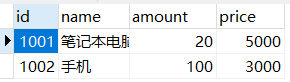
举例:购买商品 trans_sale 项目 本例要实现购买商品,模拟用户下订单,向订单表添加销 售记录,从商品表减少库存。
创建数据库表
创建两个数据库表 sale , goods
sale 销售表:

goods 商品:
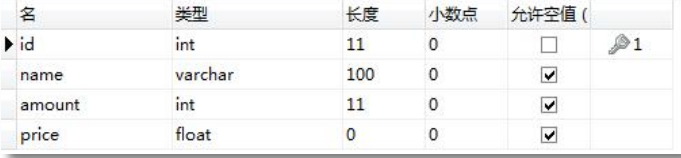
goods 表数据:
maven 依赖 pom.xml、applicationContext.xml 以及主配置文件
直接使用spring集成mybatis的pom文件即可!
<!--声明service-->
<bean id="studentService" class="ysk.service.impl.StudentServiceImpl">
    <property name="studentDao" ref="studentDao" />
</bean>
创建实体类
public class Goods {

    private Integer id;
    private String name;
    private Integer amount;
    private Float price;
}
public class Sale { private Integer id; private Integer gid; private Integer nums; }dao接口
public interface GoodsDao {
    //更新库存
    //goods表示本次用户购买的商品信息, id, 购买数量
    int updateGoods(Goods goods);

    //查询商品的信息
    Goods selectGoods(Integer id);
}
public interface SaleDao { //增加销售记录 int insertSale(Sale sale); }mapper文件
<mapper namespace="ysk.dao.GoodsDao"> <select id="selectGoods" resultType="ysk.domain.Goods"> select id,name,amount,price from goods where id=#{gid} </select> <update id="updateGoods"> update goods set amount = amount - #{amount} where id=#{id} </update> </mapper><mapper namespace="ysk.dao.SaleDao"> <insert id="insertSale"> insert into sale(gid,nums) values(#{gid},#{nums}) </insert> </mapper>异常类
package ysk.excep;

//自定义的运行时异常
public class NotEnoughException extends RuntimeException {
    public NotEnoughException() {
        super();
    }

    public NotEnoughException(String message) {
        super(message);
    }
}
service接口以及实现类
package ysk.excep;

//自定义的运行时异常
public class NotEnoughException extends RuntimeException {
    public NotEnoughException() {
        super();
    }

    public NotEnoughException(String message) {
        super(message);
    }
}
public class BuyGoodServiceImpl implements BuyGoodsService { private GoodsDao goodsDao; private SaleDao saleDao; public void setGoodsDao(GoodsDao goodsDao) { this.goodsDao = goodsDao; } public void setSaleDao(SaleDao saleDao) { this.saleDao = saleDao; } @Override public void buy(Integer goodsId, Integer nums) { System.out.println("=====buy方法的开始===="); //记录销售信息,向sale表添加记录 Sale sale = new Sale(); sale.setGid(goodsId); sale.setNums(nums); saleDao.insertSale(sale); //更新库存 Goods goods = goodsDao.selectGoods(goodsId); if( goods == null){ //商品不存在 throw new NullPointerException("编号是:"+goodsId+",商品不存在"); } else if( goods.getAmount() < nums){ //商品库存不足 throw new NotEnoughException("编号是:"+goodsId+",商品库存不足"); } //修改库存了 Goods buyGoods = new Goods(); buyGoods.setId( goodsId); buyGoods.setAmount(nums); goodsDao.updateGoods(buyGoods); System.out.println("=====buy方法的完成===="); } }测试
@Test
public void test(){
    String config = "applicationContext.xml";
    ApplicationContext ac = new ClassPathXmlApplicationContext(config);
    BuyGoodsService service = (BuyGoodsService) ac.getBean("buyService");
    service.buy(1001,10);
}
使用 Spring 的事务注解管理事务(掌握)
通过@Transactional 注解方式,可将事务织入到相应 public 方法中,实现事务管理。
适合中小项目使用的, 注解方案。
spring框架自己用aop实现给业务方法增加事务的功能, 使用@Transactional注解增加事务。 @Transactional注解是spring框架自己注解,放在public方法的上面,表示当前方法具有事务。可以给注解的属性赋值,表示具体的隔离级别,传播行为,异常信息等等
@Transactional 的所有可选属性如下所示:
- propagation:用于设置事务传播属性。该属性类型为 Propagation 枚举,默认值Propagation.REQUIRED。
- isolation:用于设置事务的隔离级别。该属性类型为 Isolation 枚举,默认值为 Isolation.DEFAULT。
- readOnly:用于设置该方法对数据库的操作是否是只读的。该属性为 boolean,默认值 为 false。
- timeout:用于设置本操作与数据库连接的超时时限。单位为秒,类型为 int,默认值为 -1,即没有时限。
- rollbackFor:指定需要回滚的异常类。类型为 Class[],默认值为空数组。当然,若只有 一个异常类时,可以不使用
- rollbackForClassName:指定需要回滚的异常类类名。类型为 String[],默认值为空数组。 当然,若只有一个异常类时,可以不使用数组。
- noRollbackFor:指定不需要回滚的异常类。类型为 Class[],默认值为空数组。当然,若 只有一个异常类时,可以不使用数组。
- noRollbackForClassName:指定不需要回滚的异常类类名。类型为 String[],默认值为空数组。当然,若只有一个异常类时,可以不使用数组
需要注意的是,@Transactional 若用在方法上,只能用于 public 方法上。对于其他非 public 方法,如果加上了注解@Transactional,虽然 Spring不会报错,但不会将指定事务织入到该 方法中。因为 Spring 会忽略掉所有非 public 方法上的@Transaction 注解。 若@Transaction 注解在类上,则表示该类上所有的方法均将在执行时织入事务。
实现注解的事务步骤:
需要声明事务管理器对象
<!--使用spring的事务处理-->
<!--1. 声明事务管理器-->
<bean id="transactionManager" class="org.springframework.jdbc.datasource.DataSourceTransactionManager">
    <!--连接的数据库, 指定数据源-->
    <property name="dataSource" ref="myDataSource" />
</bean>
开启注解驱动
<beans xmlns="http://www.springframework.org/schema/beans"
       xmlns:xsi="http://www.w3.org/2001/XMLSchema-instance"
       xmlns:context="http://www.springframework.org/schema/context" xmlns:tx="http://www.springframework.org/schema/tx"
       xsi:schemaLocation="http://www.springframework.org/schema/beans http://www.springframework.org/schema/beans/spring-beans.xsd
       http://www.springframework.org/schema/context https://www.springframework.org/schema/context/spring-context.xsd
       http://www.springframework.org/schema/tx
       http://www.springframework.org/schema/tx/spring-tx.xsd">

<!--2. 开启事务注解驱动,告诉spring使用注解管理事务,创建代理对象
           transaction-manager:事务管理器对象的id
-->
<tx:annotation-driven transaction-manager="transactionManager" />
业务层public方法加入事务属性
public class BuyGoodServiceImpl implements BuyGoodsService {
    private GoodsDao goodsDao;
    private SaleDao saleDao;

    public void setGoodsDao(GoodsDao goodsDao) {
        this.goodsDao = goodsDao;
    }

    public void setSaleDao(SaleDao saleDao) {
        this.saleDao = saleDao;
    }
    /**
     *
     * rollbackFor:表示发生指定的异常一定回滚.
     *   处理逻辑是:
     *     1) spring框架会首先检查方法抛出的异常是不是在rollbackFor的属性值中
     *         如果异常在rollbackFor列表中,不管是什么类型的异常,一定回滚。
     *     2) 如果你的抛出的异常不在rollbackFor列表中,spring会判断异常是不是RuntimeException,
     *         如果是一定回滚。
     *
     */
   /* @Transactional(
            propagation = Propagation.REQUIRED,
            isolation = Isolation.DEFAULT,
            readOnly = false,
            rollbackFor = {
                    NullPointerException.class,  NotEnoughException.class
            }
    )*/

    //使用的是事务控制的默认值, 默认的传播行为是REQUIRED,默认的隔离级别DEFAULT
    //这一个驻俄籍相当于上面那段代码,默认抛出运行时异常,回滚事务。
    @Transactional
    @Override
    public void buy(Integer goodsId, Integer nums) {
        System.out.println("=====buy方法的开始====");
        //记录销售信息,向sale表添加记录
        Sale sale  = new Sale();
        sale.setGid(goodsId);
        sale.setNums(nums);
        saleDao.insertSale(sale);

        //更新库存
        Goods goods  = goodsDao.selectGoods(goodsId);
        if( goods == null){
            //商品不存在
            throw  new  NullPointerException("编号是:"+goodsId+",商品不存在");
        } else if( goods.getAmount() < nums){
            //商品库存不足
            throw new NotEnoughException("编号是:"+goodsId+",商品库存不足");
        }

        //修改库存了
        Goods buyGoods = new Goods();
        buyGoods.setId( goodsId);
        buyGoods.setAmount(nums);
        goodsDao.updateGoods(buyGoods);
        System.out.println("=====buy方法的完成====");
    }
}
使用 AspectJ 的 AOP 配置管理事务(掌握)
使用 XML 配置事务代理的方式的不足是,每个目标类都需要配置事务代理。当目标类 较多,配置文件会变得非常臃肿。
使用 XML 配置顾问方式可以自动为每个符合切入点表达式的类生成事务代理。其用法 很简单,只需将前面代码中关于事务代理的配置删除,再替换为如下内容即可。
几乎是固定写法:
<!--声明式事务处理:和源代码完全分离的-->
<!--1.声明事务管理器对象-->
<bean id="transactionManager" class="org.springframework.jdbc.datasource.DataSourceTransactionManager">
    <property name="dataSource" ref="myDataSource" />
</bean>

<!--2.声明业务方法它的事务属性(隔离级别,传播行为,超时时间)
          id:自定义名称,表示 <tx:advice> 和 </tx:advice>之间的配置内容的
          transaction-manager:事务管理器对象的id
    -->
<tx:advice id="myAdvice" transaction-manager="transactionManager">
    <!--tx:attributes:配置事务属性-->
    <tx:attributes>
        <!--tx:method:给具体的方法配置事务属性,method可以有多个,分别给不同的方法设置事务属性
                name:方法名称,1)完整的方法名称,不带有包和类。
                              2)方法可以使用通配符,* 表示任意字符
                propagation:传播行为,枚举值
                isolation:隔离级别
                rollback-for:你指定的异常类名,全限定类名。 发生异常一定回滚
            -->
        <tx:method name="buy" propagation="REQUIRED" isolation="DEFAULT"
                   rollback-for="java.lang.NullPointerException,com.bjpowernode.excep.NotEnoughException"/>

        <!--使用通配符,指定很多的方法-->
        <tx:method name="add*" propagation="REQUIRES_NEW" />
        <!--指定修改方法-->
        <tx:method name="modify*" />
        <!--删除方法-->
        <tx:method name="remove*" />
        <!--查询方法,query,search,find-->
        <tx:method name="*" propagation="SUPPORTS" read-only="true" />
    </tx:attributes>
</tx:advice>

<!--配置aop-->
<aop:config>
    <!--配置切入点表达式:指定哪些包中类,要使用事务
            id:切入点表达式的名称,唯一值
            expression:切入点表达式,指定哪些类要使用事务,aspectj会创建代理对象

            com.bjpowernode.service
            com.crm.service
            com.service
        -->
    <aop:pointcut id="servicePt" expression="execution(* *..service..*.*(..))"/>

    <!--配置增强器:关联adivce和pointcut
           advice-ref:通知,上面tx:advice哪里的配置
           pointcut-ref:切入点表达式的id
        -->
    <aop:advisor advice-ref="myAdvice" pointcut-ref="servicePt" />
</aop:config>
Spring 与 Web
Web 项目使用 Spring 的问题(了解
新建项目:

相关文件采用spring集成mybatis模块。
注意:默认生成的web.xml文件,版本较低,需要手动修改:
先删除原有的web.xml 再点击+号创建新的 命名为1web.xml 再将名字更改为web.xml!

pom.xml多余的:
 <!-- servlet 依赖 -->
    <dependency>
      <groupId>javax.servlet</groupId>
      <artifactId>javax.servlet-api</artifactId>
      <version>3.1.0</version>
      <scope>provided</scope>
    </dependency>
    <!-- jsp 依赖 -->
    <dependency>
      <groupId>javax.servlet.jsp</groupId>
      <artifactId>jsp-api</artifactId>
      <version>2.2.1-b03</version>
      <scope>provided</scope>
    </dependency>
    <!--为了使用监听器对象,加入依赖-->
    <dependency>
      <groupId>org.springframework</groupId>
      <artifactId>spring-web</artifactId>
      <version>5.2.5.RELEASE</version>
    </dependency>
index.jsp:
<%@ page contentType="text/html;charset=UTF-8" language="java" %>
<html>
<head>
    <title>Title</title>
</head>
<body>
     <p>注册学生</p>
     <form action="reg" method="post">
         <table>
             <tr>
                 <td>id</td>
                 <td><input type="text" name="id"></td>
             </tr>
             <tr>
                 <td>姓名:</td>
                 <td><input type="text" name="name"></td>
             </tr>
             <tr>
                 <td>email:</td>
                 <td><input type="text" name="email"></td>
             </tr>
             <tr>
                 <td>年龄:</td>
                 <td><input type="text" name="age"></td>
             </tr>
             <tr>
                 <td></td>
                 <td><input type="submit" value="注册学生"></td>
             </tr>
         </table>
     </form>
</body>
</html>
result.jsp:
<%@ page contentType="text/html;charset=UTF-8" language="java" %>
<html>
<head>
    <title>Title</title>
</head>
<body>
result.jsp 注册成功
</body>
</html>
web.xml:
<?xml version="1.0" encoding="UTF-8"?>
<web-app xmlns="http://xmlns.jcp.org/xml/ns/javaee"
         xmlns:xsi="http://www.w3.org/2001/XMLSchema-instance"
         xsi:schemaLocation="http://xmlns.jcp.org/xml/ns/javaee http://xmlns.jcp.org/xml/ns/javaee/web-app_4_0.xsd"
         version="4.0">
    <servlet>
        <servlet-name>RegisterServlet</servlet-name>
        <servlet-class>ysk.controller.RegisterServlet</servlet-class>
    </servlet>
    <servlet-mapping>
        <servlet-name>RegisterServlet</servlet-name>
        <url-pattern>/reg</url-pattern>
    </servlet-mapping>
</web-app>
RegisterServlet.java:
String strId = request.getParameter("id");
String strName = request.getParameter("name");
String strEmail = request.getParameter("email");
String strAge = request.getParameter("age");
//创建spring的容器对象
String config= "applicationContext.xml";
ApplicationContext ctx = new ClassPathXmlApplicationContext(config);
//获取service
StudentService service  = (StudentService) ctx.getBean("studentService");
Student student  = new Student();
student.setId(Integer.parseInt(strId));
student.setName(strName);
student.setEmail(strEmail);
student.setAge(Integer.valueOf(strAge));
service.addStudent(student);

//给一个页面
request.getRequestDispatcher("/result.jsp").forward(request,response);
运行结果分析:
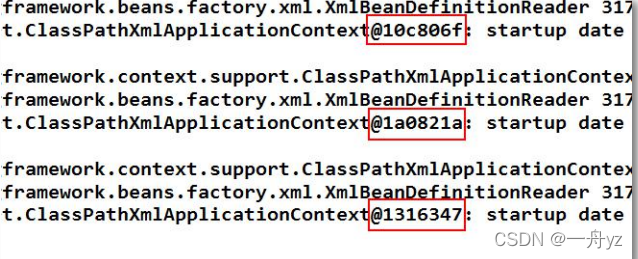
当表单提交,跳转到 success.jsp 后,多刷新几次页面,查看后台输出,发现每刷新一次 页面,就 new 出一个新的 Spring 容器。即,每提交一次请求,就会创建一个新的 Spring 容 器。对于一个应用来说,只需要一个 Spring 容器即可。所以,将 Spring 容器的创建语句放 在 Servlet 的 doGet()或 doPost()方法中是有问题的。
此时,可以考虑,将 Spring 容器的创建放在 Servlet 进行初始化时进行,即执行 init()方 法时执行。并且,Servlet 还是单例多线程的,即一个业务只有一个 Servlet 实例,所有执行 该业务的用户执行的都是这一个 Servlet 实例。这样,Spring 容器就具有了唯一性。
但是,Servlet 是一个业务一个 Servlet 实例,即 LoginServlet 只有一个,但还会有 StudentServlet、TeacherServlet 等。每个业务都会有一个 Servlet,都会执行自己的 init()方法, 也就都会创建一个 Spring 容器了。这样一来,Spring
使用 Spring 的监听器 ContextLoaderListener(掌握)
对于 Web 应用来说, ServletContext 对象是唯一的,一个 Web 应用,只有一个 ServletContext 对象,该对象是在 Web 应用装载时初始化的。若将 Spring容器的创建时机, 放在 ServletContext 初始化时,就可以保证 Spring 容器的创建只会执行一次,也就保证了 Spring 容器在整个应用中的唯一性。
当 Spring 容器创建好后,在整个应用的生命周期过程中,Spring容器应该是随时可以被访问的。即,Spring 容器应具有全局性。而放入 ServletContext 对象的属性,就具有应用的 全局性。所以,将创建好的 Spring 容器,以属性的形式放入到 ServletContext 的空间中,就 保证了 Spring 容器的全局性。上述的这些工作,已经被封装在了如下的 Spring 的 Jar 包的相关 API 中。
maven 依赖 pom.xml
<dependency>
    <groupId>org.springframework</groupId>
    <artifactId>spring-web</artifactId>
    <version>5.2.5.RELEASE</version>
</dependency>
注册监听器ContextLoaderListener
若要在 ServletContext 初 始 化 时 创 建 Spring 容 器 , 就 需 要 使 用 监 听 器 接 口 ServletContextListener 对 ServletContext 进行监听。在 web.xml 中注册该监听器。
<listener>
    <listener-class>org.springframework.web.context.ContextLoaderListener</listener-class>
</listener>
指定 Spring配置文件的位置
<!--注册监听器ContextLoaderListener
        监听器被创建对象后,会读取/WEB-INF/spring.xml
        为什么要读取文件:因为在监听器中要创建ApplicationContext对象,需要加载配置文件。
        /WEB-INF/applicationContext.xml就是监听器默认读取的spring配置文件路径

        可以修改默认的文件位置,使用context-param重新指定文件的位置


        配置监听器:目的是创建容器对象,创建了容器对象, 就能把applicationContext.xml配置文件中的所有对象都创建好。
        用户发起请求就可以直接使用对象了。
    -->
<context-param>
    <!-- contextConfigLocation:表示配置文件的路径  -->
    <param-name>contextConfigLocation</param-name>
    <!--自定义配置文件的路径-->
    <param-value>classpath:applicationContext.xml</param-value>
</context-param>
获取 Spring 容器对象
在 Servlet 中获取容器对象的常用方式有两种:
直接从 ServletContext 中获取
从对监听器 ContextLoaderListener 的源码分析可知,容器对象在 ServletContext的中存 放的 key 为 WebApplicationContext.ROOT_WEB_APPLICATION_CONTEXT_ATTRIBUTE。所以,可 以直接通过 ServletContext 的 getAttribute()方法,按照指定的 key 将容器对象获取到。
String key =  WebApplicationContext.ROOT_WEB_APPLICATION_CONTEXT_ATTRIBUTE;
Object attr  = getServletContext().getAttribute(key);
if( attr != null){
    ctx = (WebApplicationContext)attr;
}
通过 WebApplicationContextUtils 获取
工具类 WebApplicationContextUtils 有一个方法专门用于从 ServletContext 中获取 Spring 容器对象:getRequiredWebApplicationContext(ServletContext sc)
调用 Spring 提供的方法获取容器对象:
//使用框架中的方法,获取容器对象
ServletContext sc = getServletContext();
ctx = WebApplicationContextUtils.getRequiredWebApplicationContext(sc);