简介
Ehcache简介
Ehcache 是一个纯Java的进程内缓存框架,具有快速、精干等特点,是Hibernate中默认CacheProvider。Ehcache是一种广泛使用的开源Java分布式缓存。主要面向通用缓存,Java EE和轻量级容器。它具有内存和磁盘存储,缓存加载器,缓存扩展,缓存异常处理程序,一个gzip缓存servlet过滤器,支持REST和SOAP api等特点。
Spring中提供了对缓存功能的抽象:即允许绑定不同的缓存解决方案(如Ehcache),但本身不直接提供缓存功能的实现。它支持注解方式使用缓存,非常方便。
EhCache特性
- 快速
- 简单
- 多种缓存策略
- 缓存数据有两级:内存和磁盘,因此无需担心容量问题
- 缓存数据会在虚拟机重启的过程中写入磁盘
- 可以通过RMI、可插入API等方式进行分布式缓存
- 具有缓存和缓存管理器的侦听接口
- 支持多缓存管理器实例,以及一个实例的多个缓存区域
- 提供Hibernate的缓存实现
集成方式
可以单独使用,一般在第三方库中被用到的比较多(如mybatis、shiro等)Ehcache 对分布式支持不够好,多个节点不能同步,通常和redis一块使用
Ehcache和Redis对比
Ehcache直接在jvm虚拟机中缓存,速度快,效率高;但是缓存共享麻烦,集群分布式应用不方便。
Redis是通过socket访问到缓存服务,效率比Ehcache低,比数据库要快很多,处理集群和分布式缓存方便,有成熟的方案。如果是单个应用或者对缓存访问要求很高的应用,用Ehcache。如果是大型系统,存在缓存共享、分布式部署、缓存内容很大的,建议用redis。
Ehcache也有缓存共享方案,不过是通过RMI或者Jgroup多播方式进行广播缓存通知更新,缓存共享复杂,维护不方便;简单的共享可以,但是涉及到缓存恢复,大数据缓存,则不合适。
整合示例
1、pom.xml中添加依赖
<dependency>
	<groupId>org.springframework.boot</groupId>
	<artifactId>spring-boot-starter-cache</artifactId>
</dependency>

<dependency>
	<groupId>net.sf.ehcache</groupId>
	<artifactId>ehcache</artifactId>
</dependency>
2、创建ehcache.xml配置文件
在resources目录下创建ehcache.xml文件,可以在ehcache依赖包中找到示例文件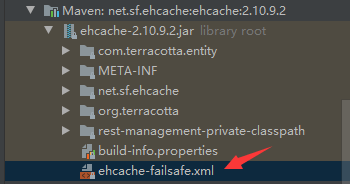
ehcache.xml内容及说明:
详细介绍
<ehcache xmlns:xsi="http://www.w3.org/2001/XMLSchema-instance" xsi:noNamespaceSchemaLocation="http://ehcache.org/ehcache.xsd">

    <!--内存缓存满了之后会往这个路径存放-->
    <diskStore path="temp/ehcache"/>

    <!--默认缓存-->
    <!--
        maxElementsInMemory:    内存缓存中最多可以存放的元素数量,若放入Cache中的元素超过这个数值,则有以下两种情况
                                    1)若overflowToDisk=true,则会将Cache中多出的元素放入磁盘文件中
                                    2)若overflowToDisk=false,则根据memoryStoreEvictionPolicy策略替换Cache中原有的元素
        eternal                  缓存中对象是否永久有效
        timeToIdleSeconds        缓存数据在失效前的允许闲置时间(单位:秒),仅当eternal=false时使用,默认值是0表示可闲置时间无穷大,两次调用缓存的间隔时间大于这个值会将元素从Cache中清除
        timeToLiveSeconds        缓存数据的总的存活时间(单位:秒),仅当eternal=false时使用,从创建开始计时,失效结束
        maxElementsOnDisk        磁盘缓存中最多可以存放的元素数量,0表示无穷大
        diskExpiryThreadIntervalSeconds     磁盘缓存的清理线程运行间隔
        memoryStoreEvictionPolicy           内存存储与释放策略,即达到maxElementsInMemory限制时,Ehcache会根据指定策略清理内存
                                            共有三种策略,分别为LRU(最近最少使用)、LFU(最常用的)、FIFO(先进先出)
    -->
    <defaultCache
            maxElementsInMemory="10000"
            eternal="false"
            timeToIdleSeconds="120"
            timeToLiveSeconds="120"
            maxElementsOnDisk="10000000"
            diskExpiryThreadIntervalSeconds="120"
            memoryStoreEvictionPolicy="LRU">
        <persistence strategy="localTempSwap"/>
    </defaultCache>

    <!--cache标签是自定义的缓存-->
    <cache name="userCache"
           maxElementsInMemory="10000"
           eternal="false"
           timeToIdleSeconds="120"
           timeToLiveSeconds="120"
           maxElementsOnDisk="10000000"
           diskExpiryThreadIntervalSeconds="120"
           memoryStoreEvictionPolicy="LRU">
        <persistence strategy="localTempSwap"/>
    </cache>
</ehcache>
3、在SpringBoot配置文件中配置ehcache.xml
# .yml
spring:
  cache:
    ehcache:
      config: ehcache.xml

# .properties
spring.cache.ehcache.config=ehcache.xml
4、在Application启动类中增加注解
@EnableCaching
5、使用缓存
注解说明
@Service
public class UserServiceImpl implements UserService {
    @Resource
    private UserMapper userMapper;

    @Override
    @Cacheable(value = "userCache")
    public List<User> findList() {
        return userMapper.findList();
    }

    @Override
    @CacheEvict(value = "userCache",allEntries = true)
    public Integer delete(Integer id) {
        return userMapper.delete(id);
    }
}
6、测试
package com.test.cache;

import com.test.cache.entity.User;
import com.test.cache.service.UserService;
import org.junit.jupiter.api.Test;
import org.springframework.boot.test.context.SpringBootTest;

import javax.annotation.Resource;
import java.text.SimpleDateFormat;
import java.util.Date;
import java.util.List;

@SpringBootTest
class CacheApplicationTests {
    @Resource
    private UserService userService;

    @Test
    void test1() {
        SimpleDateFormat dateFormat = new SimpleDateFormat("yyyy-MM-dd HH:mm:ss.SSS");
        Date start = new Date();

        List<User> list = userService.findList();
        System.out.println("list.size() ------>> "+list.size());

        Date end = new Date();

        System.out.println("耗时:"+(end.getTime()-start.getTime())+" ms");
    }

    @Test
    void test2(){
        for (int i=0;i<4;i++){
            test1();
            System.out.println();
        }
    }

    @Test
    void test3(){
        for (int i=0;i<4;i++){
            if(i==2){
                userService.delete(i);
            }
            test1();
            System.out.println();
        }
    }

    @Test
    void test4() throws InterruptedException {
        for (int i=0;i<4;i++){
            if(i==2){
                Thread.sleep(3000);
            }
            test1();
            System.out.println();
        }
    }

}
创建了一个user表,并在里面添加了10w条记录
6.1、先取消findList方法的缓存注解:@Cacheable,然后运行test2()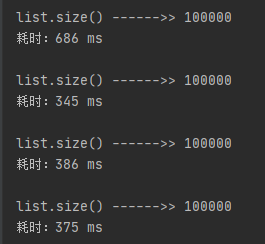
执行成功后恢复缓存注解:@Cacheable,再次运行test2(),速度的提升一目了然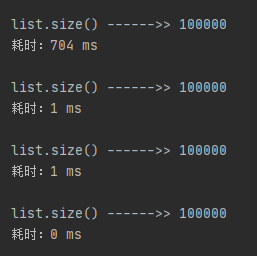
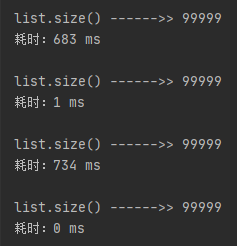
6.2、运行test3(),当执行完第二次后进入delete方法删除了一条记录,并且使用@CacheEvict注解清除了缓存数据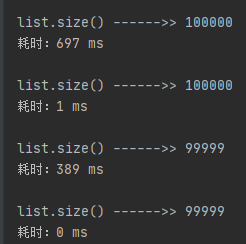
6.3、修改ehcache.xml中userCache的timeToLiveSeconds为2,运行test4(),由于设置了数据的总存活时间为2秒,所以当从睡眠中出来时又要去访问数据库了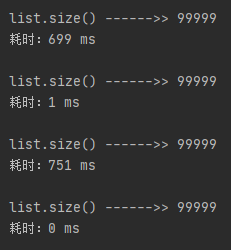
6.4、恢复上一步的改动,并将ehcache.xml中userCache的timeToIdleSeconds改为2,运行test4(),由于设置了数据的闲置时间为2秒,所以当从睡眠中出来时又要去访问数据库了