和传统的单体应用不同,这里我们选择将数据上传到分布式文件服务器上。
这里我们选择将图片放置到阿里云上,使用对象存储。
阿里云上使使用对象存储方式:
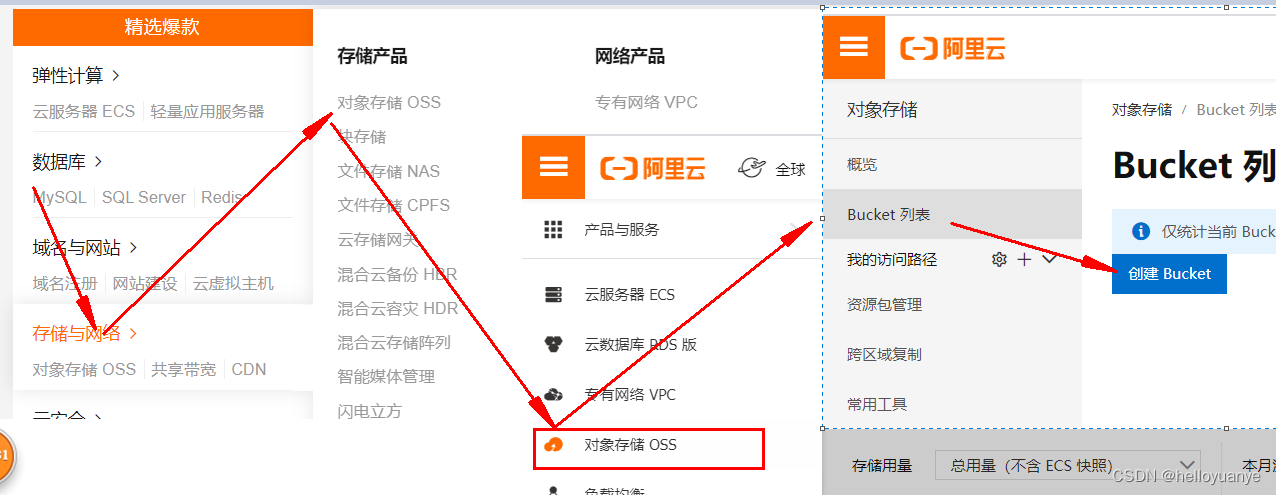
创建Bucket
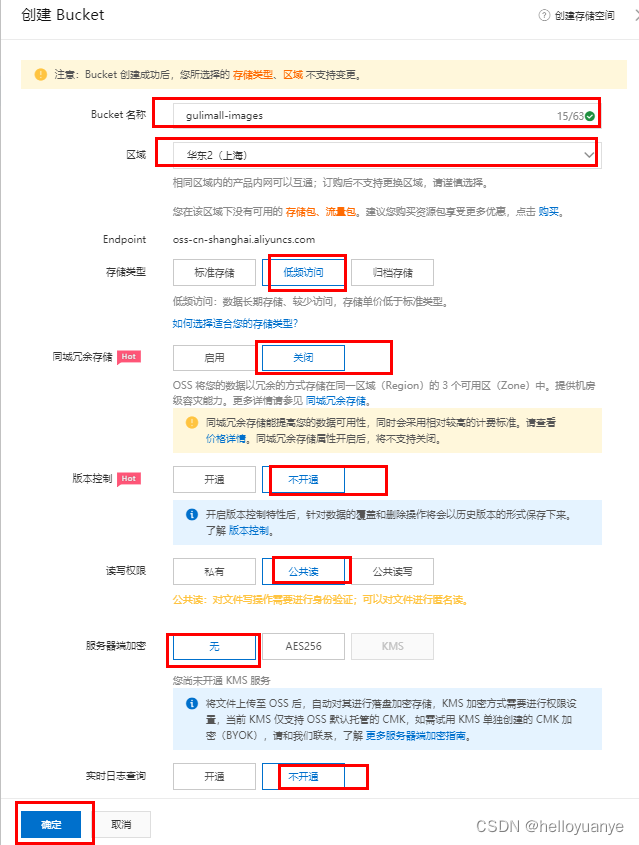
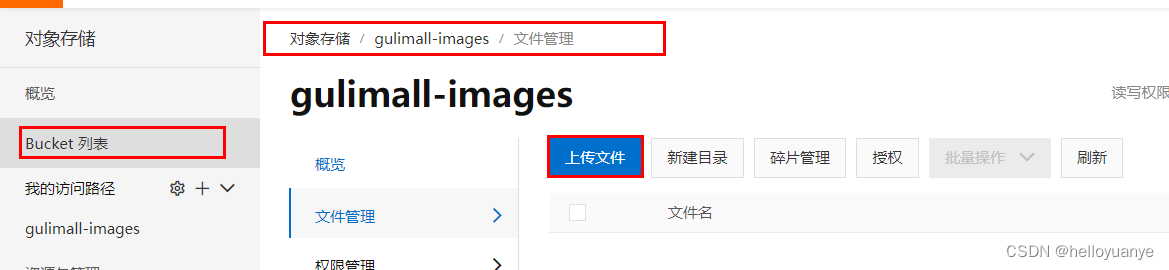
上传文件:
上传成功后,取得图片的URL
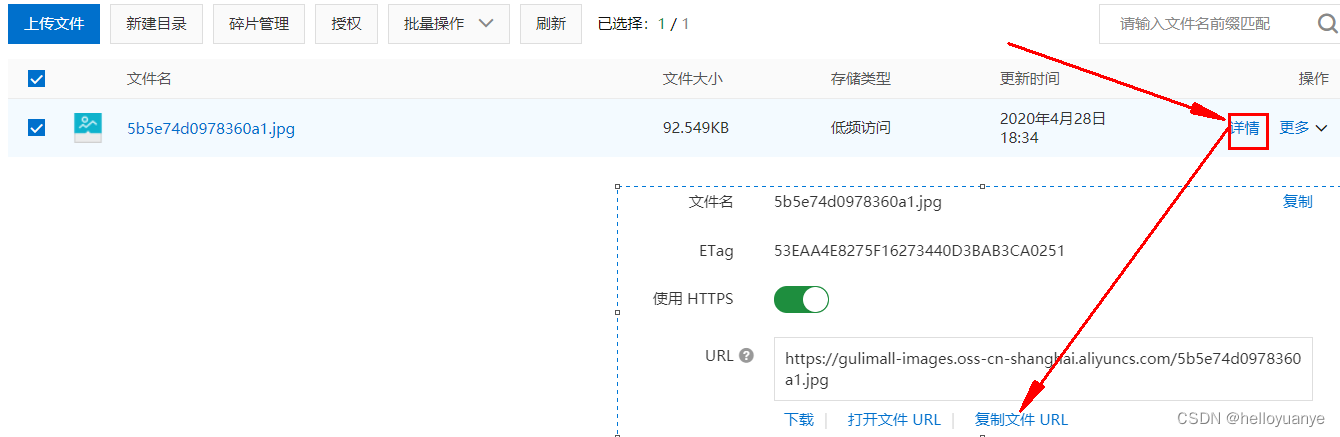
这种方式是手动上传图片,实际上我们可以在程序中设置自动上传图片到阿里云对象存储。
上传模型:
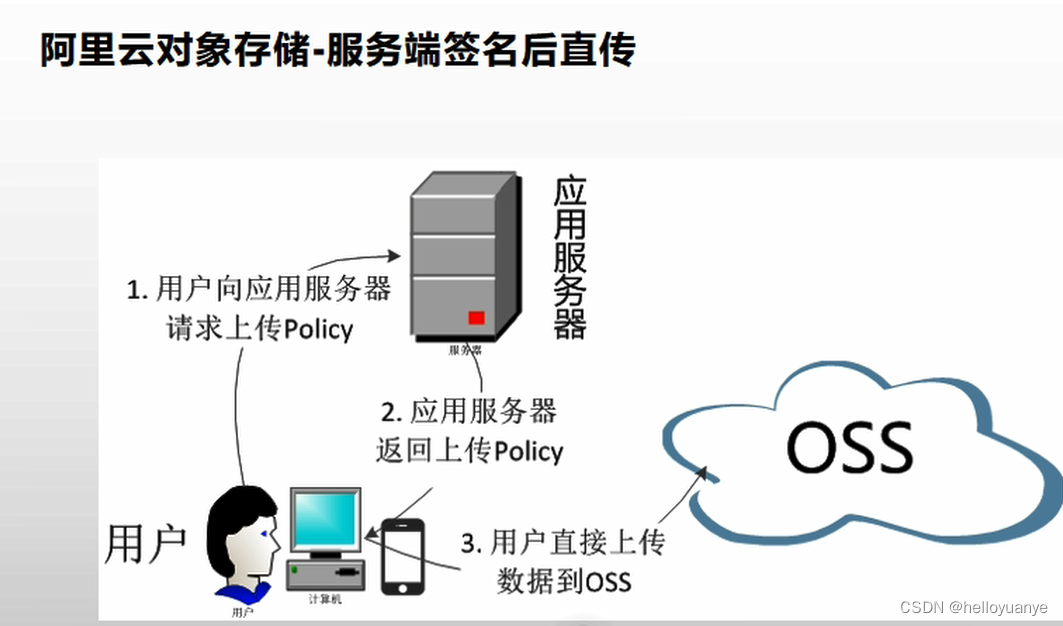
查看阿里云关于文件上传的帮助: https://help.aliyun.com/document_detail/32009.html?spm=a2c4g.11186623.6.768.549d59aaWuZMGJ
(1)、添加依赖包
在Maven项目中加入依赖项(推荐方式)
在 Maven 工程中使用 OSS Java SDK,只需在 pom.xml 中加入相应依赖即可。以 3.8.0 版本为例,在 内加入如下内容:
com.aliyun.oss aliyun-sdk-oss 3.8.0 (2)、上传文件流以下代码用于上传文件流:
// Endpoint以杭州为例,其它Region请按实际情况填写。
String endpoint = "http://oss-cn-hangzhou.aliyuncs.com";
// 云账号AccessKey有所有API访问权限,建议遵循阿里云安全最佳实践,创建并使用RAM子账号进行API访问或日常运维,请登录 https://ram.console.aliyun.com 创建。
String accessKeyId = "<yourAccessKeyId>";
String accessKeySecret = "<yourAccessKeySecret>";

// 创建OSSClient实例。
OSS ossClient = new OSSClientBuilder().build(endpoint, accessKeyId, accessKeySecret);

// 上传文件流。
InputStream inputStream = new FileInputStream("<yourlocalFile>");
ossClient.putObject("<yourBucketName>", "<yourObjectName>", inputStream);

// 关闭OSSClient。
ossClient.shutdown();
endpoint的取值:

accessKeyId和accessKeySecret需要创建一个RAM账号:
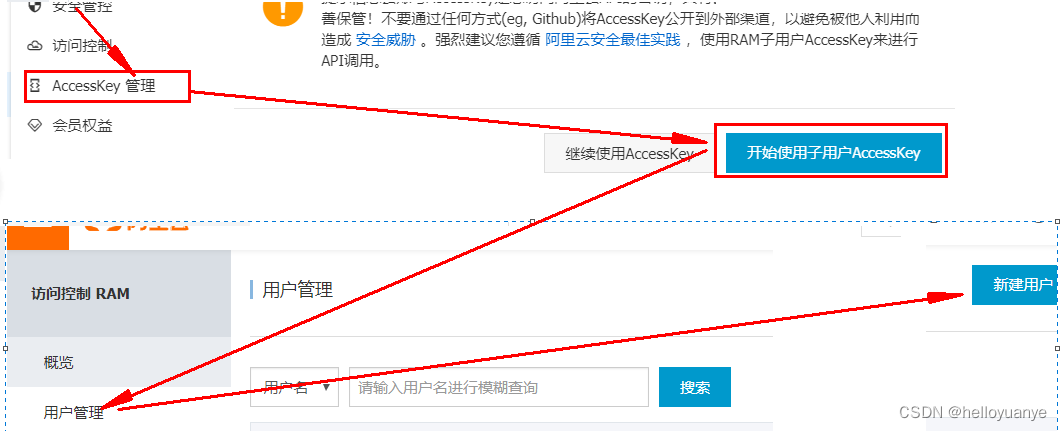
创建用户完毕后,会得到一个“AccessKey ID”和“AccessKeySecret”,然后复制这两个值到代码的“AccessKey ID”和“AccessKeySecret”。
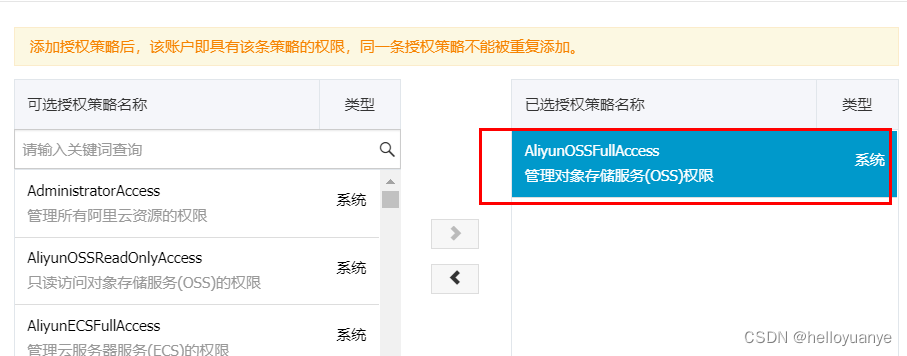
另外还需要添加访问控制权限:
 @Test
    public void testUpload() throws FileNotFoundException {
        // Endpoint以杭州为例,其它Region请按实际情况填写。
        String endpoint = "oss-cn-shanghai.aliyuncs.com";
        // 云账号AccessKey有所有API访问权限,建议遵循阿里云安全最佳实践,创建并使用RAM子账号进行API访问或日常运维,请登录 https://ram.console.aliyun.com 创建。
        String accessKeyId = "自己申请的子用户"; //自己知道就好,我的暴露安全性被攻击了
        String accessKeySecret = "子用户的密码";       // 创建OSSClient实例。
        OSS ossClient = new OSSClientBuilder().build(endpoint, accessKeyId, accessKeySecret);
        // 上传文件流。
        InputStream inputStream = new FileInputStream("C:\\Users\\Administrator\\Pictures\\timg.jpg");
        ossClient.putObject("gulimall-images", "time.jpg", inputStream);

        // 关闭OSSClient。
        ossClient.shutdown();
        System.out.println("上传成功.");
    }
更为简单的使用方式,是使用SpringCloud Alibaba: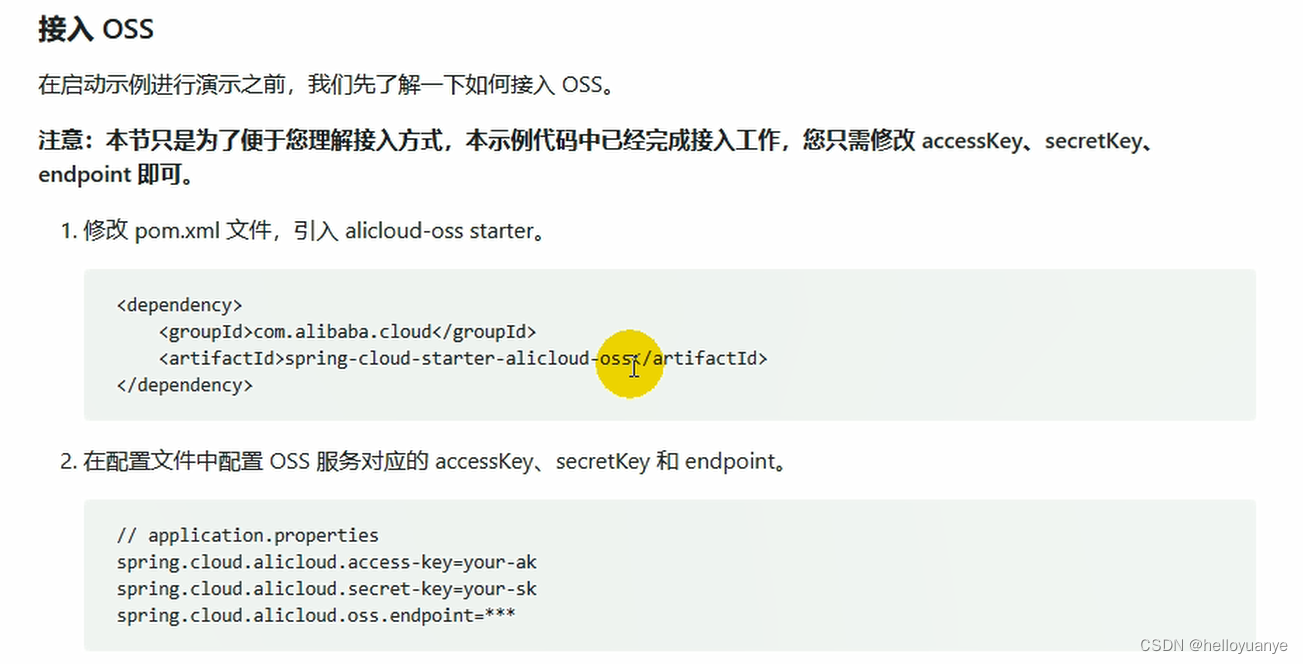
详细使用方法,见: https://help.aliyun.com/knowledge_detail/108650.html
(1)添加依赖
    <dependency>
        <groupId>com.alibaba.cloud</groupId>
        <artifactId>spring-cloud-starter-alicloud-oss</artifactId>
        <version>2.2.0.RELEASE</version>
    </dependency>
(2)创建“AccessKey ID”和“AccessKeySecret”
(3)配置key,secret和endpoint相关信息
  access-key: 自己申请的子用户
  secret-key: 自己子用户的密码
  oss:
    endpoint: oss-cn-shanghai.aliyuncs.com
(4)注入OSSClient并进行文件上传下载等操作
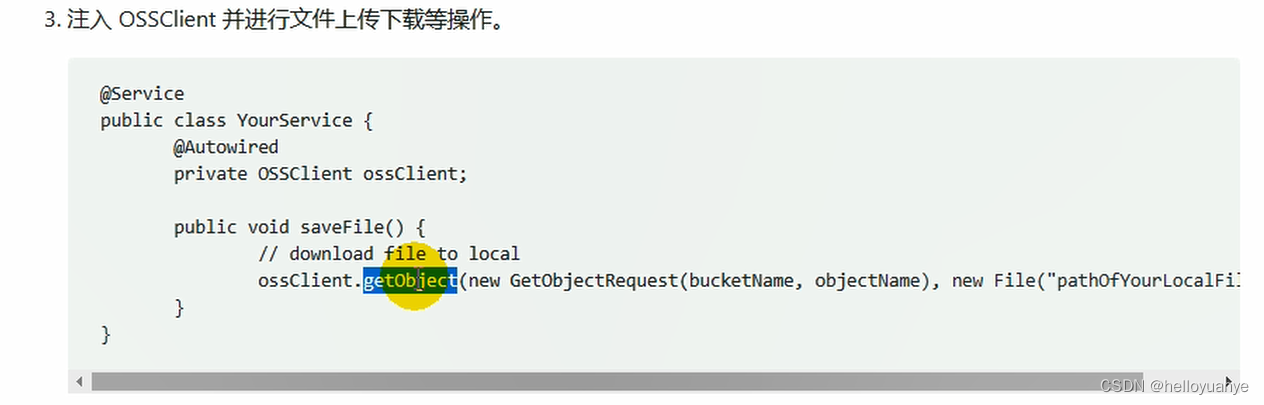
但是这样来做还是比较麻烦,如果以后的上传任务都交给gulimall-product来完成,显然耦合度高。最好单独新建一个Module来完成文件上传任务。
3)、上传其他方式
1)新建gulimall-third-party
2)添加依赖,将原来gulimall-common中的“spring-cloud-starter-alicloud-oss”依赖移动到该项目中
<?xml version="1.0" encoding="UTF-8"?>
<project xmlns="http://maven.apache.org/POM/4.0.0" xmlns:xsi="http://www.w3.org/2001/XMLSchema-instance"
         xsi:schemaLocation="http://maven.apache.org/POM/4.0.0 https://maven.apache.org/xsd/maven-4.0.0.xsd">
    <modelVersion>4.0.0</modelVersion>
    <parent>
        <groupId>org.springframework.boot</groupId>
        <artifactId>spring-boot-starter-parent</artifactId>
        <version>2.3.4.RELEASE</version>
        <relativePath/> <!-- lookup parent from repository -->
    </parent>
    <groupId>com.atguigu.gulimall</groupId>
    <artifactId>gulimall-thrid-party</artifactId>
    <version>0.0.1-SNAPSHOT</version>
    <name>gulimall-thrid-party</name>
    <description>第三方服务</description>

    <properties>
        <java.version>1.8</java.version>
        <spring-cloud.version>Hoxton.SR8</spring-cloud.version>
    </properties>

    <dependencies>
        <!--阿里云文件上传-->
        <dependency>
            <groupId>com.alibaba.cloud</groupId>
            <artifactId>spring-cloud-starter-alicloud-oss</artifactId>
        </dependency>
        <dependency>
            <groupId>com.auguigu.gulimall</groupId>
            <artifactId>gulimall-commom</artifactId>
            <version>0.0.1-SNAPSHOT</version>
            <exclusions>
                <exclusion>
                    <groupId>com.baomidou</groupId>
                    <artifactId>mybatis-plus-boot-starter</artifactId>
                </exclusion>
            </exclusions>
        </dependency>
        <dependency>
            <groupId>org.springframework.boot</groupId>
            <artifactId>spring-boot-starter-web</artifactId>
        </dependency>
        <dependency>
            <groupId>org.springframework.cloud</groupId>
            <artifactId>spring-cloud-starter-openfeign</artifactId>
        </dependency>

        <dependency>
            <groupId>org.springframework.boot</groupId>
            <artifactId>spring-boot-starter-test</artifactId>
            <scope>test</scope>
            <exclusions>
                <exclusion>
                    <groupId>org.junit.vintage</groupId>
                    <artifactId>junit-vintage-engine</artifactId>
                </exclusion>
            </exclusions>
        </dependency>
    </dependencies>

    <dependencyManagement>
        <dependencies>
            <dependency>
                <groupId>org.springframework.cloud</groupId>
                <artifactId>spring-cloud-dependencies</artifactId>
                <version>${spring-cloud.version}</version>
                <type>pom</type>
                <scope>import</scope>
            </dependency>
            <dependency>
                <groupId>com.alibaba.cloud</groupId>
                <artifactId>spring-cloud-alibaba-dependencies</artifactId>
                <version>2.2.0.RELEASE</version>
                <type>pom</type>
                <scope>import</scope>
            </dependency>
        </dependencies>
    </dependencyManagement>

    <build>
        <plugins>
            <plugin>
                <groupId>org.springframework.boot</groupId>
                <artifactId>spring-boot-maven-plugin</artifactId>
            </plugin>
        </plugins>
    </build>

</project>
3)在主启动类中开启服务的注册和发现
@EnableDiscoveryClient
4)在nacos中注册
(1)创建命名空间“ gulimall-third-party ”
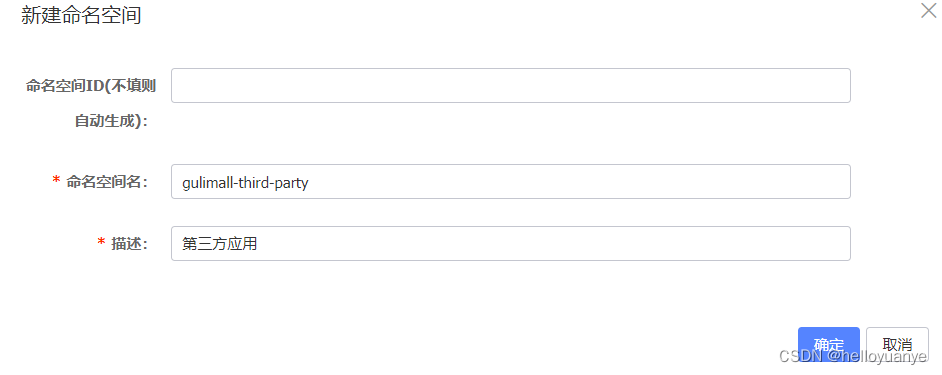
2)在“ gulimall-third-party”命名空间中,创建“ gulimall-third-party.yml”文件
spring:
  cloud:
    alicloud:
      access-key: 自己申请的子用户
      secret-key: 子用户的密码
      oss:
        endpoint: oss-cn-shanghai.aliyuncs.com
5)编写配置文件
application.yml
server:
  port: 30000

spring:
  application:
    name: gulimall-third-party
  cloud:
    nacos:
      discovery:
        server-addr: 192.168.137.14:8848

logging:
  level:
    com.bigdata.gulimall.product: debug
bootstrap.properties
spring.application.name=gulimall-thrid-party
spring.cloud.nacos.config.server-addr=127.0.0.1:8848
spring.cloud.nacos.config.namespace=555d020c-9b7e-4e8e-b625-65a3c4b6ff47
spring.cloud.nacos.config.extension-configs[0].data-id=oss.yml
spring.cloud.nacos.config.extension-configs[0].group=DEFAULT_GROUP
spring.cloud.nacos.config.extension-configs[0].refresh=true
6) 编写测试类
package com.bigdata.gulimall.thirdparty;
import com.aliyun.oss.OSS;
import com.aliyun.oss.OSSClient;
import com.aliyun.oss.OSSClientBuilder;
import org.junit.jupiter.api.Test;
import org.springframework.beans.factory.annotation.Autowired;
import org.springframework.boot.test.context.SpringBootTest;
import java.io.FileInputStream;
import java.io.FileNotFoundException;
import java.io.InputStream;

@SpringBootTest
class GulimallThirdPartyApplicationTests {

    @Autowired
    OSSClient ossClient;

    @Test
    public void testUpload() throws FileNotFoundException {
        // Endpoint以杭州为例,其它Region请按实际情况填写。
        String endpoint = "oss-cn-shanghai.aliyuncs.com";
        // 云账号AccessKey有所有API访问权限,建议遵循阿里云安全最佳实践,创建并使用RAM子账号进行API访问或日常运维,请登录 https://ram.console.aliyun.com 创建。
        String accessKeyId = "自己申请的子用户";
        String accessKeySecret = "子用户的密码";

        // 创建OSSClient实例。
        OSS ossClient = new OSSClientBuilder().build(endpoint, accessKeyId, accessKeySecret);

         //上传文件流。
        InputStream inputStream = new FileInputStream("C:\\Users\\Administrator\\Pictures\\timg.jpg");
        ossClient.putObject("gulimall-images", "time3.jpg", inputStream);

        // 关闭OSSClient。
        ossClient.shutdown();
        System.out.println("上传成功.");
    }
}
服务端签名后直传 - 对象存储 OSS - 阿里云
背景
采用JavaScript客户端直接签名(参见JavaScript客户端签名直传)时,AccessKeyID和AcessKeySecret会暴露在前端页面,因此存在严重的安全隐患。因此,OSS提供了服务端签名后直传的方案。
原理介绍
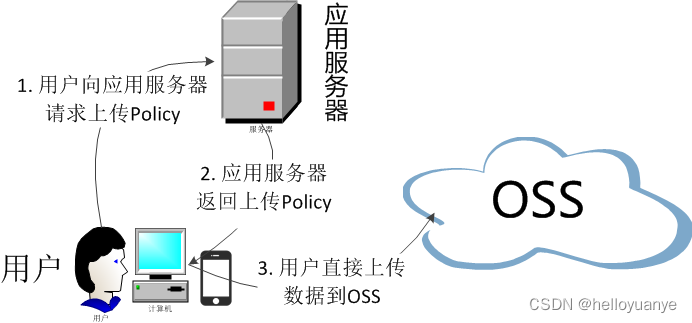
服务端签名后直传的原理如下:
1、用户发送上传Policy请求到应用服务器。
2、应用服务器返回上传Policy和签名给用户。
3、用户直接上传数据到OSS。
编写“com.atguigu.gulimall.thridparty.controller.OSSController”类:
package com.atguigu.gulimall.thridparty.controller;

import com.aliyun.oss.OSS;
import com.aliyun.oss.common.utils.BinaryUtil;
import com.aliyun.oss.model.MatchMode;
import com.aliyun.oss.model.PolicyConditions;
import com.atguigu.common.utils.R;
import org.springframework.beans.factory.annotation.Autowired;
import org.springframework.beans.factory.annotation.Value;
import org.springframework.web.bind.annotation.RequestMapping;
import org.springframework.web.bind.annotation.RestController;

import java.text.SimpleDateFormat;
import java.util.Date;
import java.util.LinkedHashMap;
import java.util.Map;

/**
 * @author WangTianShun
 * @date 2020/10/10 16:06
 */

@RestController
public class OSSController {

    @Autowired
    OSS ossClient;

    @Value("${spring.cloud.alicloud.oss.endpoint}")
    private String endpoint;

    @Value("${spring.cloud.alicloud.oss.bucket}")
    private String bucket;

    @Value("${spring.cloud.alicloud.access-key}")
    private String accessId;

    @RequestMapping("/oss/policy")
    public R policy(){
        String host = "https://" + bucket + "." + endpoint; // host的格式为 bucketname.endpoint
        // callbackUrl为 上传回调服务器的URL,请将下面的IP和Port配置为您自己的真实信息。
        //String callbackUrl = "http://88.88.88.88:8888";
        String format = new SimpleDateFormat("yyyy-MM-dd").format(new Date());
        String dir = format+"/"; // 用户上传文件时指定的前缀。
        Map<String, String> respMap = null;
        try {
            long expireTime = 30;
            long expireEndTime = System.currentTimeMillis() + expireTime * 1000;
            Date expiration = new Date(expireEndTime);
            // PostObject请求最大可支持的文件大小为5 GB,即CONTENT_LENGTH_RANGE为5*1024*1024*1024。
            PolicyConditions policyConds = new PolicyConditions();
            policyConds.addConditionItem(PolicyConditions.COND_CONTENT_LENGTH_RANGE, 0, 1048576000);
            policyConds.addConditionItem(MatchMode.StartWith, PolicyConditions.COND_KEY, dir);

            String postPolicy = ossClient.generatePostPolicy(expiration, policyConds);
            byte[] binaryData = postPolicy.getBytes("utf-8");
            String encodedPolicy = BinaryUtil.toBase64String(binaryData);
            String postSignature = ossClient.calculatePostSignature(postPolicy);

            respMap = new LinkedHashMap<String, String>();
            respMap.put("accessid", accessId);
            respMap.put("policy", encodedPolicy);
            respMap.put("signature", postSignature);
            respMap.put("dir", dir);
            respMap.put("host", host);
            respMap.put("expire", String.valueOf(expireEndTime / 1000));
            // respMap.put("expire", formatISO8601Date(expiration));

        } catch (Exception e) {
            // Assert.fail(e.getMessage());
            System.out.println(e.getMessage());
        } finally {
            ossClient.shutdown();
        }
        return R.ok().put("data",respMap);
    }
}
测试: http://localhost:30000/oss/policy
{"accessid":"LTAI4G4W1RA4JXz2QhoDwHhi","policy":"eyJleHBpcmF0aW9uIjoiMjAyMC0wNC0yOVQwMjo1ODowNy41NzhaIiwiY29uZGl0aW9ucyI6W1siY29udGVudC1sZW5ndGgtcmFuZ2UiLDAsMTA0ODU3NjAwMF0sWyJzdGFydHMtd2l0aCIsIiRrZXkiLCIyMDIwLTA0LTI5LyJdXX0=","signature":"s42iRxtxGFmHyG40StM3d9vOfFk=","dir":"2020-04-29/","host":"https://gulimall-images.oss-cn-shanghai.aliyuncs.com","expire":"1588129087"}
以后在上传文件时的访问路径为“ http://localhost:88/api/thirdparty/oss/policy”,
在“gulimall-gateway”中配置路由规则:
    - id: third_party_route
      uri: lb://gulimall-gateway
      predicates:
        - Path=/api/thirdparty/**
      filters:
        - RewritePath=/api/thirdparty/(?<segment>/?.*),/$\{segment}
测试是否能够正常跳转: http://localhost:88/api/thirdparty/oss/policy
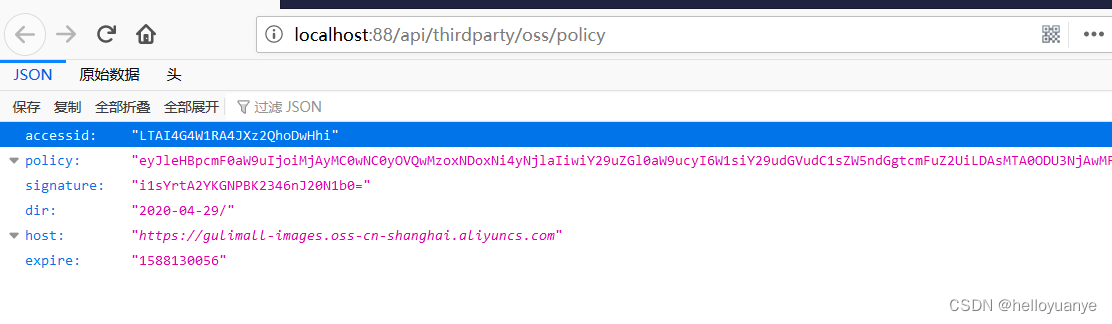
上传组件
放置项目提供的upload文件夹到components目录下,一个是单文件上传,另外一个是多文件上传
PS D:\Project\gulimall\renren-fast-vue\src\components\upload> ls


    目录: D:\Project\gulimall\renren-fast-vue\src\components\upload


Mode                LastWriteTime         Length Name
----                -------------         ------ ----
-a----  2020/4/29 星期三     12:0           3122 multiUpload.vue
                                2
-a----  2019/11/11 星期一     21:            343 policy.js
                               20
-a----  2020/4/29 星期三     12:0           3053 singleUpload.vue
                                1


PS D:\Project\gulimall\renren-fast-vue\src\components\upload>
修改这两个文件的配置后
开始执行上传,但是在上传过程中,出现了如下的问题:

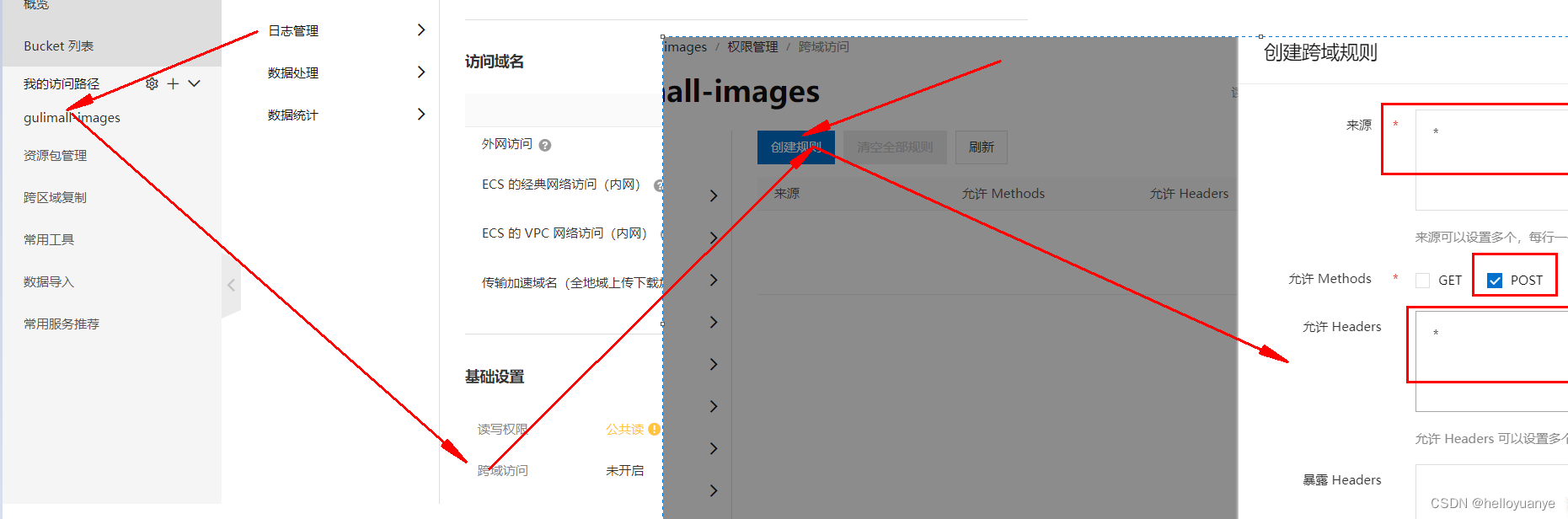
Access to XMLHttpRequest at 'http://gulimall-images.oss-cn-shanghai.aliyuncs.com/' from origin 'http://localhost:8001' has been blocked by CORS policy: Response to preflight request doesn't pass access control check: No 'Access-Control-Allow-Origin' header is present on the requested resource.
这又是一个跨域的问题,解决方法就是在阿里云上开启跨域访问:
再次执行文件上传。