本文为转载文章,原文链接:https://blog.csdn.net/wenjun_xiao/article/details/104458940
PS:配置注册表时运行失败后可以直接手动配置到注册表上:
原文:
Windows下pyhive无法使用的解决方案
Windows下使用pyhive连接hive的代码例子如下
from pyhive import hive
conn = hive.Connection(host='172.100.0.11',port=10000)
cursor = conn.cursor()
cursor.execute('show tables')
for result in cursor.fetchall():
    print(result)
运行以上例子需要安装以下库pyhive、thrift、thrift_sasl、sasl,
其中sasl在Windows安装下安装需要编译环境,为了方便可直接从https://www.lfd.uci.edu/~gohlke/pythonlibs/#sasl下载编译好的包,直接进行安装,比如
C:\>pip install sasl-0.2.1-cp37-cp37m-win_amd64.whl
C:\>pip install pyhive thrift_sasl thrift
安装完毕,执行代码会报以下错误
>>> from pyhive import hive
>>> conn = hive.Connection(host='172.100.0.11',port=10000)
Traceback (most recent call last):
  File "<stdin>", line 1, in <module>
  File "...\Python37\lib\site-packages\pyhive\hive.py", line 192, in __init__
    self._transport.open()
  File "...\Python37\lib\site-packages\thrift_sasl\__init__.py", line 79, in open
    message=("Could not start SASL: %s" % self.sasl.getError()))
thrift.transport.TTransport.TTransportException: Could not start SASL: b'Error in sasl_client_start (-12) SASL library is not initialized
【解决方案】
先直接贴出解决方案,后面再给出分析过程。在Windows中使用管理员权限打开控制台,在控制执行一段命令即可,操作如下。
C:\Windows\system32> FOR /F "usebackq delims=" %A IN (`python -c "from importlib import util;import os;print(os.path.join(os.path.dirname(util.find_spec('sasl').origin),'sasl2'))"`) DO (
  REG ADD "HKEY_LOCAL_MACHINE\SOFTWARE\Carnegie Mellon\Project Cyrus\SASL Library" /v SearchPath /t REG_SZ /d "%A"
)
命令主要是把sasl包目录下包含的sasl2这个目录的路径写到注册表HKEY_LOCAL_MACHINE\SOFTWARE\Carnegie Mellon\Project Cyrus\SASL Library下SearchPath的值上。
问题分析过程
【问题分析】Could not start SASL&SASL library is not initialized
根据报错查看pyhive\hive.py的代码
if auth == 'NOSASL':
    # NOSASL corresponds to hive.server2.authentication=NOSASL in hive-site.xml
    self._transport = thrift.transport.TTransport.TBufferedTransport(socket)
elif auth in ('LDAP', 'KERBEROS', 'NONE', 'CUSTOM'):
    # Defer import so package dependency is optional
    import sasl
    import thrift_sasl
    if auth == 'KERBEROS':
        # KERBEROS mode in hive.server2.authentication is GSSAPI in sasl library
        sasl_auth = 'GSSAPI'
    else:
        sasl_auth = 'PLAIN'
        if password is None:
            # Password doesn't matter in NONE mode, just needs to be nonempty.
            password = 'x'
    def sasl_factory():
        sasl_client = sasl.Client()
        sasl_client.setAttr('host', host)
        if sasl_auth == 'GSSAPI':
            sasl_client.setAttr('service', kerberos_service_name)
        elif sasl_auth == 'PLAIN':
            sasl_client.setAttr('username', username)
            sasl_client.setAttr('password', password)
        else:
            raise AssertionError
        sasl_client.init()
        return sasl_client
    self._transport = thrift_sasl.TSaslClientTransport(sasl_factory, sasl_auth, socket)
由于参数auth的默认值是NONE,因此实际使用了sasl
def sasl_factory():
    sasl_client = sasl.Client()
    print("%s" % sasl_client.setAttr('host', host))
    if sasl_auth == 'GSSAPI':
        sasl_client.setAttr('service', kerberos_service_name)
    elif sasl_auth == 'PLAIN':
        sasl_client.setAttr('username', username)
        sasl_client.setAttr('password', password)
    else:
        raise AssertionError
    print("init: %s" % sasl_client.init())
    return sasl_client
直接在控制台使用sasl
>>> import sasl
>>> client = sasl.Client()
>>> client.setAttr('host', '172.100.0.11')
True
>>> client.setAttr('username', 'wenjunxiao')
True
>>> client.setAttr('password', 'x')
True
>>> client.init()
False
>>> client.getError()
b'Error in sasl_client_init (-1) generic failure'
发现client.init()返回False是因为sasl_client_init失败了,所以才会报错SASL library is not initialized,查看site-packages\sasl库的内容,发现使用了libsasl.dll库
│  libsasl.dll
│  saslwrapper.cp37-win_amd64.pyd
│  saslwrapper.cpp
│  saslwrapper.h
│  saslwrapper.pyx
│  __init__.py
├─sasl2
│      saslANONYMOUS.dll
│      saslCRAMMD5.dll
│      saslDIGESTMD5.dll
│      saslLOGIN.dll
│      saslNTLM.dll
│      saslPLAIN.dll
│      saslSASLDB.dll
│      saslSCRAM.dll
│      saslSQLITE.dll
└─__pycache__
        __init__.cpython-37.pyc
查看libsasl的文件信息是Carnegie Mellon University SASL,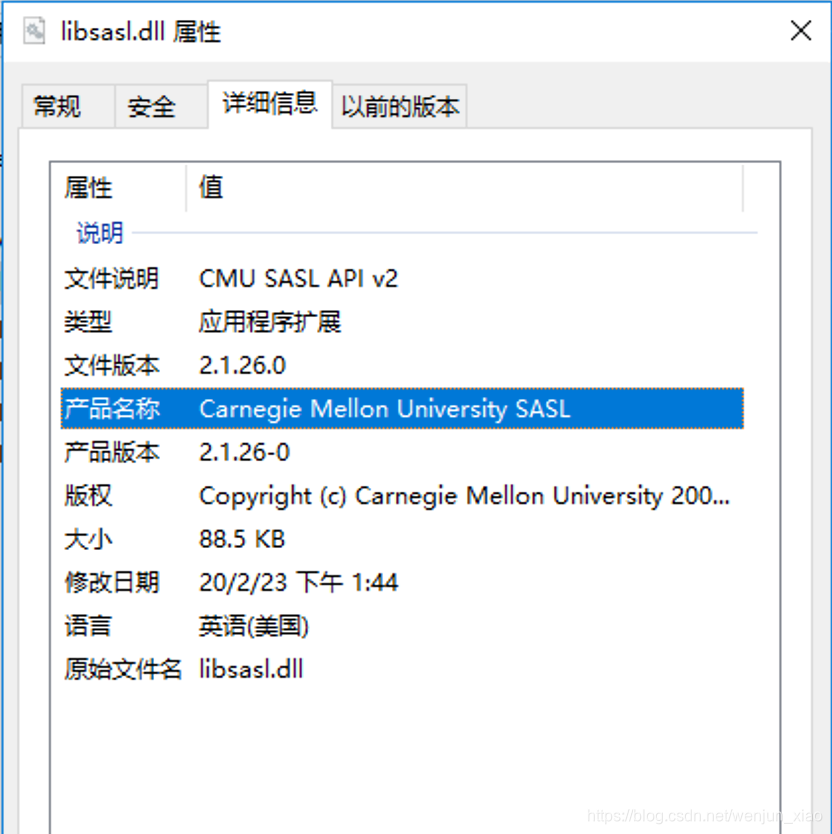
下载对应的源码自己编译进行调试,编译方式参考WIN10 VS2019 编译Cyrus SASL,定位到初始化失败的原因是在lib/client.c的get_fqhostname
  if (get_fqhostname (name, MAXHOSTNAMELEN, 0) != 0) {
      return (SASL_FAIL);
  }
继续查看get_fqhostname的代码,里面的功能主要是获取hostname,提炼出来为test_host.c的文件单独编译执行
// test_host.c
#include <stdio.h>
#include <string.h>
#include <Winsock2.h>
#include <ws2tcpip.h>
#pragma comment(lib, "WS2_32.lib")
int main()
{
    char name[128] = "";
    int ret = gethostname(name, sizeof(name));
	if (ret != 0) {
		printf("gethostname fail => %d %d\n", ret, WSAGetLastError());
		return ret;
	}
    printf("gethostname ok => %s\n", name);
	if (strchr (name, '.') != NULL) {
		goto LOWERCASE;
	}
    struct addrinfo hints;
    struct addrinfo *result;
    struct sockaddr_in *addr;
    char m_ipaddr[16];
	memset(&hints, 0, sizeof(struct addrinfo));
    hints.ai_family = PF_UNSPEC;
    hints.ai_flags = AI_CANONNAME;
    hints.ai_socktype = SOCK_STREAM;
    hints.ai_protocol = 0;
    hints.ai_addrlen = 0;
    hints.ai_canonname = NULL;
    hints.ai_addr = NULL;
    hints.ai_next = NULL;
    ret = getaddrinfo(name, NULL,&hints,&result);
    if (ret != 0) {
        printf("getaddrinfo fail => %d %d\n", ret, WSAGetLastError());
        goto LOWERCASE;
    }
	if (result != NULL && result->ai_canonname != NULL) {
		printf("ai_canonname => %s\n", result->ai_canonname);
		if (strchr (result->ai_canonname, '.') != NULL) {
			printf("ai_canonname is valid.\n");
			strncpy(name, result->ai_canonname, 128);
		}
	}
LOWERCASE:
	printf("fqhostname => %s\n", name);
    return 0;
}
打开Visual Studio的控制台编译并执行
C:\test>cl test_host.c
C:\test>.\test_host.exe
gethostname fail => -1 10093
发现系统函数gethostname返回错误10093,查看微软的API文档gethostname返回的错误码(具体数值查看错误码的对应关系)主要有WSAEFAULT(10014)、WSANOTINITIALISED(10093)、WSAENETDOWN(10050)和WSAEINPROGRESS(10036)。
【解决方案第一步】调用WSAStartup
查看WSANOTINITIALISED(10093)的含义,是没有先调用WSAStartup导致,函数入口增加以下代码
WSADATA wsaData;
WSAStartup(MAKEWORD(2, 0), &wsaData);
并在函数返回之前增加WSACleanup()。再次编译运行
C:\test>.\test_host.exe
gethostname ok => win10
ai_canonname => win10
fqhostname => win10
可以正常返回hostname了,查看代码strchr (name, '.') != NULL和strchr (result->ai_canonname, '.') != NULL检查了名称中是否包含.,在windows系统中计算机名称不允许设置.,因为它是域名分隔符,但是在Linux中是可以设置的,说明get_fqhostname()会优先使用类似域名的字符串作为客户端的clientFQDN,默认使用机器名,但是客户端的名称是否是域名并不影响最终的。但是在Windows也可以通过以下方式来达到类似域名的机器名,
通过【系统】->【更改设置】->【计算机名】->【更改】->【其他】,填入任意字符串,比如com,最终【计算机全名】会是win10.com(这对于sasl来说不是必须的,可以忽略此设置)。
【验证解决方案】
在【解决方案第一步】中需要调用WSAStartup,但是python中没有这个方法,这个方法是windows下socket必须执行的,因此可以使用python的socket库间接调用。修改sasl再次执行sasl代码
>>> import socket
>>> socket.gethostname()
'win10'
>>> import sasl
>>> client = sasl.Client()
>>> client.setAttr('host', '172.100.0.11')
True
>>> client.setAttr('username', 'wenjunxiao')
True
>>> client.setAttr('password', 'x')
True
>>> client.init()
True
初始化成功了,在另一个窗口尝试执行pyhive连接的代码
>>> from pyhive import hive
>>> conn = hive.Connection(host='172.100.0.11',port=10000)
Traceback (most recent call last):
  File "<stdin>", line 1, in <module>
  File "...\Python37\lib\site-packages\pyhive\hive.py", line 192, in __init__
    self._transport.open()
  File "...\Python37\lib\site-packages\thrift_sasl\__init__.py", line 79, in open
    message=("Could not start SASL: %s" % self.sasl.getError()))
thrift.transport.TTransport.TTransportException: Could not start SASL: b'Error in sasl_client_start (-4) SASL(-4): no mechanism available: Unable to find a callback: 2'
【问题分析】no mechanism available: Unable to find a callback
根据上一步产生了不同的错误,继续跟踪python代码,报错是因为在thrift_sasl\__init__.py执行sasl的start操作失败了
ret, chosen_mech, initial_response = self.sasl.start(self.mechanism)
其中self.mechanism来自于pyhive\hive.py的sasl_auth,即为PLAIN。接着在client上执行start操作
>>> import socket
...
>>> client.start('PLAIN')
(False, b'', b'')
继续调试cyrus-sasl的代码lib\client.c发现是在sasl_client_start函数中可用的c_conn->mech_list中没有需要的PLAIN,只有一个EXTERNAL,c_conn->mech_list来自于cmechlist->mech_list,而后者是全局的,通过sasl_client_add_plugin添加,最终在sasl_client_init函数中找到EXTERNAL的来源
sasl_client_add_plugin("EXTERNAL", &external_client_plug_init);
ret = _sasl_common_init(&global_callbacks_client);
if (ret == SASL_OK)
  ret = _sasl_load_plugins(ep_list,
		  _sasl_find_getpath_callback(callbacks),
		  _sasl_find_verifyfile_callback(callbacks));
这个EXTERNAL是默认添加的,其他通过_sasl_load_plugins加载,通过阅读代码可以知道插件主要从_sasl_find_getpath_callback函数获取搜索路径,最终确定到lib\common.c文件中的如下两个函数
int _sasl_getpath(...) {
...
default_plugin_path = _sasl_get_default_win_path(context,
						SASL_PLUGIN_PATH_ATTR,
						PLUGINDIR);
...
}
...
char *_sasl_get_default_win_path(...) {
}
最终_sasl_get_default_win_path方法通过查找注册表中SASL_ROOT_KEY下SASL_PLUGIN_PATH_ATTR设置的路径搜索,如果没有对应的键,那么取PLUGINDIR作为默认路径,查看win32/include/config.h中对于这三个的定义
#define SASL_ROOT_KEY _T("SOFTWARE\\Carnegie Mellon\\Project Cyrus\\SASL Library")
#define SASL_PLUGIN_PATH_ATTR _T("SearchPath")
...
#define PLUGINDIR "C:\\CMU\\bin\\sasl2"
查看系统是否设置了注册表和默认路径,发现都不存在,最终知道了为什么没有搜索到对应的插件。在前面我们知道在site-packages\sasl\sasl2目录下有很多.dll,其中一个就是saslPLAIN.dll就是我们需要的PLAIN插件,所以只需要设置注册标或者把插件的.dll放到C:\CMU\bin\sasl2目录。
【解决方案第二步】增加注册表
通过增加注册表来修复插件无法找到问题,用管理员打开控制台
C:\Windows\system32>FOR /F "usebackq delims=" %A IN (`python -c "from importlib import util;import os;print(os.path.join(os.path.dirname(util.find_spec('sasl').origin),'sasl2'))"`) DO (
  REG ADD "HKEY_LOCAL_MACHINE\SOFTWARE\Carnegie Mellon\Project Cyrus\SASL Library" /v SearchPath /t REG_SZ /d "%A"
)
【验证解决方案】
验证以下目前是否可以正常了
>>> import socket
>>> socket.gethostname()
'win10'
>>> import sasl
>>> client = sasl.Client()
>>> client.setAttr('host', '172.100.0.11')
True
>>> client.setAttr('username', 'wenjunxiao')
True
>>> client.setAttr('password', 'x')
True
>>> client.init()
True
>>> client.start('PLAIN')
(True, b'PLAIN', b'wenjunxiao\x00wenjunxiao\x00x')
成功,测试pyhive,使用pyhive时不需要使用socket.gethostname(),因为已经初始化过socket了socket = thrift.transport.TSocket.TSocket(host, port)
>>> from pyhive import hive
>>> conn = hive.Connection(host='172.100.0.11',port=10000)
>>> cursor = conn.cursor()
>>> cursor.execute('show tables')
>>> cursor.execute('show tables')
>>> for result in cursor.fetchall():
...     print(result)
...
('ext_table',)
('hive_table',)
('phoenix_table',)
查询成功。
终极解决方案
一般来说其他情况下在使用sasl的时候都会使用socket的库,但是必须在sasl的init()之前初始化socket保证WSAStartup被调用。pyhive在使用sasl的时候已经初始化了socket,因此没有必要再调用socket中的其他方法。所以只需要修改注册表增加插件的搜索路径即可。用管理员打开控制台
C:\Windows\system32>FOR /F "usebackq delims=" %A IN (`python -c "from importlib import util;import os;print(os.path.join(os.path.dirname(util.find_spec('sasl').origin),'sasl2'))"`) DO (
  REG ADD "HKEY_LOCAL_MACHINE\SOFTWARE\Carnegie Mellon\Project Cyrus\SASL Library" /v SearchPath /t REG_SZ /d "%A"
)