从Display坐标系点转世界坐标系点
int eventDisplayPosition[3]{0};
this->Interactor->GetEventPosition(eventDisplayPosition);
this->Renderer->SetDisplayPoint((double)eventDisplayPosition[0], (double)eventDisplayPosition[1], (double)eventDisplayPosition[2]);
this->Renderer->DisplayToWorld();
double  eventWorldPoint[4];
this->Renderer->GetWorldPoint(eventWorldPoint);
DisplayToWorld的源码实现
/**
   * Convert display (or screen) coordinates to world coordinates.
   */
  void DisplayToWorld()
  {
    this->DisplayToView();
    this->ViewToWorld();
  }
DisplayToView
// Convert display coordinates to view coordinates.
void vtkViewport::DisplayToView()
{
  if (this->VTKWindow)
  {
    double vx, vy, vz;
    int sizex, sizey;

    /* get physical window dimensions */
    const int* size = this->VTKWindow->GetSize();
    if (size == nullptr)
    {
      return;
    }
    sizex = size[0];
    sizey = size[1];

    vx = 0.0;
    if (sizex != 0.0)
    {
      vx = 2.0 * (this->DisplayPoint[0] - sizex * this->Viewport[0]) /
          (sizex * (this->Viewport[2] - this->Viewport[0])) -
        1.0;
    }

    vy = 0.0;
    if (sizey != 0.0)
    {
      vy = 2.0 * (this->DisplayPoint[1] - sizey * this->Viewport[1]) /
          (sizey * (this->Viewport[3] - this->Viewport[1])) -
        1.0;
    }

    vz = this->DisplayPoint[2];

    this->SetViewPoint(vx, vy, vz);
  }
}
- 其中Viewport[4] = {Xmin,Ymin,Xmax,Ymax},DispayPoint[3]{x,y,0}
我计算vx的伪代码如下:
view_x_Len= this->Viewport[2] - this->Viewport[0]// view 坐标系的x轴长度
view_normal_x = 1/view_x_len;
//sizex window坐标系x轴长度
window_normal_x = 1/sizex;
vx = this->DisplayPoint[0]*window_normal_x*view_normal_x-this->Viewport[0]*view_normal_x;
//也就是
vx = (this->DisplayPoint[0] - sizex * this->Viewport[0]) /
          (sizex * (this->Viewport[2] - this->Viewport[0]))
可是实际答案如下,这是为甚么呢?
vx = 2.0 * (this->DisplayPoint[0] - sizex * this->Viewport[0]) /
          (sizex * (this->Viewport[2] - this->Viewport[0])) -
        1.0;
带着问题接着探索
vtkCoordinate and Coordinate Systems
The Visualization Toolkit supports several different coordinate systems, and the class vtkCoordinate
manages transformations between them. The supported coordinate systems are as follows.
• DISPLAY — x-y pixel values in the (rendering) window. (Note that vtkRenderWindow is a
subclass of vtkWindow). The origin is the lower-left corner (which is true for all 2D coordinate
systems described below).
• NORMALIZED DISPLAY — x-y (0,1) normalized values in the window.
• VIEWPORT — x-y pixel values in the viewport (or renderer — a subclass of vtkViewport)
• NORMALIZED VIEWPORT — x-y (0,1) normalized values in viewport
• VIEW — x-y-z (-1,1) values in camera coordinates (z is depth)
• WORLD — x-y-z global coordinate value
• USERDEFINED - x-y-z in user-defined space. The user must provide a transformation method
for user defined coordinate systems. See vtkCoordinate for more information.
The class vtkCoordinate can be used to transform between coordinate systems and can be linked
together to form “relative” or “offset” coordinate values. Refer to the next section for an example of
using vtkCoordinate in an application
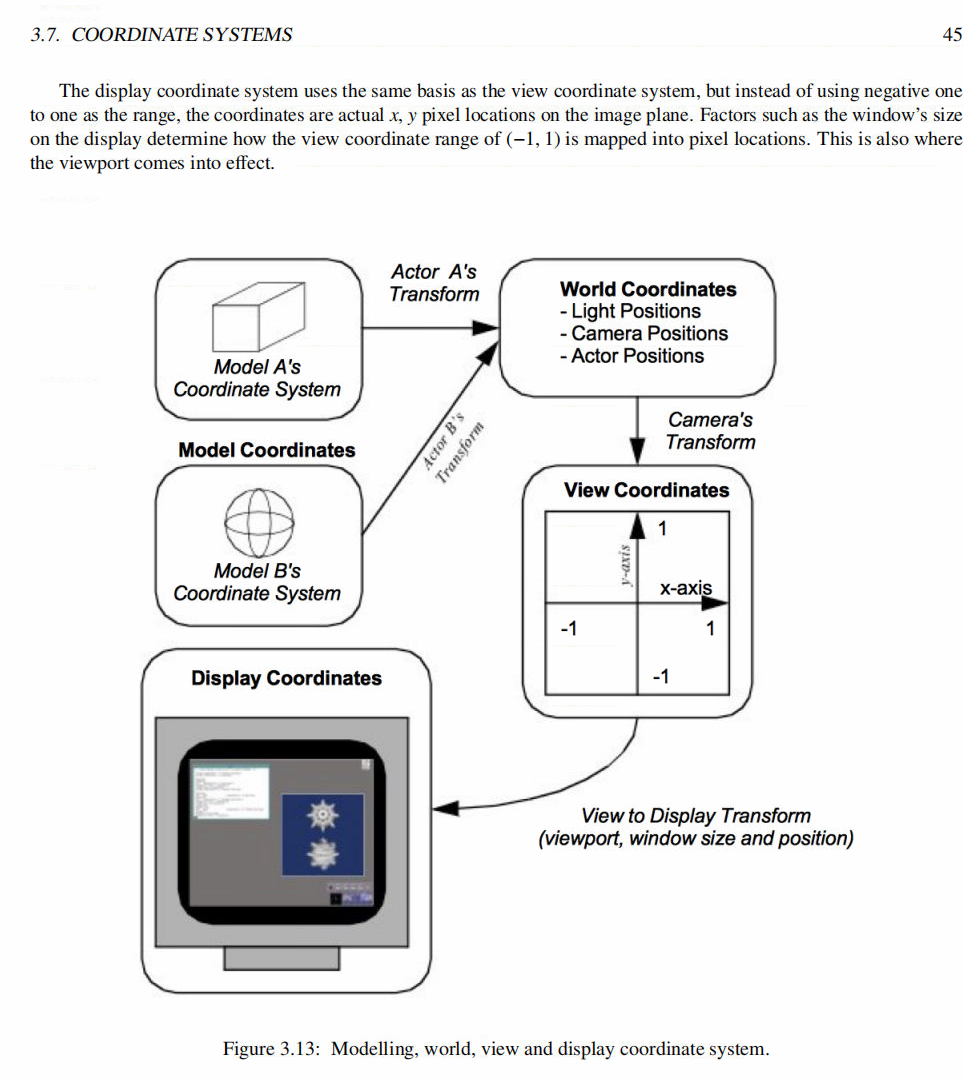
从以上信息我们得出结论坐标系的表示方式不同导致的计算结果和想象的不一样,如下图

举个例子,如果windows坐标系的下宽高都为1,也就是Xmax = 1,Ymax = 1;
如果在windows坐标系下的坐标是(0.5,0.5)映射到View坐标是多少呢,答案是(0,0)
所以有2*0.5-1 = 0
所以
vx = 2.0 * (this->DisplayPoint[0] - sizex * this->Viewport[0]) /
          (sizex * (this->Viewport[2] - this->Viewport[0])) -
        1.0;
ViewToWorld实现
// Convert view point coordinates to world coordinates.
void vtkRenderer::ViewToWorld()
{
  double result[4];
  result[0] = this->ViewPoint[0];
  result[1] = this->ViewPoint[1];
  result[2] = this->ViewPoint[2];
  result[3] = 1.0;
  this->ViewToWorld(result[0],result[1],result[2]);
  this->SetWorldPoint(result);
}
获取投影矩阵逆矩阵,把view 坐标系的点转换到世界坐标系
void vtkRenderer::ViewToWorld(double &x, double &y, double &z)
{
  double mat[16];
  double result[4];


  if (this->ActiveCamera == nullptr)
  {
    vtkErrorMacro("ViewToWorld: no active camera, cannot compute view to world, returning 0,0,0");
    x = y = z = 0.0;
    return;
  }


  // get the perspective transformation from the active camera
  vtkMatrix4x4 *matrix = this->ActiveCamera->
                GetCompositeProjectionTransformMatrix(
                  this->GetTiledAspectRatio(),0,1);


  // use the inverse matrix
  vtkMatrix4x4::Invert(*matrix->Element, mat);


  // Transform point to world coordinates
  result[0] = x;
  result[1] = y;
  result[2] = z;
  result[3] = 1.0;


  vtkMatrix4x4::MultiplyPoint(mat,result,result);


  // Get the transformed vector & set WorldPoint
  // while we are at it try to keep w at one
  if (result[3])
  {
    x = result[0] / result[3];
    y = result[1] / result[3];
    z = result[2] / result[3];
  }
}
以上是我的理解,欢迎留言讨论,共同进步