以idea编程工具为例,而且数据库中表已建好,数据库使用mysql
步骤一:
使用spring--boot搭建maven项目框架,集成springMVC,Mybatis,Mysql。配置application.properties文件
spring.datasource.driverClassName=com.mysql.jdbc.Driver
spring.datasource.url=jdbc:mysql://127.0.0.1:3306/course?useUnicode=true&characterEncoding=utf-8&serverTimezone=UTC
spring.datasource.username=root
spring.datasource.password=root
server.port=8888

mybatis.mapper-locations= classpath:/mapper/**/*.xml
步骤二:新建目录结构如图
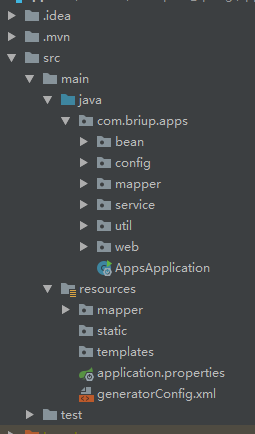
步骤三:使用mybatisgenerator生成bean文件和映射文件,映射接口
一,添加配置文件generatorConfig.xml,内容如下:
<?xml version="1.0" encoding="UTF-8"?>
<!DOCTYPE generatorConfiguration
  PUBLIC "-//mybatis.org//DTD MyBatis Generator Configuration 1.0//EN"
  "http://mybatis.org/dtd/mybatis-generator-config_1_0.dtd">
<!-- mybatis-generator的核心配置文件 -->
<generatorConfiguration>
  <classPathEntry location="D:\android\repository\mysql\mysql-connector-java\8.0.15/mysql-connector-java-8.0.15.jar" />

  <context id="DB2Tables" targetRuntime="MyBatis3">
    <jdbcConnection driverClass="com.mysql.jdbc.Driver"
        connectionURL="jdbc:mysql://127.0.0.1:3306/course?serverTimezone=UTC"
        userId="root"
        password="root">
      <property name="useInformationSchema" value="true"/>

    </jdbcConnection>

	<!--指定生成的类型为java类型,避免数据库中number等类型字段 -->
    <javaTypeResolver >
      <property name="forceBigDecimals" value="false" />
    </javaTypeResolver>

	<!--自动生成的实体的存放包路径 -->
    <javaModelGenerator targetPackage="com.briup.apps.bean" targetProject="./src/main/java">
      <property name="enableSubPackages" value="true" />
      <property name="trimStrings" value="true" />
    </javaModelGenerator>

	<!--自动生成的*Mapper.xml文件存放路径 -->
    <sqlMapGenerator targetPackage="mapper"  targetProject="./src/main/resources">
      <property name="enableSubPackages" value="true" />
    </sqlMapGenerator>

	<!--自动生成的*Mapper.java存放路径 -->
    <javaClientGenerator type="XMLMAPPER" targetPackage="com.briup.apps.mapper"  targetProject="./src/main/java">
      <property name="enableSubPackages" value="true" />
    </javaClientGenerator>


	<!-- 映射配置 -->
  	<table tableName="c_user" domainObjectName="User" ></table>
    <table tableName="c_course" domainObjectName="Course" ></table>
    <table tableName="c_student_course" domainObjectName="StudentCourse" ></table>

  </context>
</generatorConfiguration>
二,在maven的pom.xml文件中加入插件
 <plugin>
       <groupId>org.mybatis.generator</gr
       <artifactId>mybatis-generator-maven-plugin</artifactId>
       <version>1.3.5</version>
 </plugin>
三,在config文件夹中添加配置类MybatisConfig.java标识Mapper类地址
package com.briup.apps.config;

import org.mybatis.spring.annotation.MapperScan;
import org.springframework.context.annotation.Configuration;

@Configuration
@MapperScan("com.briup.apps.mapper")
public class MybatisConfig {

}
四,在控制台输入命令执行生成:
mvn -Dmybatis.generator.overwrite=true mybatis-generator:generate
步骤四:编写service代码和web代码
一,创建接口和存放实现的文件夹例如;
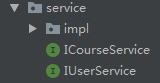
二,编写接口和实现
例:ICourseService接口
package com.briup.apps.service;

import com.briup.apps.bean.Course;
import com.briup.apps.bean.Extends.CourseExtends;

import java.util.List;

public interface ICourseService {

    List<CourseExtends> findAll();

    void saveOrUpdate(Course course) throws RuntimeException;


}
其实现类
package com.briup.apps.service.impl;

import com.briup.apps.bean.Course;
import com.briup.apps.bean.Extends.CourseExtends;
import com.briup.apps.mapper.CourseMapper;
import com.briup.apps.mapper.Extends.CourseExtendsMapper;
import com.briup.apps.service.ICourseService;
import org.springframework.beans.factory.annotation.Autowired;
import org.springframework.stereotype.Service;


import java.util.List;
@Service
public class CourseServiceImpl implements ICourseService {

    @Autowired
    CourseMapper courseMapper;

    @Autowired
    CourseExtendsMapper courseExtendsMapper;


    @Override
    public List<CourseExtends> findAll() {
        return courseExtendsMapper.selectAll();
    }

    @Override
    public void saveOrUpdate(Course course) throws RuntimeException {
        if(course.getId() == null){
            courseMapper.insert(course);
        }else{
            courseMapper.updateByPrimaryKey(course);
        }
    }
}
编写Controller代码,例CourseController
package com.briup.apps.web;


import com.briup.apps.bean.Course;
import com.briup.apps.bean.Extends.CourseExtends;
import com.briup.apps.service.ICourseService;
import com.briup.apps.util.Message;
import com.briup.apps.util.MessageUtil;
import io.swagger.annotations.Api;
import io.swagger.annotations.ApiOperation;
import org.springframework.beans.factory.annotation.Autowired;
import org.springframework.web.bind.annotation.GetMapping;
import org.springframework.web.bind.annotation.RequestMapping;
import org.springframework.web.bind.annotation.RestController;

import java.util.List;
@Api(description = "课程相关接口")
@RestController
@RequestMapping("/course")
public class CourseController {

    @Autowired
    ICourseService courseService;


    @ApiOperation("查询所有的课程信息,信息中级联任课老师信息")
    @GetMapping("getAllCourse")
    public Message getAllCourse(){
       List<CourseExtends> list =  courseService.findAll();
       return MessageUtil.success(list);
    }

    /**
     * 更新和保存courses数据
     * @param course
     * @return
     */
    @ApiOperation(value = "保存或更新课程" ,notes = "填写Id为更新不填写为保存")
    @GetMapping ("updateOrSave")
    public Message updateOrSave(Course course){
        courseService.saveOrUpdate(course);
        return MessageUtil.success("保存成功");
    }

}
步骤五:统一返回数据类型
一, 在工具文件夹中添加工具类Massage.java和MasssageUtil.java
Massage.java内容
package com.briup.apps.util;

public class Message {
    private int code;
    private  String message;
    private Object data;
    private Long timestamp;

    public int getCode() {
        return code;
    }

    public void setCode(int code) {
        this.code = code;
    }

    public String getMessage() {
        return message;
    }

    public void setMessage(String message) {
        this.message = message;
    }

    public Object getData() {
        return data;
    }

    public void setData(Object data) {
        this.data = data;
    }

    public Long getTimestamp() {
        return timestamp;
    }

    public void setTimestamp(Long timestamp) {
        this.timestamp = timestamp;
    }
}
MassageUtil.java
package com.briup.apps.util;


import java.util.Date;

public class MessageUtil {

    public static Message success(Object data){
        Message message = new Message();

        message.setCode(200);
        message.setData(data);
        message.setMessage("成功");
        message.setTimestamp(new Date().getTime());
        return message;
    }

    public static Message success(String str,Object data){
        Message message = new Message();

        message.setCode(200);
        message.setData(data);
        message.setMessage(str);
        message.setTimestamp(new Date().getTime());
        return message;
    }

    public static Message success(String str){
        Message message = new Message();

        message.setCode(200);
        message.setData(null);
        message.setMessage(str);
        message.setTimestamp(new Date().getTime());
        return message;
    }

    public static Message error(String str){
        Message message = new Message();

        message.setCode(500);
        message.setData(null);
        message.setMessage(str);
        message.setTimestamp(new Date().getTime());
        return message;
    }


}
二,使用如CourseController中
return MessageUtil.success(list);
步骤六:使用swagger,让后台接口通过页面的形式展现在前端开发者面前
一,在config文件夹中添加swagger.java文件,注意更改basePackage("com.briup.apps.web")地址
/**
 * Project Name:poll
 * File Name:Swagger2.java
 * Package Name:com.briup.apps.poll.config
 * Date:2018年6月10日下午6:22:51
 * Copyright (c) 2018, chenzhou1025@126.com All Rights Reserved.
 *
*/

package com.briup.apps.config;

import org.springframework.context.annotation.Bean;
import org.springframework.context.annotation.Configuration;

import springfox.documentation.builders.ApiInfoBuilder;
import springfox.documentation.builders.PathSelectors;
import springfox.documentation.builders.RequestHandlerSelectors;
import springfox.documentation.service.ApiInfo;
import springfox.documentation.spi.DocumentationType;
import springfox.documentation.spring.web.plugins.Docket;
import springfox.documentation.swagger2.annotations.EnableSwagger2;

/**
 * ClassName:Swagger2 <br/>
 * Function: TODO ADD FUNCTION. <br/>
 * Reason:	 TODO ADD REASON. <br/>
 * Date:     2018年6月10日 下午6:22:51 <br/>
 * @author   lichunyu
 * @version
 * @since    JDK 1.6
 * @see
 */
@Configuration
@EnableSwagger2
public class Swagger2 {
	@Bean
	public Docket createRestApi() {
		return new Docket(DocumentationType.SWAGGER_2)
				.apiInfo(apiInfo())
				.select()
				.apis(RequestHandlerSelectors.basePackage("com.briup.apps.web"))
				.paths(PathSelectors.any())
				.build();
	}

	private ApiInfo apiInfo() {
		return new ApiInfoBuilder()
				.title("智慧校园,课调系统API")
				.description("昆山杰普软件科技有限公司,http://www.briup.com")
				.termsOfServiceUrl("http://www.briup.com")
				.version("1.0")
				.build();
	}
}
二,在pom.xml文件中添加依赖
<!-- swagger api文档 -->
        <dependency>
            <groupId>io.springfox</groupId>
            <artifactId>springfox-swagger2</artifactId>
            <version>2.6.1</version>
        </dependency>
        <dependency>
            <groupId>io.springfox</groupId>
            <artifactId>springfox-swagger-ui</artifactId>
            <version>2.6.1</version>
        </dependency>
三,添加注解,便于让前端开发者使用
1>在bean类中添加注解:
@ApiModel("课程模型")
@ApiParam(value = "课程名" , required = true)
例:Course类
package com.briup.apps.bean;


import io.swagger.annotations.ApiModel;
import io.swagger.annotations.ApiParam;

@ApiModel("课程模型")
public class Course {
    /**
     *
     * This field was generated by MyBatis Generator.
     * This field corresponds to the database column c_course.id
     *
     * @mbg.generated Fri Apr 19 15:49:13 CST 2019
     */
    @ApiParam("编号")
    private Long id;

    /**
     *
     * This field was generated by MyBatis Generator.
     * This field corresponds to the database column c_course.name
     *
     * @mbg.generated Fri Apr 19 15:49:13 CST 2019
     */
    @ApiParam(value = "课程名" , required = true)
    private String name;

    /**
     *
     * This field was generated by MyBatis Generator.
     * This field corresponds to the database column c_course.description
     *
     * @mbg.generated Fri Apr 19 15:49:13 CST 2019
     */
    private String description;

    /**
     *
     * This field was generated by MyBatis Generator.
     * This field corresponds to the database column c_course.credit
     *
     * @mbg.generated Fri Apr 19 15:49:13 CST 2019
     */
    private Double credit;

    /**
     *
     * This field was generated by MyBatis Generator.
     * This field corresponds to the database column c_course.teacher_id
     *
     * @mbg.generated Fri Apr 19 15:49:13 CST 2019
     */
    private Long teacherId;

    /**
     * This method was generated by MyBatis Generator.
     * This method returns the value of the database column c_course.id
     *
     * @return the value of c_course.id
     *
     * @mbg.generated Fri Apr 19 15:49:13 CST 2019
     */
    public Long getId() {
        return id;
    }

    /**
     * This method was generated by MyBatis Generator.
     * This method sets the value of the database column c_course.id
     *
     * @param id the value for c_course.id
     *
     * @mbg.generated Fri Apr 19 15:49:13 CST 2019
     */
    public void setId(Long id) {
        this.id = id;
    }

    /**
     * This method was generated by MyBatis Generator.
     * This method returns the value of the database column c_course.name
     *
     * @return the value of c_course.name
     *
     * @mbg.generated Fri Apr 19 15:49:13 CST 2019
     */
    public String getName() {
        return name;
    }

    /**
     * This method was generated by MyBatis Generator.
     * This method sets the value of the database column c_course.name
     *
     * @param name the value for c_course.name
     *
     * @mbg.generated Fri Apr 19 15:49:13 CST 2019
     */
    public void setName(String name) {
        this.name = name == null ? null : name.trim();
    }

    /**
     * This method was generated by MyBatis Generator.
     * This method returns the value of the database column c_course.description
     *
     * @return the value of c_course.description
     *
     * @mbg.generated Fri Apr 19 15:49:13 CST 2019
     */
    public String getDescription() {
        return description;
    }

    /**
     * This method was generated by MyBatis Generator.
     * This method sets the value of the database column c_course.description
     *
     * @param description the value for c_course.description
     *
     * @mbg.generated Fri Apr 19 15:49:13 CST 2019
     */
    public void setDescription(String description) {
        this.description = description == null ? null : description.trim();
    }

    /**
     * This method was generated by MyBatis Generator.
     * This method returns the value of the database column c_course.credit
     *
     * @return the value of c_course.credit
     *
     * @mbg.generated Fri Apr 19 15:49:13 CST 2019
     */
    public Double getCredit() {
        return credit;
    }

    /**
     * This method was generated by MyBatis Generator.
     * This method sets the value of the database column c_course.credit
     *
     * @param credit the value for c_course.credit
     *
     * @mbg.generated Fri Apr 19 15:49:13 CST 2019
     */
    public void setCredit(Double credit) {
        this.credit = credit;
    }

    /**
     * This method was generated by MyBatis Generator.
     * This method returns the value of the database column c_course.teacher_id
     *
     * @return the value of c_course.teacher_id
     *
     * @mbg.generated Fri Apr 19 15:49:13 CST 2019
     */
    public Long getTeacherId() {
        return teacherId;
    }

    /**
     * This method was generated by MyBatis Generator.
     * This method sets the value of the database column c_course.teacher_id
     *
     * @param teacherId the value for c_course.teacher_id
     *
     * @mbg.generated Fri Apr 19 15:49:13 CST 2019
     */
    public void setTeacherId(Long teacherId) {
        this.teacherId = teacherId;
    }
}
二,在Controller类中添加注解
@Api(description = "课程相关接口")
@ApiOperation(value = "保存或更新课程" ,notes = "填写Id为更新不填写为保存")
例:如上CourseController
三,运行项目访问localhost:8888/swagger-ui.html实现结果为:


另附mybatis-generator的生成操作数据库的方法使用说明:来自其他网页


