字符串是Python中最受欢迎、最常用的数据类型。可以通过用引号括起字符来创建他们。
字符串的定义:
s1="Hello Python"
s2='你好世界'
print(s1)      #Hello Python
print(s2)      #你好世界
2.转义字符和原始字符串
需要指出的是,并不是所有的字符串只要两端加上双引号,就会原样输出,当遇到转义字符,其字符会发生变化。
| 转义字符 | 含义 | 转义字符 | 含义 |
| \\ | 单个\ | \r | 回车 |
| \n | 换行 | \' | 单引号 |
| \t | 制表符 | \" | 双引号 |
s1 = '\'hello, world!\''
print(s1)                          # 'hello,world'
s2 = '\\hello, world!\\'
print(s2)                          #\hello,world\


'''
还有很多你们自己动手试一试
'''Python中的字符串可以r或R开头,这种字符串被称为原始字符串,意思是字符串中的每个字符都是它本来的含义。
s1 =r'\'hello, world!\''
print(s1)                          # \'hello,world\'
s2 = R'\\hello, world!\\'
print(s2)                          #\\hello,world\\
3.字符串的运算
s1="Helo world"*3
print(s1)            #Helo worldHelo worldHelo world


s2="hello"
s3="python"
print(s2+s3)            #hellopython


s1 = 'a whole new world'
s2 = 'hello world'
print(s1 == s2, s1 < s2)      # False True
print(s2 == 'hello world')    # True
print(s2 == 'Hello world')    # False
print(s2 != 'Hello world')    # True
s3 = '李寿鹏'
print(ord('李'), ord('寿'),ord('鹏'))             # 26446 23551 40527
s4 = '王大锤'
print(ord('王'), ord('大'), ord('锤'))    # 29579 22823 38180
print(s3 > s4, s3 <= s4)      #False True


'''
在python中=为赋值,而==是比较运算
在字符串与字符串比较时是比较字符串的Ascll码
ord()功能描述:以一个字符(长度为1的字符串)作为参数,返回对应的ASCll数值,
或者Unicode值,如果所给的Unicode字符超出了你的Python定义范围,则会引发一个TypeError的异常。
'''


s1="hello world"
print("h" in s1)   #True
print("h" not in s1)   #False


s1="hello world"
print(len(s1))       #11

'''
len()函数可以查看字符串的长度(注意:一个空格也算一个)
'''
4.字符串的切片
索引号可以是正数由0开始从左向右,也可以是负数由-1开始从右向左。(注意len()函数是从1开始的,而切片是从0开始的)
| 字符 | H | e | l | l | o | P | y | t | h | o | n | |
| 索引 | 0 | 1 | 2 | 3 | 4 | 5 | 6 | 7 | 8 | 9 | 10 | 11 |
s = 'abc123456'
N = len(s)

# 获取第一个字符
print(s[0], s[-N])    # a a

# 获取最后一个字符
print(s[N-1], s[-1])  # 6 6

# 获取索引为2或-7的字符
print(s[2], s[-7])    # c c

# 获取索引为5和-4的字符
print(s[5], s[-4])    # 3 3
格式: [start:end:step]
[:] 提取从开头(默认位置0)到结尾(默认位置-1)的整个字符串
[start:] 从start 提取到结尾
[:end] 从开头提取到end - 1
[start:end] 从start 提取到end - 1
[start:end:step] 从start 提取到end - 1,每step 个字符提取一个
左侧第一个字符的位置/偏移量为0,右侧最后一个字符的位置/偏移量为-1
上面我只写了一部分,剩下的你自己动手试一试 。
5.字符串的方法
1.大小写的相关操作
s1="hello world"
print(s1.capitalize())     #Hello world
print(s1.title())          #Hello World
print(s1.upper())           #HELLO WORLD
print(s1.lower())            #hello world


'''
capitalize()  #获得字符串首字母大写后的字符串
title()        #每个字符串的首字母大写
upper()        #所有字符串大写
lower()        #所有字符串小写
'''
2.移除字符串头尾指定的字符或字符序列
s1=" hello world "
print(s1.strip())    #hello world
print(s1.lstrip())   #hello world
print(s1.rstrip())   # hello world


s1="ehello worlde"
print(s1.strip("e"))    #hello world
print(s1.lstrip("e"))   #hello worlde
print(s1.rstrip("e"))   #ehello world


'''
srtip()  是用于用于移除字符串头尾指定的字符(默认为空格)或字符序列
lstrip()  是用于用于移除字符串头指定的字符(默认为空格)或字符序列
rstrip()  用于移除字符串尾指定的字符(默认为空格)或字符序列
'''
3.查找
如果想在一个字符串中从前向后查找有没有另外一个字符串,可以使用字符串的find或index方法。
s1="hello world"
print(s1.index("o"))     #4
print(s1.index("p"))      #ValueError: substring not found

print(s1.find("o"))       #4
print(s1.find("p"))        #-1


s1="hello world"
print(s1.rindex("o"))     #7
print(s1.rindex("p"))      #ValueError: substring not found


s1="hello world"
print(s1.rfind("o"))   #7
print(s1.rfind("p"))    #-1

'''
index() 从字符串中查找另一个字符串所在的位置找到了返回字符串中另一个字符串首字符的索引
           找不到引发报错(从左向右找)

find() 从字符串中查找另一个字符串所在的位置找到了返回字符串中另一个字符串首字符的索引
           找不到返回-1(从左向右找)


rindex()与rdind()为从右向左找
4.替换
s1="hesso worsd"
print(s1.replace("s","l"))     #hello world


'''
replace()为替换操作
replace(替换的元素,替换后的元素)
5.性质判断
可以通过字符串的startswith、endswith来判断字符串是否以某个字符串开头和结尾;还可以用is开头的方法判断字符串的特征,这些方法都返回布尔值,代码如下所示。
s1 = 'hello, world!'

# startwith方法检查字符串是否以指定的字符串开头返回布尔值
print(s1.startswith('He'))    # False
print(s1.startswith('hel'))   # True
# endswith方法检查字符串是否以指定的字符串结尾返回布尔值
print(s1.endswith('!'))       # True

s2 = 'abc123456'

# isdigit方法检查字符串是否由数字构成返回布尔值
print(s2.isdigit())    # False
# isalpha方法检查字符串是否以字母构成返回布尔值
print(s2.isalpha())    # False
# isalnum方法检查字符串是否以数字和字母构成返回布尔值
print(s2.isalnum())    # True
6.统计出现次数
s1="hello world"
print(s1.count("o"))    #2

'''
count()为统计某个元素出现的次数
count(要统计出现次数的元素)
'''
7.拆分/合并操作
s = 'I love you'
words = s.split()
print(words)            # ['I', 'love', 'you']
print('#'.join(words))  # I#love#you


s = 'I#love#you#so#much'
words = s.split('#')
print(words)  # ['I', 'love', 'you', 'so', 'much']
words = s.split('#', 3)
print(words)  # ['I', 'love', 'you', 'so#much']

'''

需要说明的是,split方法默认使用空格进行拆分,
我们也可以指定其他的字符来拆分字符串,
而且还可以指定最大拆分次数来控制拆分的效果,
'''
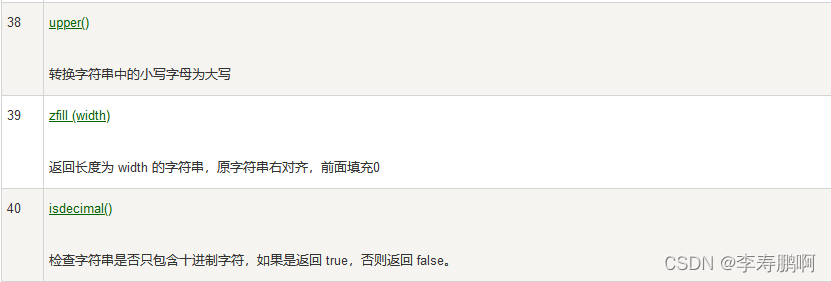
当然字符串的方法远远不止这些,还有很多,但常用的只有这一些,如果你感兴趣你可以把下面的字符串所有的方法全部练习一遍。


版权声明:本文为weixin_62024248原创文章,遵循CC 4.0 BY-SA版权协议,转载请附上原文出处链接和本声明。