1.问题现象
在编译app时安装到虚拟器上时,突然报错:
16:24	Executing tasks: [:app:assembleDebug] in project D:\Android\Projects\AiAgriculture

16:24	Gradle build finished in 7 s 949 ms

16:24	Failed to commit install session 579333955 with command pm install-commit 579333955. Error: INSTALL_FAILED_MISSING_SHARED_LIBRARY: Package couldn't be installed in /data/app/xx.xxx.xxx-1: Package xx.xx.xxx requires unavailable shared library com.google.android.wearable; failing!

16:24	Error
			Installation did not succeed.
			The application could not be installed: INSTALL_FAILED_MISSING_SHARED_LIBRARY
			Retry

16:24	Session 'app': Installation did not succeed.
			The application could not be installed: INSTALL_FAILED_MISSING_SHARED_LIBRARY
			Retry
2.原因分析
在错误提示中,Package xx.xx.xxx requires unavailable shared library com.google.android.wearable; failing!已经对编译失败原因进行了说明,就是在虚拟器上缺少com.google.android.wearable库,导致编译失败。也就是说,app类型搞错了,把用于WATCH上的app编译到了Phone类型的设备上。
3.问题解决
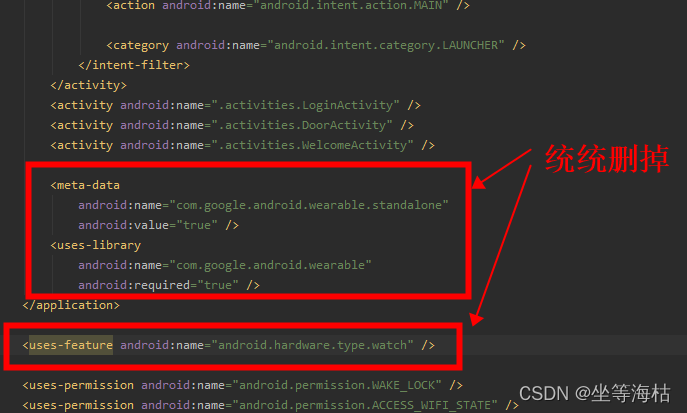
(1)检查AndroidManifests.xml文件中,是否因为use-feature设置成了WATCH,若有,则去掉;
(2)检查Module:xx.app的build.gradle文件,是否有编译限制,若有,则删掉:
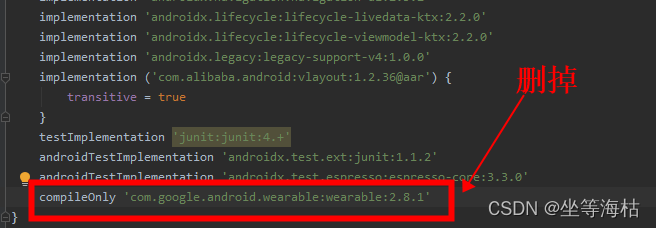
重新编译,问题解决
版权声明:本文为xinbadar原创文章,遵循CC 4.0 BY-SA版权协议,转载请附上原文出处链接和本声明。