1 概述
1. 实际开发中,不同业务系统使用 '不同的用户',方便管理
2. 创建用户时,建议 '指定表空间',否则全部默认 'users'('表空间容易过大,不易维护,不利于查询')
2 操作
2.1 创建
create user <username> identified by <password>;
-- 默认 user 表空间(不推荐)
create user <username> identified by <password>
default tablespace <tablespace_name> -- 默认表空间
temporary tablespace temp -- 临时表空间
quota unlimited on <tablespace_name> -- 表空间额度
grant create session to <username>; -- 授权(可以登录)
示例:创建用户 zhangsan 密码 12345,表空间 TESTTBS
create user zhangsan identified by 12345
default tablespace TESTTBS
temporary tablespace temp
quota unlimited on TESTTBS;
grant create session TO zhangsan;
登录成功: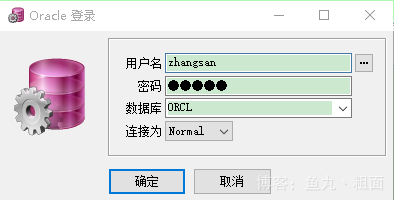
3.2 查询
select * from dba_users t where t.username = 'ZHANGSAN';
查询截图: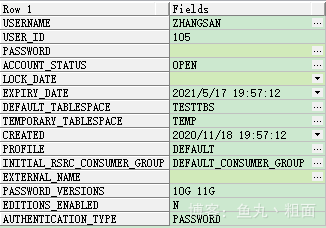
3 表空间
-- 创建
create tablespace TESTTBS -- 区分大小写
datafile 'E:\TableSpace\TESTTBS01.dbf' size 10m;
-- 查询
select * from dba_tablespaces t where t.tablespace_name = 'TESTTBS'; -- 表空间
select * from dba_data_files t where t.tablespace_name = 'TESTTBS'; -- 数据文件
版权声明:本文为m0_37253968原创文章,遵循CC 4.0 BY-SA版权协议,转载请附上原文出处链接和本声明。