什么是MapReduce
MapReduce是一种可用于数据处理的编程模型,我们现在设想一个场景,你接到一个任务,任务是:挖掘分析我国气象中心近年来的数据日志,该数据日志大小有3T,让你分析计算出每一年的最高气温,如果你现在只有一台计算机,如何处理呢?我想你应该会读取这些数据,并且将读取到的数据与目前的最大气温值进行比较。比较完所有的数据之后就可以得出最高气温了。不过以我们的经验都知道要处理这么多数据肯定是非常耗时的。
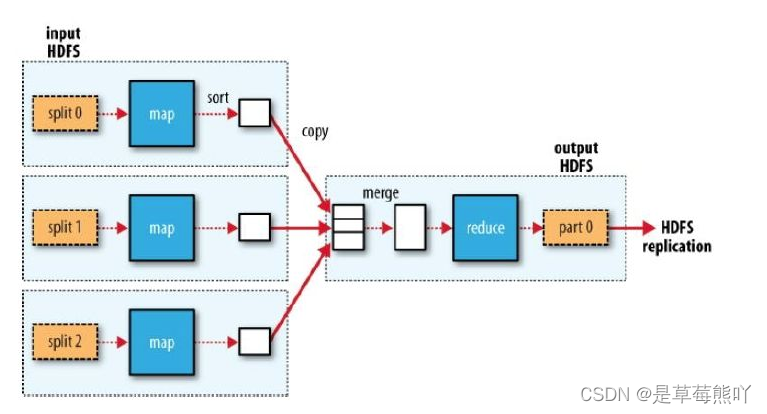
如果我现在给你三台机器,你会如何处理呢?看到下图你应该想到了:最好的处理方式是将这些数据切分成三块,然后分别计算处理这些数据(Map),处理完毕之后发送到一台机器上进行合并(merge),再计算合并之后的数据,归纳(reduce)并输出。
这就是一个比较完整的MapReduce的过程了。
如何使用MapReduce进行运算
我们通过一个示例,来体验Map/Reduce的使用。
我们从一个问题入手:目前我们想统计两个文本文件中,每个单词出现的次数。
首先我们在当前目录下创建两个文件:
创建file01输入内容:
Hello World Bye World
创建file02输入内容:
Hello Hadoop Goodbye Hadoop
将文件上传到HDFS的/usr/input/目录下:
不要忘了启动DFS: start-dfs.sh
然后创建文件夹并上传:

在右侧代码区域编写,文件WordCount.java,添加如下内容:
public class WordCount {
//Mapper类
/*LongWritable表示每一行起始偏移量
第一个Text是用来接受文件中的内容,
第二个Text是用来输出给Reduce类的key,
IntWritable是用来输出给Reduce类的value*/
 public static class TokenizerMapper
       extends Mapper<LongWritable, Text, Text, IntWritable>{
    private final static IntWritable one = new IntWritable(1);
    private Text word = new Text();
    public void map(LongWritable key, Text value, Context context
                    ) throws IOException, InterruptedException {
      StringTokenizer itr = new StringTokenizer(value.toString());
      while (itr.hasMoreTokens()) {
        word.set(itr.nextToken());
        context.write(word, one);
      }
    }
  }
  public static class IntSumReducer
       extends Reducer<Text,IntWritable,Text,IntWritable> {
    private IntWritable result = new IntWritable();
    public void reduce(Text key, Iterable<IntWritable> values,
                       Context context
                       ) throws IOException, InterruptedException {
      int sum = 0;
      for (IntWritable val : values) {
        sum += val.get();
      }
      result.set(sum);
      context.write(key, result);
    }
  }
  public static void main(String[] args) throws Exception {
    //创建配置对象
    Configuration conf = new Configuration();
    //创建job对象
    Job job = new Job(conf, "word count");
    //设置运行job的类
    job.setJarByClass(WordCount.class);
    //设置Mapper的类
    job.setMapperClass(TokenizerMapper.class);
    //设置Reduce的类
    job.setReducerClass(IntSumReducer.class);
    //设置输出的key value格式
    job.setOutputKeyClass(Text.class);
    job.setOutputValueClass(IntWritable.class);
    //设置输入路径
    String inputfile = "/usr/input";
    //设置输出路径
    String outputFile = "/usr/output";
    //执行输入
    FileInputFormat.addInputPath(job, new Path(inputfile));
    //执行输出
    FileOutputFormat.setOutputPath(job, new Path(outputFile));
    //是否运行成功,true输出0,false输出1
    System.exit(job.waitForCompletion(true) ? 0 : 1);
  }
}点击评测,运行代码,可以看到/usr/output目录下已经生成了文件。

我们来查看part--r-00000文件的内容:

可以看到统计的数据已经生成在文件中了。
如果你还想要运行一次,那么你需要删除输出路径的文件夹和文件。
代码解释
示例中,Map/Reduce程序总共分为三块即:Map,Recude,Job,Map负责处理输入文件的内容。
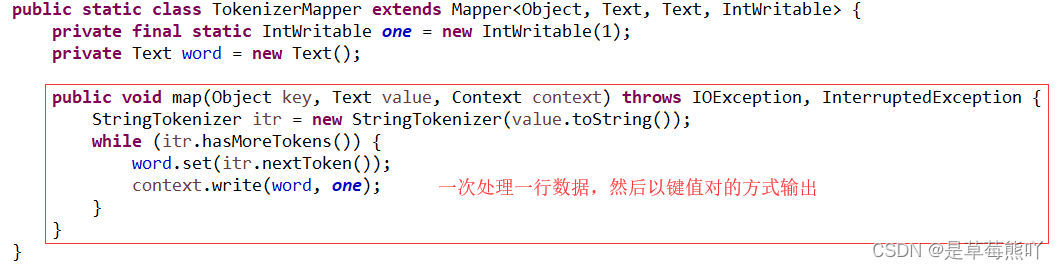
TokenizerMapper的map方法,它通过StringTokenizer 以空格为分隔符将一行切分为若干tokens,之后,输出< <word>, 1>形式的键值对。
对于示例中的第一个输入,map输出是:< Hello, 1>< World, 1>< Bye, 1>< World, 1>
第二个输入,map输出是:< Hello, 1>< Hadoop, 1>< Goodbye, 1>< Hadoop, 1>
WordCount还指定了一个combiner。因此,每次map运行之后,会对输出按照key进行排序,然后把输出传递给本地的combiner(按照作业的配置与Reducer一样),进行本地聚合。

第一个map的输出是:< Bye, 1>< Hello, 1>< World, 2>
第二个map的输出是:< Goodbye, 1>< Hadoop, 2>< Hello, 1>
reduce的数据是这样的:
< Bye , [1]>< GoodBye , [1]>< Hadoop , [2]>< Hello , [1,1]>< World , [2]>
Reducer中的reduce方法 仅是将每个key(本例中就是单词)出现的次数求和。
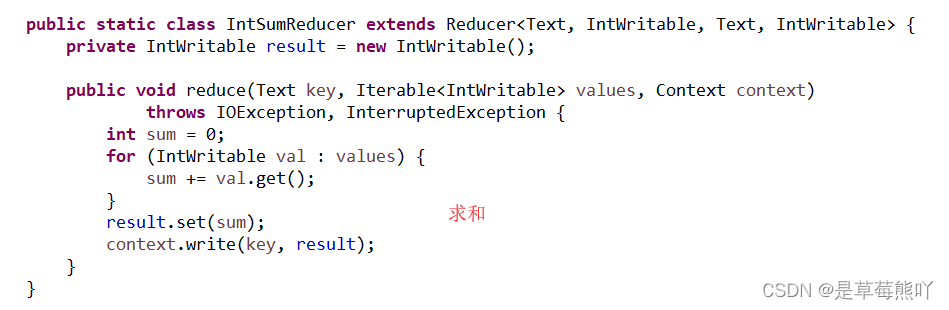
因此这个作业的输出就是:< Bye, 1>< Goodbye, 1>< Hadoop, 2>< Hello, 2>< World, 2>
在之后的实训中我们还会学习到JobConf, JobClient,Tool这些对象。
编程要求
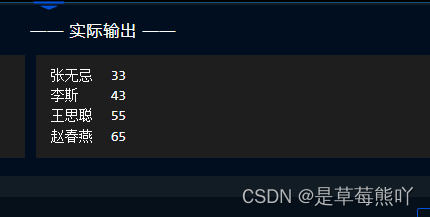
使用MapReduce计算班级每个学生的最好成绩,输入文件路径为/user/test/input,请将计算后的结果输出到/user/test/output/目录下。
代码文件
import java.io.IOException;
import java.util.StringTokenizer;

import java.io.IOException;
import java.util.StringTokenizer;
import org.apache.hadoop.conf.Configuration;
import org.apache.hadoop.fs.Path;
import org.apache.hadoop.io.*;
import org.apache.hadoop.io.Text;
import org.apache.hadoop.mapreduce.Job;
import org.apache.hadoop.mapreduce.Mapper;
import org.apache.hadoop.mapreduce.Reducer;
import org.apache.hadoop.mapreduce.lib.input.FileInputFormat;
import org.apache.hadoop.mapreduce.lib.output.FileOutputFormat;
import org.apache.hadoop.util.GenericOptionsParser;

public class WordCount {
    /********** Begin **********/
	//Mapper函数
    public static class TokenizerMapper extends Mapper<LongWritable, Text, Text, IntWritable> {
        private final static IntWritable one = new IntWritable(1);
        private Text word = new Text();
        private int maxValue = 0;
        public void map(LongWritable key, Text value, Context context) throws IOException, InterruptedException {
            StringTokenizer itr = new StringTokenizer(value.toString(),"\n");
            while (itr.hasMoreTokens()) {
                String[] str = itr.nextToken().split(" ");
                String name = str[0];
                one.set(Integer.parseInt(str[1]));
                word.set(name);
                context.write(word,one);
            }
            //context.write(word,one);
        }
    }
    public static class IntSumReducer extends Reducer<Text, IntWritable, Text, IntWritable> {
        private IntWritable result = new IntWritable();
        public void reduce(Text key, Iterable<IntWritable> values, Context context)
                throws IOException, InterruptedException {
            int maxAge = 0;
            int age = 0;
            for (IntWritable intWritable : values) {
                maxAge = Math.max(maxAge, intWritable.get());
            }
            result.set(maxAge);
            context.write(key, result);
        }
    }
    public static void main(String[] args) throws Exception {
        Configuration conf = new Configuration();
        Job job = new Job(conf, "word count");
        job.setJarByClass(WordCount.class);
        job.setMapperClass(TokenizerMapper.class);
        job.setCombinerClass(IntSumReducer.class);
        job.setReducerClass(IntSumReducer.class);
        job.setOutputKeyClass(Text.class);
        job.setOutputValueClass(IntWritable.class);
        String inputfile = "/user/test/input";
        String outputFile = "/user/test/output/";
        FileInputFormat.addInputPath(job, new Path(inputfile));
        FileOutputFormat.setOutputPath(job, new Path(outputFile));
        job.waitForCompletion(true);
    /********** End **********/
    }
}
命令行
root@evassh-12041368:~# touch file01
root@evassh-12041368:~# echo Hello World Bye World
Hello World Bye World
root@evassh-12041368:~# cat file01
Hello World Bye World
root@evassh-12041368:~# echo Hello World Bye World >file01
root@evassh-12041368:~# cat file01
Hello World Bye World
root@evassh-12041368:~# touch file02
root@evassh-12041368:~# echo Hello Hadoop Goodbye Hadoop >file02
root@evassh-12041368:~# cat file02
Hello Hadoop Goodbye Hadoop
root@evassh-12041368:~# start-dfs.sh
Starting namenodes on [localhost]
localhost: Warning: Permanently added 'localhost' (ECDSA) to the list of known hosts.
localhost: starting namenode, logging to /usr/local/hadoop/logs/hadoop-root-namenode-evassh-12041368.out
localhost: Warning: Permanently added 'localhost' (ECDSA) to the list of known hosts.
localhost: starting datanode, logging to /usr/local/hadoop/logs/hadoop-root-datanode-evassh-12041368.out
Starting secondary namenodes [0.0.0.0]
0.0.0.0: Warning: Permanently added '0.0.0.0' (ECDSA) to the list of known hosts.
0.0.0.0: starting secondarynamenode, logging to /usr/local/hadoop/logs/hadoop-root-secondarynamenode-evassh-12041368.out
root@evassh-12041368:~# hadoop fs -mkdir /usr
mkdir: Cannot create directory /usr. Name node is in safe mode.
root@evassh-12041368:~# hadoop fs -mkdir /usr/
root@evassh-12041368:~# hadoop fs -mkdir /usr/input
root@evassh-12041368:~# hadoop fs -ls /usr/output
ls: `/usr/output': No such file or directory
root@evassh-12041368:~# hadoop fs -mkdir /usr/output
root@evassh-12041368:~# hadoop fs -ls /usr/output
root@evassh-12041368:~# hadoop fs -ls /
Found 3 items
drwxr-xr-x   - root supergroup          0 2022-07-27 06:44 /uer
drwxr-xr-x   - root supergroup          0 2022-07-27 06:46 /user
drwxr-xr-x   - root supergroup          0 2022-07-27 07:02 /usr
root@evassh-12041368:~# hadoop fs -ls /usr
Found 2 items
drwxr-xr-x   - root supergroup          0 2022-07-27 07:00 /usr/input
drwxr-xr-x   - root supergroup          0 2022-07-27 07:02 /usr/output
root@evassh-12041368:~# hadoop fs -put file01 /usr/input
root@evassh-12041368:~# hadoop fs -put file02 /usr/input
root@evassh-12041368:~# hadoop fs -ls /usr/input
Found 2 items
-rw-r--r--   1 root supergroup         22 2022-07-27 07:03 /usr/input/file01
-rw-r--r--   1 root supergroup         28 2022-07-27 07:05 /usr/input/file02
root@evassh-12041368:~#
结果