一、后台代码
详情见:https://blog.csdn.net/weixin_41583535/article/details/80350597
二、wxml代码
<!-- 上方tabBar 开始 --> < view class= "swiper-tab"> < block wx:for= "{{cateItems}}" wx:key= "id"> < view class= "swiper-tab-list {{currentTab==item.cate_id ? 'on' : ''}}" data-current= "{{item.cate_id}}" bindtap= "swichNav"> {{item.cate_name}} </ view > </ block > </ view > <!-- 上方tabBar 结束 --> <!-- 下方 内容 开始 --> < view wx:if= "{{currentTab==children}}" class= "swiper-box"> < block wx:for= "{{cateItems[children-1].children}}" wx:key= "id"> < view class= "swiper-box_items"> < image src= "{{item.image}}"></ image > < text >{{item.name}} </ text > </ view > </ block > </ view > <!-- 下方 内容 结束 --> |
三、js代码
// pages/TabBar/TabBar.js var app = getApp(); Page({ /* 页面的初始数据 */ data: { currentTab: 1, // tab切换 children: 1, // 内容切换 }, /* tab 切换事件 */ swichNav: function (e) { var that = this; that.setData({ currentTab: e.target.dataset.current, children: e.target.dataset.current }) }, /* 在页面加载时 从后台将数据查询出来 */ onLoad: function (options) { var that = this; console.log( 'oload....'); wx.request({ url: 'http://localhost:8080/Min_Chengxu/Communications', data: { }, method: 'GET', header: { 'content-type': 'application/json' // 默认值 }, success: function (res) { console.log(res.data); that.setData({ cateItems: res.data, }) }, fail: function (res) { console.log( ".....fail....."); } }) } }) |
四、xcss代码
/* pages/TabBar/TabBar.wxss */ /* 1. 选项卡 */ .swiper-tab { width: 100%; /* 选项卡所占宽度 */ border-bottom: 2 rpx solid #777; /* 设置选项卡下边框的样式 */ text-align: center; /* 设置选项卡字体的显示 */ line-height: 80 rpx; /* 设置选项卡所占的告诉 */ } /* 1.1. 选项卡中的子选项 */ .swiper-tab-list { font-size: 38 rpx; /* 设置选项卡字体的大小 */ display: inline-block; /* 行内块元素。(CSS2.1 新增的值) */ width: 25%; /* 每个子选项所占的宽度 */ color: #777; /* 字体的颜色 */ } /* 1.2. 子选项被选中时的样式 */ .on { color: #3385ff; /* 选中时字体的颜色 */ border-bottom: 5 rpx solid #3385ff; /* 选中时选项卡下边框的样式 */ } /* 2.选项卡下方的内容 */ .swiper-box{ position: absolute; /* 使用绝对定位 */ top: 10; /* 距离上边距:0px */ left: 40px; /* 距离左边距:80px */ width: 75%; /* 右侧主盒子所占宽度 */ height: 600px; /* 右侧主盒子所占高度 */ padding: 10px; /* 所有 4 个内边距都是 10px*/ box-sizing: border-box; /* 为元素指定的任何内边距和边框都将在已设定的宽度和高度内进行绘制*/ } /* 2.1. 选项卡下方的内容的每个item */ .swiper-box .swiper-box_items{ float: left; /* 浮动向左 */ width: 33.33%; /* 每个item设置宽度是33.33% */ height: 120px; /* 每个item设置高度是120px */ text-align: center; /* 设置图片下方的提示文字居中显示 */ } /* 2.2. 选项卡下方的内容的每个图片样式设置 */ .swiper-box .swiper-box_items image{ width: 60px; /* 给图片设置宽度 */ height: 60px; /* 给图片设置高度 */ margin-top: 15px; /* 图片距离上边距15px */ border-radius: 40%; /* 给图片添加圆角边框 */ } |
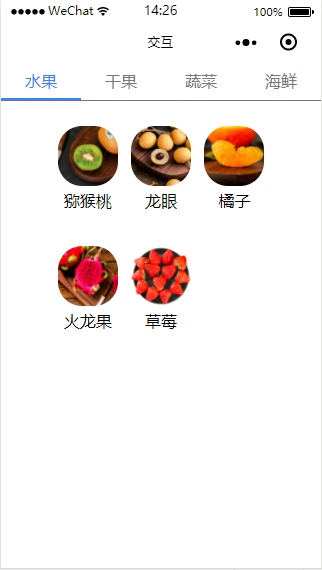
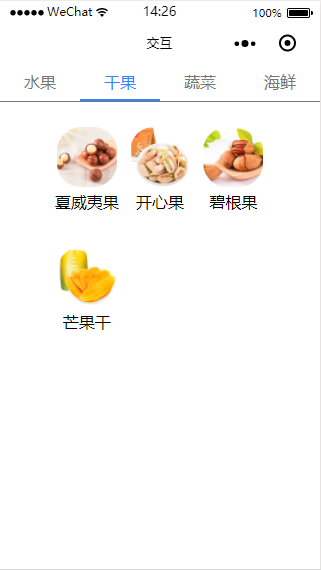
五、效果图
版权声明:本文为weixin_41583535原创文章,遵循CC 4.0 BY-SA版权协议,转载请附上原文出处链接和本声明。