local模式启动flink
./bin/start-local.sh查看启动日志
tail log/flink-*-jobmanager-*.log启动netcat作为本地服务器生产数据
nc -l 9000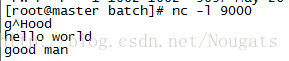
提交flink程序,该程序会连接socket,等待输入数据
./bin/flink run examples/streaming/SocketWindowWordCount.jar --port 9000结果会输出在.out文件末尾
tail -f log/flink-*-jobmanager-*.out
8081查看UI


使用scala实现的代码
object SocketWindowWordCount {

    def main(args: Array[String]) : Unit = {

        // the port to connect to
        val port: Int = try {
            ParameterTool.fromArgs(args).getInt("port")
        } catch {
            case e: Exception => {
                System.err.println("No port specified. Please run 'SocketWindowWordCount --port <port>'")
                return
            }
        }

        // get the execution environment
        val env: StreamExecutionEnvironment = StreamExecutionEnvironment.getExecutionEnvironment

        // get input data by connecting to the socket
        val text = env.socketTextStream("localhost", port, '\n')

        // parse the data, group it, window it, and aggregate the counts
        val windowCounts = text
            .flatMap { w => w.split("\\s") }
            .map { w => WordWithCount(w, 1) }
            .keyBy("word")
            .timeWindow(Time.seconds(5), Time.seconds(1))
            .sum("count")

        // print the results with a single thread, rather than in parallel
        windowCounts.print().setParallelism(1)

        env.execute("Socket Window WordCount")
    }

    // Data type for words with count
    case class WordWithCount(word: String, count: Long)
}版权声明:本文为Nougats原创文章,遵循CC 4.0 BY-SA版权协议,转载请附上原文出处链接和本声明。