Braintree支持的支付方式

Braintree 信用卡支持类型
Braintree Drop-in UI 集成介绍
Drop-in UI集成链接:
1.官网–drop-in UI 官方提供的UI和服务器交互界面(不用处理其它事)
2.git地址官方提供的demo示例
交互逻辑示意图:
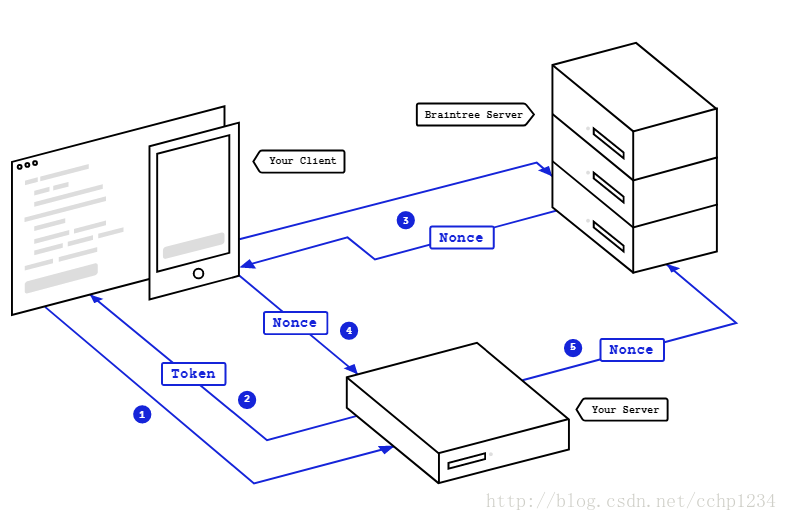
- 交互步骤:
- Your app or web front-end requests a client token from your server in order to initialize the client SDK
- Your server generates and sends a client token back to your client with the server SDK
- Once the client SDK is initialized and the customer has submitted payment information, the SDK communicates that information and returns a payment method nonce
- You then send the payment method nonce to your server
- Your server code receives the payment method nonce from your client and then uses the server SDK to create a transaction or perform other functions detailed in the guides
交互步骤总结:
从服务器拿到token,作为初始化drop-in UI 的初始化参数,初始化订单相关数据传递drop-in UI, 进入sdk提供的界面输入对应的信用卡卡号信息,通过验证,提交到braintree服务器,成功后返回 一个nonce的对象,将nonce提交给服务器,服务器端和braintree完成具体的交易后续步骤。
app端配置和代码片段
build.gradle的配置
dependencies {

//BGA目前的版本,不是最新版
implementation 'com.braintreepayments.api:braintree:2.3.12'
implementation 'com.braintreepayments.api:drop-in:2.3.8'
implementation 'com.braintreepayments.api:data-collector:2.3.12'

}
获取服务器端的token
      //支付使用BraintreeToken 接口
public static void getBraintreeToken(Object tag, CustomCallback callback) {

    HashMap<String, String> paramsMap = new HashMap<>();
    //PrefsCache.getString("useCustomerId"); //是否记录客户,下次面输入卡号信息
    paramsMap.put("useCustomerId", "1");
    okGoGet(ApiUrl.getBraintreeToken, paramsMap, tag, callback);

}
初始化drop- in ui
 //BGA 目前版本
 PaymentRequest paymentRequest = new PaymentRequest()
                .collectDeviceData(true)
                .primaryDescription(totalAmount)
                .secondaryDescription(Session.getInstance().shopcartNum + " " + items)
                .amount(mOrderConfirmModel.cartAmount)
                .submitButtonText(purchase)
                .clientToken(clientToken);

 startActivityForResult(paymentRequest.getIntent(this), BRAINTREE_REQUEST_CODE);

//新版本
  private DropInRequest getDropInRequest() {

        DropInRequest dropInRequest = new DropInRequest()
                .amount("1.00")
                .clientToken(mAuthorization)
                .collectDeviceData(Settings.shouldCollectDeviceData(this))
                .requestThreeDSecureVerification(
                        Settings.isThreeDSecureEnabled(this))
                .androidPayCart(getAndroidPayCart())
                .androidPayShippingAddressRequired(
                        Settings.isAndroidPayShippingAddressRequired(this))
                .androidPayPhoneNumberRequired(
                        Settings.isAndroidPayPhoneNumberRequired(this))
                .androidPayAllowedCountriesForShipping(
                        Settings.getAndroidPayAllowedCountriesForShipping(this));

        return dropInRequest;
   }

  startActivityForResult(getDropInRequest().getIntent(this), DROP_IN_REQUEST);
获得提交给服务器的nonce和DeviceData
//BGA 目前代码(没有返回DeviceData,新版sdk和nonce一起返回)
  @Override
protected void onActivityResult(int requestCode, int resultCode, Intent data) {
    super.onActivityResult(requestCode, resultCode, data);
    if (requestCode == BRAINTREE_REQUEST_CODE) {
        switch (resultCode) {
            case Activity.RESULT_OK:
                if (data != null) {
                    PaymentMethodNonce mNonce =data.getParcelableExtra
                    (BraintreePaymentActivity.EXTRA_PAYMENT_METHOD_NONCE);
                    braintreePurchased(mNonce);
                }
                break;
            default:
                break;
        }
    }

//新版sdk 代码
 @Override
public void onActivityResult(int requestCode, int resultCode, Intent data) {
    super.onActivityResult(requestCode, resultCode, data);
     DropInResult result = data.getParcelableExtra(
     DropInResult.EXTRA_DROP_IN_RESULT);
     displayResult(result.getPaymentMethodNonce(), result.getDeviceData());

    }
}

//DeviceData
DataCollector.collectDeviceData(braintreeFragment, kountMerchantId, new BraintreeResponseListener<String> {
      @Override
      public void onResponse(String deviceData) {
        // send deviceData to your server
      }
});
常见问题
DeviceData的获得,新版已经获得nonce的时候一起得到
BraintreeFragment创建时不能将应用切换到后台
网络如果是监听状态容易报:SERVER_ERROR,测试是会遇到。
注意braintree支持的币种,切换币种的时候需刷新clientToken
braintree可以设置是否记录客户信息,下次免输入(后台控制)
braintree支付订单金额有限制,BG这边是1~500美金.
braintree 风控支持

版权声明:本文为cchp1234原创文章,遵循CC 4.0 BY-SA版权协议,转载请附上原文出处链接和本声明。