点击上方蓝字关注我们
背景:系统中有一个添加品牌的搜索框,当搜索类目不做限制的时候,全部的品牌列表会有1W多个,这时候在框架的加持下,操作速度感人。可以在https://codesandbox.io/s/pure-vue-kqber中体验一下,甚至不用打开控制台看console输出,就可以感受到载入长列表和重置之间切换时,页面停止响应的时间。
问题产生原因
DOM节点数量过多,浏览器渲染吃力

(图片引用自https://zhuanlan.zhihu.com/p/26022258)
其实不光是初次渲染时间长,如果有大量节点出现,那么在滚动的时候,也能明显感受到不流畅的滚动现象
可选方案
懒加载
通过懒加载的方式,在出现长列表的时候,第一次并不完全渲染所有的DOM节点,即可解决一部分场景下的问题。
优点:实现简单
缺点:
想要定位到某一个位置的数据会非常困难
如果一直加载到底,那么最终还是会出现大量的DOM节点,导致滚动不流畅
虚拟渲染
懒加载无法满足真正的长列表展示,那么如果真正要解决此类问题该怎么办?还有一种思路就是:列表局部渲染,又被称为虚拟列表.
当前比较知名的一些第三方库有vue-virtual-scroller、react-tiny-virtual-list、react-virtualized。它们都可以利用局部加载解决列表过长的问题的,vue-virtual-scroller、react-tiny-virtual-list一类的方案只支持虚拟列表,而react-virtualized这种大而全的库则是支持表格、集合、列表等多种情况下的局部加载方案。
单纯列表虚拟渲染
我们先看下vue-virtual-scroller、react-tiny-virtual-list这种纯虚拟列表的解决方案。它们的实现原理是利用视差和错觉制作一份出一份“虚拟”列表,一个虚拟列表由三部分组成:
视窗口
虚拟数据列表(数据展示)
滚动占位区块(底部滚动区)
虚拟列表侧面图示意:

正面图:

滚动一段距离后:

最终要实现的效果:由滚动占位区块产生滚动条,随着滚动条的移动,在可视窗口展示虚拟数据列表
react-virtualized的二维虚拟渲染
react-virtualized的实现方案和我们上面探讨的不太一样,因为表格是二维的,而列表是一维的(可以认为列表是一种特殊的表格),react-virtualized就是在二维的基础上构建的一套虚拟数据渲染工具。
示意图如下:
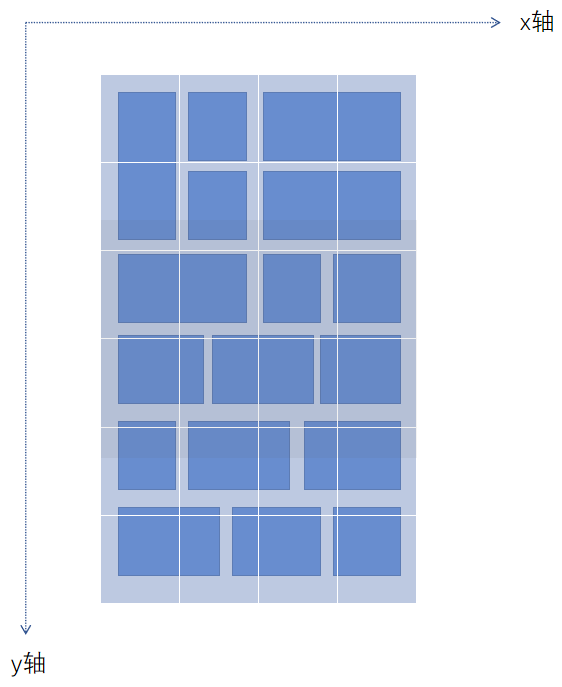
蓝色的部分被称为Cell,上面白色线分隔的区块叫做Section。
基本原理:在列表的上方打上一层方格(Section),下面的每个元素(Cell)都能落到某个方格上(Section)。滚动的时候,随着Cell的动态增加,Section也会被动态的创建,将每一个Cell都注册到对应的Section下。根据当前滚动到的Section,可以得到当前Section下包含的Cell,从此将Cell渲染出来。
/* 0 1 2 3 4 5 ┏━━━┯━━━┯━━━┓0┃0 0┊1 3┊6 6┃1┃0 0┊2 3┊6 6┃ ┠┈┈┈┼┈┈┈┼┈┈┈┨2┃4 4┊4 3┊7 8┃3┃4 4┊4 5┊9 9┃ ┗━━━┷━━━┷━━━┛Sections to Cells map: 0.0 [0] 1.0 [1, 2, 3] 2.0 [6] 0.1 [4] 1.1 [3, 4, 5] 2.1 [7, 8, 9]*/实现方案
由于我们的目的是处理前端超长列表,而react-virtualized的实现方案是基于二维表格的,其List组件也是继承自Grid组件,如果要做列表方案,必须先实现二维的Grid方案。只处理长列表的情况下,实现一个单纯的虚拟列表渲染方案比二维的Grid方案要更合适一些。
基本结构
首先我们按照虚拟列表示意图来规划出若干个元素。.virtual-scroller乃整个滚动列表组件,在最外层监测其滚动事件。在内部我们需放置一个.phantom来撑开容器,使滚动条出现,并且该元素的高度 = 数据总数 * 列表项高度。接着我们在.phantom的上一层,再画出一个ul列表,它被用来动态加载数据,而它的位置和数据将由计算得出。
https://codesandbox.io/s/list--scrollbar-basic-bbxlq
<template> <div id="app"> <input type="text" v-model.number="dataLength">条 <div class="virtual-scroller" @scroll="onScroll" :style="{height: 600 + 'px'}"> <div class="phantom" :style="{height: this.dataLength * itemHeight + 'px'}"> <ul :style="{'margin-top': `${scrollTop}px`}"> <li v-for="item in visibleList" :key="item.brandId" :style="{height: `${itemHeight}px`, 'line-height': `${itemHeight}px`}"> <div> <div>{{item.name}}div> div> li> ul> div> div> div>template><script>export default { name: "App", data() { return { itemHeight: 60, visibleCount: 10, dataLength: 100, startIndex: 0, endIndex: 10, scrollTop: 0 }; }, computed: { dataList() { const newDataList = [...Array(this.dataLength || 0).keys()].map((v, i) => ({ brandId: i + 1, name: `第${i + 1}项`, height: this.itemHeight })); return newDataList; }, visibleList() { return this.dataList.slice(this.startIndex, this.endIndex); } }, watch: { dataList() { console.time('rerender'); setTimeout(() => { console.timeEnd('rerender'); }, 0) } }, methods: { onScroll(e) { } }};script><style lang="stylus" scoped>#app { font-family: 'Avenir', Helvetica, Arial, sans-serif; -webkit-font-smoothing: antialiased; -moz-osx-font-smoothing: grayscale; text-align: center; color: #2c3e50;}.virtual-scroller { border: solid 1px #eee; margin-top: 10px; height 600px overflow auto}.phantom { overflow hidden}ul { background: #ccc; list-style: none; padding: 0; margin: 0; li { outline: solid 1px #fff; }}style>Make it scroll
上一例中,onScroll函数并没有填写,也就是说虚拟列表中的数据及位置并不会随着我们滚动而更新。这一步,补全onScroll函数。
https://codesandbox.io/s/list--scrollbar-easy-i7ok7
<template> <div id="app"> <input type="text" v-model.number="dataLength">条 <div class="virtual-scroller" @scroll="onScroll" :style="{height: 600 + 'px'}"> <div class="phantom" :style="{height: this.dataLength * itemHeight + 'px'}"> <ul :style="{'margin-top': `${scrollTop}px`}"> <li v-for="item in visibleList" :key="item.brandId" :style="{height: `${itemHeight}px`, 'line-height': `${itemHeight}px`}"> <div> <div>{{item.name}}div> div> li> ul> div> div> div>template><script>export default { name: "App", data() { return { itemHeight: 60, visibleCount: 10, dataLength: 100, startIndex: 0, endIndex: 10, scrollTop: 0 }; }, computed: { dataList() { const newDataList = [...Array(this.dataLength || 0).keys()].map((v, i) => ({ brandId: i + 1, name: `第${i + 1}项`, height: this.itemHeight })); return newDataList; }, visibleList() { return this.dataList.slice(this.startIndex, this.endIndex); } }, watch: { dataList() { console.time('rerender'); setTimeout(() => { console.timeEnd('rerender'); }, 0) } }, methods: { onScroll(e) { const scrollTop = e.target.scrollTop; this.scrollTop = scrollTop; console.log('scrollTop', scrollTop); this.startIndex = Math.floor(scrollTop / this.itemHeight); this.endIndex = this.startIndex + 10; } }};script><style lang="stylus" scoped>#app { font-family: 'Avenir', Helvetica, Arial, sans-serif; -webkit-font-smoothing: antialiased; -moz-osx-font-smoothing: grayscale; text-align: center; color: #2c3e50;}.virtual-scroller { border: solid 1px #eee; margin-top: 10px; height 600px overflow auto}.phantom { overflow hidden}ul { background: #ccc; list-style: none; padding: 0; margin: 0; li { outline: solid 1px #fff; }}style>解决滚动不连贯的问题
上一例中我们滚动时,会发现一定要滚动一段距离后,虚拟列表中的内容才会突然更新一下,而不是循序渐进的过程。
这是因为startIndex由scrollTop/itemHeight计算出来,只能是item高度的倍数,假设scrollTop值在1倍和2倍之间的时候,虚拟列表内的startIndex并不会更新,也不会产生滚动现象
那么如何解决呢?其实我们利用ul元素自身的滚动来“欺骗眼睛”,原理如下图所示:
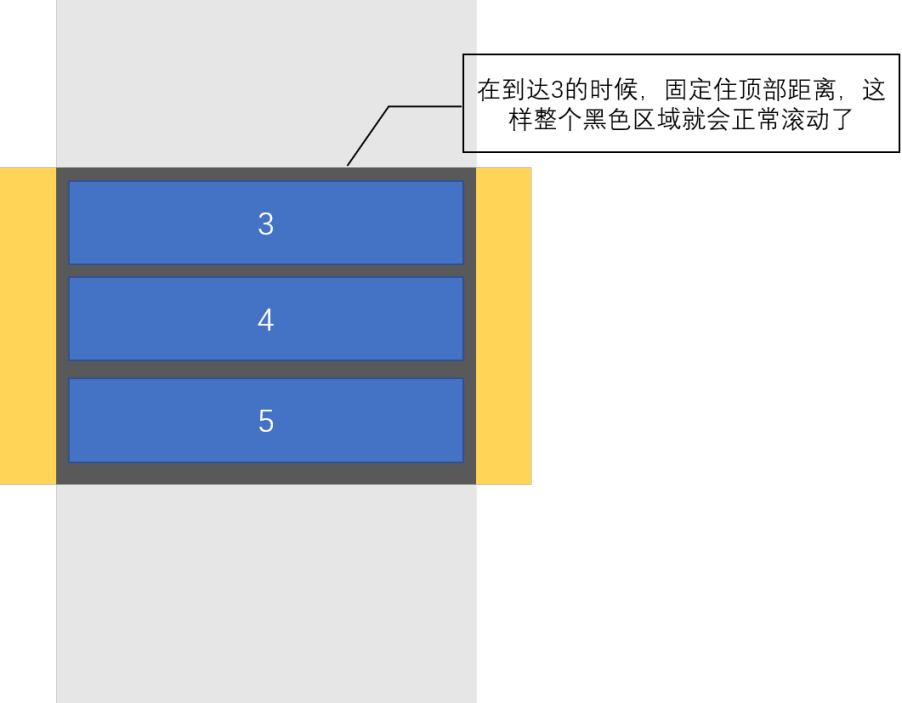
只需将我们的onScroll函数调整一下。ul的margin-top由计算得出,而不是直接使用e.target.scrollTop。
onScroll(e) { const scrollTop = e.target.scrollTop; this.startIndex = Math.floor(scrollTop / this.itemHeight); this.endIndex = this.startIndex + 10; this.scrollTop = this.startIndex * this.itemHeight;}减少reflow
由于我们每滚动一次,就需要改变一次margin-top,可能会频发引发reflow,那么我们可以考虑降低margin-top改变的频率
onScroll(e) { const scrollTop = e.target.scrollTop; const startIndex = Math.floor(scrollTop / this.itemHeight); let endIndex = startIndex + 10; if (endIndex > this.dataList.length) { endIndex = this.dataList.length; } // 当前滚动高度 const currentScrollTop = startIndex * this.itemHeight; // 如果往下滚了可视区域的一部分,或者往上滚任意距离 if (currentScrollTop - this.scrollTop > this.itemHeight * (this.visibleCount - 1) || currentScrollTop - this.scrollTop < 0) { this.scrollTop = currentScrollTop; this.startIndex = startIndex; this.endIndex = endIndex; }}列表项高度不固定,但可在渲染前获得高度的
上面处理的基本是写死高度的情况,如果是由数据中获取高度的,需要如下改写。
https://codesandbox.io/s/list--scrollbar-diff-height-7yb8m
<template> <div id="app"> <input type="text" v-model.number="dataLength">条{{this.scrollBarHeight}} <div class="virtual-scroller" @scroll="onScroll" :style="{height: 600 + 'px'}"> <div class="phantom" :style="{height: this.scrollBarHeight + 'px'}"> <ul :style="{'margin-top': `${scrollTop}px`}"> <li v-for="item in visibleList" :key="item.brandId" :style="{height: `${item.height}px`, 'line-height': `${item.height}px`}"> <div> <div>{{item.name}}div> div> li> ul> div> div> div>template><script>export default { name: "App", data() { return { visibleCount: 10, dataLength: 2000, startIndex: 0, endIndex: 10, scrollTop: 0, bufferItemCount: 4, dataList: [] }; }, computed: { visibleList() { return this.dataList.slice(this.startIndex, this.endIndex + this.bufferItemCount); }, scrollBarHeight() { return this.dataList.reduce((pre, current)=> { console.log(pre, current) return pre + current.height; }, 0); } }, watch: { dataList() { console.time('rerender'); setTimeout(() => { console.timeEnd('rerender'); }, 0) } }, mounted() { this.dataList = this.getDataList(); }, methods: { getDataList() { const newDataList = [...Array(this.dataLength || 0).keys()].map((v, i) => ({ brandId: i + 1, name: `第${i + 1}项`, height: Math.floor(Math.max(Math.random() * 10, 5)) * 10 })); return newDataList; }, getScrollTop(startIndex) { return this.dataList.slice(0, startIndex).reduce((pre, current) => { return pre + current.height; }, 0) }, getStartIndex(scrollTop) { let index = 0; let heightAccumulate = 0; for (let i = 0; i < this.dataList.length; i++) { if (heightAccumulate > scrollTop) { index = i - 1; return index; } if (heightAccumulate === scrollTop) { index = i; return i } heightAccumulate += this.dataList[i].height; } return index; }, onScroll(e) { const scrollTop = e.target.scrollTop; this.startIndex = this.getStartIndex(scrollTop); this.endIndex = this.startIndex + 10; this.scrollTop = this.getScrollTop(this.startIndex); } }};script><style lang="stylus" scoped>#app { font-family: 'Avenir', Helvetica, Arial, sans-serif; -webkit-font-smoothing: antialiased; -moz-osx-font-smoothing: grayscale; text-align: center; color: #2c3e50;}.virtual-scroller { border: solid 1px #eee; margin-top: 10px; height 600px overflow auto}.phantom { overflow hidden}ul { background: #ccc; list-style: none; padding: 0; margin: 0; li { outline: solid 1px #fff; }}style>缓存每个元素的scrollTop
上一个例子中,我们每次getScrollTop都需要重新计算一次,比较浪费性能。可以在一开始的时候加上缓存,这样每次调用时直接从map中取,耗时较小。
https://codesandbox.io/s/list--scrollbar-diff-height-opt1-n2gvs
generatePositionCache() { const allHeight = this.dataList.reduce((pre, current, i) => { const heightSum = pre + current.height; this.positionCache[i] = pre; return heightSum; }, 0) this.scrollBarHeight = allHeight}二分查找减少startIndex的查找时间
另外,还可以利用二分查找来降低getStartIndex的时间

getStartIndex(scrollTop) { // 在itemTopCache中找到一个左侧小于scrollTop但右侧大于scrollTop的位置 // 复杂度O(n) // for (let i = 0; i < this.itemTopCache.length; i++) { // if (this.itemTopCache[i] > scrollTop) { // return i - 1; // } // } // 复杂度O(logn) let arr = this.itemTopCache; let index = -1; let left = 0, right = arr.length - 1, mid = Math.floor((left + right) / 2); let circleTimes = 0; while (right - left > 1) { // console.log('index: ', left, right); // console.log('height: ', arr[left], arr[right]); circleTimes++; // console.log('circleTimes:', circleTimes) // 目标数在左侧 if (scrollTop < arr[mid]) { right = mid; mid = Math.floor((left + right) / 2); } else if (scrollTop > arr[mid]) { // 目标数在右侧 left = mid; mid = Math.floor((left + right) / 2); } else { index = mid; return index; } } index = left; return index;}解决CSS索引问题
正常的列表结构是从第0个元素开始的,我们在CSS中通过选择器2n可以选中偶数行的列表。但虚拟列表不同,我们每次计算出来的startIndex都不同,startIndex为奇数时,2n便表现异常,所以我们需要保证startIndex为一个偶数。解决方法也很简单,如果发现是奇数,则取上一位,确保startIndex一定是偶数。
https://codesandbox.io/s/list--scrollbar-diff-height-opt3-9pb9x
ul { background: #ccc; list-style: none; padding: 0; margin: 0; li { outline: solid 1px #fff; &:nth-child(2n) { background: #fff; } }}...// onScroll中加入// 如果是奇数开始,就取其前一位偶数if (startIndex % 2 !== 0) { this.startIndex = startIndex - 1;} else { this.startIndex = startIndex;}渲染后才可确定高度的
有种情况是每个列表项中包含的文字数量不同,导致渲染后撑开的高度不一样。那么我们就可以在组件mounted后更新一次列表项的高度。
https://codesandbox.io/s/list--scrollbar-diff-height-opt4-sholq
Item.vue
<template> <li :key="item.brandId" :style="{height: `${item.height}px`, 'line-height': `${item.height}px`}" ref="node"> <div> <div>{{item.name}}div> div> li>template><script>export default { props: { item: { default() { return {} }, type: Object }, index: Number }, data() { return { } }, mounted() { this.$emit('update-height', {height: this.$refs.node.getBoundingClientRect().height, index: this.index}) }}script>Item组件加载时会更新高度,但是整个列表初始化时是没有高度的怎么办?我们需要引入一个估算值:estimatedItemHeight,它代表每个Item的预估高度,每当Item有更新时,则替换掉预估值,同时更新列表的整体高度。
App.vue
"app">"text" v-model.number="dataLength">条 Height:{{scrollBarHeight}}class="virtual-scroller" @scroll="onScroll" :style="{height: 600 + 'px'}">class="phantom" :style="{height: scrollBarHeight + 'px'}">"{'transform': `translate3d(0,${scrollTop}px,0)`}">for="item in visibleList" :item="item" :index="item.index" :key="item.brandId" @update-height="updateItemHeight"/>import Item from './components/Item.vue';export default {name: "App", components: {Item }, data() {return {estimatedItemHeight: 30, visibleCount: 10, dataLength: 200, startIndex: 0, endIndex: 10, scrollTop: 0, scrollBarHeight: 0, bufferItemCount: 4, dataList: [], itemHeightCache: [], itemTopCache: [] }; }, computed: {visibleList() {return this.dataList.slice(this.startIndex, this.endIndex + this.bufferItemCount); } }, watch: {dataList() {console.time('rerender'); setTimeout(() => {console.timeEnd('rerender'); }, 0) } }, created() {this.dataList = this.getDataList(); this.generateEstimatedItemData(); }, mounted() {}, methods: {generateEstimatedItemData() {const estimatedTotalHeight = this.dataList.reduce((pre, current, index)=> {this.itemHeightCache[index] = this.estimatedItemHeight; const currentHeight = this.estimatedItemHeight; this.itemTopCache[index] = index === 0 ? 0 : this.itemTopCache[index - 1] + this.estimatedItemHeight; return pre + currentHeight }, 0); this.scrollBarHeight = estimatedTotalHeight; }, updateItemHeight({index, height}) {this.itemHeightCache[index] = height; this.scrollBarHeight = this.itemHeightCache.reduce((pre, current) => {return pre + current; }, 0) let newItemTopCache = [0]; for (let i = 1, l = this.itemHeightCache.length; i < l; i++) {newItemTopCache[i] = this.itemTopCache[i - 1] + this.itemHeightCache[i - 1] }; this.itemTopCache = newItemTopCache; }, getDataList() {const newDataList = [...Array(this.dataLength || 0).keys()].map((v, i) => ({index: i, brandId: i + 1, name: `第${i + 1}项`, height: Math.floor(Math.max(Math.random() * 10, 5)) * 10 // height: 50 })); return newDataList; }, getStartIndex(scrollTop) {// 在heightAccumulateCache中找到一个左侧小于scrollTop但右侧大于scrollTop的位置 // 复杂度O(n) // for (let i = 0; i < this.itemTopCache.length; i++) {// if (this.itemTopCache[i] > scrollTop) {// return i - 1; // } // } // 复杂度O(logn) let arr = this.itemTopCache; let index = -1; let left = 0, right = arr.length - 1, mid = Math.floor((left + right) / 2); let circleTimes = 0; while (right - left > 1) {circleTimes++; // 目标数在左侧 if (scrollTop < arr[mid]) {right = mid; mid = Math.floor((left + right) / 2); } else if (scrollTop > arr[mid]) {// 目标数在右侧 left = mid; mid = Math.floor((left + right) / 2); } else {index = mid; return index; } } index = left; return index; }, onScroll(e) {const scrollTop = e.target.scrollTop; console.log('scrollTop', scrollTop); let startIndex = this.getStartIndex(scrollTop); // 如果是奇数开始,就取其前一位偶数 if (startIndex % 2 !== 0) {this.startIndex = startIndex - 1; } else {this.startIndex = startIndex; } this.endIndex = this.startIndex + this.visibleCount; this.scrollTop = this.itemTopCache[this.startIndex] || 0; } }}; scoped> #app { font-family: 'Avenir', Helvetica, Arial, sans-serif; -webkit-font-smoothing: antialiased; -moz-osx-font-smoothing: grayscale; text-align: center; color: #2c3e50; }
.virtual-scroller { border: solid 1px #eee; margin-top: 10px; height 600px overflow auto }
.phantom { overflow hidden }
ul { background: #ccc; list-style: none; padding: 0; margin: 0; li { outline: solid 1px #fff; &:nth-child(2n) { background: #fff; } } } 假如列表项中包含了img标签,并会被img自动撑开,那么我们可以利用img的onload事件来通知列表更新高度。react-virtualized中也有img配合CellMeasure组件使用的例子。那么如果遇到更复杂的高度变化场景该怎么办?
ResizeObserver
ResizeObserver 接口可以监听到 Element 的内容区域或 SVGElement的边界框改变,可以处理复杂的高度变化场景。
但ResizeObserver 兼容性较为一般: https://caniuse.com/#feat=resizeobserver

虽然兼容性不太好,但在某些后台系统中,还是可以尝试使用的。
ResizeObserve使用例子
https://codesandbox.io/s/list--scrollbar-diff-height-opt5-89ckw
https://codesandbox.io/s/list--scrollbar-diff-height-opt6-nhcm0
主要调整点就是在list item中增加observe和unobserve方法。
Item.vue
<template> <li :key="item.brandId" :style="{height: `${item.height}px`, 'line-height': `${item.height}px`}" ref="node"> <div> <div>{{item.name}}div> div> li>template><script>export default { props: { item: { default() { return {} }, type: Object }, index: Number }, data() { return {} }, mounted() { this.observe(); }, methods: { observe() { this.resizeObserver = new ResizeObserver((entries) => { const entry = entries[0]; console.log(this.index, entry.contentRect.height) this.$emit('update-height', {height: entry.contentRect.height, index: this.index}) }); this.resizeObserver.observe(this.$refs.node); }, unobserve() { this.resizeObserver.unobserve(this.$refs.node); } }, beforeDestroy() { this.unobserve(); }}script>使用resize dectect库监测高度
对于高度变化场景且兼容性要求较高的,我们可以使用它的polyfill:ResizeObserver Polyfill,支持到IE8以上。另外应注意到它的一些限制:
Notifications are delivered ~20ms after actual changes happen.
Changes caused by dynamic pseudo-classes, e.g.
:hoverand:focus, are not tracked. As a workaround you could add a short transition which would trigger thetransitionendevent when an element receives one of the former classes (example).Delayed transitions will receive only one notification with the latest dimensions of an element.
如果在没有原生ResizeObserver的情况下想实现:hover及:focus后的size更新观察,那么就要使用element-resize-detector、javascript-detect-element-resize(react-virtualized使用)这一类的第三方库了,当然它们也有一些限制,可以在observation-strategy中详细查阅到。
总结
解决了上述的一系列问题,我们才算实现了一个较为基础的虚拟列表。一些兼容性问题的修复和性能的优化,需要根据实际情况来看。在生产环境中,建议直接使用成熟的第三方库,在兼容性和性能方面有保证。如果时间充裕,可以造个轮子理解下思路,这样在使用第三方组件时也会更加得心应手。
参考文章:
https://github.com/dwqs/blog/issues/70
https://yuque.antfin-inc.com/abraham.cj/aay1e0/gtmmim
https://developer.mozilla.org/zh-CN/docs/Web/API/ResizeObserver
https://zhuanlan.zhihu.com/p/26022258
https://zhuanlan.zhihu.com/p/34585166
https://ant.design/components/list-cn/
https://github.com/que-etc/resize-observer-polyfill/blob/master/README.md
写在最后
方凳雅集是由阿里巴巴B系6大BU(1688,ICBU,零售通,AE,企业金融,考拉)共同维护的公众号奥,我们会定期发送优质好文,欢迎扫码关注

求关注
求转发