Vite是一个由原生ES module驱动的web开发构建工具,在开发环境下基于浏览器原生Es import开发,在生产环境下基于Rollup打包。
vite的特点有:
- 闪电般的冷启动速度
- 即使热更新
- 真正的按需编译
要求:
vite 要求项目完全由esmodule模块组成
common.js模块不能在vite上使用
打包上依旧还是rollup等传统打包工具
vite的底层实现:
- 已知目录结构
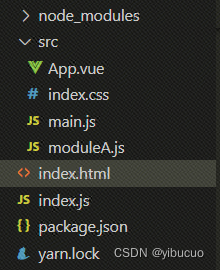
- App.vue内容
<template>
  <div>
    <h1>大家好,我是阿亮</h1>
    <h2>
      <span>count is {{ count }}</span>
      <button @click="count++">+1</button>
      <button @click="add">add+1</button>
    </h2>
  </div>
</template>

<script>
import { ref } from "vue";
export default {
  setup() {
    const count = ref(6);
    function add() {
      count.value++;
    }
    return { add, count };
  },
};
</script>
- index.css
h1 {color: red;}
- main.js
import { str } from './moduleA.js'
console.log('vite ...', str);
import { createApp, h } from 'vue';
import App from './App.vue'
import './index.css'
const App1 = {
    render() {
        // <div><div>hello vite</div></div>
        return h('div', null, [
            h('div', null, String('hello vite'))
        ])
    }
}
createApp(App).mount('#app')
- moduleA.js
export const str = 'zanlan 321'
- index.html
<h1>hello vite</h1>
<div id="app"></div>
<script src="./src/main.js" type="module"></script>
- index.js
const Koa = require('Koa')

const fs = require('fs')
const path = require('path')
const app = new Koa()
const compilerSfc = require('@vue/compiler-sfc')
const compilerDom = require('@vue/compiler-dom')

app.use(async (ctx) => {
    const { url, query } = ctx.request
    console.log('url ------------' + url);
    if (url === '/') {
        ctx.type = 'text/html'
        let content = fs.readFileSync('./index.html', 'utf-8')
        content = content.replace('<script', `
            <script>
                window.process = {env:{NODE_ENV:'dev'}}
            </script>
        <script`)
        ctx.body = content
    } else if (url.endsWith('.js')) {
        //  /src/main.js => 代码文件所在位置/src/main.js
        const p = path.resolve(__dirname, url.slice(1))
        const content = fs.readFileSync(p, 'utf-8')
        ctx.type = 'application/javascript'
        ctx.body = rewriteImport(content)
    } else if (url.startsWith('/@modules')) {
        // 第三方库的支持
        // /@modules/vue => node_modules
        // /@modules/vue => 代码的位置/node_modules/vue/ 的es模块入口
        const prefix = path.resolve(
            __dirname,
            "node_modules",
            url.replace("/@modules/", "")
        )
        // 读取package.json的module属性
        const module = require(prefix + '/package.json').module
        const p = path.resolve(prefix, module)
        const ret = fs.readFileSync(p, 'utf-8')
        ctx.type = 'application/javascript'
        ctx.body = rewriteImport(ret)
    } else if (url.indexOf('.vue') > -1) {
        // /*.vue?type = template
        const p = path.resolve(__dirname, url.split('?')[0].slice(1))
        const { descriptor } = compilerSfc.parse(fs.readFileSync(p, 'utf-8'))
        if (!query.type) {
            // 第一步vue文件 => template script (compiler-sfc)
            // descriptor => js + template生成render部分
            ctx.type = "application/javascript"
            // 借用vue自导的compile框架,解析单文件组件,其实相当于vue-loader做的事情
            ctx.body = `
            ${rewriteImport(
                descriptor.script.content.replace("export default", "const __script = ")
            )}
            import { render as __render } from "${url}?type=template"
            __script.render = __render
            export default __script
            `
        } else {
            // 第二步 template模板 => render函数(compiler-dom)
            const template = descriptor.template
            const render = compilerDom.compile(template.content, { mode: 'module' })
            ctx.type = "application/javascript"
            console.log('render', render);
            ctx.body = rewriteImport(render.code)
        }
    } else if (url.endsWith('.css')) {
        console.log('9999999999999999999999999');
        const p = path.resolve(__dirname, url.slice(1))
        const file = fs.readFileSync(p, 'utf-8')
        // css转换为js代码
        // 利用js添加一个style标签
        const content = `
            const css = "${file.replace(/\n/g, "")}"
            let link = document.createElement('style')
            link.setAttribute('type','text/css')
            document.head.appendChild(link)
            link.innerHTML = css
            export default css
        `
        ctx.type = 'application/javascript'
        ctx.body = content
    }


    // 第三方库的支持
    // vue => node_modules/***
    // 改写函数
    // 需要改写 欺骗一下浏览器 'vue' => '/@modules/vue' => 别名
    // from 'xxx'
    function rewriteImport(content) {
        return content.replace(/ from ['|"]([^'"]+)['|""]/g, (...args) => {
            if (args[1][0] !== '.' && args[1][1] !== '/') {
                return ` from '/@modules/${args[1]}'`
            } else {
                return args[0]
            }
        })
    }
    /**
    rewriteImport('import { createApp, h } from \'vue\'')
	"import { createApp, h } from '/@modules/vue'"
*/

})

app.listen(3000, () => {
    console.log('vite start at 3000');
})
- pakage.json
{
  "name": "vite",
  "version": "1.0.0",
  "description": "",
  "main": "index.js",
  "scripts": {
    "test": "echo \"Error: no test specified\" && exit 1"
  },
  "keywords": [],
  "author": "",
  "license": "ISC",
  "dependencies": {
    "koa": "^2.13.4",
    "vue": "^3.2.36"
  }
}
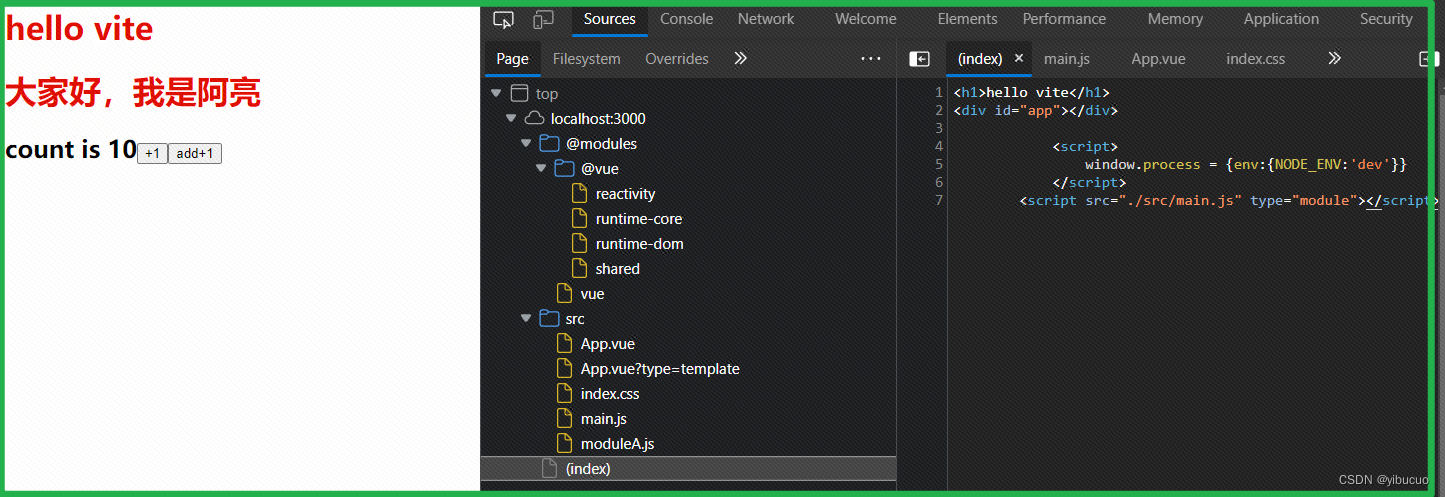
- 执行node index.js
- 在页面上输入 localhost:3000,展示页面如下:
版权声明:本文为formylovetm原创文章,遵循CC 4.0 BY-SA版权协议,转载请附上原文出处链接和本声明。