HTML + CSS + Vue.js实现一个简易的本地教室管理系统
临近期末,萌生了一个把之前做过的大作业和培训作业之类的总结一下的想发,方便以后复习。此本地教室管理系统主要使用了v-if、v-show、v-model等基础的vue指令。
一、实现的效果
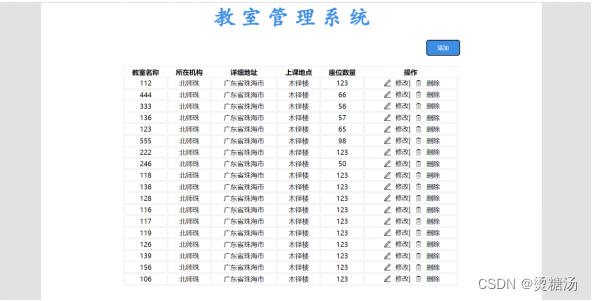
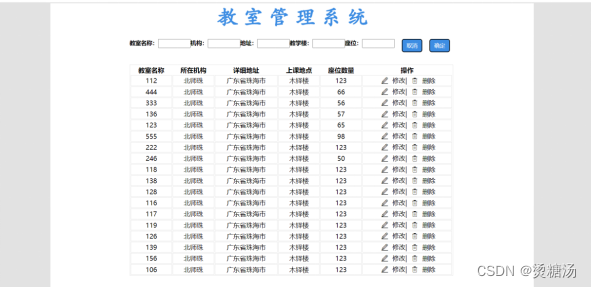
点击添加按钮会在左边空白区域弹出添加信息的框,在输入好数据后点击确认,数据会展示在列表底端,在点击了取消或者确认后输入信息的弹窗会自动隐藏。
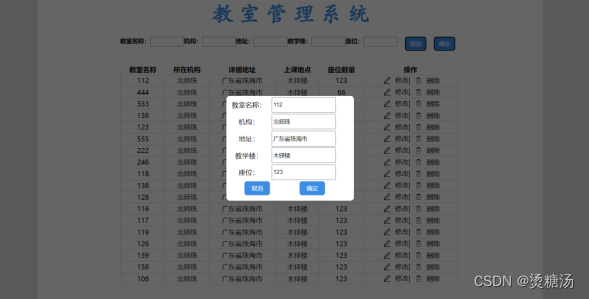
点击修改,弹出一个弹窗修改好后点击确认,此时在界面展示的就是更新过后的数据。
二、代码
1、HTML
<!DOCTYPE html>
<html lang="en">
<head>
<meta charset="UTF-8">
<link rel="stylesheet" href="class.css">
<script src="https://cdn.jsdelivr.net/npm/vue@2/dist/vue.js"></script>
<title>教室管理</title>
</head>
<body>
<div id="app">
<div id="containner">
<h1 class="Hcss">教 室 管 理 系 统</h1>
<!--添加信息的弹窗-->
<div id="addClassroom" v-show="isShow">
<div class="addBody">
<span>教室名称:<input type="text" class="inputForm" v-model="newclassroom"></span>
<span>机构:<input type="text" class="inputForm" v-model="newdepartment"></span>
<span>地址:<input type="text" class="inputForm" v-model="newaddress"></span>
<span>教学楼:<input type="text" class="inputForm" v-model="newbuilding"></span>
<span>座位:<input type="text" class="inputForm" v-model="newnum"></span>
<span><button id="btnback" @click="changeIsshow">取消</button></span>
<span><button id="btnSure" @click="addData">确定</button></span>
</div>
</div>
<div id="toView" v-if="ifShow">
<button id="btnAdd" class="flr" @click="changeIsshow" >添加</button>
</div>
<!--展示教室信息-->
<div id="ClassroomTable">
<table>
<tr>
<th>教室名称</th>
<th>所在机构</th>
<th>详细地址</th>
<th>上课地点</th>
<th>座位数量</th>
<th>操作</th>
</tr>
<!--v-for遍历datalist里面的数据并展示-->
<tr v-for = "(item,index) in dataList">
<td>{{item.classroom}}</td>
<td>{{item.department}}</td>
<td>{{item.address}}</td>
<td>{{item.building}}</td>
<td>{{item.num}}</td>
<td>
<span>
<button class="changeBtn" @click="the_select(item,index)">
<span class="iconfont"></span>
</button>
修改|
<button class="changeBtn" @click="removeClass(index)">
<span class="iconfont"></span>
</button>
删除
</span>
</td>
</tr>
</table>
</div>
<!--修改教室信息的弹窗-->
<div id="changeClass" v-show="isShow2">
<div class="changeBody">
<table>
<tr>
<td>教室名称:</td>
<td><input type="text" class="inputForm" v-model="wantChangeData.classroom"></td>
</tr>
<tr>
<td>机构:</td>
<td><input type="text" class="inputForm" v-model="wantChangeData.department"></td>
</tr>
<tr>
<td>地址:</td>
<td><input type="text" class="inputForm" v-model="wantChangeData.address"></td>
</tr>
<tr>
<td>教学楼:</td>
<td><input type="text" class="inputForm" v-model="wantChangeData.building"></td>
</tr>
<tr>
<td>座位:</td>
<td><input type="text" class="inputForm" v-model="wantChangeData.num"></td>
</tr>
<tr>
<td class="tr_td_btn"><button id="btnback2" @click="changeBtnshow2">取消</button></td>
<td class="tr_td_btn"><button id="btnSure2" @click="changeData(wantChangeData,selected)">确定</button></td>
</tr>
</table>
<!-- <span>教室名称:<input type="text" class="inputForm" v-model="wantChangeData.classroom"></span>-->
<!-- <span>机构:<input type="text" class="inputForm" v-model="wantChangeData.department"></span>-->
<!-- <span>地址:<input type="text" class="inputForm" v-model="wantChangeData.address"></span>-->
<!-- <span>教学楼:<input type="text" class="inputForm" v-model="wantChangeData.building"></span>-->
<!-- <span>座位:<input type="text" class="inputForm" v-model="wantChangeData.num"></span>-->
<!-- <span><button id="btnback2" @click="changeBtnshow2">取消</button></span>-->
<!-- <span><button id="btnSure2" @click="changeData(wantChangeData,selected)">确定</button></span>-->
</div>
</div>
</div>
</div>
<script type="text/javascript" src="classroom.js"></script>
</body>
</html>2、Vue.js
/*js*/
var app = new Vue({
    el:"#app",
    data:{
        selected:-1,
        isShow:false,
        isShow2:false,
        ifShow:true,
        newclassroom:"",
        newdepartment:"",
        newaddress:"",
        newbuilding:"",
        newnum:"",
        wantChangeData:{},
        dataList: [
            {classroom: '112', department: '北师珠', address: '广东省珠海市', building: '木铎楼', num: '123'},
            {classroom: '444', department: '北师珠', address: '广东省珠海市', building: '木铎楼', num: '66'},
            {classroom: '333', department: '北师珠', address: '广东省珠海市', building: '木铎楼', num: '56'},
            {classroom: '136', department: '北师珠', address: '广东省珠海市', building: '木铎楼', num: '57'},
            {classroom: '123', department: '北师珠', address: '广东省珠海市', building: '木铎楼', num: '65'},
            {classroom: '555', department: '北师珠', address: '广东省珠海市', building: '木铎楼', num: '98'},
            {classroom: '222', department: '北师珠', address: '广东省珠海市', building: '木铎楼', num: '123'},
            {classroom: '246', department:'北师珠', address: '广东省珠海市', building: '木铎楼', num: '50'},
            {classroom: '118', department: '北师珠', address: '广东省珠海市', building: '木铎楼', num: '123'},
            {classroom: '138', department: '北师珠', address: '广东省珠海市', building: '木铎楼', num: '123'},
            {classroom: '128', department: '北师珠', address: '广东省珠海市', building: '木铎楼', num: '123'},
            {classroom: '116', department: '北师珠', address: '广东省珠海市', building: '木铎楼', num: '123'},
            {classroom: '117', department: '北师珠', address: '广东省珠海市', building: '木铎楼', num: '123'},
            {classroom: '119', department: '北师珠', address: '广东省珠海市', building: '木铎楼', num: '123'},
            {classroom: '126', department: '北师珠', address: '广东省珠海市', building: '木铎楼', num: '123'},
            {classroom: '139', department: '北师珠', address: '广东省珠海市', building: '木铎楼', num: '123'},
            {classroom: '156', department: '北师珠', address: '广东省珠海市', building: '木铎楼', num: '123'},
            {classroom: '106', department: '北师珠', address: '广东省珠海市', building: '木铎楼', num: '123'},

        ],

    },

    methods:{
        //控制窗口添加教室的窗口
        changeIsshow:function(){
            this.isShow = !this.isShow;
            this.ifShow = !this.ifShow;
        },
        //控制修改教室信息的弹窗
        changeBtnshow2:function(){
            this.isShow2 = !this.isShow2;
        },
        //删除教室
        removeClass:function(index){
            this.dataList.splice(index,1);
            alert("删除成功");
        },
        //增加教室
        addData:function(){
            this.dataList.push({classroom: this.newclassroom,
                department: this.newdepartment,address: this.newaddress,
                building: this.newbuilding,num:this.newnum})
            alert("添加成功")
            this.isShow = !this.isShow;
            this.ifShow = !this.ifShow;
        },
        //将选中行的信息展示在修改信息的弹窗上
        the_select:function(item,index){
            this.isShow2 = !this.isShow2;
            this.selected = index;
            this.wantChangeData={
                classroom: item.classroom,
                department: item.department,
                address: item.address,
                building: item.building,
                num: item.num
            }

        },
        //修改教室信息
        changeData:function (item,selected) {
            Vue.set(this.dataList,selected,item);
            alert("修改成功!");
            this.isShow2 = !this.isShow2;
        }
    },
})
3、CSS
/*CSS*/
#app{
    width: 100%;
    height: auto;
    background-color: #e2e2e2;
    margin:auto;
    overflow: hidden;
}
#containner{
    width: 1190px;
    height: 1111px;
    background-color: #ffffff;
    margin: 2px auto;
    overflow: hidden;
}
.fll{
    float: left;
}

.flr{
    float: right;
}

.Hcss{
    color: #3d8de3;
    text-align: center;
    font-family: 华文楷体;
    font-size: 51px;
    margin: 0px 0px 21px 0px;
}
#btnAdd{
    width: 80px;
    height:  38px;
    background-color: #3d8de3;
    color: #ffffff;
    text-align: center;
    border-radius: 6px;
}

/*.btn000{*/
/*    margin-left: 60px;*/
/*}*/

/*#btnSure{*/
/*    width: 80px;*/
/*    height:  38px;*/
/*    background-color: #3d8de3;*/
/*    color: #ffffff;*/
/*    text-align: center;*/
/*    border-radius: 6px;*/
/*    margin-right:2px;*/
/*}*/

#btnback{
    width: 50px;
    height:  33px;
    background-color: #3d8de3;
    color: #ffffff;
    text-align: center;
    border-radius: 6px;
    margin-left:18px;
}

#btnSure{
    width: 50px;
    height:  33px;
    background-color: #3d8de3;
    color: #ffffff;
    text-align: center;
    border-radius: 6px;
    margin-left:18px;
}

#addClassroom{
    width: 800px;
    height: 61px;
    margin: auto;
}

#addClassroom .addBody span{
    font-size: 14px;
    font-weight: bold;
    float: left;
}

#addClassroom .addBody{
    width: 800px;
    margin: 3px auto;
}

.inputForm{
    width: 72px;
    height: 16px;
    outline: none;
}

#toView{
    width: 800px;
    height: 61px;
    margin: auto;

}

@font-face {
    font-family: 'iconfont';
    src: url('font_5u1853rredm/iconfont.ttf?t=1648996295937') format('truetype');
}

.iconfont {
    font-family: "iconfont" !important;
    font-size: 16px;
    font-style: normal;
    -webkit-font-smoothing: antialiased;
    -moz-osx-font-smoothing: grayscale;
}

#ClassroomTable{
    width: 800px;
    margin: 2px auto;
}

#ClassroomTable table{
    width: 796px;
    border: 1px solid #e2e2e2;
}

#ClassroomTable table tr{
    width: 796px;
    border: 1px solid #e2e2e2;
    text-align: center;
}
#ClassroomTable table tr td{
    border: 1px solid #e2e2e2;
    text-align: center;
}

.changeBtn{
    background-color: #ffffff;
    border: none;
}

#changeClass{
    width: 100%;
    height: 100%;
    position: fixed;
    left: 0;
    top: 0;
    background: rgba(0,0,0,0.6);
    display: flex;
    align-items: center;
    justify-content: center;
}

/*#changeClass span{*/
/*    font-size: 14px;*/
/*    font-weight: bold;*/
/*    float: left;*/
/*}*/

#changeClass .changeBody{
    width: 300px;
    height: 246px;
    margin: 3px auto;
    background-color: #fff;
    border-radius: 8px;
    text-align: center;
}

.changeBody input{
    width: 143px;
    height: 30px;
    outline: none;
}

#btnback2{
    width: 60px;
    height:  33px;
    background-color: #3d8de3;
    color: #ffffff;
    text-align: center;
    border-radius: 6px;
    margin-left:18px;
    border: none;
}

#btnSure2{
    width: 60px;
    height:  33px;
    background-color: #3d8de3;
    color: #ffffff;
    text-align: center;
    border-radius: 6px;
    margin-left:18px;
    border: none;
}

.tr_td_btn{
    padding-left: 23px;
}版权声明:本文为weixin_51057268原创文章,遵循CC 4.0 BY-SA版权协议,转载请附上原文出处链接和本声明。