1.csv导出工具类
import java.io.OutputStream;
import java.io.UnsupportedEncodingException;
import java.net.URLEncoder;
import java.text.SimpleDateFormat;
import java.util.Date;
import java.util.List;
import java.util.Map;

import javax.servlet.http.HttpServletResponse;

import org.apache.commons.collections4.CollectionUtils;

/**
 * csv导出工具类
 *
 * @author
 *
 */
public class CsvExportUtil {

	/**
	 * CSV文件列分隔符
	 */
	private static final String CSV_COLUMN_SEPARATOR = ",";

	/**
	 * CSV文件行分隔符
	 */
	private static final String CSV_ROW_SEPARATOR = "\r\n";

	/**
	 * @param dataList
	 *            集合数据
	 * @param titles
	 *            表头部数据
	 * @param keys
	 *            表内容的键值
	 * @param os
	 *            输出流
	 */
	public static void doExport(List<Map<String, Object>> dataList, String titles, String keys, OutputStream os)
			throws Exception {

		// 保证线程安全
		StringBuffer buf = new StringBuffer();

		String[] titleArr = null;
		String[] keyArr = null;

		titleArr = titles.split(",");
		keyArr = keys.split(",");

		// 组装表头
		for (String title : titleArr) {
			buf.append(title).append(CSV_COLUMN_SEPARATOR);
		}
		buf.append(CSV_ROW_SEPARATOR);

		// 组装数据
		if (CollectionUtils.isNotEmpty(dataList)) {
			for (Map<String, Object> data : dataList) {
				for (String key : keyArr) {
					buf.append(data.get(key)).append(CSV_COLUMN_SEPARATOR);
				}
				buf.append(CSV_ROW_SEPARATOR);
			}
		}

		// 写出响应
		os.write(buf.toString().getBytes("GBK"));
		os.flush();
	}

	/**
	 * 设置Header
	 *
	 * @param fileName
	 * @param response
	 * @throws UnsupportedEncodingException
	 */
	public static void responseSetProperties(String fileName, HttpServletResponse response)
			throws UnsupportedEncodingException {
		// 设置文件后缀
		SimpleDateFormat sdf = new SimpleDateFormat("yyyyMMddHHmmss");
		String fn = fileName + sdf.format(new Date()) + ".csv";
		// 读取字符编码
		String utf = "UTF-8";

		// 设置响应
		response.setContentType("application/ms-txt.numberformat:@");
		response.setCharacterEncoding(utf);
		response.setHeader("Pragma", "public");
		response.setHeader("Cache-Control", "max-age=30");
		response.setHeader("Content-Disposition", "attachment; filename=" + URLEncoder.encode(fn, utf));
	}

}
2.controller,方法
  /**
	 * 导出云手机数据
	 *
	 * @param name
	 *            支持检索端口、云手机ID、用户名、IP、MAC
	 * @param nodeName
	 *            服务器名
	 * @param isUse
	 *            云手机状态
	 */
	@GetMapping("/c/virtualMachine/export")
	public void export(HttpServletResponse response, String name, String nodeName, String isUse) {
		List<Map<String, Object>> dataList = virtualMachineService.getCloudPhoneDetails(name, nodeName, isUse);
		/**
		 * 构造导出数据结构
		 */
		String titles = "服务器,服务器IP,云手机ID,传输端口,ADB端口,MAC,关联用户,状态,外网IP,外网传输端口,外网ADB端口,CPU,内存,存储,CPU使能"; // 设置表头
		// 设置每列字段
		String keys = "nodeName,intranetIp,uid,logginPortOne,adbPort,macAddress,userName,isUse,publicIp,publicLogginPortOne,publicAdbPort,cpuNum,cpuMemory,saveSize,gpuEnabled";
		// 设置导出文件前缀
		String fName = "cloudPhoneDetails_";
		// 文件导出
		try {
			OutputStream os = response.getOutputStream();
			CsvExportUtil.responseSetProperties(fName, response);
			CsvExportUtil.doExport(dataList, titles, keys, os);
			os.close();
			log.info("导出云手机数据成功, name={},nodeName={},isUse={}", name, nodeName, isUse);
		} catch (Exception e) {
			log.error("导出云手机数据失败 ,name={},nodeName={},isUse={},error:{}", name, nodeName, isUse, e.getMessage());
		}
	}
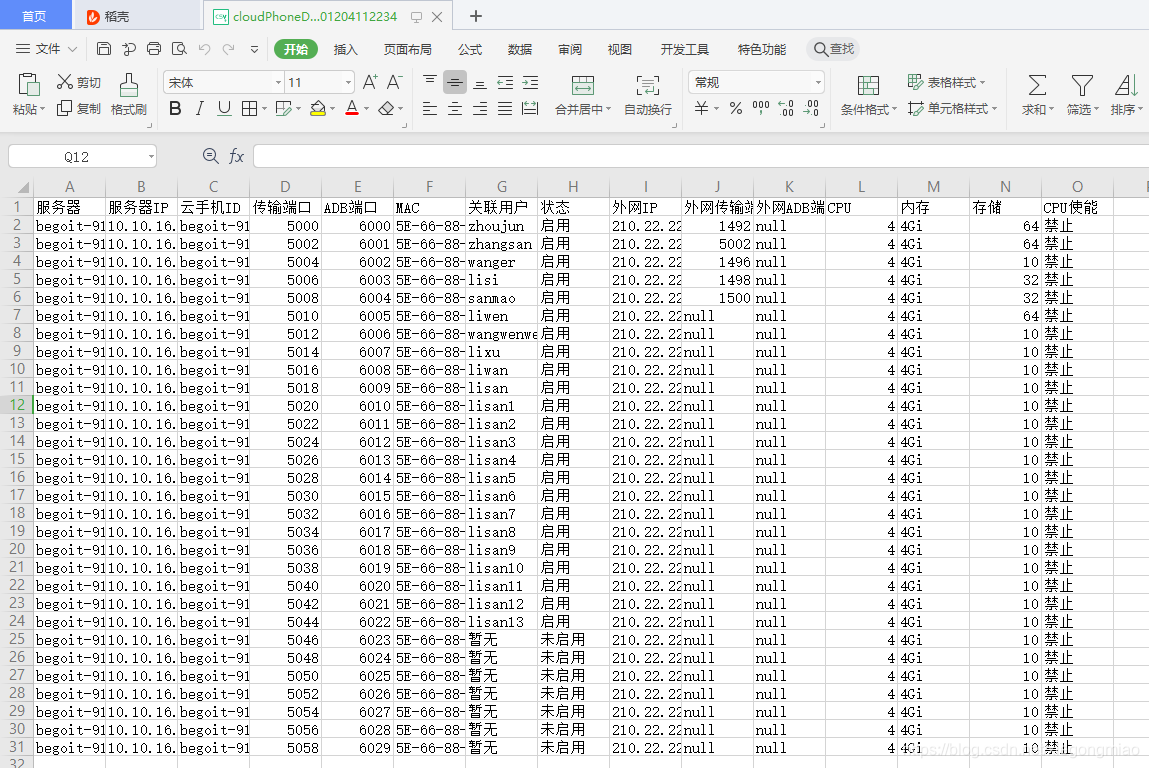
3.生成的文件截图
4.如何设置.csv文件中时间的格式
在时间数据两边增加 “\t”,
" \t2021-01-26 19:35:48.987\t"
可以在sql中使用CONCAT进行拼接:CONCAT('\t',r.start_time,'\t') as startTime
导出的时间格式为

版权声明:本文为xiegongmiao原创文章,遵循CC 4.0 BY-SA版权协议,转载请附上原文出处链接和本声明。