效果图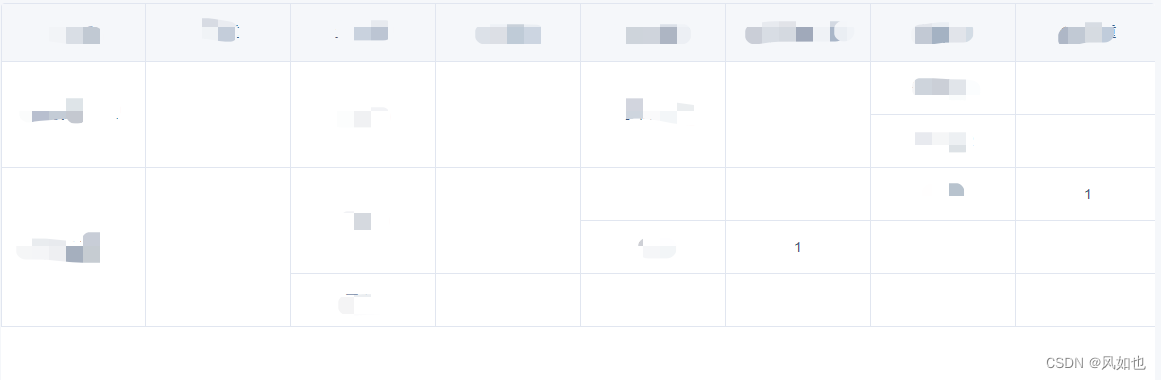
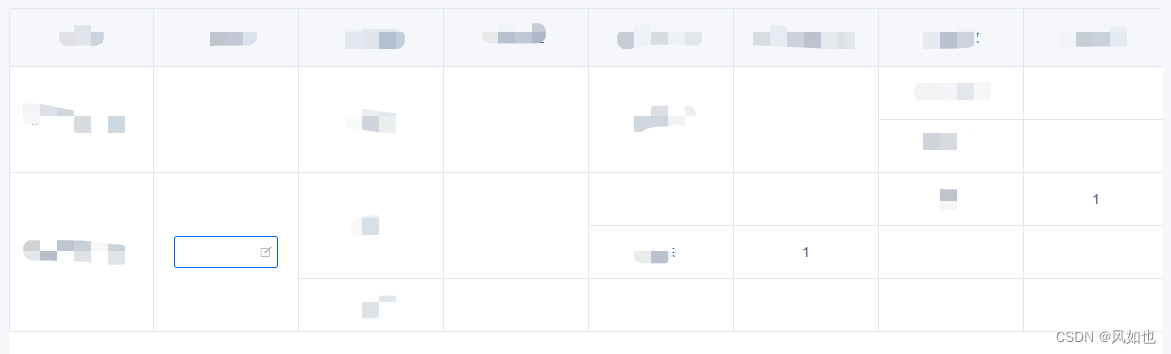
可以对子节点进行编辑操作。
具体使用组件
components/RightTree/index.vue
<template>
  <div class="main-info">
    <div ref="column" class="column-header">
      <div
        :style="styleWidth"
        v-for="i in columnData"
        :key="i">{{ i }}</div>
    </div>
    <div
      class="background-info"
      :style="{
        width: `${width}px`,
        height: `${height}px`
      }">
      <div
        class="background-border"
        :style="{
          width: `${width}px`,
          height: `${height}px`
        }"
      >
        <div
          :style="styleWidth"
          v-for="i in bgGridNum"
          :key="i"></div>
      </div>
    </div>
    <div ref="main" class="tree-contain" :style="{ top: `-${height}px` }">
      <Tree
        v-for="(item, index) in data"
        :key="item.id"
        :index="index"
        :data="item"
        :isTree="true"
        ></Tree>
    </div>
  </div>
</template>

<script>
import Tree from '@/components/RightTree/Tree.vue'
export default {
  name: "index",
  components: {
    Tree
  },
  props: {
    data: {
      type: Array
    },
    columnData: {
      type: Array
    },
    columnWidth: {
      type: Number,
      default: 200
    },
    columnHeight: {
      type: Number,
      default: 53
    },
  },
  data() {
    return {
      width: 0,
      height: 0,
    };
  },
  created() {
    this.$on("edit-value", (data) => {
      this.$emit("edit-data", data);
    })
  },
  computed: {
    styleWidth() {
      return {
        width: `${this.columnWidth}px`
      }
    },
    bgGridNum() {
      return this.height / this.columnHeight * this.columnData.length
    },
  },
  watch: {
    data: {
      handler(nVal) {
        this.$nextTick(() => {
          this.height = this.$refs.main.offsetHeight;
          this.width = this.$refs.column.offsetWidth;
        })
      },
      deep: true,
    }
  },
  provide() {
    return {
      styleWidth: this.styleWidth,
      columnHeight: this.columnHeight,
    }
  }
};
</script>

<style lang="less" scoped>
  .main-info {
    width: 100%;
    height: 100%;
    box-sizing: border-box;
    overflow-x: auto;
  }
  .background-info {
    // position: absolute;
    // top: 161px;
    // left: 650px;
    position: relative;
    top: 0;
    left: 0;
    z-index: 0;
    .background-border {
      display: grid;
      // grid-template-columns: repeat(auto-fill, 200px);
      grid-template-columns: repeat(8, 1fr);
      div {
        display: flex;
        align-items: center;
        justify-content: center;
        box-sizing: border-box;
        padding: 10px 20px;
        border-right: 1px solid #e1e6f0;
        border-bottom: 1px solid #e1e6f0;
        &:nth-child(8n + 1) {
          border-left: 1px solid #e1e6f0;
        }
      }
    }
  }
  .tree-contain {
    position: relative;
    left: 0;
    z-index: 33;
  }
  .column-header {
    display: grid;
    // grid-template-columns: repeat(auto-fill, 200px);
    grid-template-columns: repeat(8, 1fr);
    // display: flex;
    // align-items: center;
    div {
      background-color: #f5f7fa;
      user-select: none;
      display: flex;
      align-items: center;
      justify-content: center;
      box-sizing: border-box;
      padding: 18px 20px;
      border-right: 1px solid #e1e6f0;
      border-bottom: 1px solid #e1e6f0;
      border-top: 1px solid #e1e6f0;
      &:first-child {
        border-left: 1px solid #e1e6f0;
      }
    }
  }
</style>
/components/RightTree/tree.vue
<template>
  <div class="tree">
    <div class="tree-item-name"
      :style="{
        minHeight: `${columnHeight}px`,
        marginLeft: getMarginLeft(data)
      }">
      <span>{{ data.template }}</span>
      <div
        :style="styleWidth"
        class="input-content"
        @dblclick="(e) => {
          editTree(e, data)
        }">
        <template v-if="data.weight_edit">
          <YsInput
            size="small"
            icon="ios-create-outline"
            v-model="inputValue"
            @on-blur="editValue(data)"
            @on-change="handleQuery($event)"
            @on-click="handleQuery($event)"
          />
        </template>
        <template v-else>
          <span>{{ data.weight}}</span>
        </template>
      </div>
    </div>
    <div
      class="tree-children"
      v-if="data.children && data.children.length">
      <Tree
        v-for="item in data.children"
        :key="item.id"
        :data="item"
        :index="index"
        :isTree="isTree"
        ></Tree>
    </div>
  </div>
</template>

<script>
export default {
  name: "Tree",
  props: {
    data: {
      type: Object
    },
    index: Number,
    isTree: {
      type: Boolean
    }
  },
  data() {
    return {
      inputValue: "",
      tree: null,
      }
    }
  },
  inject: ["styleWidth", "columnHeight"],
  created() {
    let parent = this.$parent;
    if (parent.isTree) {
      this.tree = parent.tree;
    } else {
      this.tree = parent;
    }
  },
  methods: {
    // 节点编辑框失焦时触发
    editValue(data) {
      this.$set(data, 'item_weight', this.inputValue);
      this.setStates(data);
      this.tree.$emit("edit-value", data);
    },
    // 双击节点执行的事件
    editTree(ev, data) {
      ev.stopPropagation();
      this.inputValue = data.item_weight;
      this.setStates(data);
      //实现双击后输入框自动聚焦
      this.$nextTick(() => {
        ev.currentTarget.getElementsByTagName("input")[0].focus();
      });
    },
    handleQuery(ev) {
      this.inputValue = ev.target.value;
    },
    setStates(data) {
      if (data.weight_edit) {
        this.$set(data, "weight_edit", false);
      } else {
        this.$set(data, "weight_edit", true);
      }
    },
    getMarginLeft(data) {
      let padding = 0;
      if (this.styleWidth) {
        padding = this.styleWidth.width.split("px")[0];
      }
      if (data.layer !== data.type) {
        if (data.type === 4) {
          if (data.layer === 2) {
            return `${4 * padding}px`;
          } else if (data.layer === 3) {
            return `${2 * padding}px`;
          }
        } else if (data.type === 3) {
          if (data.layer === 1) {
            return `${4 * padding}px`;
          } else if (data.layer === 2) {
            return `${2 * padding}px`;
          }
        } else if (data.type === 2) {
          if (data.layer === 1) {
            return `${2 * padding}px`;
          }
        }
      }
    },
  }
};
</script>
<style lang="less" scoped>
.tree {
  display: flex;
  flex-direction: row;
  &-item-name {
    display: flex;
    flex-direction: row;
    min-height: 53px;
    > div {
      box-sizing: border-box;
      padding: 10px 20px;
      border-right: 1px solid #e1e6f0;
      border-bottom: 1px solid #e1e6f0;
      display: flex;
      justify-content: center;
      align-items: center;
      &:first-child {
        border-left: 1px solid #e1e6f0;
      }
    }
    .input-content {
      cursor: pointer;
      display: flex;
      background: #fff;
      align-items: center;
      user-select: none;
    }
    .base-span-info {
      user-select: none;
      background: #fff;
    }
    .p-limit {
      overflow: hidden;
      text-overflow: ellipsis;
      white-space: nowrap;
    }
  }
  &-children {
    display: flex;
    flex-direction: column;
    .tree-item-name {
      div {
        &:first-child {
          border-left: 0px;
        }
      }
    }
  }
}
</style>
使用
Test.vue
<template>
<div>
     <RightTree
           :column-data="columnData"
           :column-width="145"
           :column-height="53"
           :data="treeData"
           @edit-data="editData"
           ></RightTree>
</div>
</template>

<script>
import RightTree from '@/components/RightTree/index.vue'
const vm = {
  name: "Test",
  components: {
    RightTree
  },
  data() {
    return {
      columnData: [ "参数1", "参数2"],
      version_id: null,
      treeData: [],
    };
  },
  methods: {
    async getTreeData() {
      let res = await this.$http({...参数});
      this.treeData = this.resolveTreeData(data, 1);
    },
    editData(data) {
    	console.log(data) // 当前节点
    	console.log(this.findParentNode(data, data.id)) // 当前节点的父节点
      // 调用修改接口
    },
    // 找到当前节点的父节点
    findParentNode(data, id, parent) {
      for (let item of data) {
        if (item.id === id) {
          return parent || item;
        }
        if (item?.children?.length) {
          let node = this.findParentNode(item.children, id, item);
          if (node) {
            return node;
          }
        }
      }
      return null;
    },
    // 给树的每个节点添加属性
    resolveTreeData(treeData, layer) {
      const tree = treeData.map((item) => {
        item.layer = layer;
        if (Object.prototype.hasOwnProperty.call(item, "children")) {
          item.children && this.resolveTreeData(item.children, layer + 1);
        }
        return item;
      })
      return tree;
    },
  },
};
export default vm;
</script>
版权声明:本文为qq_38157825原创文章,遵循CC 4.0 BY-SA版权协议,转载请附上原文出处链接和本声明。