springboot自动配置MVC原理
springboot官方文档对springboot的MVC配置原理是这么说明的:
官方说明
Spring MVC Auto-configuration
// Spring Boot为Spring MVC提供了自动配置,它可以很好地与大多数应用程序一起工作。
Spring Boot provides auto-configuration for Spring MVC that works well with
most applications.
// 自动配置在Spring默认设置的基础上添加了以下功能:
The auto-configuration adds the following features on top of Spring’s
defaults:
// 包含内容协商视图解析器和bean解析器
Inclusion of ContentNegotiatingViewResolver and BeanNameViewResolver beans.
// 支持静态资源文件夹的路径,以及webjars
Support for serving static resources, including support for WebJars
// 自动注册了Converter:
// 转换器,这就是我们网页提交数据到后台自动封装成为对象的东西,比如把"1"字符串自动转换为
int类型
// Formatter:【格式化器,比如页面给我们了一个2019-8-10,它会给我们自动格式化为Date对
象】
Automatic registration of Converter, GenericConverter, and Formatter beans.
// SpringMVC用来转换Http请求和响应的的,比如我们要把一个User对象转换为JSON字符串,可以
去看官网文档解释;
//支持网络消息转换。
Support for HttpMessageConverters (covered later in this document).
// 定义错误代码生成规则的
Automatic registration of MessageCodesResolver (covered later in this
document).
// 首页定制
Static index.html support.
// 图标定制
Custom Favicon support (covered later in this document).
// 初始化数据绑定器:帮我们把请求数据绑定到JavaBean中!
Automatic use of a ConfigurableWebBindingInitializer bean (covered later in
this document).
/*
如果您希望保留Spring Boot MVC功能,并且希望添加其他MVC配置(拦截器、格式化程序、视图控制
器和其他功能),则可以添加自己
的@configuration类,类型为webmvcconfiguer,但不添加@EnableWebMvc。如果希望提供
RequestMappingHandlerMapping、RequestMappingHandlerAdapter或
ExceptionHandlerExceptionResolver的自定义
实例,则可以声明WebMVCregistrationAdapter实例来提供此类组件。
*/
If you want to keep Spring Boot MVC features and you want to add additional
MVC configuration
(interceptors, formatters, view controllers, and other features), you
can add your own @Configuration class of type WebMvcConfigurer but without @EnableWebMvc.
If you wish to provide
custom instances of RequestMappingHandlerMapping,
RequestMappingHandlerAdapter, or ExceptionHandlerExceptionResolver, you can declare a
WebMvcRegistrationsAdapter instance to provide such components.
// 如果您想完全控制Spring MVC,可以添加自己的@Configuration,并用@EnableWebMvc进行
注释。
If you want to take complete control of Spring MVC, you can add your own
@Configuration annotated with @EnableWebMvc.
总结成三点:
- SpringBoot默认集成并自动配置了原有的SpringMVC,它的功能有内容协商视图解析器 ,静态资源路径设置,注册了Converter转换器, Formatter格式化器,网络消息转换, 错误代码生成规则,首页定制,图标定制,初始化数据绑定器等。
- 如果我们想要在默认配置的基础上进行拓展功能(拦截器、格式化程序、视图控制器和其他功能),我们可以通过添加自己的@configuration类,类型为webmvcconfiguer,但不添加@EnableWebMvc的方式,如果想手动配置控制处理器和控制映射器,则可以声明WebMVCregistrationAdapter实例。
- 如果不想使用默认的SpringMVC配置,可以自己完全重新自定义,通过可以添加自己的@Configuration(Webmvcconfiguer类型),并用@EnableWebMvc进行注释。
分析内容协商视图解析源码,加入我们自己的视图解析器。
先来看一下SpringMVC配置的东西,内容协商视图解析器。
在spring中,我们需要手动的配置我们的视图解析器ViewResovler,并且手动增加前缀和后缀进行转发。那么SpringMVC如何实现的,SpringMVC的所有配置都放在WebMVCAutoConfiguration这个类中。根据官方文档的名字,解析器在ContentNegotiatingViewResolver配置,我们点开这个配置类,找到它。
@Bean
//存在视图解析器时生效
@ConditionalOnBean(ViewResolver.class)
//如果缺少自定义视图解析器时生效
@ConditionalOnMissingBean(name = "viewResolver", value = ContentNegotiatingViewResolver.class)
public ContentNegotiatingViewResolver viewResolver(BeanFactory beanFactory) {
    ContentNegotiatingViewResolver resolver = new ContentNegotiatingViewResolver();
    //设置内容管理
   resolver.setContentNegotiationManager(beanFactory.getBean(ContentNegotiationManager.class));
    // ContentNegotiatingViewResolver uses all the other view resolvers to locate
    // a view so it should have a high precedence
    // ContentNegotiatingViewResolver使用所有其他视图解析器来定位视图,因此它应该具 有较高的优先级
    resolver.setOrder(Ordered.HIGHEST_PRECEDENCE);
    return resolver;
}
查看注入管理的类ContentNegotiatingViewResolver.Class点开resolveViewName方法
@Override
@Nullable
public View resolveViewName(String viewName, Locale locale) throws Exception {
    RequestAttributes attrs = RequestContextHolder.getRequestAttributes();
    Assert.state(attrs instanceof ServletRequestAttributes, "No current ServletRequestAttributes");

    List<MediaType> requestedMediaTypes = getMediaTypes(((ServletRequestAttributes) attrs).getRequest());
    if (requestedMediaTypes != null) {
        //获得所有视图
        List<View> candidateViews = getCandidateViews(viewName, locale, requestedMediaTypes);
        //选取最好的视图。
        View bestView = getBestView(candidateViews, requestedMediaTypes, attrs);
        if (bestView != null) {
            return bestView;
        }
    }
获得所有视图的过程:
private List<View> getCandidateViews(String viewName, Locale locale, List<MediaType> requestedMediaTypes)throws Exception {
		List<View> candidateViews = new ArrayList<>();
		if (this.viewResolvers != null) {
			Assert.state(this.contentNegotiationManager != null, "No ContentNegotiationManager set");
            //对所有视图解析器进行迭代解析
			for (ViewResolver viewResolver : this.viewResolvers) {
				View view = viewResolver.resolveViewName(viewName, locale);
				if (view != null) {
					candidateViews.add(view);
				}
通过源码,ContentNegotiatingViewResolver是这样工作的:现获取所有的视图解析器,根据所有的视图解析器获取最合适的视图,然后利用获取的视图进行定位。
那么我们可以将我们自己的视图解析器加进去然后让它根据我们的视图解析器来进行视图定位吗。
来看ContentNegotiatingViewResolver中源码:
@Override
protected void initServletContext(ServletContext servletContext) {
    //利用工具类从容器中获取所有的视图解析器。
    Collection<ViewResolver> matchingBeans =
            BeanFactoryUtils.beansOfTypeIncludingAncestors(obtainApplicationContext(), ViewResolver.class).values();
    if (this.viewResolvers == null) {
        this.viewResolvers = new ArrayList<>(matchingBeans.size());
        for (ViewResolver viewResolver : matchingBeans) {
            if (this != viewResolver) {
                this.viewResolvers.add(viewResolver);
            }
        }
    }
所以只要我们定义了以ViewResolver为接口的实例并将其注入到容器中,最后就会被ContentNegotiatingViewResolver给初始化到视图解析器集合中。
只要定义这一功能组件的子类,再增加个性化定制,注入容器中,SpringBoot底层就会自动将我们的组件加入组件组中。
这就是springboot设置MVC并且允许我们添加自定义功能的原理。
下面来自定义一个视图解析器
@Bean
public ViewResolver myViewResolver() {
    return new MyViewResolver();
}

private static class MyViewResolver implements ViewResolver {
    @Override
    public View resolveViewName(String s, Locale locale) throws Exception {
        return null;
    }
}
这样的方式,我们自定义的视图解析器也加到springmvc的组件组中去了。
在SpringBoot的配置中,有两种方式来处理自定义组件
- springboot和自定义结合使用。
- 用户自定义后时使用用户自定义的,否则使用默认的。
- 通过注入的方式使原来的失效
- 通过重写方法并将自定义的组件添加进去,set或者add方法。
而视图解析器就是第二种
springboot默认配置中的组件,可以通过分析源码的方式再次解析
横向拓展功能
上一步中我们分析了内容协商视图解析器,并且将我们的自定义的解析器也加入进去,这些都是对器默认组件进行简单设置。
第二点是对在原有的功能上进行横向拓展,它要求我们写一个配置类,并且集成WebAutoConfiger接口的方式来进行拓展。
@Configuration
public class ControllerController implements WebMvcConfigurer {

}
查看可以重写的方法,
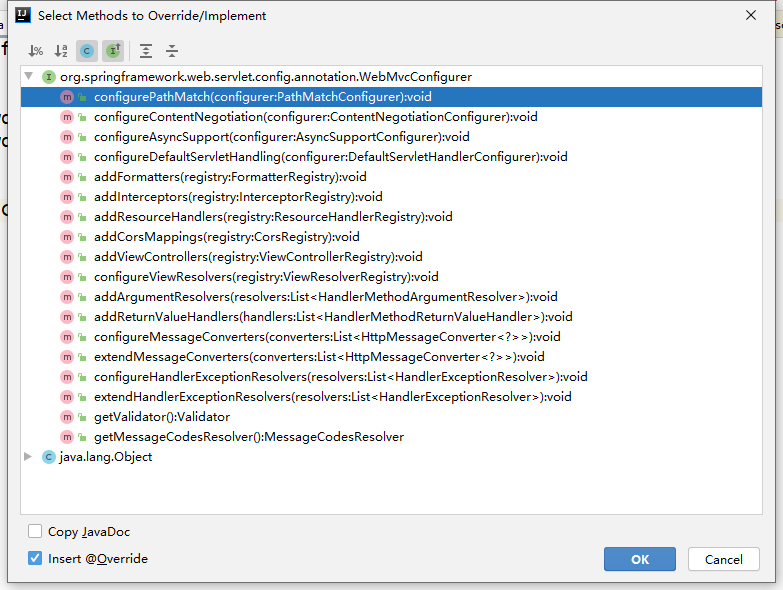
这些也就是我们可以拓展的功能,挑两个进行实现
addViewController:添加视图控制器
将请求在@Controller注解下的类之前将请求获取并自定义规则,就相当于另一个@Controller注解下的类,只是优先级最高。
@Configuration
public class ControllerController implements WebMvcConfigurer {
    @Override
    public void addViewControllers(ViewControllerRegistry registry) {
        //设置重定向方法,将所有请求都重定向到请求
        registry.addRedirectViewController("/","go");
        //设置请求跳转功能,可以将请求直接跳转至页面
        registry.addViewController("/main").setViewName("index");
    }
}
至于其他的功能,我只看得懂处理适配器和处理映射器,其他的都不会配置。